属性动画原理
Android 3.0(API 11)引入了属性动画框架,通过控制动画对象的属性变化来施加动画效果。属性动画是补间动画的增强版,可直接修改任何对象的任何属性,功能更加灵活强大。借助属性动画系统,可以自定义以下特性:
- 动画播放时长(Duration):指定动画完成所需总时间,默认 300ms。
- 时间插值(Time Interpolation):基于当前动画已消耗时间的函数,用来计算属性的值。
- 重复计数和行为(Repeat Count):指定是否重复播放以及重复次数,还可以指定反向播放。
- 动画集(Animator Sets):将一系列动画放进一组,让其一起播放或按序播放。
- 帧刷新频率:动画帧的刷新频率最终取决于系统繁忙程度和时钟频率。
属性动画的核心原理是:在一定时间间隔内,通过不断对值进行改变,再将值赋给对象的属性(任意对象的任意属性),从而实现该对象在该属性上的动画效果。
在属性动画体系中,Animator 是基类,常用子类有两个:
| 类 | 工作原理 |
|---|---|
ValueAnimator | 通过不断控制值的变化,再由开发者手动赋给对象属性,从而实现动画效果 |
ObjectAnimator | 继承自 ValueAnimator,直接对对象的属性值进行改变操作,自动赋值 |
插值器与估值器
插值器(Interpolator) 控制动画随时间轴变化的效果。所有插值器都实现了 TimeInterpolator 接口:
// TimeInterpolator.java
public interface TimeInterpolator {
    /**
     * @param input 代表动画已执行时间的比例,∈[0,1]
     * @return 插值转换后的值
     */
    float getInterpolation(float input);
}
常用内置插值器:
| 插值器 | 描述 |
|---|---|
AccelerateDecelerateInterpolator | 先加速、后减速 |
LinearInterpolator | 匀速 |
DecelerateInterpolator | 减速 |
AccelerateInterpolator | 加速 |
AnticipateInterpolator | 先反向运动一段距离,再加速正向运行 |
AnticipateOvershootInterpolator | 先反向,加速正向,减速并超过目标再回弹 |
BounceInterpolator | 到达目标后衰减回弹,类似皮球落地 |
PathInterpolator | 万能插值器,传入一个 Path 路径来定义曲线 |
估值器(TypeEvaluator) 根据当前动画进度、属性起始值和结束值来计算具体的属性值。自定义估值器需要实现 TypeEvaluator 接口。Android 内置了 FloatEvaluator、IntEvaluator 等。
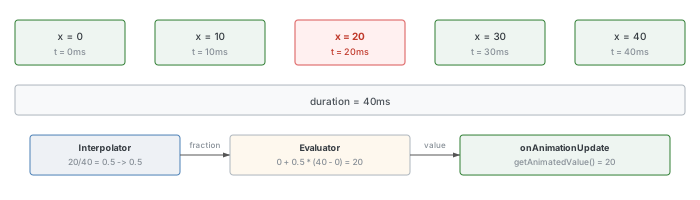
插值器与估值器的协作关系:以一个 x 属性从 0 变到 40、时长 40ms 的线性动画为例——动画分为 5 帧(每帧 10ms)。当 t=20ms 时,时间进度 = 20/40 = 0.5。线性插值器返回 0.5,表示属性变化了 50%。接下来估值器根据公式 startValue + fraction × (endValue - startValue) = 0 + 0.5 × (40 - 0) = 20,得出 x = 20。
总结:插值器决定属性值随时间变化的规律(时间进度 → 动画进度);估值器根据动画进度计算具体的属性数值。
ValueAnimator 工作原理
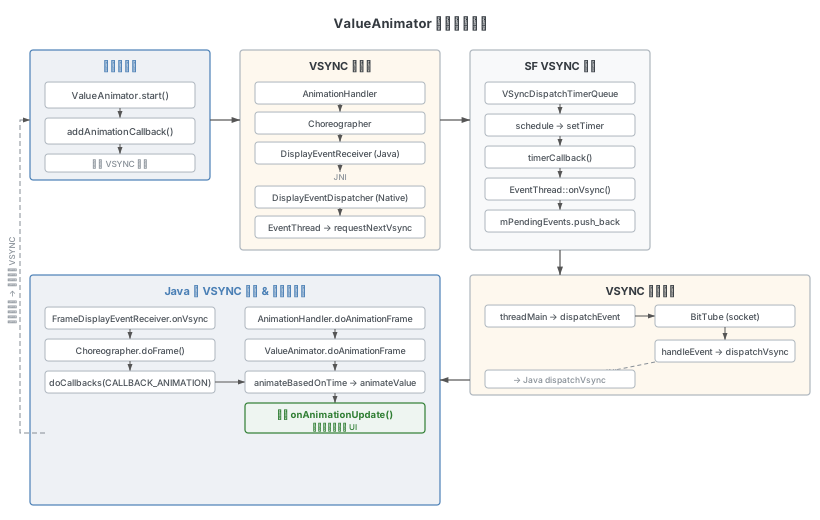
ValueAnimator 是整个属性动画框架的核心类。本章以 ValueAnimator 为主线,从创建、启动到 VSYNC 驱动的帧计算,完整分析其工作机制。
简单使用
以下是一个典型的 ValueAnimator 用法示例:
ValueAnimator animator = ValueAnimator.ofFloat(0, 1.0f);
animator.setDuration(300);
animator.addUpdateListener(new ValueAnimator.AnimatorUpdateListener() {
    @Override
    public void onAnimationUpdate(ValueAnimator animation) {
        Log.d("Animator", "自定义逻辑。 value = " + animation.getAnimatedValue()
                + " currentPlayTime = " + animation.getCurrentPlayTime());
    }
});
animator.start();
这段代码创建了一个从 0 到 1.0 数值变化的 ValueAnimator,动画时长 300ms。通过 addUpdateListener 向底层注册了 VSYNC 信号监听,动画期间每当 VSYNC 信号到来时,系统会回调 onAnimationUpdate 方法。此时可以通过 animation.getCurrentPlayTime() 获取当前动画进度时间,在回调中放入更新动画对象属性的逻辑即可——例如对于窗口动画,需要计算当前时刻窗口的大小和显示位置,然后送到 SurfaceFlinger 合成。
以上代码在 60Hz 设备上的 Log 输出:
04-15 17:14:01.057 Animator: 自定义逻辑。 value = 0.0            currentPlayTime = 0
04-15 17:14:01.070 Animator: 自定义逻辑。 value = 0.007902175    currentPlayTime = 17
04-15 17:14:01.086 Animator: 自定义逻辑。 value = 0.031359017    currentPlayTime = 34
04-15 17:14:01.103 Animator: 自定义逻辑。 value = 0.066987276    currentPlayTime = 50
04-15 17:14:01.120 Animator: 自定义逻辑。 value = 0.118102014    currentPlayTime = 67
04-15 17:14:01.137 Animator: 自定义逻辑。 value = 0.17727113     currentPlayTime = 83
04-15 17:14:01.153 Animator: 自定义逻辑。 value = 0.25000006     currentPlayTime = 100
04-15 17:14:01.171 Animator: 自定义逻辑。 value = 0.33063102     currentPlayTime = 117
04-15 17:14:01.186 Animator: 自定义逻辑。 value = 0.41145772     currentPlayTime = 133
04-15 17:14:01.203 Animator: 自定义逻辑。 value = 0.5            currentPlayTime = 150
04-15 17:14:01.220 Animator: 自定义逻辑。 value = 0.5885423      currentPlayTime = 167
04-15 17:14:01.236 Animator: 自定义逻辑。 value = 0.669369       currentPlayTime = 183
04-15 17:14:01.254 Animator: 自定义逻辑。 value = 0.7500001      currentPlayTime = 200
04-15 17:14:01.270 Animator: 自定义逻辑。 value = 0.8227289      currentPlayTime = 217
04-15 17:14:01.287 Animator: 自定义逻辑。 value = 0.881898       currentPlayTime = 233
04-15 17:14:01.303 Animator: 自定义逻辑。 value = 0.9330126      currentPlayTime = 250
04-15 17:14:01.320 Animator: 自定义逻辑。 value = 0.9704404      currentPlayTime = 267
04-15 17:14:01.337 Animator: 自定义逻辑。 value = 0.99209785     currentPlayTime = 283
04-15 17:14:01.353 Animator: 自定义逻辑。 value = 1.0            currentPlayTime = 300
从 Log 可以看到,自定义逻辑在整个动画期间大约每 16ms 调用一次。这是因为 60Hz 设备每 16.6ms 刷新一次屏幕,VSYNC 信号也以相同频率到来。对于 120Hz 设备,更新频率约为 8ms。
创建 ValueAnimator 对象
ValueAnimator 提供了多种初始化方法:
public static ValueAnimator ofInt(int... values)
public static ValueAnimator ofArgb(int... values)       // 颜色值
public static ValueAnimator ofFloat(float... values)
public static ValueAnimator ofObject(TypeEvaluator evaluator, Object... values)
public static ValueAnimator ofPropertyValuesHolder(PropertyValuesHolder... values)
以 ofFloat 为例分析创建流程:
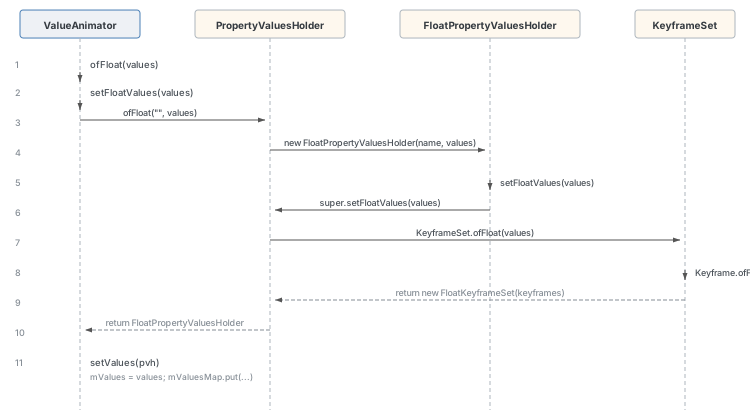
// ValueAnimator.java (line 468)
public static ValueAnimator ofFloat(float... values) {
    ValueAnimator anim = new ValueAnimator();
    anim.setFloatValues(values);
    return anim;
}
setFloatValues 内部创建 PropertyValuesHolder:
// ValueAnimator.java (line 559)
public void setFloatValues(float... values) {
    if (values == null || values.length == 0) {
        return;
    }
    if (mValues == null || mValues.length == 0) {
        setValues(PropertyValuesHolder.ofFloat("", values));
    } else {
        PropertyValuesHolder valuesHolder = mValues[0];
        valuesHolder.setFloatValues(values);
    }
    mInitialized = false;
}
创建出来的属性对象通过 setValues 记录到 ValueAnimator 对象中:
// ValueAnimator.java (line 618)
public void setValues(PropertyValuesHolder... values) {
    int numValues = values.length;
    mValues = values;
    mValuesMap = new HashMap<>(numValues);
    for (int i = 0; i < numValues; ++i) {
        PropertyValuesHolder valuesHolder = values[i];
        mValuesMap.put(valuesHolder.getPropertyName(), valuesHolder);
    }
    mInitialized = false;
}
PropertyValuesHolder 用来计算每一帧该属性的取值。创建 float 类型属性时:
// PropertyValuesHolder.java (line 275)
public static PropertyValuesHolder ofFloat(String propertyName, float... values) {
    return new FloatPropertyValuesHolder(propertyName, values);
}// PropertyValuesHolder.java (line 1324)
public FloatPropertyValuesHolder(String propertyName, float... values) {
super(propertyName);
setFloatValues(values);
}// PropertyValuesHolder.java (line 624)
public void setFloatValues(float... values) {
mValueType = float.class;
mKeyframes = KeyframeSet.ofFloat(values);
}KeyframeSet 负责创建一组关键帧(Keyframe),每个关键帧定义了动画在特定时间点的属性值:
// KeyframeSet.java (line 74)
public static KeyframeSet ofFloat(float... values) {
    boolean badValue = false;
    int numKeyframes = values.length;
    FloatKeyframe keyframes[] = new FloatKeyframe[Math.max(numKeyframes, 2)];
    if (numKeyframes == 1) {
        // 单值情况:创建两个关键帧,首帧值为 0,尾帧值为传入值
        keyframes[0] = (FloatKeyframe) Keyframe.ofFloat(0f);
        keyframes[1] = (FloatKeyframe) Keyframe.ofFloat(1f, values[0]);
        // ...
    } else {
        // 多值情况:每个关键帧按等比例分配时间位置
        keyframes[0] = (FloatKeyframe) Keyframe.ofFloat(0f, values[0]);
        for (int i = 1; i < numKeyframes; ++i) {
            keyframes[i] = (FloatKeyframe)
                    Keyframe.ofFloat((float) i / (numKeyframes - 1), values[i]);
            // ...
        }
    }
    return new FloatKeyframeSet(keyframes);
}
每个关键帧的时间位置由公式 (float) i / (numKeyframes - 1) 决定。例如 ValueAnimator.ofFloat(0, 50, 100, 200) 共 4 个关键帧,分别在位置 0、1/3、2/3、1。
小结:无论通过哪种 ofXXX 方法初始化,最终都会创建 PropertyValuesHolder 对象,其中包含以下关键成员:
mPropertyName:属性名字mProperty:封装的 Property 对象,记录属性名和类型mKeyframes:关键帧集合,记录各时间点的属性取值
启动动画
调用 ValueAnimator.start() 启动动画后,主要流程分为三部分:向 Choreographer 注册动画回调、初始化、设置动画进度。
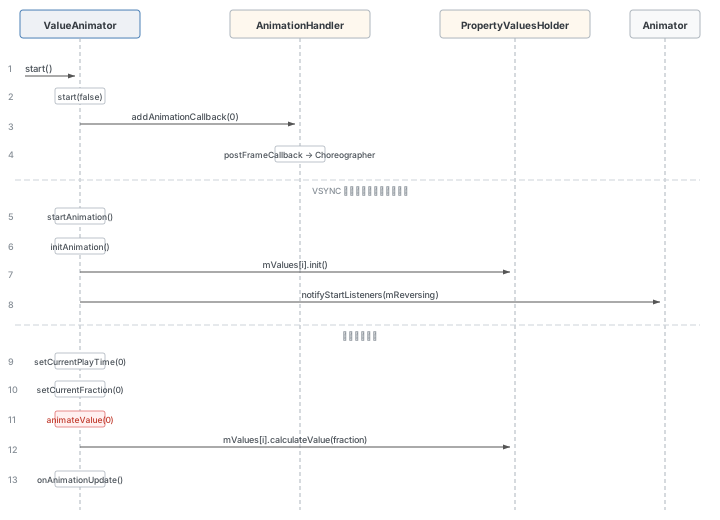
// ValueAnimator.java (line 1117)
private void start(boolean playBackwards) {
    if (Looper.myLooper() == null) {
        throw new AndroidRuntimeException("Animators may only be run on Looper threads");
    }
    mReversing = playBackwards;
    mSelfPulse = !mSuppressSelfPulseRequested;
    if (playBackwards && mSeekFraction != -1 && mSeekFraction != 0) {
        if (mRepeatCount == INFINITE) {
            float fraction = (float) (mSeekFraction - Math.floor(mSeekFraction));
            mSeekFraction = 1 - fraction;
        } else {
            mSeekFraction = 1 + mRepeatCount - mSeekFraction;
        }
    }
    mStarted = true;
    mPaused = false;
    mRunning = false;
    mAnimationEndRequested = false;
    mLastFrameTime = -1;
    mFirstFrameTime = -1;
    mStartTime = -1;

    // 1. 注册动画回调(默认延时为 0)
    addAnimationCallback(0);

    if (mStartDelay == 0 || mSeekFraction >= 0 || mReversing) {
        // 2. 初始化并开启动画
        startAnimation();
        if (mSeekFraction == -1) {
            // 3. 动画从头开始
            setCurrentPlayTime(0);
        } else {
            setCurrentFraction(mSeekFraction);
        }
    }
}
addAnimationCallback
// ValueAnimator.java (line 1599)
private void addAnimationCallback(long delay) {
    if (!mSelfPulse) {
        return;
    }
    getAnimationHandler().addAnimationFrameCallback(this, delay);
}
通过 getAnimationHandler() 获取 AnimationHandler 实例(单例类,为所有属性动画服务),调用其 addAnimationFrameCallback 方法。传入的 this 即当前 ValueAnimator——它实现了 AnimationFrameCallback 接口:
// AnimationHandler.java (line 484)
interface AnimationFrameCallback {
    boolean doAnimationFrame(long frameTime);
    void commitAnimationFrame(long frameTime);
}// AnimationHandler.java (line 291)
public void addAnimationFrameCallback(final AnimationFrameCallback callback, long delay) {
if (mAnimationCallbacks.size() == 0) {
getProvider().postFrameCallback(mFrameCallback);
}
if (!mAnimationCallbacks.contains(callback)) {
mAnimationCallbacks.add(callback);
}
if (delay > 0) {
mDelayedCallbackStartTime.put(callback, (SystemClock.uptimeMillis() + delay));
}
}当 mAnimationCallbacks 集合为空时(即第一次注册回调),通过 getProvider().postFrameCallback(mFrameCallback) 向 Choreographer 注册帧回调。getProvider() 返回 MyFrameCallbackProvider,其内部委托给 Choreographer:
// AnimationHandler.java (line 443)
private class MyFrameCallbackProvider implements AnimationFrameCallbackProvider {
    final Choreographer mChoreographer = Choreographer.getInstance();

    @Override
    public void postFrameCallback(Choreographer.FrameCallback callback) {
        mChoreographer.postFrameCallback(callback);
    }
    // ...
}
startAnimation
// ValueAnimator.java (line 1319)
private void startAnimation() {
    // ...
    mAnimationEndRequested = false;
    initAnimation();
    mRunning = true;
    if (mSeekFraction >= 0) {
        mOverallFraction = mSeekFraction;
    } else {
        mOverallFraction = 0f;
    }
    notifyStartListeners(mReversing);
}
initAnimation 遍历 mValues 数组,调用每一个 PropertyValuesHolder 的 init 方法给属性设置类型估值器:
// ValueAnimator.java (line 653)
void initAnimation() {
    if (!mInitialized) {
        if (mValues != null) {
            int numValues = mValues.length;
            for (int i = 0; i < numValues; ++i) {
                mValues[i].init();
            }
        }
        mInitialized = true;
    }
}// PropertyValuesHolder.java (line 980)
void init() {
if (mEvaluator == null) {
mEvaluator = (mValueType == Integer.class) ? sIntEvaluator :
(mValueType == Float.class) ? sFloatEvaluator :
null;
}
if (mEvaluator != null) {
mKeyframes.setEvaluator(mEvaluator);
}
}setCurrentFraction
// ValueAnimator.java (line 754)
public void setCurrentFraction(float fraction) {
    initAnimation();
    fraction = clampFraction(fraction);
    mStartTimeCommitted = true;
    if (isPulsingInternal()) {
        long seekTime = (long) (getScaledDuration() * fraction);
        long currentTime = AnimationUtils.currentAnimationTimeMillis();
        mStartTime = currentTime - seekTime;
    } else {
        mSeekFraction = fraction;
    }
    mOverallFraction = fraction;
    final float currentIterationFraction = getCurrentIterationFraction(fraction, mReversing);
    animateValue(currentIterationFraction);
}
animateValue 是每一帧动画都会调用的核心方法,详见后文"动画帧计算"一节。
小结:
ValueAnimator.start()先通过AnimationHandler将自身添加到mAnimationCallbacks队列AnimationHandler通过Choreographer.scheduleVsyncLocked()向底层注册监听下一个 VSYNC 信号事件- 然后执行
startAnimation()初始化并通知动画开始
VSYNC 信号注册
接下来深入追踪 Choreographer 如何向底层注册 VSYNC 信号监听。
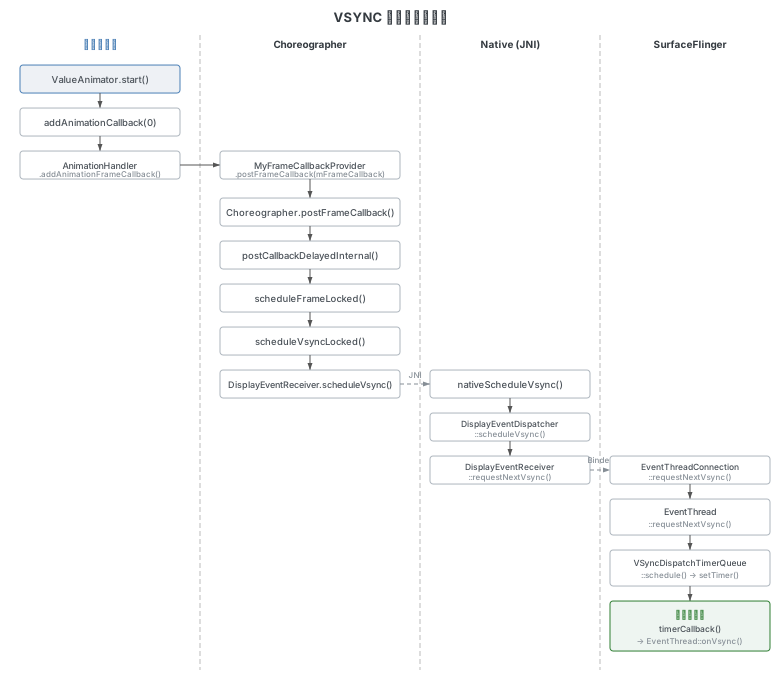
Choreographer 注册链
// Choreographer.java (line 728)
public void postFrameCallback(FrameCallback callback) {
    postFrameCallbackDelayed(callback, 0);
}// Choreographer.java (line 744)
public void postFrameCallbackDelayed(FrameCallback callback, long delayMillis) {
if (callback == null) {
throw new IllegalArgumentException("callback must not be null");
}
postCallbackDelayedInternal(CALLBACK_ANIMATION,
callback, FRAME_CALLBACK_TOKEN, delayMillis);
}注意这里传入的 callbackType 是 CALLBACK_ANIMATION,表示这是动画类型的回调。
// Choreographer.java (line 632)
private void postCallbackDelayedInternal(int callbackType,
        Object action, Object token, long delayMillis) {
    // ...
    synchronized (mLock) {
        final long now = SystemClock.uptimeMillis();
        final long dueTime = now + delayMillis;
        mCallbackQueues[callbackType].addCallbackLocked(dueTime, action, token);

        if (dueTime <= now) {
            scheduleFrameLocked(now);
        } else {
            Message msg = mHandler.obtainMessage(MSG_DO_SCHEDULE_CALLBACK, action);
            msg.arg1 = callbackType;
            msg.setAsynchronous(true);
            mHandler.sendMessageAtTime(msg, dueTime);
        }
    }
}
将回调加入 mCallbackQueues[CALLBACK_ANIMATION] 队列后,如果到期时间已到(dueTime <= now,对于 delayMillis == 0 的情况必然满足),则调用 scheduleFrameLocked。
// Choreographer.java (line 898)
private void scheduleFrameLocked(long now) {
    if (!mFrameScheduled) {
        mFrameScheduled = true;
        if (USE_VSYNC) {
            if (isRunningOnLooperThreadLocked()) {
                scheduleVsyncLocked();
            } else {
                Message msg = mHandler.obtainMessage(MSG_DO_SCHEDULE_VSYNC);
                msg.setAsynchronous(true);
                mHandler.sendMessageAtFrontOfQueue(msg);
            }
        } else {
            final long nextFrameTime = Math.max(
                    mLastFrameTimeNanos / TimeUtils.NANOS_PER_MS + sFrameDelay, now);
            Message msg = mHandler.obtainMessage(MSG_DO_FRAME);
            msg.setAsynchronous(true);
            mHandler.sendMessageAtTime(msg, nextFrameTime);
        }
    }
}
当 USE_VSYNC 为 true(现代设备上基本都是),并且当前线程是 Looper 线程,直接调用 scheduleVsyncLocked():
// Choreographer.java (line 1293)
private void scheduleVsyncLocked() {
    try {
        Trace.traceBegin(Trace.TRACE_TAG_VIEW, "Choreographer#scheduleVsyncLocked");
        mDisplayEventReceiver.scheduleVsync();
    } finally {
        Trace.traceEnd(Trace.TRACE_TAG_VIEW);
    }
}
进入 Native 层:注册 VSYNC 监听
mDisplayEventReceiver 是 FrameDisplayEventReceiver 类型(Choreographer 的内部类),其 scheduleVsync() 方法继承自 DisplayEventReceiver:
// DisplayEventReceiver.java (line 339)
public void scheduleVsync() {
    if (mReceiverPtr == 0) {
        Log.w(TAG, "Attempted to schedule a vertical sync pulse but the display event "
                + "receiver has already been disposed.");
    } else {
        nativeScheduleVsync(mReceiverPtr);
    }
}
通过 JNI 调用 nativeScheduleVsync 进入 Native 层:
// android_view_DisplayEventReceiver.cpp (line 349)
static void nativeScheduleVsync(JNIEnv* env, jclass clazz, jlong receiverPtr) {
    sp<NativeDisplayEventReceiver> receiver =
            reinterpret_cast<NativeDisplayEventReceiver*>(receiverPtr);
    status_t status = receiver->scheduleVsync();
    if (status) {
        String8 message;
        message.appendFormat("Failed to schedule next vertical sync pulse.  status=%d", status);
        jniThrowRuntimeException(env, message.c_str());
    }
}
NativeDisplayEventReceiver 继承了 DisplayEventDispatcher,因此调用的是 DisplayEventDispatcher::scheduleVsync():
// DisplayEventDispatcher.cpp (line 83)
status_t DisplayEventDispatcher::scheduleVsync() {
    if (!mWaitingForVsync) {
        ALOGV("dispatcher %p ~ Scheduling vsync.", this);

        // Drain all pending events.
        nsecs_t vsyncTimestamp;
        PhysicalDisplayId vsyncDisplayId;
        uint32_t vsyncCount;
        VsyncEventData vsyncEventData;
        if (processPendingEvents(&vsyncTimestamp, &vsyncDisplayId,
                &vsyncCount, &vsyncEventData)) {
            ALOGE("dispatcher %p ~ last event processed while scheduling was for %" PRId64 "",
                  this, ns2ms(static_cast<nsecs_t>(vsyncTimestamp)));
        }

        status_t status = mReceiver.requestNextVsync();
        if (status) {
            ALOGW("Failed to request next vsync, status=%d", status);
            return status;
        }

        mWaitingForVsync = true;
        mLastScheduleVsyncTime = systemTime(SYSTEM_TIME_MONOTONIC);
    }
    return OK;
}
这里先清空积压事件,然后调用 mReceiver.requestNextVsync() 请求下一个 VSYNC 脉冲。mReceiver 是 DisplayEventReceiver 类型:
// DisplayEventReceiver.cpp (line 89)
status_t DisplayEventReceiver::requestNextVsync() {
    if (mEventConnection != nullptr) {
        mEventConnection->requestNextVsync();
        return NO_ERROR;
    }
    return mInitError.has_value() ? mInitError.value() : NO_INIT;
}
这是一个 Binder 调用,跨进程到 SurfaceFlinger 的 EventThread:
// EventThread.cpp (line 229)
binder::Status EventThreadConnection::requestNextVsync() {
    ATRACE_CALL();
    mEventThread->requestNextVsync(sp<EventThreadConnection>::fromExisting(this));
    return binder::Status::ok();
}// EventThread.cpp (line 383)
void EventThread::requestNextVsync(const sp<EventThreadConnection>& connection) {
mCallback.resync();
std::lock_guard<std::mutex> lock(mMutex);
if (connection->vsyncRequest == VSyncRequest::None) {
connection->vsyncRequest = VSyncRequest::Single;
mCondition.notify_all();
} else if (connection->vsyncRequest == VSyncRequest::SingleSuppressCallback) {
connection->vsyncRequest = VSyncRequest::Single;
}
}将连接的 vsyncRequest 设为 VSyncRequest::Single,然后通过 mCondition.notify_all() 唤醒 EventThread::threadMain 线程。
EventThread::threadMain 与 VSyncDispatchTimerQueue
threadMain 是一个无限循环,其核心工作是从 mPendingEvents 中获取 VSYNC 信号并派发给注册者,没有待处理事件时则休眠等待。
// EventThread.cpp (line 483)
void EventThread::threadMain(std::unique_lock<std::mutex>& lock) {
    DisplayEventConsumers consumers;

    while (mState != State::Quit) {
        std::optional<DisplayEventReceiver::Event> event;

        if (!mPendingEvents.empty()) {
            event = mPendingEvents.front();
            mPendingEvents.pop_front();
            // ... handle hotplug events ...
        }

        // Find connections that should consume this event.
        auto it = mDisplayEventConnections.begin();
        while (it != mDisplayEventConnections.end()) {
            if (const auto connection = it->promote()) {
                if (event && shouldConsumeEvent(*event, connection)) {
                    consumers.push_back(connection);
                }
                vsyncRequested |= connection->vsyncRequest != VSyncRequest::None;
                ++it;
            } else {
                it = mDisplayEventConnections.erase(it);
            }
        }

        if (!consumers.empty()) {
            dispatchEvent(*event, consumers);
            consumers.clear();
        }

        if (mVSyncState && vsyncRequested) {
            mState = mVSyncState->synthetic ? State::SyntheticVSync : State::VSync;
        } else {
            mState = State::Idle;
        }

        if (mState == State::VSync) {
            const auto scheduleResult =
                    mVsyncRegistration.schedule({
                        .workDuration = mWorkDuration.get().count(),
                        .readyDuration = mReadyDuration.count(),
                        .lastVsync = mLastVsyncCallbackTime.ns()});
            LOG_ALWAYS_FATAL_IF(!scheduleResult, "Error scheduling callback");
        } else {
            mVsyncRegistration.cancel();
        }

        // ...
        if (mState == State::Idle) {
            mCondition.wait(lock);
        }
    }
}
唤醒 threadMain 后,此时 mPendingEvents 中还没有 VSYNC 信号,需要先通过 mVsyncRegistration.schedule() 向 VSyncDispatchTimerQueue 申请定时调度。到了设定时间,定时器触发 timerCallback,遍历回调并最终执行 EventThread::onVsync():
// EventThread.cpp (line 428)
void EventThread::onVsync(nsecs_t vsyncTime, nsecs_t wakeupTime, nsecs_t readyTime) {
    std::lock_guard<std::mutex> lock(mMutex);
    mLastVsyncCallbackTime = TimePoint::fromNs(vsyncTime);

    LOG_FATAL_IF(!mVSyncState);
    mVsyncTracer = (mVsyncTracer + 1) % 2;
    mPendingEvents.push_back(makeVSync(mVSyncState->displayId, wakeupTime,
            ++mVSyncState->count, vsyncTime, readyTime));
    mCondition.notify_all();
}
主要做了两件事:把 VSYNC 信号加入 mPendingEvents 集合,然后唤醒 threadMain 循环。
VSYNC 信号派发
threadMain 被唤醒后,从 mPendingEvents 中取出 VSYNC 信号,开始向上层派发。
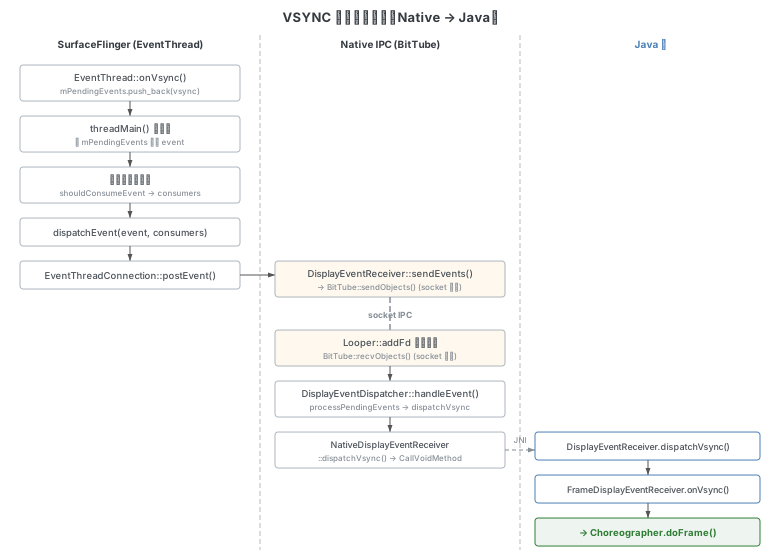
Native 派发:dispatchEvent → BitTube → handleEvent
当 mPendingEvents 不为空,threadMain 取出 event 后调用 dispatchEvent:
// EventThread.cpp (line 727)
void EventThread::dispatchEvent(const DisplayEventReceiver::Event& event,
                                const DisplayEventConsumers& consumers) {
    for (const auto& consumer : consumers) {
        DisplayEventReceiver::Event copy = event;
        if (event.header.type == DisplayEventReceiver::DISPLAY_EVENT_VSYNC) {
            const int64_t frameInterval = mGetVsyncPeriodFunction(consumer->mOwnerUid);
            copy.vsync.vsyncData.frameInterval = frameInterval;
            generateFrameTimeline(copy.vsync.vsyncData, frameInterval,
                    copy.header.timestamp,
                    event.vsync.vsyncData.preferredExpectedPresentationTime(),
                    event.vsync.vsyncData.preferredDeadlineTimestamp());
        }
        switch (consumer->postEvent(copy)) {
            case NO_ERROR:
                break;
            // ...
        }
    }
}
EventThreadConnection::postEvent 通过 DisplayEventReceiver::sendEvents → BitTube::sendObjects 将事件写入 socket。BitTube 封装了 socket 通信的细节——sendObjects 和 recvObjects 配合使用。
在 DisplayEventDispatcher::initialize() 中,通过 Looper::addFd 把 DisplayEventDispatcher 自身注册为 fd 的回调监听者,这样在 Looper 循环中会不断回调 handleEvent:
// DisplayEventDispatcher.cpp (line 117)
int DisplayEventDispatcher::handleEvent(int, int events, void*) {
    // ...
    nsecs_t vsyncTimestamp;
    PhysicalDisplayId vsyncDisplayId;
    uint32_t vsyncCount;
    VsyncEventData vsyncEventData;
    if (processPendingEvents(&vsyncTimestamp, &vsyncDisplayId,
            &vsyncCount, &vsyncEventData)) {
        mWaitingForVsync = false;
        mLastVsyncCount = vsyncCount;
        dispatchVsync(vsyncTimestamp, vsyncDisplayId, vsyncCount, vsyncEventData);
    }
    // ...
    return 1; // keep the callback
}
processPendingEvents 内部调用 mReceiver.getEvents() 获取通过 BitTube 传来的事件。获取 VSYNC 事件后,调用 dispatchVsync 通过 JNI 回到 Java 层:
// android_view_DisplayEventReceiver.cpp (line 171)
void NativeDisplayEventReceiver::dispatchVsync(nsecs_t timestamp,
        PhysicalDisplayId displayId, uint32_t count,
        VsyncEventData vsyncEventData) {
    JNIEnv* env = AndroidRuntime::getJNIEnv();

    ScopedLocalRef<jobject> receiverObj(env, GetReferent(env, mReceiverWeakGlobal));
    // ...
    env->CallVoidMethod(receiverObj.get(),
            gDisplayEventReceiverClassInfo.dispatchVsync,
            timestamp, displayId.value, count);
    // ...
}
Java 层 VSYNC 派发
// DisplayEventReceiver.java (line 357)
private void dispatchVsync(long timestampNanos, long physicalDisplayId, int frame) {
    onVsync(timestampNanos, physicalDisplayId, frame, mVsyncEventData);
}
onVsync 的实现在 Choreographer 的内部类 FrameDisplayEventReceiver 中:
// Choreographer.java (line 1619)
@Override
public void onVsync(long timestampNanos, long physicalDisplayId, int frame,
        VsyncEventData vsyncEventData) {
    // ...
    mTimestampNanos = timestampNanos;
    mFrame = frame;
    mLastVsyncEventData.copyFrom(vsyncEventData);
    Message msg = Message.obtain(mHandler, this);
    msg.setAsynchronous(true);
    mHandler.sendMessageAtTime(msg, timestampNanos / TimeUtils.NANOS_PER_MS);
    // ...
}
通过 mHandler.sendMessageAtTime 将自身(FrameDisplayEventReceiver 实现了 Runnable)投递到 Handler 消息队列,到时间后执行 run 方法:
// Choreographer.java (line 1685)
@Override
public void run() {
    mHavePendingVsync = false;
    doFrame(mTimestampNanos, mFrame, mLastVsyncEventData);
}
Choreographer.doFrame
doFrame 是 APP 常规绘制流程的核心方法,按顺序执行不同类型的回调:
// Choreographer.java (line 972)
void doFrame(long frameTimeNanos, int frame,
        DisplayEventReceiver.VsyncEventData vsyncEventData) {
    // ... frame time validation and jank detection ...

    mFrameInfo.markInputHandlingStart();
    doCallbacks(Choreographer.CALLBACK_INPUT, frameIntervalNanos);

    mFrameInfo.markAnimationsStart();
    doCallbacks(Choreographer.CALLBACK_ANIMATION, frameIntervalNanos);
    doCallbacks(Choreographer.CALLBACK_INSETS_ANIMATION, frameIntervalNanos);

    mFrameInfo.markPerformTraversalsStart();
    doCallbacks(Choreographer.CALLBACK_TRAVERSAL, frameIntervalNanos);

    doCallbacks(Choreographer.CALLBACK_COMMIT, frameIntervalNanos);
}
doCallbacks(Choreographer.CALLBACK_ANIMATION, ...) 负责处理动画回调:
// Choreographer.java (line 1189)
void doCallbacks(int callbackType, long frameIntervalNanos) {
    CallbackRecord callbacks;
    long frameTimeNanos = mFrameData.mFrameTimeNanos;
    synchronized (mLock) {
        final long now = System.nanoTime();
        callbacks = mCallbackQueues[callbackType].extractDueCallbacksLocked(
                now / TimeUtils.NANOS_PER_MS);
        if (callbacks == null) {
            return;
        }
        mCallbacksRunning = true;
        // ...
    }
    try {
        for (CallbackRecord c = callbacks; c != null; c = c.next) {
            c.run(mFrameData);
        }
    } finally {
        // ... recycle callbacks ...
    }
}
CallbackRecord.run 内部的分发逻辑:
// Choreographer.java (line 1729)
public void run(long frameTimeNanos) {
    if (token == FRAME_CALLBACK_TOKEN) {
        ((FrameCallback)action).doFrame(frameTimeNanos);
    } else {
        ((Runnable)action).run();
    }
}
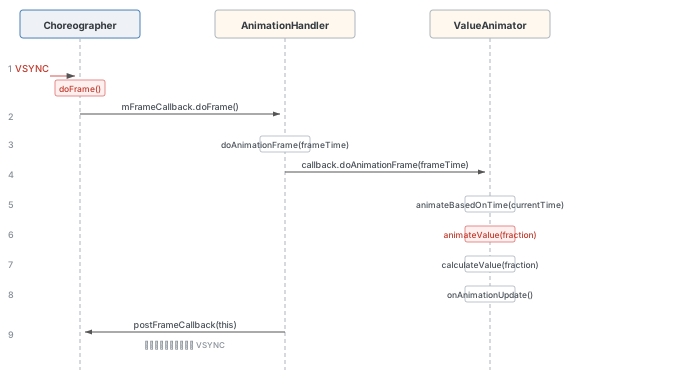
注册时传入的 token 是 FRAME_CALLBACK_TOKEN,action 是 AnimationHandler 中的 mFrameCallback,因此执行的是 mFrameCallback.doFrame()。
动画帧计算
// AnimationHandler.java (line 84)
private final Choreographer.FrameCallback mFrameCallback = new Choreographer.FrameCallback() {
    @Override
    public void doFrame(long frameTimeNanos) {
        doAnimationFrame(getProvider().getFrameTime());
        if (mAnimationCallbacks.size() > 0) {
            getProvider().postFrameCallback(this);
        }
    }
};
这里做了两件事:
- 调用
doAnimationFrame(getProvider().getFrameTime())计算当前帧动画属性值。 - 如果
mAnimationCallbacks还有回调(即动画未结束),则重新调用postFrameCallback(this)向底层注册下一次 VSYNC 监听,形成循环。
VSYNC 到达 APP 后的完整调用栈:
doAnimationFrame:1511, ValueAnimator (android.animation)
doAnimationFrame:335, AnimationHandler (android.animation)
doFrame:84, AnimationHandler$1 (android.animation)
run:1729, Choreographer$CallbackRecord (android.view)
doCallbacks:1189, Choreographer (android.view)
doFrame:972, Choreographer (android.view)
run:1685, Choreographer$FrameDisplayEventReceiver (android.view)
handleCallback:959, Handler (android.os)
dispatchMessage:100, Handler (android.os)
loopOnce:249, Looper (android.os)
loop:337, Looper (android.os)
main:9614, ActivityThread (android.app)
AnimationHandler.doAnimationFrame
// AnimationHandler.java (line 335)
private void doAnimationFrame(long frameTime) {
    long currentTime = SystemClock.uptimeMillis();
    final int size = mAnimationCallbacks.size();
    for (int i = 0; i < size; i++) {
        final AnimationFrameCallback callback = mAnimationCallbacks.get(i);
        if (callback == null) {
            continue;
        }
        if (isCallbackDue(callback, currentTime)) {
            callback.doAnimationFrame(frameTime);
            if (mCommitCallbacks.contains(callback)) {
                getProvider().postCommitCallback(new Runnable() {
                    @Override
                    public void run() {
                        commitAnimationFrame(callback, getProvider().getFrameTime());
                    }
                });
            }
        }
    }
    cleanUpList();
}
遍历 mAnimationCallbacks,对每个到期的回调调用 doAnimationFrame。其中的 callback 就是之前注册的 ValueAnimator 对象。
ValueAnimator.doAnimationFrame
// ValueAnimator.java (line 1511)
public final boolean doAnimationFrame(long frameTime) {
    if (mStartTime < 0) {
        // 第一帧:初始化 mStartTime
        mStartTime = mReversing
                ? frameTime
                : frameTime + (long) (mStartDelay * resolveDurationScale());
    }

    // Handle pause/resume
    if (mPaused) {
        mPauseTime = frameTime;
        removeAnimationCallback();
        return false;
    } else if (mResumed) {
        mResumed = false;
        if (mPauseTime > 0) {
            mStartTime += (frameTime - mPauseTime);
        }
    }

    if (!mRunning) {
        if (mStartTime > frameTime && mSeekFraction == -1) {
            return false;
        } else {
            mRunning = true;
            startAnimation();
        }
    }

    if (mLastFrameTime < 0) {
        if (mSeekFraction >= 0) {
            long seekTime = (long) (getScaledDuration() * mSeekFraction);
            mStartTime = frameTime - seekTime;
            mSeekFraction = -1;
        }
        mStartTimeCommitted = false;
    }
    mLastFrameTime = frameTime;
    final long currentTime = Math.max(frameTime, mStartTime);
    boolean finished = animateBasedOnTime(currentTime);

    if (finished) {
        endAnimation();
    }
    return finished;
}
主要做了三件事:(1) 处理动画第一帧的初始化;(2) 根据当前时间计算动画进度;(3) 判断动画是否结束。
animateBasedOnTime
// ValueAnimator.java (line 1383)
boolean animateBasedOnTime(long currentTime) {
    boolean done = false;
    if (mRunning) {
        final long scaledDuration = getScaledDuration();
        final float fraction = scaledDuration > 0 ?
                (float)(currentTime - mStartTime) / scaledDuration : 1f;
        final float lastFraction = mOverallFraction;
        final boolean newIteration = (int) fraction > (int) lastFraction;
        final boolean lastIterationFinished = (fraction >= mRepeatCount + 1) &&
                (mRepeatCount != INFINITE);
        if (scaledDuration == 0) {
            done = true;
        } else if (newIteration && !lastIterationFinished) {
            notifyListeners(AnimatorCaller.ON_REPEAT, false);
        } else if (lastIterationFinished) {
            done = true;
        }
        mOverallFraction = clampFraction(fraction);
        float currentIterationFraction = getCurrentIterationFraction(
                mOverallFraction, mReversing);
        animateValue(currentIterationFraction);
    }
    return done;
}
将 currentTime 归一化到 0~1 区间得到 fraction,表示当前动画进度。然后调用 animateValue。
animateValue
// ValueAnimator.java (line 1630)
void animateValue(float fraction) {
    // ...
    if (mValues == null) {
        return;
    }
    // 1. 插值器变换:将时间进度转换为动画进度
    fraction = mInterpolator.getInterpolation(fraction);
    mCurrentFraction = fraction;
    int numValues = mValues.length;
    for (int i = 0; i < numValues; ++i) {
        // 2. 计算当前帧的属性取值
        mValues[i].calculateValue(fraction);
    }
    if (mSeekFraction >= 0 || mStartListenersCalled) {
        // 3. 通知监听者
        callOnList(mUpdateListeners, AnimatorCaller.ON_UPDATE, this, false);
    }
}
三个关键步骤:
- 插值器变换:
mInterpolator.getInterpolation(fraction)将线性进度转换为插值后的进度(如加速减速效果)。 - 计算属性值:
mValues[i].calculateValue(fraction)根据插值进度计算实际的属性值。 - 通知监听者:回调所有
AnimatorUpdateListener的onAnimationUpdate方法。
关键帧计算属性值
calculateValue 将插值后的动画进度交给关键帧机制来换算成具体的属性值。例如 ValueAnimator.ofFloat(0f, 100f) 表示值从 0 到 100 变化,插值器输出的 0~1 进度值需要映射到 0~100。
// PropertyValuesHolder.java (line 1353)
void calculateValue(float fraction) {
    mFloatAnimatedValue = mFloatKeyframes.getFloatValue(fraction);
}// FloatKeyframeSet.java (line 56)
public float getFloatValue(float fraction) {
if (fraction <= 0f) {
// 动画首帧:取前两个关键帧计算
final FloatKeyframe prevKeyframe = (FloatKeyframe) mKeyframes.get(0);
final FloatKeyframe nextKeyframe = (FloatKeyframe) mKeyframes.get(1);
float prevValue = prevKeyframe.getFloatValue();
float nextValue = nextKeyframe.getFloatValue();
float prevFraction = prevKeyframe.getFraction();
float nextFraction = nextKeyframe.getFraction();
final TimeInterpolator interpolator = nextKeyframe.getInterpolator();
if (interpolator != null) {
fraction = interpolator.getInterpolation(fraction);
}
float intervalFraction = (fraction - prevFraction) / (nextFraction - prevFraction);
return mEvaluator == null ?
prevValue + intervalFraction * (nextValue - prevValue) :
((Number)mEvaluator.evaluate(intervalFraction, prevValue, nextValue)).
floatValue();
} else if (fraction >= 1f) {
// 动画尾帧:取最后两个关键帧计算(逻辑同上)
// ...
}
// 中间帧:遍历所有关键帧,找到当前进度所在的区间
FloatKeyframe prevKeyframe = (FloatKeyframe) mKeyframes.get(0);
for (int i = 1; i < mNumKeyframes; ++i) {
FloatKeyframe nextKeyframe = (FloatKeyframe) mKeyframes.get(i);
if (fraction < nextKeyframe.getFraction()) {
final TimeInterpolator interpolator = nextKeyframe.getInterpolator();
float intervalFraction = (fraction - prevKeyframe.getFraction()) /
(nextKeyframe.getFraction() - prevKeyframe.getFraction());
float prevValue = prevKeyframe.getFloatValue();
float nextValue = nextKeyframe.getFloatValue();
if (interpolator != null) {
intervalFraction = interpolator.getInterpolation(intervalFraction);
}
return mEvaluator == null ?
prevValue + intervalFraction * (nextValue - prevValue) :
((Number)mEvaluator.evaluate(intervalFraction, prevValue, nextValue)).
floatValue();
}
prevKeyframe = nextKeyframe;
}
// ...
}计算逻辑要点:
- 找到当前动画进度相邻的两个关键帧(
prevKeyframe和nextKeyframe) - 计算
intervalFraction:当前进度在这两个关键帧之间的相对位置 - 如果设置了估值器,用估值器计算;否则直接线性插值
prevValue + intervalFraction × (nextValue - prevValue)
commitAnimationFrame
commitAnimationFrame 用于防止动画第一帧掉帧。如果页面过于复杂,绘制花费过多时间,属性动画根据之前记录的第一帧时间戳计算进度时会发现丢了开头几帧。此方法通过延后动画开始时间来补偿:
// ValueAnimator.java (line 1358)
public void commitAnimationFrame(long frameTime) {
    if (!mStartTimeCommitted) {
        mStartTimeCommitted = true;
        long adjustment = frameTime - mLastFrameTime;
        if (adjustment > 0) {
            mStartTime += adjustment;
        }
    }
}
动画结束
// ValueAnimator.java (line 1288)
private void endAnimation() {
    if (mAnimationEndRequested) {
        return;
    }
    removeAnimationCallback();

    mAnimationEndRequested = true;
    mPaused = false;
    boolean notify = (mStarted || mRunning) && mListeners != null;
    if (notify && !mRunning) {
        notifyStartListeners(mReversing);
    }
    mLastFrameTime = -1;
    mFirstFrameTime = -1;
    mStartTime = -1;
    mRunning = false;
    mStarted = false;
    notifyEndListeners(mReversing);
    mReversing = false;
    // ...
}
removeAnimationCallback 通知 AnimationHandler 从列表中移除该回调,动画不再接收 VSYNC 帧回调。
ObjectAnimator 工作原理
ObjectAnimator 继承自 ValueAnimator,允许指定 target 对象并自动调用属性的 setter 方法。
// 使用示例
ObjectAnimator animator = ObjectAnimator.ofFloat(myView, "alpha", 0f, 1f);
animator.setDuration(300);
animator.start();
初始化
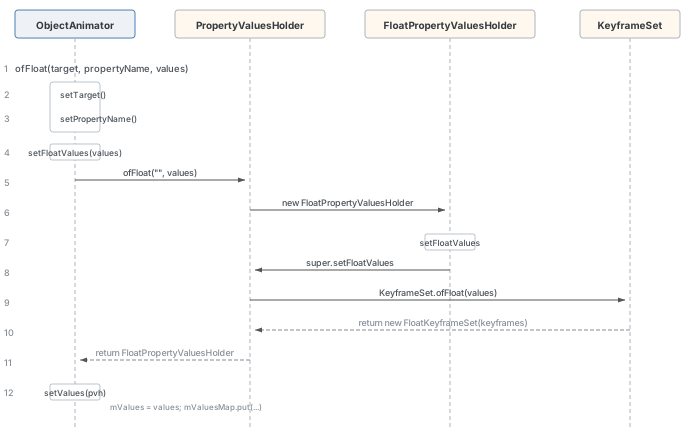
创建过程与 ValueAnimator 大体相同,唯一不同的是还需保存属性作用对象与属性名:
// ObjectAnimator.java (line 436)
public static ObjectAnimator ofFloat(Object target, String propertyName, float... values) {
    ObjectAnimator anim = new ObjectAnimator(target, propertyName);
    anim.setFloatValues(values);
    return anim;
}// ObjectAnimator.java (line 920)
public void setTarget(@Nullable Object target) {
final Object oldTarget = getTarget();
if (oldTarget != target) {
if (isStarted()) {
cancel();
}
mTarget = target;
mInitialized = false;
}
}启动
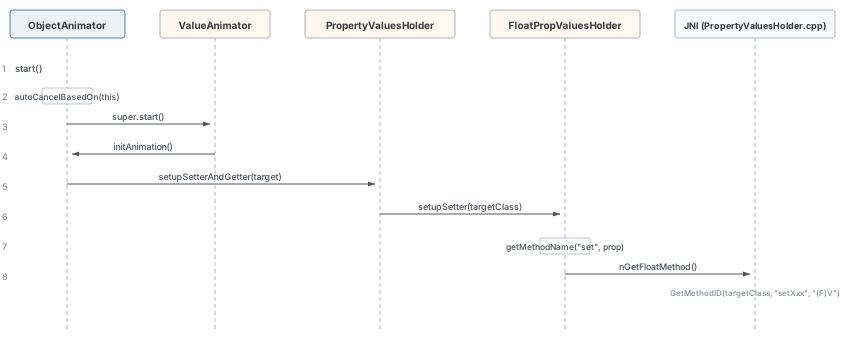
// ObjectAnimator.java (line 835)
public void start() {
    AnimationHandler.getInstance().autoCancelBasedOn(this);
    // ...
    super.start();
}
ObjectAnimator 的核心功能在于:在动画驱动的每一帧里自动为指定对象的属性赋值。在 initAnimation 阶段,需要找到对应的 setter/getter 方法:
// ObjectAnimator.java (line 877)
void initAnimation() {
    if (!mInitialized) {
        final Object target = getTarget();
        if (target != null) {
            final int numValues = mValues.length;
            for (int i = 0; i < numValues; ++i) {
                mValues[i].setupSetterAndGetter(target);
            }
        }
        super.initAnimation();
    }
}
setupSetterAndGetter 分两种路径:
// PropertyValuesHolder.java (line 809)
void setupSetterAndGetter(Object target) {
    if (mProperty != null) {
        // 路径一:客户端传入了 Property 对象,直接使用 Property.get() 获取属性值
        try {
            List<Keyframe> keyframes = mKeyframes.getKeyframes();
            int keyframeCount = keyframes == null ? 0 : keyframes.size();
            for (int i = 0; i < keyframeCount; i++) {
                Keyframe kf = keyframes.get(i);
                if (!kf.hasValue() || kf.valueWasSetOnStart()) {
                    Object testValue = convertBack(mProperty.get(target));
                    kf.setValue(testValue);
                    kf.setValueWasSetOnStart(true);
                }
            }
            return;
        } catch (ClassCastException e) {
            mProperty = null;
        }
    }

    // 路径二:通过反射获取 setter/getter
    if (mProperty == null) {
        Class targetClass = target.getClass();
        if (mSetter == null) {
            setupSetter(targetClass);
        }
        // ... getter setup ...
    }
}
FloatPropertyValuesHolder 的 setupSetter 优先通过 JNI 快速查找 setter 方法:
// PropertyValuesHolder.java (line 1403)
void setupSetter(Class targetClass) {
    if (mProperty != null) {
        return;
    }
    synchronized (sJNISetterPropertyMap) {
        HashMap<String, Long> propertyMap = sJNISetterPropertyMap.get(targetClass);
        boolean wasInMap = false;
        if (propertyMap != null) {
            wasInMap = propertyMap.containsKey(mPropertyName);
            if (wasInMap) {
                Long jniSetter = propertyMap.get(mPropertyName);
                if (jniSetter != null) {
                    mJniSetter = jniSetter;
                }
            }
        }
        if (!wasInMap) {
            String methodName = getMethodName("set", mPropertyName);
            try {
                mJniSetter = nGetFloatMethod(targetClass, methodName);
            } catch (NoSuchMethodError e) {
                // ...
            }
            // ... cache to propertyMap ...
        }
    }
    if (mJniSetter == 0) {
        super.setupSetter(targetClass);
    }
}
JNI 层的 nGetFloatMethod 通过 GetMethodID 获取方法句柄:
// android_animation_PropertyValuesHolder.cpp (line 41)
static jlong android_animation_PropertyValuesHolder_getFloatMethod(
        JNIEnv* env, jclass pvhClass, jclass targetClass, jstring methodName)
{
    const char *nativeString = env->GetStringUTFChars(methodName, 0);
    jmethodID mid = env->GetMethodID(targetClass, nativeString, "(F)V");
    env->ReleaseStringUTFChars(methodName, nativeString);
    return reinterpret_cast<jlong>(mid);
}
播放动画
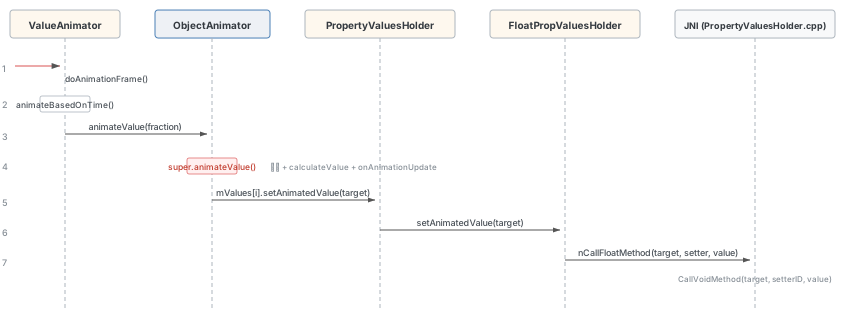
ObjectAnimator 的动画驱动逻辑与 ValueAnimator 一致,都通过 Choreographer 动画回调驱动。差异在于 animateValue 的重写:
// ObjectAnimator.java (line 972)
void animateValue(float fraction) {
    final Object target = getTarget();
    super.animateValue(fraction);
    int numValues = mValues.length;
    for (int i = 0; i < numValues; ++i) {
        mValues[i].setAnimatedValue(target);
    }
}
先调用 super.animateValue(fraction) 计算属性值,然后调用 setAnimatedValue 将值设置到目标对象上。FloatPropertyValuesHolder 的设值逻辑:
// PropertyValuesHolder.java (line 1377)
void setAnimatedValue(Object target) {
    if (mFloatProperty != null) {
        mFloatProperty.setValue(target, mFloatAnimatedValue);
        return;
    }
    if (mProperty != null) {
        mProperty.set(target, mFloatAnimatedValue);
        return;
    }
    if (mJniSetter != 0) {
        nCallFloatMethod(target, mJniSetter, mFloatAnimatedValue);
        return;
    }
    if (mSetter != null) {
        try {
            mTmpValueArray[0] = mFloatAnimatedValue;
            mSetter.invoke(target, mTmpValueArray);
        } catch (InvocationTargetException e) {
            Log.e("PropertyValuesHolder", e.toString());
        } catch (IllegalAccessException e) {
            Log.e("PropertyValuesHolder", e.toString());
        }
    }
}设值优先级:FloatProperty > Property > JNI 快速调用 > Java 反射。JNI 层的 nCallFloatMethod:
// android_animation_PropertyValuesHolder.cpp (line 82)
static void android_animation_PropertyValuesHolder_callFloatMethod(
        JNIEnv* env, jclass pvhObject, jobject target, jlong methodID, jfloat arg)
{
    env->CallVoidMethod(target, reinterpret_cast<jmethodID>(methodID), arg);
}
总结
ValueAnimator 本身是一个工具类,它只负责按时间进度计算属性值,并不直接更新 UI 界面。具体的 UI 更新需要在 onAnimationUpdate 回调中完成。ObjectAnimator 在此基础上增加了自动调用目标对象 setter 方法的能力。
整个工作流程的核心环路为:
ValueAnimator.start()→ 通过AnimationHandler→Choreographer向底层注册 VSYNC 监听Choreographer→DisplayEventReceiver→ JNI →DisplayEventDispatcher→ Binder →EventThread→VSyncDispatchTimerQueue完成 VSYNC 请求- VSYNC 到来后,
EventThread::onVsync()将事件推入队列,threadMain通过dispatchEvent→BitTube(socket) 回传到应用进程 - 应用进程的
DisplayEventDispatcher::handleEvent()→ JNI →FrameDisplayEventReceiver.onVsync()→Choreographer.doFrame() doFrame执行CALLBACK_ANIMATION类型回调 →AnimationHandler.doAnimationFrame()→ValueAnimator.doAnimationFrame()→animateBasedOnTime()→animateValue()→ 通知监听者- 若动画未结束,重新注册 VSYNC 监听,回到步骤 1 继续循环
对于 ObjectAnimator,在步骤 5 的 animateValue 之后,还会额外调用 setAnimatedValue 将计算出的属性值通过 JNI 快速反射设置到目标对象上。