窗口动画
定义
窗口动画是指单个窗口(WindowState)的动画,与 Activity/Task 级别的过渡动画(Transition)不同。窗口动画作用于窗口的 Surface,通过 SurfaceControl.Transaction 直接修改窗口的 matrix、alpha、crop 等属性。
类型
窗口动画的 transit 类型定义在 WindowManagerPolicy 中:
// WindowManagerPolicy.java line 400
/** Window has been added to the screen. */
public static final int TRANSIT_ENTER = 1;
/** Window has been removed from the screen. */
public static final int TRANSIT_EXIT = 2;
/** Window has been made visible. */
public static final int TRANSIT_SHOW = 3;
/** Window has been made invisible.
 * TODO: Consider removal as this is unused. */
public static final int TRANSIT_HIDE = 4;
/** The "application starting" preview window is no longer needed, and will
 * animate away to show the real window. */
public static final int TRANSIT_PREVIEW_DONE = 5;- TRANSIT_ENTER:窗口首次添加到屏幕时使用。
- TRANSIT_EXIT:窗口从屏幕移除时使用。
- TRANSIT_SHOW:窗口从不可见变为可见时使用(非首次添加)。
- TRANSIT_HIDE:窗口从可见变为不可见(目前未使用,标记为 TODO 待移除)。
- TRANSIT_PREVIEW_DONE:启动窗口(Starting Window)完成预览,即将消失以显示真实窗口。
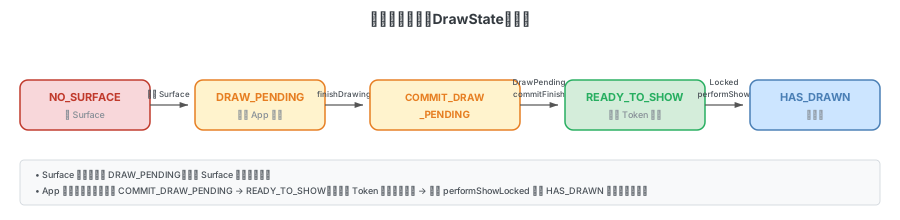
窗口绘制状态(DrawState)
窗口的 Surface 有以下几种绘制状态,定义在 WindowStateAnimator 中,它们决定了窗口动画何时启动:
// WindowStateAnimator.java line 140
/** This is set when there is no Surface */
static final int NO_SURFACE = 0;
/** This is set after the Surface has been created but before the window has been drawn.
 *  During this time the surface is hidden. */
static final int DRAW_PENDING = 1;
/** This is set after the window has finished drawing for the first time but before its
 *  surface is shown. The surface will be displayed when the next layout is run. */
static final int COMMIT_DRAW_PENDING = 2;
/** This is set during the time after the window's drawing has been committed, and before
 *  its surface is actually shown. It is used to delay showing the surface until all windows
 *  in a token are ready to be shown. */
static final int READY_TO_SHOW = 3;
/** Set when the window has been shown in the screen the first time. */
static final int HAS_DRAWN = 4;状态流转:NO_SURFACE → DRAW_PENDING(Surface 创建)→ COMMIT_DRAW_PENDING(App 绘制完成)→ READY_TO_SHOW(等待显示)→ HAS_DRAWN(已显示)。
整体流程
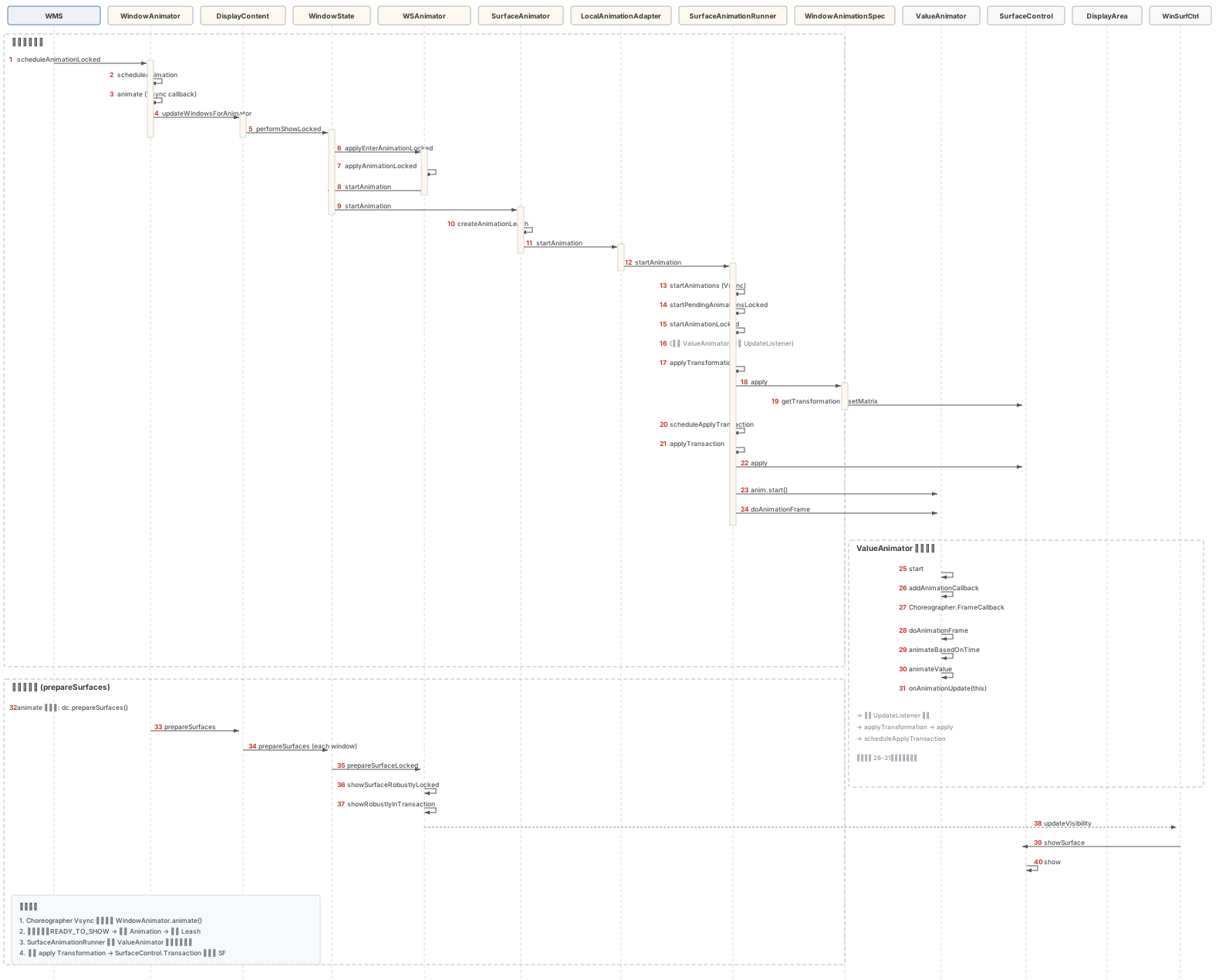
整体流程可以分为以下几个阶段:
- 调度阶段:
WMS.scheduleAnimationLocked()→WindowAnimator.scheduleAnimation()→ Choreographer Vsync 回调 - 窗口遍历:
WindowAnimator.animate()→ 遍历所有 DisplayContent,更新窗口状态 - 动画加载:
performShowLocked()→applyEnterAnimationLocked()→applyAnimationLocked()加载 Animation 资源 - 动画启动:
WindowState.startAnimation()→SurfaceAnimator.startAnimation()→ 创建 Leash,启动SurfaceAnimationRunner - 动画驱动:
SurfaceAnimationRunner使用ValueAnimator逐帧调用WindowAnimationSpec.apply()更新 SurfaceControl - 帧提交:
SurfaceControl.Transaction.apply()将变换提交到 SurfaceFlinger
1. WMS.scheduleAnimationLocked
发起动画调度,委托给 WindowAnimator:
// WindowManagerService.java line 7257
void scheduleAnimationLocked() {
    mAnimator.scheduleAnimation();
}
2. WindowAnimator.scheduleAnimation
通过 Choreographer 注册下一帧 Vsync 回调:
// WindowAnimator.java line 276
void scheduleAnimation() {
    if (!mAnimationFrameCallbackScheduled) {
        mAnimationFrameCallbackScheduled = true;
        mChoreographer.postFrameCallback(mAnimationFrameCallback);
    }
}
WindowAnimator 构造时初始化了 Choreographer 和回调:
// WindowAnimator.java line 88
WindowAnimator(final WindowManagerService service) {
    mService = service;
    mContext = service.mContext;
    mPolicy = service.mPolicy;
    mTransaction = service.mTransactionFactory.get();
    service.mAnimationHandler.runWithScissors(
            () -> mChoreographer = Choreographer.getSfInstance(), 0 /* timeout */);

    mAnimationFrameCallback = frameTimeNs -> {
        synchronized (mService.mGlobalLock) {
            mAnimationFrameCallbackScheduled = false;
            animate(frameTimeNs);
            if (mNotifyWhenNoAnimation && !mLastRootAnimating) {
                mService.mGlobalLock.notifyAll();
            }
        }
    };
}
注意这里使用的是 Choreographer.getSfInstance(),它注册到 SurfaceFlinger 的 Vsync 信号(sf-vsync),而非普通应用使用的 app-vsync。
3. WindowAnimator.animate
Vsync 回调触发 animate() 方法。该方法遍历所有 DisplayContent,更新窗口动画状态并提交 Surface 变换:
// WindowAnimator.java line 114
private void animate(long frameTimeNs) {
    if (!mInitialized) {
        return;
    }

    // Schedule next frame already such that back-pressure happens continuously.
    scheduleAnimation();

    final RootWindowContainer root = mService.mRoot;
    final boolean useShellTransition = root.mTransitionController.isShellTransitionsEnabled();
    final int animationFlags = useShellTransition ? CHILDREN : (TRANSITION | CHILDREN);
    boolean rootAnimating = false;
    mCurrentTime = frameTimeNs / TimeUtils.NANOS_PER_MS;
    mBulkUpdateParams = 0;
    root.mOrientationChangeComplete = true;
    // ...

    try {
        // Remove all deferred displays, tasks, and activities.
        root.handleCompleteDeferredRemoval();

        final AccessibilityController accessibilityController =
                mService.mAccessibilityController;
        final int numDisplays = root.getChildCount();
        for (int i = 0; i < numDisplays; i++) {
            final DisplayContent dc = root.getChildAt(i);
            // Update animations of all applications, including those
            // associated with exiting/removed apps.
            dc.updateWindowsForAnimator();
            dc.prepareSurfaces();
        }

        for (int i = 0; i < numDisplays; i++) {
            final DisplayContent dc = root.getChildAt(i);

            if (!useShellTransition) {
                dc.checkAppWindowsReadyToShow();
            }
            if (accessibilityController.hasCallbacks()) {
                accessibilityController
                        .recomputeMagnifiedRegionAndDrawMagnifiedRegionBorderIfNeeded(
                                dc.mDisplayId);
            }
            // ... high frame rate tracking, merge pending transactions
        }

        cancelAnimation();

        if (mService.mWatermark != null) {
            mService.mWatermark.drawIfNeeded();
        }

    } catch (RuntimeException e) {
        Slog.wtf(TAG, "Unhandled exception in Window Manager", e);
    }

    // Handle pending layout changes
    final boolean hasPendingLayoutChanges = root.hasPendingLayoutChanges(this);
    final boolean doRequest = (mBulkUpdateParams != 0 || root.mOrientationChangeComplete)
            && root.copyAnimToLayoutParams();
    if (hasPendingLayoutChanges || doRequest) {
        mService.mWindowPlacerLocked.requestTraversal();
    }

    // ... trace begin/end for "animating"

    mTransaction.apply();
}
关键流程:
- 开头立即调用
scheduleAnimation()注册下一帧回调,形成持续的动画循环。 - 遍历每个
DisplayContent,调用updateWindowsForAnimator()检查窗口是否准备好显示。 - 调用
dc.prepareSurfaces()处理 Surface 的可见性和属性更新。 - 如果使用 Shell Transition(Android 13+),跳过旧的
checkAppWindowsReadyToShow()逻辑。 - 最终
mTransaction.apply()将所有 Surface 变换统一提交到 SurfaceFlinger。
4. DisplayContent.updateWindowsForAnimator
遍历所有窗口,检查绘制状态为 READY_TO_SHOW 的窗口:
// DisplayContent.java line 5777
void updateWindowsForAnimator() {
    forAllWindows(mUpdateWindowsForAnimator, true /* traverseTopToBottom */);
    if (mAsyncRotationController != null) {
        mAsyncRotationController.updateTargetWindows();
    }
}
mUpdateWindowsForAnimator 是一个 lambda 表达式,对每个窗口执行检查:
// DisplayContent.java line 907
private final Consumer<WindowState> mUpdateWindowsForAnimator = w -> {
    WindowStateAnimator winAnimator = w.mWinAnimator;
    final ActivityRecord activity = w.mActivityRecord;
    if (winAnimator.mDrawState == READY_TO_SHOW) {
        if (activity == null || activity.canShowWindows()) {
            if (w.performShowLocked()) {
                pendingLayoutChanges |= FINISH_LAYOUT_REDO_ANIM;
                // ...
            }
        }
    }
};
当窗口的 mDrawState 为 READY_TO_SHOW(Surface 内容已绘制完成),且关联的 Activity 允许显示窗口时,调用 performShowLocked() 开始窗口的显示流程。
5. WindowState.performShowLocked
执行窗口的实际显示,包括触发进入动画:
// WindowState.java line 5027
boolean performShowLocked() {
    if (!showToCurrentUser()) {
        if (DEBUG_VISIBILITY) Slog.w(TAG, "hiding " + this + ", belonging to " + mOwnerUid);
        clearPolicyVisibilityFlag(VISIBLE_FOR_USER);
        return false;
    }

    logPerformShow("performShow on ");

    final int drawState = mWinAnimator.mDrawState;
    if ((drawState == HAS_DRAWN || drawState == READY_TO_SHOW) && mActivityRecord != null) {
        if (mAttrs.type != TYPE_APPLICATION_STARTING) {
            mActivityRecord.onFirstWindowDrawn(this);
        } else {
            mActivityRecord.onStartingWindowDrawn();
        }
    }

    if (mWinAnimator.mDrawState != READY_TO_SHOW || !isReadyForDisplay()) {
        return false;
    }

    logPerformShow("Showing ");

    mWmService.enableScreenIfNeededLocked();
    mWinAnimator.applyEnterAnimationLocked();

    // Force the show in the next prepareSurfaceLocked() call.
    mWinAnimator.mLastAlpha = -1;
    mWinAnimator.mDrawState = HAS_DRAWN;
    mWmService.scheduleAnimationLocked();

    if (mHidden) {
        mHidden = false;
        final DisplayContent displayContent = getDisplayContent();

        for (int i = mChildren.size() - 1; i >= 0; --i) {
            final WindowState c = mChildren.get(i);
            if (c.mWinAnimator.mSurfaceController != null) {
                c.performShowLocked();
                if (displayContent != null) {
                    displayContent.setLayoutNeeded();
                }
            }
        }
    }

    return true;
}
关键逻辑:
- 检查窗口是否可以显示给当前用户(多用户场景)。
- 通知
ActivityRecord窗口首次绘制完成(onFirstWindowDrawn/onStartingWindowDrawn)。 - 调用
applyEnterAnimationLocked()设置进入动画。 - 将
mDrawState从READY_TO_SHOW更新为HAS_DRAWN。 - 递归处理子窗口的显示。
6. WindowStateAnimator.applyEnterAnimationLocked
确定 transit 类型并发起动画:
// WindowStateAnimator.java line 578
void applyEnterAnimationLocked() {
    final int transit;
    if (mEnterAnimationPending) {
        mEnterAnimationPending = false;
        transit = WindowManagerPolicy.TRANSIT_ENTER;
    } else {
        transit = WindowManagerPolicy.TRANSIT_SHOW;
    }

    // We don't apply animation for application main window here since this window type
    // should be controlled by ActivityRecord in general. Wallpaper is also excluded because
    // WallpaperController should handle it. Also skip play enter animation for the window
    // below starting window.
    if (mAttrType != TYPE_BASE_APPLICATION && !mIsWallpaper
            && !(mWin.mActivityRecord != null && mWin.mActivityRecord.hasStartingWindow())) {
        applyAnimationLocked(transit, true);
    }

    if (mService.mAccessibilityController.hasCallbacks()) {
        mService.mAccessibilityController.onWindowTransition(mWin, transit);
    }
}mEnterAnimationPending在WMS.addWindow()时设为true,在relayoutWindow()时重置。如果窗口是首次添加,使用TRANSIT_ENTER;否则使用TRANSIT_SHOW。- 排除条件:应用主窗口(
TYPE_BASE_APPLICATION)由ActivityRecord控制过渡动画;壁纸窗口由WallpaperController处理;有启动窗口(Starting Window)时也跳过其下方窗口的进入动画。
7. WindowStateAnimator.applyAnimationLocked
加载 Animation 对象:
// WindowStateAnimator.java line 610
boolean applyAnimationLocked(int transit, boolean isEntrance) {
    if (mWin.isAnimating() && mAnimationIsEntrance == isEntrance) {
        // If we are trying to apply an animation, but already running
        // an animation of the same type, then just leave that one alone.
        return true;
    }

    if (mWin.mAttrs.type == TYPE_INPUT_METHOD) {
        mWin.getDisplayContent().adjustForImeIfNeeded();
        if (isEntrance) {
            mWin.setDisplayLayoutNeeded();
            mService.mWindowPlacerLocked.requestTraversal();
        }
    }

    if (mWin.mControllableInsetProvider != null) {
        // All our animations should be driven by the insets control target.
        return false;
    }

    if (mWin.mToken.okToAnimate()) {
        // 1. 先让 DisplayPolicy 选择特殊动画
        int anim = mWin.getDisplayContent().getDisplayPolicy()
                .selectAnimation(mWin, transit);
        int attr = -1;
        Animation a = null;
        if (anim != DisplayPolicy.ANIMATION_STYLEABLE) {
            if (anim != DisplayPolicy.ANIMATION_NONE) {
                a = AnimationUtils.loadAnimation(mContext, anim);
            }
        } else if (!isEntrance && mWin.isForceHiddenNonSystemOverlayWindow()) {
            // 2. 被强制隐藏的非系统 overlay 窗口,使用淡出动画
            a = new AlphaAnimation(1f, 0f);
            a.setDuration(mContext.getResources().getInteger(
                    com.android.internal.R.integer.config_shortAnimTime));
        } else {
            // 3. 根据 transit 类型从窗口的 windowAnimations 样式中加载
            switch (transit) {
                case WindowManagerPolicy.TRANSIT_ENTER:
                    attr = com.android.internal.R.styleable
                            .WindowAnimation_windowEnterAnimation;
                    break;
                case WindowManagerPolicy.TRANSIT_EXIT:
                    attr = com.android.internal.R.styleable
                            .WindowAnimation_windowExitAnimation;
                    break;
                case WindowManagerPolicy.TRANSIT_SHOW:
                    attr = com.android.internal.R.styleable
                            .WindowAnimation_windowShowAnimation;
                    break;
                case WindowManagerPolicy.TRANSIT_HIDE:
                    attr = com.android.internal.R.styleable
                            .WindowAnimation_windowHideAnimation;
                    break;
            }
            if (attr >= 0) {
                a = mWin.getDisplayContent().mAppTransition.loadAnimationAttr(
                        mWin.mAttrs, attr, TRANSIT_OLD_NONE);
            }
        }
        // ...
        if (a != null) {
            mWin.startAnimation(a);
            mAnimationIsEntrance = isEntrance;
        }
    } else {
        mWin.cancelAnimation();
    }

    return mWin.isAnimating(0 /* flags */, ANIMATION_TYPE_WINDOW_ANIMATION);
}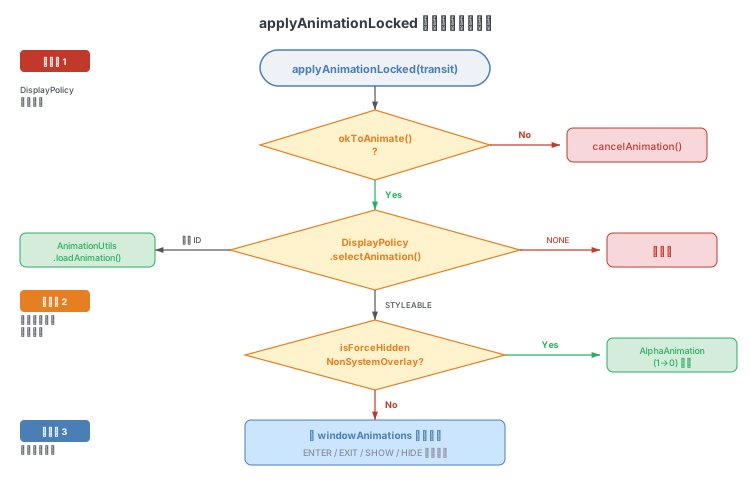
动画加载的三个来源(按优先级):
DisplayPolicy.selectAnimation():对TRANSIT_PREVIEW_DONE做特殊处理(启动窗口退出动画)。- 强制隐藏窗口:对被
isForceHiddenNonSystemOverlayWindow()标记的窗口,使用简单的淡出动画。 - 窗口样式属性:从
WindowManager.LayoutParams.windowAnimations引用的 style 资源中,根据 transit 类型加载对应的windowEnterAnimation/windowExitAnimation/windowShowAnimation/windowHideAnimation。
DisplayPolicy.selectAnimation() 的实现:
// DisplayPolicy.java line 1639
int selectAnimation(WindowState win, int transit) {
    if (transit == TRANSIT_PREVIEW_DONE) {
        if (win.hasAppShownWindows()) {
            if (win.isActivityTypeHome()) {
                // Dismiss the starting window as soon as possible to avoid
                // the crossfade out with old content because home is easier
                // to have different UI states.
                return ANIMATION_NONE;
            }
            return R.anim.app_starting_exit;
        }
    }
    return ANIMATION_STYLEABLE;
}
8. WindowState.startAnimation
创建 AnimationAdapter 并启动动画:
// WindowState.java line 5640
void startAnimation(Animation anim) {

    // If we are an inset provider, all our animations are driven by the inset client.
    if (mControllableInsetProvider != null) {
        return;
    }

    final DisplayInfo displayInfo = getDisplayInfo();
    anim.initialize(mWindowFrames.mFrame.width(), mWindowFrames.mFrame.height(),
            displayInfo.appWidth, displayInfo.appHeight);
    anim.restrictDuration(MAX_ANIMATION_DURATION);
    anim.scaleCurrentDuration(mWmService.getWindowAnimationScaleLocked());
    // 注: 此处源码有厂商定制(scaleCurrentDuration 参数不同),文档展示 AOSP 原始逻辑

    final Point position = new Point();
    if (com.android.window.flags.Flags.removePrepareSurfaceInPlacement()) {
        transformFrameToSurfacePosition(mWindowFrames.mFrame.left,
                mWindowFrames.mFrame.top, position);
    } else {
        position.set(mSurfacePosition);
    }
    // 注: 此处源码有厂商定制(条件增加了额外判断),文档展示 AOSP 原始逻辑
    final AnimationAdapter adapter = new LocalAnimationAdapter(
            new WindowAnimationSpec(anim, position, false /* canSkipFirstFrame */,
                    0 /* windowCornerRadius */),
            mWmService.mSurfaceAnimationRunner);
    startAnimation(getPendingTransaction(), adapter);
    // 注: 此处源码有厂商定制(使用 getSyncTransaction()),文档展示 AOSP 原始逻辑
    commitPendingTransaction();
}
关键步骤:
- 初始化
Animation对象,设置窗口尺寸和显示区域尺寸。 - 限制动画最大时长(
MAX_ANIMATION_DURATION)。 - 根据系统设置缩放动画时长(开发者选项中的"窗口动画缩放")。
- 创建
LocalAnimationAdapter,它封装了:WindowAnimationSpec:包含Animation对象和窗口位置信息,负责每帧计算变换矩阵。SurfaceAnimationRunner:负责驱动动画逐帧执行。
- 调用
startAnimation(Transaction, AnimationAdapter)进入SurfaceAnimator的动画启动流程。
9-10. SurfaceAnimator.startAnimation
创建动画 Leash(代理 Surface),将窗口 Surface 挂载到 Leash 下:
// SurfaceAnimator.java line 170
void startAnimation(Transaction t, AnimationAdapter anim, boolean hidden,
        @AnimationType int type,
        @Nullable OnAnimationFinishedCallback animationFinishedCallback,
        @Nullable Runnable animationCancelledCallback,
        @Nullable AnimationAdapter snapshotAnim, @Nullable SurfaceFreezer freezer) {
    cancelAnimation(t, true /* restarting */, true /* forwardCancel */);
    mAnimation = anim;
    mAnimationType = type;
    mSurfaceAnimationFinishedCallback = animationFinishedCallback;
    mAnimationCancelledCallback = animationCancelledCallback;
    final SurfaceControl surface = mAnimatable.getSurfaceControl();
    if (surface == null) {
        Slog.w(TAG, "Unable to start animation, surface is null or no children.");
        cancelAnimation();
        return;
    }
    mLeash = freezer != null ? freezer.takeLeashForAnimation() : null;
    if (mLeash == null) {
        mLeash = createAnimationLeash(mAnimatable, surface, t, type,
                mAnimatable.getSurfaceWidth(), mAnimatable.getSurfaceHeight(),
                0 /* x */, 0 /* y */, hidden, mService.mTransactionFactory);
        mAnimatable.onAnimationLeashCreated(t, mLeash);
    }
    mAnimatable.onLeashAnimationStarting(t, mLeash);
    if (mAnimationStartDelayed) {
        return;
    }
    mAnimation.startAnimation(mLeash, t, type, mInnerAnimationFinishedCallback);
    // ...
    if (snapshotAnim != null) {
        mSnapshot = freezer.takeSnapshotForAnimation();
        if (mSnapshot == null) {
            Slog.e(TAG, "No snapshot target to start animation on for " + mAnimatable);
            return;
        }
        mSnapshot.startAnimation(t, snapshotAnim, type);
    }
}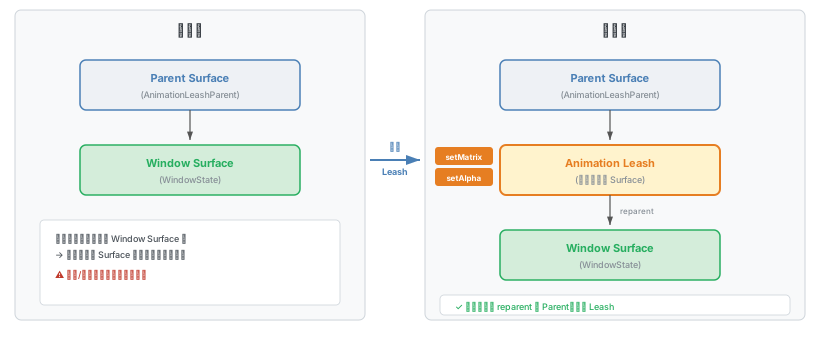
Leash 机制:动画不直接操作窗口的 Surface,而是创建一个中间 Surface(Leash),将窗口 Surface reparent 到 Leash 下。动画操作 Leash,动画结束后将窗口 Surface 恢复到原来的父节点。这样做可以避免动画期间其他逻辑对窗口 Surface 位置/大小的修改与动画变换冲突。
createAnimationLeash() 创建 Leash 的过程:
// SurfaceAnimator.java line 467
static SurfaceControl createAnimationLeash(Animatable animatable, SurfaceControl surface,
        Transaction t, @AnimationType int type, int width, int height, int x, int y,
        boolean hidden, Supplier<Transaction> transactionFactory) {
    final SurfaceControl.Builder builder = animatable.makeAnimationLeash()
            .setParent(animatable.getAnimationLeashParent())
            .setName(surface + " - animation-leash of " + animationTypeToString(type))
            .setHidden(hidden)
            .setEffectLayer()
            .setCallsite("SurfaceAnimator.createAnimationLeash");
    final SurfaceControl leash = builder.build();
    t.setWindowCrop(leash, width, height);
    t.setPosition(leash, x, y);
    t.show(leash);
    t.setAlpha(leash, hidden ? 0 : 1);

    t.reparent(surface, leash);
    return leash;
}
11-12. SurfaceAnimationRunner.startAnimation
LocalAnimationAdapter.startAnimation() 将动画交给 SurfaceAnimationRunner 管理:
// SurfaceAnimationRunner.java line 184
void startAnimation(AnimationSpec a, SurfaceControl animationLeash, Transaction t,
        Runnable finishCallback) {
    synchronized (mLock) {
        final RunningAnimation runningAnim = new RunningAnimation(a, animationLeash,
                finishCallback);
        boolean requiresEdgeExtension = requiresEdgeExtension(a);

        if (requiresEdgeExtension) {
            // 需要边缘扩展的动画(如平移动画),等待 Transaction 提交后再截图扩展
            // ...
            mPreProcessingAnimations.put(animationLeash, runningAnim);
            t.addTransactionCommittedListener(mEdgeExtensionExecutor, () -> {
                // ... edge extension processing
                synchronized (mLock) {
                    if (mPreProcessingAnimations.get(animationLeash) == runningAnim) {
                        mPreProcessingAnimations.remove(animationLeash);
                        mPendingAnimations.put(animationLeash, runningAnim);
                        if (!mAnimationStartDeferred
                                && mPreProcessingAnimations.isEmpty()) {
                            mChoreographer.postFrameCallback(this::startAnimations);
                        }
                    }
                }
            });
        }

        if (!requiresEdgeExtension) {
            mPendingAnimations.put(animationLeash, runningAnim);
            if (!mAnimationStartDeferred && mPreProcessingAnimations.isEmpty()) {
                mChoreographer.postFrameCallback(this::startAnimations);
            }
        }

        // Some animations (e.g. move animations) require the initial transform
        // to be applied immediately.
        applyTransformation(runningAnim, t, 0 /* currentPlayTime */);
    }
}
动画被放入 mPendingAnimations,然后通过 Choreographer 注册下一帧回调 startAnimations。
13-14. startAnimations → startPendingAnimationsLocked
// SurfaceAnimationRunner.java line 403
private void startAnimations(long frameTimeNanos) {
    synchronized (mLock) {
        if (!mPreProcessingAnimations.isEmpty()) {
            // Wait for all preprocessing animations to finish
            return;
        }
        startPendingAnimationsLocked();
    }
    mPowerManagerInternal.setPowerBoost(Boost.INTERACTION, 0);
}// SurfaceAnimationRunner.java line 317
private void startPendingAnimationsLocked() {
for (int i = mPendingAnimations.size() - 1; i >= 0; i--) {
startAnimationLocked(mPendingAnimations.valueAt(i));
}
mPendingAnimations.clear();
}遍历所有待启动的动画,逐个调用 startAnimationLocked()。同时设置 PowerBoost.INTERACTION 提升 CPU 性能。
15. SurfaceAnimationRunner.startAnimationLocked
创建 ValueAnimator 驱动动画:
// SurfaceAnimationRunner.java line 325
private void startAnimationLocked(RunningAnimation a) {
    final ValueAnimator anim = mAnimatorFactory.makeAnimator();

    // Animation length is already expected to be scaled.
    anim.overrideDurationScale(1.0f);
    anim.setDuration(a.mAnimSpec.getDuration());
    anim.addUpdateListener(animation -> {
        synchronized (mCancelLock) {
            if (!a.mCancelled) {
                final long duration = anim.getDuration();
                long currentPlayTime = anim.getCurrentPlayTime();
                if (currentPlayTime > duration) {
                    currentPlayTime = duration;
                }
                applyTransformation(a, mFrameTransaction, currentPlayTime);
            }
        }

        // Transaction will be applied in the commit phase.
        scheduleApplyTransaction();
    });

    anim.addListener(new AnimatorListenerAdapter() {
        @Override
        public void onAnimationStart(Animator animation) {
            synchronized (mCancelLock) {
                if (!a.mCancelled) {
                    mFrameTransaction.setAlpha(a.mLeash, 1);
                }
            }
        }

        @Override
        public void onAnimationEnd(Animator animation) {
            synchronized (mLock) {
                mRunningAnimations.remove(a.mLeash);
                synchronized (mCancelLock) {
                    if (!a.mCancelled) {
                        // Post on other thread that we can push final state without jank.
                        mAnimationThreadHandler.post(a.mFinishCallback);
                    }
                }
            }
        }
    });
    a.mAnim = anim;
    mRunningAnimations.put(a.mLeash, a);

    anim.start();
    if (a.mAnimSpec.canSkipFirstFrame()) {
        // If we can skip the first frame, we start one frame later.
        anim.setCurrentPlayTime(mChoreographer.getFrameIntervalNanos() / NANOS_PER_MS);
    }

    // Immediately start the animation by manually applying an animation frame.
    // Otherwise, the start time would only be set in the next frame, leading to a delay.
    anim.doAnimationFrame(mChoreographer.getFrameTime());
}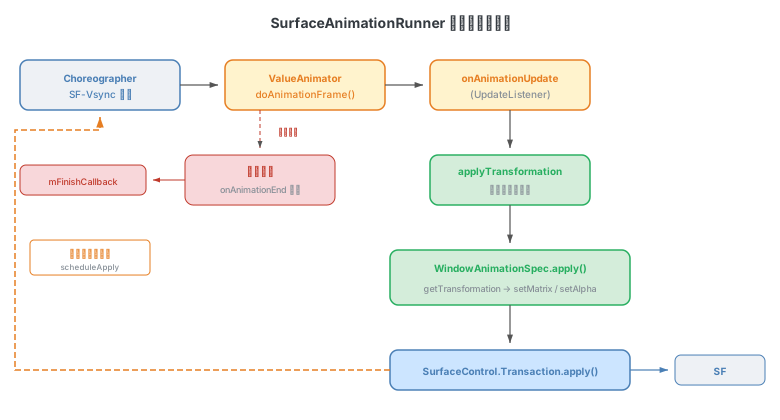
ValueAnimator 的工作原理:
- 每帧 Choreographer 回调触发
doAnimationFrame()→animateBasedOnTime()→animateValue()→onAnimationUpdate()回调。 - 在
UpdateListener中,调用applyTransformation()计算当前帧的变换,然后调用scheduleApplyTransaction()安排提交。 - 动画结束时在
onAnimationEnd()中清理状态,并通过mAnimationThreadHandler发送完成回调。
16. applyTransformation
// SurfaceAnimationRunner.java line 399
private void applyTransformation(RunningAnimation a, Transaction t, long currentPlayTime) {
    a.mAnimSpec.apply(t, a.mLeash, currentPlayTime);
}
委托给 AnimationSpec(实际是 WindowAnimationSpec)的 apply() 方法。
17-19. WindowAnimationSpec.apply
计算变换矩阵并设置到 SurfaceControl.Transaction:
// WindowAnimationSpec.java line 131
public void apply(Transaction t, SurfaceControl leash, long currentPlayTime) {
    final TmpValues tmp = mThreadLocalTmps.get();
    tmp.transformation.clear();
    mAnimation.getTransformation(currentPlayTime, tmp.transformation);
    tmp.transformation.getMatrix().postTranslate(mPosition.x, mPosition.y);
    t.setMatrix(leash, tmp.transformation.getMatrix(), tmp.floats);
    t.setAlpha(leash, tmp.transformation.getAlpha());

    boolean cropSet = false;
    if (mRootTaskClipMode == ROOT_TASK_CLIP_NONE) {
        if (tmp.transformation.hasClipRect()) {
            final Rect clipRect = tmp.transformation.getClipRect();
            accountForExtension(tmp.transformation, clipRect);
            t.setWindowCrop(leash, clipRect);
            cropSet = true;
        }
    } else {
        mTmpRect.set(mRootTaskBounds);
        if (tmp.transformation.hasClipRect()) {
            mTmpRect.intersect(tmp.transformation.getClipRect());
        }
        accountForExtension(tmp.transformation, mTmpRect);
        t.setWindowCrop(leash, mTmpRect);
        cropSet = true;
    }

    // We can only apply rounded corner if a crop is set, as otherwise the value
    // is meaningless, since it doesn't have anything it's relative to.
    if (cropSet && mAnimation.hasRoundedCorners() && mWindowCornerRadius > 0) {
        t.setCornerRadius(leash, mWindowCornerRadius);
    }
}
核心逻辑:
- 通过
Animation.getTransformation()获取当前帧的变换(矩阵 + alpha + clip rect)。 - 在矩阵上叠加窗口位置偏移(
mPosition)。 - 调用
t.setMatrix()设置变换矩阵,t.setAlpha()设置透明度。 - 根据
mRootTaskClipMode设置裁剪区域。 - 如果设置了裁剪且动画支持圆角,设置
cornerRadius。
20. scheduleApplyTransaction
// SurfaceAnimationRunner.java line 418
private void scheduleApplyTransaction() {
    if (!mApplyScheduled) {
        mChoreographer.postCallback(CALLBACK_TRAVERSAL, mApplyTransactionRunnable,
                null /* token */);
        mApplyScheduled = true;
    }
}

private final Runnable mApplyTransactionRunnable = this::applyTransaction;
通过 Choreographer 的 CALLBACK_TRAVERSAL 阶段安排 Transaction 提交。
21-22. applyTransaction
// SurfaceAnimationRunner.java line 426
private void applyTransaction() {
    mFrameTransaction.setAnimationTransaction();
    mFrameTransaction.setFrameTimelineVsync(mChoreographer.getVsyncId());
    mFrameTransaction.apply();
    mApplyScheduled = false;
}
最终通过 mFrameTransaction.apply() 将 Surface 变换提交到 SurfaceFlinger。setAnimationTransaction() 标记这是动画 Transaction,SurfaceFlinger 会优先处理。setFrameTimelineVsync() 关联到当前帧的 Vsync ID,确保变换在正确的帧中显示。
自定义动画
在 addView() 时通过 WindowManager.LayoutParams.windowAnimations 指定窗口动画样式:
WindowManager.LayoutParams lp = new WindowManager.LayoutParams(
        width,
        height,
        WindowManager.LayoutParams.TYPE_SYSTEM_DIALOG,
        WindowManager.LayoutParams.FLAG_NOT_FOCUSABLE
                | WindowManager.LayoutParams.FLAG_LAYOUT_IN_SCREEN
                | WindowManager.LayoutParams.FLAG_FULLSCREEN,
        PixelFormat.RGBA_8888);
lp.windowAnimations = R.style.MyWindowAnimation;
对应的 style 资源定义进入和退出动画:
<style name="MyWindowAnimation">
    <item name="android:windowEnterAnimation">@anim/my_enter_anim</item>
    <item name="android:windowExitAnimation">@anim/my_exit_anim</item>
</style>
在 applyAnimationLocked() 中,当 selectAnimation() 返回 ANIMATION_STYLEABLE 时,会根据 transit 类型从该 style 中加载对应的 windowEnterAnimation / windowExitAnimation / windowShowAnimation / windowHideAnimation 资源。