Android Input 系统:事件处理与 Motion 事件派发
本文详细介绍 Android Framework 层 Input 模块的整体流程,包括事件的上报与读取、事件的派发(重点分析 Motion 事件寻找派发目标的完整逻辑),以及事件的接收与响应。同时提供常见的点击无响应问题的排查方法。
整体架构
Android 系统基于 Linux,硬件事件通过 Linux Kernel 的 evdev(Event Device)机制处理。上报的事件被写入 /dev/input/ 下的设备节点文件,每个节点代表一个硬件设备。
Framework-Input(即 InputManagerService,简称 IMS)的职责就是:读取各设备节点的数据 → 解析封装 → 分发到上层应用。
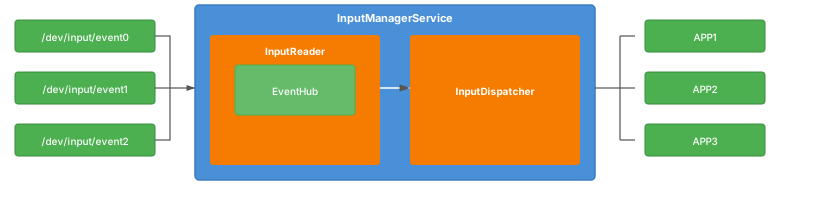
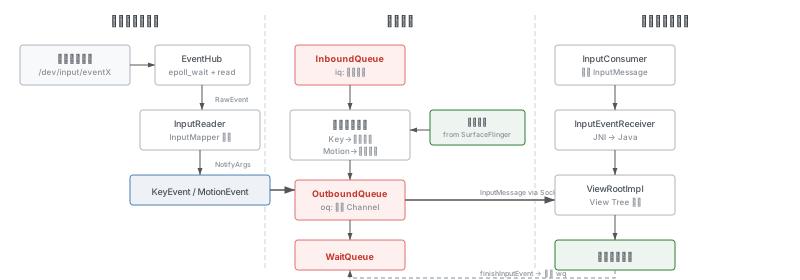
一次点击事件从上报到响应,经历三个阶段:
Linux 事件协议
IMS 根据 Linux 事件协议来解析和封装事件。通过 evdev 读取到的每个事件都是如下结构:
struct input_event {
    struct timeval time;
    __u16 type;
    __u16 code;
    __s32 value;
};除时间信息外,包含事件类型、事件代码、事件值三个关键字段。
按键事件
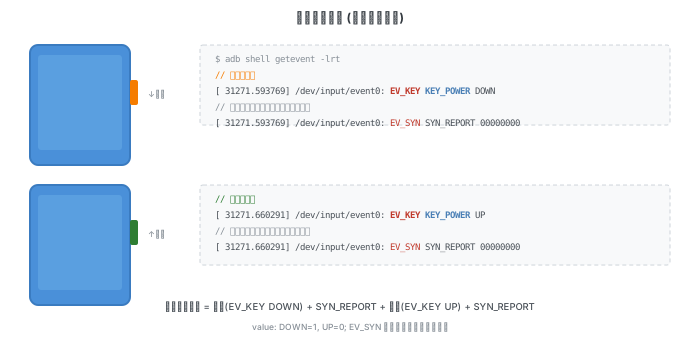
一次按键触发就是按钮按下并抬起的过程:
触摸事件
触摸事件是手指或笔等工具接触并离开设备的操作。以最简单的点击事件为例:
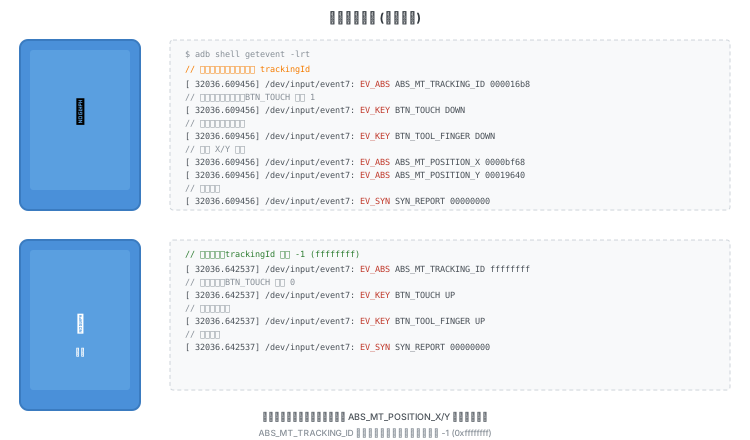
滑动事件只需在抬起之前重复上报新的 X/Y 坐标即可。
事件类型详解
Type EV_KEY
描述键盘、按钮等设备的状态变化。code 形式为 KEY_<name> 或 BTN_<name>:
- 按键按下时 value=1,抬起后 value=0
BTN_TOOL_<name>:工具类型标识,用于触摸屏、触控板、手写笔等。使用工具时值为 1,结束后为 0BTN_TOUCH:有意义的触摸时值为 1,触摸停止后为 0。可与BTN_TOOL_<name>结合使用——例如手写笔靠近但未接触屏幕时,BTN_TOOL_STYLUS=1、BTN_TOUCH=0,这被解析为悬浮(hover)操作
Type EV_SYN
SYN_REPORT 是分隔符,表示当前数据包的事件上报完成。例如鼠标可在一个包内同时上报 X 和 Y 方向的偏移量。
Type EV_ABS
描述属性的绝对变化,如触摸屏上报绝对位置。关键 code:
| Code | 含义 |
|---|---|
ABS_MT_POSITION_X | X 方向绝对坐标 |
ABS_MT_POSITION_Y | Y 方向绝对坐标 |
ABS_MT_TRACKING_ID | 手指接触屏幕后分配的 ID,抬起时上报 -1。开机后该 ID 持续递增 |
详细信息参考 Linux 输入事件代码 和 Linux 多点触控协议。
关键角色
InputManagerService 内有三个核心组件:
| 角色 | 职责 |
|---|---|
| EventHub | 读取 /dev/input 下的设备节点,创建设备,监听事件上报 |
| InputReader | 管理 EventHub,将读取的事件经过组装、加工,转发到 InputDispatcher |
| InputDispatcher | 接收来自 SurfaceFlinger 的窗口信息,将解析完的事件按特定逻辑分发到各窗口 |
模块启动
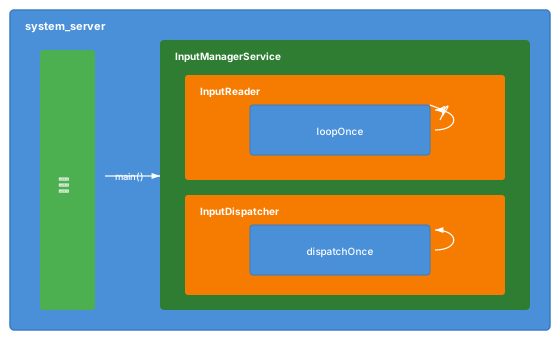
SystemServer 启动时创建 InputManagerService,最终在 native 层创建 InputManager:
InputManager::InputManager(const sp<InputReaderPolicyInterface>& readerPolicy,
                           InputDispatcherPolicyInterface& dispatcherPolicy,
                           PointerChoreographerPolicyInterface& choreographerPolicy,
                           InputFilterPolicyInterface& inputFilterPolicy) {
    mDispatcher = createInputDispatcher(dispatcherPolicy);
    // ...
    mReader = createInputReader(readerPolicy, *mTracingStages.back());
}
InputReader 和 InputDispatcher 分别作为独立线程启动:
status_t InputManager::start() {
    status_t result = mDispatcher->start();
    if (result) {
        ALOGE("Could not start InputDispatcher thread due to error %d.", result);
        return result;
    }
    result = mReader->start();
    if (result) {
        ALOGE("Could not start InputReader due to error %d.", result);
        mDispatcher->stop();
        return result;
    }
    return OK;
}
两个线程分别是死循环:InputReader 不断通过 EventHub 读取事件,InputDispatcher 不断监听队列并派发。
status_t InputReader::start() {
    if (mThread) {
        return ALREADY_EXISTS;
    }
    mThread = std::make_unique<InputThread>(
            "InputReader", [this]() { loopOnce(); }, [this]() { mEventHub->wake(); });
    return OK;
}

status_t InputDispatcher::start() {
    if (mThread) {
        return ALREADY_EXISTS;
    }
    mThread = std::make_unique<InputThread>(
            "InputDispatcher", [this]() { dispatchOnce(); }, [this]() { mLooper->wake(); });
    return OK;
}
设备加载
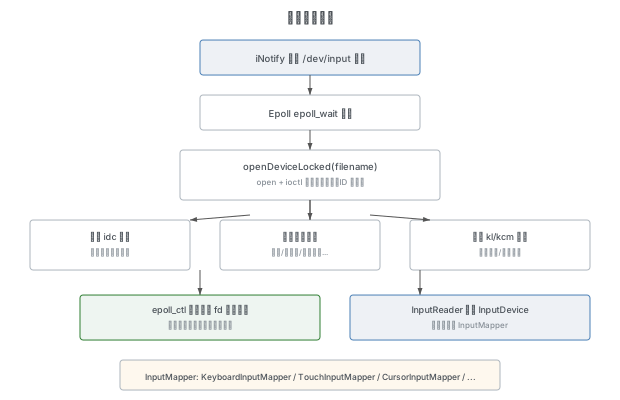
EventHub 通过 iNotify 与 Epoll 机制监听 /dev/input 下的设备节点:
// 创建 Epoll 对象
mEpollFd = epoll_create1(EPOLL_CLOEXEC);
// 创建 INotify 对象
mINotifyFd = inotify_init1(IN_CLOEXEC);
// 添加对 /dev/input 的监听
mDeviceInputWd = inotify_add_watch(mINotifyFd, "/dev/input", IN_DELETE | IN_CREATE);
// 将 iNotify 添加到 epoll 监听池
int result = epoll_ctl(mEpollFd, EPOLL_CTL_ADD, mINotifyFd, &eventItem);
当有新设备挂载时,EventHub 打开设备节点并获取关键信息:
int fd = open(devicePath.c_str(), O_RDWR | O_CLOEXEC | O_NONBLOCK);

// 获取设备名称
ioctl(fd, EVIOCGNAME(sizeof(buffer) - 1), &buffer);

// 获取设备的 vendorId、productId 等信息
struct input_id inputId;
ioctl(fd, EVIOCGID, &inputId);

// 创建设备
int32_t deviceId = mNextDeviceId++;
std::unique_ptr<Device> device = std::make_unique<Device>(fd, deviceId, devicePath, identifier,
                                     obtainAssociatedDeviceLocked(devicePath));

// 加载 idc 文件
loadConfigurationLocked();

// 根据设备支持的特性判断设备类型
device->readDeviceBitMask(EVIOCGBIT(EV_KEY, 0), device->keyBitmask);
if (haveKeyboardKeys || haveGamepadButtons || haveStylusButtons) {
    device->classes |= InputDeviceClass::KEYBOARD;
}

// 为键盘/游戏控制器/传感器加载 kl、kcm 文件
if (device->classes.any(InputDeviceClass::KEYBOARD | InputDeviceClass::JOYSTICK |
                        InputDeviceClass::SENSOR)) {
    keyMapStatus = device->loadKeyMapLocked();
}
配置文件说明:
设备加载完成后需要做两件事:
第一步:将设备节点的 fd 添加到 Epoll 监听池:
struct epoll_event eventItem = {};
eventItem.events = EPOLLIN | EPOLLWAKEUP;
eventItem.data.fd = device.fd;
epoll_ctl(mEpollFd, EPOLL_CTL_ADD, fd, &eventItem);第二步:在 InputReader 中创建对应的 InputDevice 和 InputMapper:
std::shared_ptr<InputDevice> device = std::make_shared<InputDevice>(
    &mContext, deviceId, bumpGenerationLocked(), identifier);
mPendingArgs += device->addEventHubDevice(when, eventHubId, mConfig);
InputMapper 负责将原始事件映射转换为 InputDispatcher 可以理解的事件信息。不同设备类型对应不同的 InputMapper:触摸屏 → TouchInputMapper,键盘 → KeyboardInputMapper,光标 → CursorInputMapper,等等。
InputReader 本身是一个管家角色——它管理 EventHub 与各个 InputMapper,实际的事件组装工作由 InputMapper 完成。而 EventHub 中的底层设备可能会被 InputReader 按照规则组合为一个上层设备(例如带按键的鼠标会被挂载为多个底层设备,但 InputReader 将其合并为一个)。
事件读取与组装
InputReader 启动后无限调用 EventHub 的 getEvents 方法,返回 RawEvent 数组——这是对 input_event 的封装,增加了设备 ID 等信息:
struct RawEvent {
    nsecs_t when;       // 事件发生时间
    nsecs_t readTime;   // EventHub 读取时间
    int32_t deviceId;
    int32_t type;
    int32_t code;
    int32_t value;
};

void InputReader::loopOnce() {
    // ...
    std::vector<RawEvent> events = mEventHub->getEvents(timeoutMillis);
    // ...
}
EventHub 内部通过 epoll_wait 等待事件,当设备上报新事件时,Reader 线程被唤醒:
int pollResult = epoll_wait(mEpollFd, mPendingEventItems, EPOLL_MAX_EVENTS, timeoutMillis);
// ...
if (pollResult > 0) {
    Device* device = getDeviceByFdLocked(eventItem.data.fd);
    int32_t readSize = read(device->fd, readBuffer.data(),
             sizeof(decltype(readBuffer)::value_type) * readBuffer.size());
    const size_t count = size_t(readSize) / sizeof(struct input_event);
    for (size_t i = 0; i < count; i++) {
        struct input_event& iev = readBuffer[i];
        events.push_back({
                .when = processEventTimestamp(iev),
                .readTime = systemTime(SYSTEM_TIME_MONOTONIC),
                .deviceId = deviceId,
                .type = iev.type,
                .code = iev.code,
                .value = iev.value,
        });
    }
}
InputReader 将 RawEvent 分发到各个 InputDevice 的 InputMapper 进行处理,转换为 NotifyArgs(KeyEvent 对应 NotifyKeyArgs,MotionEvent 对应 NotifyMotionArgs),然后统一转发给 InputDispatcher。
事件的分发
事件入队 (InboundQueue)
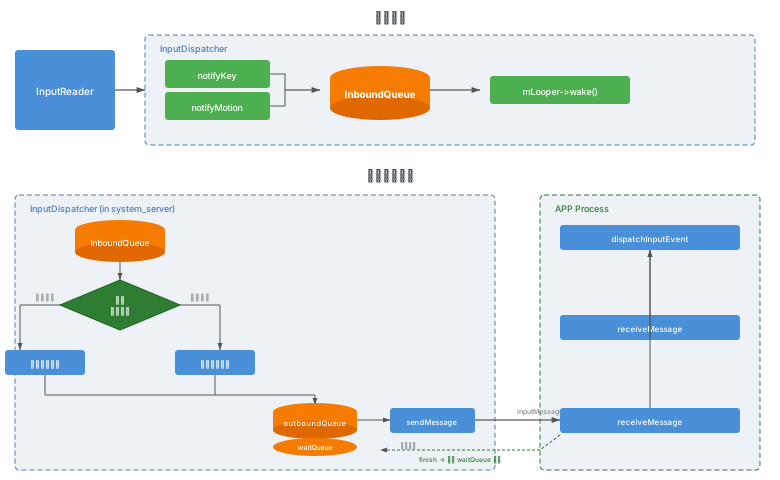
InputReader 通过调用 notifyKey/notifyMotion 将事件传递给 InputDispatcher。此时 NotifyArgs 被转换为 EventEntry(KeyEntry / MotionEntry),通过 enqueueInboundEventLocked 放入 InboundQueue 并唤醒 Dispatcher 线程:
void InputDispatcher::notifyKey(const NotifyKeyArgs& args) {
    // ...
    std::unique_ptr<KeyEntry> newEntry =
            std::make_unique<KeyEntry>(args.id, /*injectionState=*/nullptr, args.eventTime,
                                       args.deviceId, args.source, args.displayId, policyFlags,
                                       args.action, flags, keyCode, args.scanCode, metaState,
                                       repeatCount, args.downTime);
    enqueueInboundEventLocked(std::move(newEntry));
}

void InputDispatcher::notifyMotion(const NotifyMotionArgs& args) {
    // ...
    std::unique_ptr<MotionEntry> newEntry =
            std::make_unique<MotionEntry>(args.id, /*injectionState=*/nullptr, args.eventTime,
                                          args.deviceId, args.source, args.displayId,
                                          policyFlags, args.action, /* ... */);
    enqueueInboundEventLocked(std::move(newEntry));
}
窗口信息
什么是 Input 窗口? 任何一个配置了 InputWindowHandle 的 SurfaceControl 都是 Input 窗口,不需要与 GraphicBuffer 关联。
WindowInfo 主要包含:
- InputWindowHandle:窗口身份信息(pid/uid)、InputChannel token、可触摸区域(Touchable Region)等
- SurfaceControl:窗口 Frame(可见区域)、Transform(位置/方向/缩放)
InputChannel 是 LocalSocket 的封装。窗口添加时,IMS 的
openInputChannel方法最终调用 InputDispatcher 的createInputChannel,返回客户端 InputChannel,服务端 InputChannel 保存在 Dispatcher 中。两者共享一个 Token,该 Token 设置到 InputWindowHandle 中,使 Dispatcher 能通过 Token 找到对应的服务端 Channel 来向窗口写事件。
Key 事件的派发
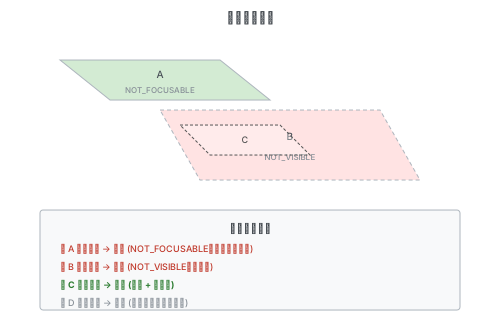
Key 事件派发的核心是找到焦点窗口。焦点请求来自 WMS,InputDispatcher 在 SurfaceFlinger 同步来的窗口列表中为目标窗口设置焦点。设置焦点需要满足:窗口存在且可见、窗口支持获得焦点。
如果当前应用没有焦点窗口,但存在 Key 事件需要派发,会等待一段时间(默认 5s),超时后触发 ANR。
Motion 事件的派发
Motion 事件分为两种:
- 指针事件(有坐标):如触摸屏的点击,根据坐标寻找对应窗口
- 非指针事件(无坐标):如游戏手柄摇杆,派发到焦点窗口
const bool isPointerEvent = isFromSource(entry->source, AINPUT_SOURCE_CLASS_POINTER);
if (isPointerEvent) {
    // 指针事件:根据坐标寻找派发目标
    inputTargets = findTouchedWindowTargetsLocked(currentTime, *entry, injectionResult);
} else {
    // 非指针事件:寻找焦点窗口
    sp<WindowInfoHandle> focusedWindow =
            findFocusedWindowTargetLocked(currentTime, *entry, nextWakeupTime, injectionResult);
}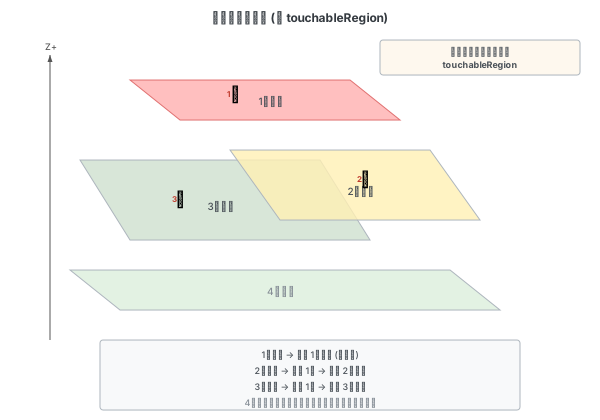
同步自 SurfaceFlinger 的窗口信息按顺序排列——越靠前的窗口越靠上。事件从上到下寻找派发窗口,一次只派发给一个前台窗口。
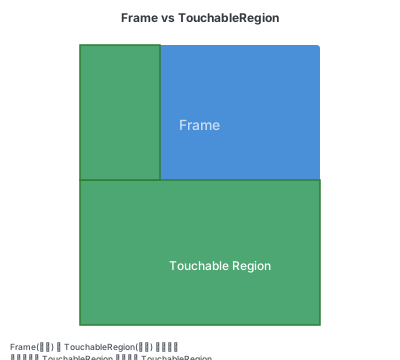
Frame 是窗口可见区域,TouchableRegion 是可触控区域,两者独立存在。InputDispatcher 按照 TouchableRegion 进行事件派发。
事件派发与完成
确定派发目标后,事件先写入目标窗口的 OutboundQueue (oq),再通过 InputChannel 的 socket 写入 InputMessage 到应用进程。写入后事件添加到 WaitQueue (wq),等待应用处理完成后回写 finish 信号。收到 finish 后从 wq 中移除事件,派发完成。如果应用迟迟不回复,触发 ANR。
// 写入 InputMessage
InputMessage msg;
msg.header.type = InputMessage::Type::KEY;
msg.body.key.action = action;
msg.body.key.keyCode = keyCode;
// ...
mChannel->sendMessage(&msg);
Motion 事件寻找派发目标(详细分析)
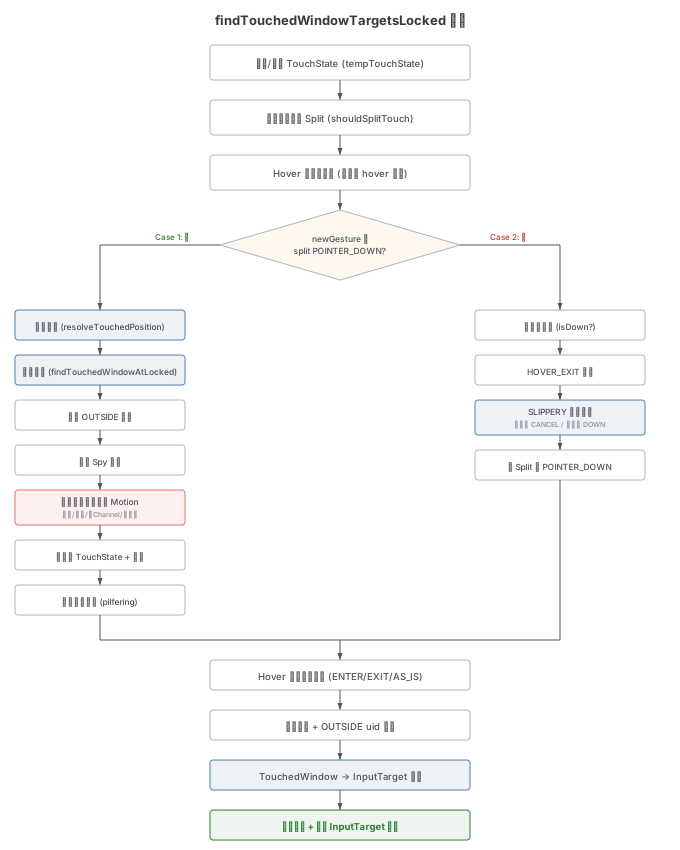
下面深入分析 findTouchedWindowTargetsLocked 方法——这是 Motion 事件派发中最复杂的核心逻辑。
关键数据结构
| 名称 | 说明 |
|---|---|
| TouchState | 触摸状态,按 Display 存储,跟踪当前手势的触摸信息,保存被触摸的窗口列表 (TouchedWindow)。手势结束后清空 |
| TouchedWindow | 某个窗口的触摸状态,包含窗口信息、派发模式、目标 flag、每个设备的触摸指针等 |
| WindowInfoHandle | 窗口信息的"句柄",唯一成员是 WindowInfo。从 SurfaceFlinger 同步,按 Display 存储 |
std::unordered_map<int32_t, TouchState> mTouchStatesByDisplay GUARDED_BY(mLock);

std::unordered_map<int32_t /*displayId*/, std::vector<sp<android::gui::WindowInfoHandle>>>
            mWindowHandlesByDisplay GUARDED_BY(mLock);

// 通过 WindowInfo 中的 token 可以找到对应的 Connection,用来派发事件
std::unordered_map<sp<IBinder>, std::shared_ptr<Connection>, StrongPointerHash<IBinder>>
            mConnectionsByToken GUARDED_BY(mLock);
DispatchMode(派发模式)
| 模式 | 含义 |
|---|---|
| AS_IS | 原样派发,不修改 action |
| OUTSIDE | 以 ACTION_OUTSIDE 派发——被点击窗口之上存在监听外部事件的窗口,DOWN 事件会以此模式派发 |
| HOVER_ENTER | 以 HOVER_ENTER 派发——例如鼠标 HOVER_MOVE 到达某窗口的第一次,应当是 HOVER_ENTER |
| HOVER_EXIT | 以 HOVER_EXIT 派发——鼠标 HOVER_MOVE 离开某窗口的最后一次 |
| SLIPPERY_EXIT | 以 CANCEL 派发——当窗口设置了 SLIPPERY flag,MOVE 事件落到新窗口时,旧窗口收到此模式 |
| SLIPPERY_ENTER | 以 DOWN 派发——新窗口在滑出转移时收到此模式 |
InputTarget::Flags(目标 flag)
| Flag | 含义 |
|---|---|
| FOREGROUND | 事件派发到前台窗口 |
| WINDOW_IS_OBSCURED | 点击位置被其他可见窗口遮挡,最终事件携带 AMOTION_EVENT_FLAG_WINDOW_IS_OBSCURED |
| SPLIT | 事件需要被分割派发到不同窗口 |
| ZERO_COORDS | 坐标需要被模糊(监听外部事件的窗口和前台窗口 uid 不同时) |
| NO_FOCUS_CHANGE | 事件即使派发到未获焦窗口也不改变焦点 |
| WINDOW_IS_PARTIALLY_OBSCURED | 目标窗口被部分或完全遮挡 |
第一步:获取 TouchState
const TouchState* oldState = nullptr;
TouchState tempTouchState;
if (const auto it = mTouchStatesByDisplay.find(displayId); it != mTouchStatesByDisplay.end()) {
    oldState = &(it->second);
    tempTouchState = *oldState;
}
根据事件目标 Display 获取之前的触摸状态,用旧状态初始化一个临时触摸状态 tempTouchState,后续操作都在这个临时状态上进行。
第二步:判断是否 Split
bool isSplit = shouldSplitTouch(tempTouchState, entry);

const bool isHoverAction = (maskedAction == AMOTION_EVENT_ACTION_HOVER_MOVE ||
                            maskedAction == AMOTION_EVENT_ACTION_HOVER_ENTER ||
                            maskedAction == AMOTION_EVENT_ACTION_HOVER_EXIT);
const bool wasDown = oldState != nullptr && oldState->isDown(entry.deviceId);
const bool isDown = (maskedAction == AMOTION_EVENT_ACTION_DOWN) ||
        (maskedAction == AMOTION_EVENT_ACTION_POINTER_DOWN && !wasDown);
const bool newGesture = isDown || maskedAction == AMOTION_EVENT_ACTION_SCROLL ||
        maskedAction == AMOTION_EVENT_ACTION_HOVER_ENTER ||
        maskedAction == AMOTION_EVENT_ACTION_HOVER_MOVE;

if (newGesture) {
    isSplit = false;
}
shouldSplitTouch 的完整实现:
bool shouldSplitTouch(const TouchState& touchState, const MotionEntry& entry) {
    if (isFromSource(entry.source, AINPUT_SOURCE_MOUSE)) {
        return false; // 鼠标事件永不 Split
    }
    for (const TouchedWindow& touchedWindow : touchState.windows) {
        if (touchedWindow.windowHandle->getInfo()->isSpy()) {
            continue; // Spy 窗口不影响 Split 判断
        }
        if (touchedWindow.windowHandle->getInfo()->supportsSplitTouch()) {
            continue;
        }
        if (touchedWindow.windowHandle->getInfo()->inputConfig.test(
                    gui::WindowInfo::InputConfig::IS_WALLPAPER)) {
            continue; // 壁纸窗口不影响 Split 判断
        }
        if (touchedWindow.hasTouchingPointers(entry.deviceId)) {
            return false; // 当前设备已 DOWN 在不支持 Split 的窗口上
        }
    }
    return true;
}
总结:除鼠标外都支持 Split,除非当前设备之前已经 DOWN 在一个不支持 Split 的窗口上。新手势时先设 isSplit = false(后续会根据窗口情况重新确认)。
第三步:Hover 前处理
if (isDown && tempTouchState.hasHoveringPointers(entry.deviceId)) {
    tempTouchState.clearHoveringPointers(entry.deviceId);
}
if (isHoverAction) {
    if (wasDown) {
        // hover 但设备已 down → 事件流不一致,drop
        outInjectionResult = InputEventInjectionResult::FAILED;
        return {};
    }
    tempTouchState.clearHoveringPointers(entry.deviceId);
}- 如果来了 DOWN 事件,清除 hover 指针(DOWN 应产生 HOVER_EXIT)
- 如果是 hover 操作但设备已 down,事件流不一致,强制 drop
- 对 hover 事件,清除旧的 hover 指针,后续重新计算
两种关键情况
情况 1:新手势或 Split 的 POINTER_DOWN
当 newGesture 或 (isSplit && POINTER_DOWN) 时:
1. 计算坐标并命中测试
const auto [x, y] = resolveTouchedPosition(entry);
const int32_t pointerIndex = MotionEvent::getActionIndex(action);
const PointerProperties& pointer = entry.pointerProperties[pointerIndex];
const bool isStylus = isPointerFromStylus(entry, pointerIndex);
sp<WindowInfoHandle> newTouchedWindowHandle =
findTouchedWindowAtLocked(displayId, x, y, isStylus);坐标计算:鼠标取光标位置,其他取指针的 X/Y 轴值:
std::pair<float, float> resolveTouchedPosition(const MotionEntry& entry) {
    const bool isFromMouse = isFromSource(entry.source, AINPUT_SOURCE_MOUSE);
    if (isFromMouse) {
        return {entry.xCursorPosition, entry.yCursorPosition};
    }
    const int32_t pointerIndex = MotionEvent::getActionIndex(entry.action);
    return {entry.pointerCoords[pointerIndex].getAxisValue(AMOTION_EVENT_AXIS_X),
            entry.pointerCoords[pointerIndex].getAxisValue(AMOTION_EVENT_AXIS_Y)};
}命中测试:findTouchedWindowAtLocked 从前到后遍历窗口,跳过 Spy 窗口,检查每个窗口能否接收事件:
sp<WindowInfoHandle> InputDispatcher::findTouchedWindowAtLocked(
        int32_t displayId, float x, float y, bool isStylus,
        bool ignoreDragWindow) const {
    const auto& windowHandles = getWindowHandlesLocked(displayId);
    for (const sp<WindowInfoHandle>& windowHandle : windowHandles) {
        if (ignoreDragWindow && haveSameToken(windowHandle, mDragState->dragWindow)) {
            continue;
        }
        const WindowInfo& info = *windowHandle->getInfo();
        if (!info.isSpy() &&
            windowAcceptsTouchAt(info, displayId, x, y, isStylus,
                                 getTransformLocked(displayId))) {
            return windowHandle;
        }
    }
    return nullptr;
}
windowAcceptsTouchAt 的判断条件:
bool windowAcceptsTouchAt(const WindowInfo& windowInfo, int32_t displayId, float x, float y,
                          bool isStylus, const ui::Transform& displayTransform) {
    const auto inputConfig = windowInfo.inputConfig;
    if (windowInfo.displayId != displayId ||
        inputConfig.test(WindowInfo::InputConfig::NOT_VISIBLE)) {
        return false;
    }
    const bool windowCanInterceptTouch = isStylus && windowInfo.interceptsStylus();
    if (inputConfig.test(WindowInfo::InputConfig::NOT_TOUCHABLE) && !windowCanInterceptTouch) {
        return false;
    }
    // 在逻辑坐标系下做命中测试
    const auto touchableRegion = displayTransform.transform(windowInfo.touchableRegion);
    const auto p = displayTransform.transform(x, y);
    if (!touchableRegion.contains(std::floor(p.x), std::floor(p.y))) {
        return false;
    }
    return true;
}
当
INTERCEPTS_STYLUS和NOT_TOUCHABLE同时设置到一个受信任窗口上时,该窗口只接收手写笔事件,不接收手或鼠标事件。
为什么要在逻辑坐标系下做命中测试? Region 的包含判断使用左闭右开区间:
bool Region::contains(int x, int y) const {
    const_iterator cur = begin();
    const_iterator const tail = end();
    while (cur != tail) {
        if (y >= cur->top && y < cur->bottom && x >= cur->left && x < cur->right) {
            return true;
        }
        cur++;
    }
    return false;
}
Input 子系统在未旋转的物理坐标系下工作,而 WM 在逻辑坐标下确定窗口边界 [l, r) 和 [t, b)。当屏幕旋转 90° 或 270° 时,物理坐标系下的 right/bottom 边界与逻辑坐标系不同,会导致一条边被错误地按闭区间匹配。旋转 180° 时两条边都会错误匹配。因此将坐标和区域都变换到逻辑坐标系后再做匹配,避免边界误命中。
2. 寻找 OUTSIDE 窗口
if (isDown) {
    targets += findOutsideTargetsLocked(displayId, newTouchedWindowHandle, pointer.id);
}
如果是 DOWN 事件,寻找目标窗口之上所有设置了 WATCH_OUTSIDE_TOUCH 的窗口:
std::vector<InputTarget> InputDispatcher::findOutsideTargetsLocked(
        int32_t displayId, const sp<WindowInfoHandle>& touchedWindow,
        int32_t pointerId) const {
    if (touchedWindow == nullptr) {
        return {};
    }
    std::vector<InputTarget> outsideTargets;
    const auto& windowHandles = getWindowHandlesLocked(displayId);
    for (const sp<WindowInfoHandle>& windowHandle : windowHandles) {
        if (windowHandle == touchedWindow) {
            // 遇到被点击窗口就停止——其下方的 WATCH_OUTSIDE_TOUCH 窗口不会收到
            return outsideTargets;
        }
        const WindowInfo& info = *windowHandle->getInfo();
        if (info.inputConfig.test(WindowInfo::InputConfig::WATCH_OUTSIDE_TOUCH)) {
            std::bitset<MAX_POINTER_ID + 1> pointerIds;
            pointerIds.set(pointerId);
            addPointerWindowTargetLocked(windowHandle, InputTarget::DispatchMode::OUTSIDE,
                                         ftl::Flags<InputTarget::Flags>(), pointerIds,
                                         /*firstDownTimeInTarget=*/std::nullopt, outsideTargets);
        }
    }
    return outsideTargets;
}
从前往后扫描被点击窗口之上的全部窗口,找到具有 WATCH_OUTSIDE_TOUCH flag 的窗口并生成 OUTSIDE 派发目标。这主要用于实现对话框点击外部消失的功能。
3. 处理找不到窗口与注入验证
// 找不到窗口时尝试使用上一个前台窗口
if (newTouchedWindowHandle == nullptr) {
    newTouchedWindowHandle = tempTouchState.getFirstForegroundWindowHandle();
}

// 验证注入事件的目标 uid
if (const auto err = verifyTargetedInjection(newTouchedWindowHandle, entry); err) {
    ALOGW("Dropping injected touch event: %s", (*err).c_str());
    outInjectionResult = os::InputEventInjectionResult::TARGET_MISMATCH;
    newTouchedWindowHandle = nullptr;
    return {};
}
注入事件可以指定目标 uid,此处验证找到的窗口 uid 是否匹配,不匹配则 drop 事件。
4. 确认 Split 状态
- 找到新窗口且支持 Split:标记
isSplit = true(鼠标除外) - 找到新窗口但不支持 Split,且之前已 Split:忽略新窗口
- 没找到窗口:也标记支持 Split
5. 寻找 Spy 窗口
std::vector<sp<WindowInfoHandle>> newTouchedWindows =
        findTouchedSpyWindowsAtLocked(displayId, x, y, isStylus);
if (newTouchedWindowHandle != nullptr) {
    // 前台窗口插入最前面,确保最先收到事件
    newTouchedWindows.insert(newTouchedWindows.begin(), newTouchedWindowHandle);
}

if (newTouchedWindows.empty()) {
    ALOGI("Dropping event because there is no touchable window at (%.1f, %.1f) on display %d.",
          x, y, displayId);
    outInjectionResult = InputEventInjectionResult::FAILED;
    return {};
}
寻找 Spy 窗口的逻辑:从前到后遍历,只收集坐标命中的 Spy 窗口,遇到第一个非 Spy 窗口就停止。但有一个例外:如果 Spy 窗口不支持 Split Touch,且该窗口已经接收了当前设备的触摸指针,则即使坐标未命中也会被收集(确保不支持 Split 的 Spy 窗口能接收同设备的后续指针)。
std::vector<sp<WindowInfoHandle>> InputDispatcher::findTouchedSpyWindowsAtLocked(
        int32_t displayId, float x, float y, bool isStylus, DeviceId deviceId) const {
    std::vector<sp<WindowInfoHandle>> spyWindows;
    const auto& windowHandles = getWindowHandlesLocked(displayId);
    for (const sp<WindowInfoHandle>& windowHandle : windowHandles) {
        const WindowInfo& info = *windowHandle->getInfo();
        if (!windowAcceptsTouchAt(info, displayId, x, y, isStylus,
                                  getTransformLocked(displayId))) {
            // 坐标未命中,但如果 Spy 窗口不支持 Split 且已有该设备的触摸指针,仍然收集
            if (info.supportsSplitTouch()) {
                continue;
            }
            if (!windowHasTouchingPointersLocked(windowHandle, deviceId)) {
                continue;
            }
            // 已有该设备的指针,继续将此 Spy 窗口加入列表
        }
        if (!info.isSpy()) {
            // 遇到第一个非 Spy 窗口就停止
            return spyWindows;
        }
        spyWindows.push_back(windowHandle);
    }
    return spyWindows;
}
所有的 Spy 窗口都必须在最上面才能生效。如果找不到任何窗口(包括 Spy),事件被丢弃。
6. 校验窗口能否接收 Motion
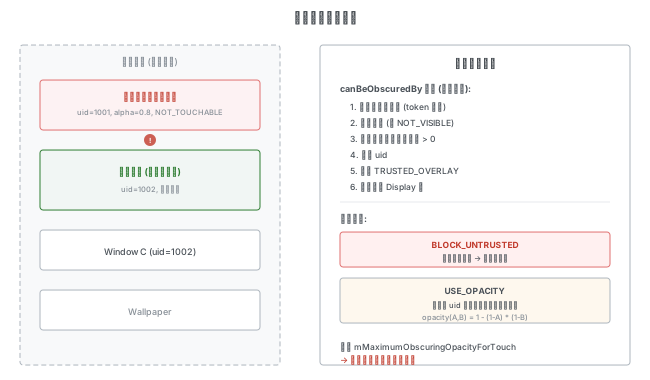
对每个找到的窗口,调用 canWindowReceiveMotionLocked 进行完整校验:
bool InputDispatcher::canWindowReceiveMotionLocked(const sp<WindowInfoHandle>& window,
                                                   const MotionEntry& motionEntry) const {
    const WindowInfo& info = *window->getInfo();

    // 1. 注入事件 uid 检查
    if (const auto err = verifyTargetedInjection(window, motionEntry); err) {
        return false;
    }

    // 2. 暂停派发检查
    if (info.inputConfig.test(WindowInfo::InputConfig::PAUSE_DISPATCHING)) {
        ALOGI("Not sending touch event to %s because it is paused",
              window->getName().c_str());
        return false;
    }

    // 3. 无 InputChannel 检查
    if (info.inputConfig.test(WindowInfo::InputConfig::NO_INPUT_CHANNEL)) {
        ALOGW("Not sending touch gesture to %s because it has config NO_INPUT_CHANNEL",
              window->getName().c_str());
        return false;
    }

    // 4. Connection 存在且有响应
    std::shared_ptr<Connection> connection = getConnectionLocked(window->getToken());
    if (connection == nullptr) {
        ALOGW("Not sending touch to %s because there's no corresponding connection",
              window->getName().c_str());
        return false;
    }
    if (!connection->responsive) {
        ALOGW("Not sending touch to %s because it is not responsive",
              window->getName().c_str());
        return false;
    }

    // 5. 遮挡检查 (Touch Occlusion)
    const auto [x, y] = resolveTouchedPosition(motionEntry);
    TouchOcclusionInfo occlusionInfo = computeTouchOcclusionInfoLocked(window, x, y);
    if (!isTouchTrustedLocked(occlusionInfo)) {
        ALOGW("Dropping untrusted touch event due to %s/%s",
              occlusionInfo.obscuringPackage.c_str(),
              occlusionInfo.obscuringUid.toString().c_str());
        return false;
    }

    // 6. DROP_INPUT / DROP_INPUT_IF_OBSCURED 检查
    if (shouldDropInput(motionEntry, window)) {
        return false;
    }

    // 7. 手写笔激活时阻止触摸
    if (info.inputConfig.test(WindowInfo::InputConfig::GLOBAL_STYLUS_BLOCKS_TOUCH) &&
        isStylusActiveInDisplay(info.displayId, mTouchStatesByDisplay)) {
        LOG(INFO) << "Dropping touch from " << window->getName()
                  << " because stylus is active";
        return false;
    }

    return true;
}遮挡信息计算(computeTouchOcclusionInfoLocked):扫描目标窗口之上的全部窗口,检查每个窗口是否能对目标造成遮挡。
具有遮挡能力的条件(canBeObscuredBy,全部满足):
- 不是同一个窗口(token 不同)
- 窗口可见(无 NOT_VISIBLE)
- 若不可点击,透明度须 > 0
- 不同 uid(同 uid 内无安全边界)
- 不是 TRUSTED_OVERLAY
- 在同一个 Display 上
遮挡检测模式:
- BLOCK_UNTRUSTED:直接阻止,事件被丢弃
- USE_OPACITY:累计同 uid 全部遮挡窗口的组合不透明度
opacity(A,B) = 1 - (1-A)*(1-B),超过mMaximumObscuringOpacityForTouch阈值则阻止
shouldDropInput 的检查:
bool InputDispatcher::shouldDropInput(
        const EventEntry& entry, const sp<WindowInfoHandle>& windowHandle) const {
    if (windowHandle->getInfo()->inputConfig.test(WindowInfo::InputConfig::DROP_INPUT) ||
        (windowHandle->getInfo()->inputConfig.test(
                 WindowInfo::InputConfig::DROP_INPUT_IF_OBSCURED) &&
         isWindowObscuredLocked(windowHandle))) {
        return true;
    }
    return false;
}
7. 设置目标 Flag 并更新 TouchState
对通过校验的每个窗口:
for (const sp<WindowInfoHandle>& windowHandle : newTouchedWindows) {
    if (!canWindowReceiveMotionLocked(windowHandle, entry)) {
        continue;
    }

    if (isHoverAction) {
        tempTouchState.addHoveringPointerToWindow(windowHandle, entry.deviceId, pointer);
    }

    // 设置目标 flag
    ftl::Flags<InputTarget::Flags> targetFlags;
    if (canReceiveForegroundTouches(*windowHandle->getInfo())) {
        targetFlags |= InputTarget::Flags::FOREGROUND; // 非 Spy 且可点击 = 前台窗口
    }
    if (isSplit) {
        targetFlags |= InputTarget::Flags::SPLIT;
    }
    if (isWindowObscuredAtPointLocked(windowHandle, x, y)) {
        targetFlags |= InputTarget::Flags::WINDOW_IS_OBSCURED;
    } else if (isWindowObscuredLocked(windowHandle)) {
        targetFlags |= InputTarget::Flags::WINDOW_IS_PARTIALLY_OBSCURED;
    }

    // 更新 TouchState(非 hover 事件)
    if (!isHoverAction) {
        const bool isDownOrPointerDown = maskedAction == AMOTION_EVENT_ACTION_DOWN ||
                maskedAction == AMOTION_EVENT_ACTION_POINTER_DOWN;
        tempTouchState.addOrUpdateWindow(windowHandle, InputTarget::DispatchMode::AS_IS,
                                         targetFlags, entry.deviceId, {pointer},
                                         isDownOrPointerDown
                                                 ? std::make_optional(entry.eventTime)
                                                 : std::nullopt);

        // DOWN 且窗口支持壁纸事件复制 → 添加壁纸窗口
        if (isDownOrPointerDown && targetFlags.test(InputTarget::Flags::FOREGROUND) &&
            windowHandle->getInfo()->inputConfig.test(
                    gui::WindowInfo::InputConfig::DUPLICATE_TOUCH_TO_WALLPAPER)) {
            sp<WindowInfoHandle> wallpaper = findWallpaperWindowBelow(windowHandle);
            if (wallpaper != nullptr) {
                ftl::Flags<InputTarget::Flags> wallpaperFlags =
                        InputTarget::Flags::WINDOW_IS_OBSCURED |
                        InputTarget::Flags::WINDOW_IS_PARTIALLY_OBSCURED;
                if (isSplit) {
                    wallpaperFlags |= InputTarget::Flags::SPLIT;
                }
                tempTouchState.addOrUpdateWindow(wallpaper,
                                                 InputTarget::DispatchMode::AS_IS,
                                                 wallpaperFlags, entry.deviceId, {pointer},
                                                 entry.eventTime);
            }
        }
    }
}
addOrUpdateWindow 的实现——如果窗口已存在则更新,否则创建新的 TouchedWindow:
android::base::Result<void> TouchState::addOrUpdateWindow(
        const sp<WindowInfoHandle>& windowHandle, InputTarget::DispatchMode dispatchMode,
        ftl::Flags<InputTarget::Flags> targetFlags, DeviceId deviceId,
        const std::vector<PointerProperties>& touchingPointers,
        std::optional<nsecs_t> firstDownTimeInTarget) {
    for (TouchedWindow& touchedWindow : windows) {
        if (touchedWindow.windowHandle == windowHandle) {
            touchedWindow.dispatchMode = dispatchMode;
            touchedWindow.targetFlags |= targetFlags;
            touchedWindow.addTouchingPointers(deviceId, touchingPointers);
            if (firstDownTimeInTarget) {
                touchedWindow.trySetDownTimeInTarget(deviceId, *firstDownTimeInTarget);
            }
            return {};
        }
    }
    TouchedWindow touchedWindow;
    touchedWindow.windowHandle = windowHandle;
    touchedWindow.dispatchMode = dispatchMode;
    touchedWindow.targetFlags = targetFlags;
    touchedWindow.addTouchingPointers(deviceId, touchingPointers);
    if (firstDownTimeInTarget) {
        touchedWindow.trySetDownTimeInTarget(deviceId, *firstDownTimeInTarget);
    }
    windows.push_back(touchedWindow);
    return {};
}
此处不用 token 比较窗口,因为共享同一 token 的窗口可能有不同的 transform。在后续创建 InputTarget 时会基于 token 合并,届时会为每个指针考虑各自窗口的 transform。
8. 窃取指针处理
// 如果窗口已在窃取,新指针也指向它时,自动将新指针也窃取
for (TouchedWindow& touchedWindow : tempTouchState.windows) {
    if (touchedWindow.hasTouchingPointer(entry.deviceId, pointer.id) &&
        touchedWindow.hasPilferingPointers(entry.deviceId)) {
        touchedWindow.addPilferingPointer(entry.deviceId, pointer.id);
    }
}
// 从非窃取窗口中移除已被窃取的指针
tempTouchState.cancelPointersForNonPilferingWindows();
cancelPointersForNonPilferingWindows 的实现:
void TouchState::cancelPointersForNonPilferingWindows() {
    // 收集所有被窃取的指针
    std::map<DeviceId, std::bitset<MAX_POINTER_ID + 1>> allPilferedPointerIdsByDevice;
    for (const TouchedWindow& w : windows) {
        for (const auto& [deviceId, pilferedPointerIds] : w.getPilferingPointers()) {
            allPilferedPointerIdsByDevice[deviceId] |= pilferedPointerIds;
        }
    };

    if (allPilferedPointerIdsByDevice.empty()) return; // 大多数时候不会发生窃取

    // 从每个窗口中移除被其他窗口窃取的指针
    for (const auto& [deviceId, allPilferedPointerIds] : allPilferedPointerIdsByDevice) {
        std::for_each(windows.begin(), windows.end(), [&](TouchedWindow& w) {
            std::bitset<MAX_POINTER_ID + 1> pilferedByOtherWindows =
                    w.getPilferingPointers(deviceId) ^ allPilferedPointerIds;
            w.removeTouchingPointers(deviceId, pilferedByOtherWindows);
        });
    }
    clearWindowsWithoutPointers(); // 清除没有指针的窗口
}
例如窗口 A 窃取了指针 {0,1,2},窗口 B 没有窃取但可接收指针 {2}——删除后 B 的指针为空,B 将不再接收事件。
情况 2:MOVE / UP / CANCEL / 非 Split 的 POINTER_DOWN
1. 一致性检查
if (!tempTouchState.isDown(entry.deviceId) &&
    maskedAction != AMOTION_EVENT_ACTION_HOVER_EXIT) {
    outInjectionResult = InputEventInjectionResult::FAILED;
    return {};
}
如果之前没有 DOWN,那么 MOVE/UP/CANCEL 事件无法派发(HOVER_EXIT 除外)。
2. HOVER_EXIT 处理
如果没有窗口有 hover 事件,也拒绝处理。有的话,移除对应的 hover 指针。
3. SLIPPERY 处理
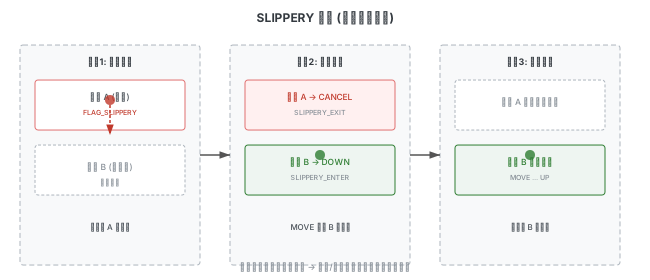
当 MOVE 事件、单指、且当前前台窗口支持 FLAG_SLIPPERY 时,检查手势是否滑出到新窗口:
if (maskedAction == AMOTION_EVENT_ACTION_MOVE && entry.getPointerCount() == 1 &&
    tempTouchState.isSlippery(entry.deviceId)) {
    const auto [x, y] = resolveTouchedPosition(entry);
    const bool isStylus = isPointerFromStylus(entry, /*pointerIndex=*/0);
    sp<WindowInfoHandle> oldTouchedWindowHandle =
            tempTouchState.getFirstForegroundWindowHandle(entry.deviceId);
    sp<WindowInfoHandle> newTouchedWindowHandle =
            findTouchedWindowAtLocked(displayId, x, y, isStylus);
    // ... 注入验证、shouldDropInput 检查、canWindowReceiveMotionLocked 检查 ...
isSlippery 的判断——有且仅有一个支持滑出的前台窗口:
bool TouchState::isSlippery(DeviceId deviceId) const {
    bool haveSlipperyForegroundWindow = false;
    for (const TouchedWindow& window : windows) {
        if (!window.hasTouchingPointers(deviceId)) {
            continue;
        }
        if (window.targetFlags.test(InputTarget::Flags::FOREGROUND)) {
            if (haveSlipperyForegroundWindow ||
                !window.windowHandle->getInfo()->inputConfig.test(
                        WindowInfo::InputConfig::SLIPPERY)) {
                return false;
            }
            haveSlipperyForegroundWindow = true;
        }
    }
    return haveSlipperyForegroundWindow;
}
如果事件落入新窗口,执行滑动转移:
if (newTouchedWindowHandle != nullptr &&
    !haveSameToken(oldTouchedWindowHandle, newTouchedWindowHandle)) {
    ALOGI("Touch is slipping out of window %s into window %s in display %" PRId32,
          oldTouchedWindowHandle->getName().c_str(),
          newTouchedWindowHandle->getName().c_str(), displayId);

    // 旧窗口 → SLIPPERY_EXIT(实际为 CANCEL)
    const TouchedWindow& touchedWindow =
            tempTouchState.getTouchedWindow(oldTouchedWindowHandle);
    addPointerWindowTargetLocked(oldTouchedWindowHandle,
                                 InputTarget::DispatchMode::SLIPPERY_EXIT,
                                 ftl::Flags<InputTarget::Flags>(), pointerIds,
                                 touchedWindow.getDownTimeInTarget(entry.deviceId), targets);

    // 新窗口 → SLIPPERY_ENTER(实际为 DOWN)
    tempTouchState.addOrUpdateWindow(newTouchedWindowHandle,
                                     InputTarget::DispatchMode::SLIPPERY_ENTER,
                                     targetFlags, entry.deviceId, {pointer}, entry.eventTime);

    // 壁纸窗口也需要进行滑动转移
    slipWallpaperTouch(targetFlags, oldTouchedWindowHandle, newTouchedWindowHandle,
                       tempTouchState, entry.deviceId, pointer, targets);
    // 从旧窗口移除指针
    tempTouchState.removeTouchingPointerFromWindow(entry.deviceId, pointer.id,
                                                   oldTouchedWindowHandle);
}
典型场景:桌面向下滑动,通知/控制中心出现后,桌面添加 SLIPPERY flag,后续手势转移到通知/控制中心继续接收。旧窗口收到 CANCEL,新窗口收到 DOWN,事件一致性得到保证。
4. 非 Split 的 POINTER_DOWN
if (!isSplit && maskedAction == AMOTION_EVENT_ACTION_POINTER_DOWN) {
    for (TouchedWindow& touchedWindow : tempTouchState.windows) {
        touchedWindow.addTouchingPointers(entry.deviceId, touchingPointers);
    }
}
不支持 Split 时,让之前所有窗口都接收新的指针。
Hover 事件处理
在情况 1 中我们清除了旧的 hover 指针并为新窗口添加了 hover 指针,在情况 2 中为 HOVER_EXIT 移除了 hover 指针。现在比较新旧 TouchState 来确定每个窗口的 hover 派发模式:
std::vector<TouchedWindow> getHoveringWindowsLocked(const TouchState* oldState,
                                                    const TouchState& newTouchState,
                                                    const MotionEntry& entry) {
    const int32_t maskedAction = MotionEvent::getActionMasked(entry.action);
    if (maskedAction == AMOTION_EVENT_ACTION_SCROLL) {
        return {}; // SCROLL 事件不影响 hover 派发
    }

    std::vector<TouchedWindow> out;
    const PointerProperties& pointer = entry.pointerProperties[0];

    std::set<sp<WindowInfoHandle>> oldWindows;
    if (oldState != nullptr) {
        oldWindows = oldState->getWindowsWithHoveringPointer(entry.deviceId, pointer.id);
    }
    std::set<sp<WindowInfoHandle>> newWindows =
            newTouchState.getWindowsWithHoveringPointer(entry.deviceId, pointer.id);

    // 旧状态有、新状态没有 → HOVER_EXIT
    for (const sp<WindowInfoHandle>& oldWindow : oldWindows) {
        if (newWindows.find(oldWindow) == newWindows.end()) {
            TouchedWindow touchedWindow;
            touchedWindow.windowHandle = oldWindow;
            touchedWindow.dispatchMode = InputTarget::DispatchMode::HOVER_EXIT;
            out.push_back(touchedWindow);
        }
    }

    for (const sp<WindowInfoHandle>& newWindow : newWindows) {
        TouchedWindow touchedWindow;
        touchedWindow.windowHandle = newWindow;
        if (oldWindows.find(newWindow) == oldWindows.end()) {
            // 新状态有、旧状态没有 → HOVER_ENTER
            touchedWindow.dispatchMode = InputTarget::DispatchMode::HOVER_ENTER;
        } else {
            // 新旧都有 → AS_IS(保持原有的 HOVER_MOVE)
            touchedWindow.dispatchMode = InputTarget::DispatchMode::AS_IS;
        }
        touchedWindow.addHoveringPointer(entry.deviceId, pointer);
        if (canReceiveForegroundTouches(*newWindow->getInfo())) {
            touchedWindow.targetFlags |= InputTarget::Flags::FOREGROUND;
        }
        out.push_back(touchedWindow);
    }
    return out;
}
为什么不存在 HOVER_MOVE 的派发模式?因为正常的 hover 事件流中:(1) 持续 HOVER_MOVE(如鼠标)会按照 HOVER_ENTER / AS_IS / HOVER_EXIT 派发;(2) 以 HOVER_ENTER 开始的流(如手写笔)同样如此。不可能出现其他 action 需要变为 HOVER_MOVE 的情况。
OUTSIDE 事件的 uid 检查
DOWN 事件时,如果前台窗口和 OUTSIDE 派发目标属于不同 uid,为 OUTSIDE 目标添加 ZERO_COORDS flag,派发时清除坐标信息以防止隐私泄漏。
TouchedWindow → InputTarget 转换
遍历 TouchState 中所有有触摸指针的窗口,通过 addPointerWindowTargetLocked 创建 InputTarget:
for (const TouchedWindow& touchedWindow : tempTouchState.windows) {
    std::vector<PointerProperties> touchingPointers =
            touchedWindow.getTouchingPointers(entry.deviceId);
    if (touchingPointers.empty()) continue;
    addPointerWindowTargetLocked(touchedWindow.windowHandle, touchedWindow.dispatchMode,
                                 touchedWindow.targetFlags, getPointerIds(touchingPointers),
                                 touchedWindow.getDownTimeInTarget(entry.deviceId), targets);
}
addPointerWindowTargetLocked 的核心逻辑:
void InputDispatcher::addPointerWindowTargetLocked(
        const sp<WindowInfoHandle>& windowHandle,
        InputTarget::DispatchMode dispatchMode, ftl::Flags<InputTarget::Flags> targetFlags,
        std::bitset<MAX_POINTER_ID + 1> pointerIds,
        std::optional<nsecs_t> firstDownTimeInTarget,
        std::vector<InputTarget>& inputTargets) const {
    // 必须有指针
    if (pointerIds.none()) {
        LOG(FATAL) << "No pointers specified for " << windowHandle->getName();
        return;
    }
    // 在已有的派发目标中查找该窗口
    auto it = std::find_if(inputTargets.begin(), inputTargets.end(),
                     [&windowHandle](const InputTarget& inputTarget) {
                         return inputTarget.connection->getToken() == windowHandle->getToken();
                     });

    // HACK:DOWN 事件会同时产生 HOVER_EXIT 和 AS_IS 两种派发模式
    // 因此需要为它们创建单独的 InputTarget
    if (it != inputTargets.end() && it->dispatchMode == InputTarget::DispatchMode::HOVER_EXIT) {
        it = inputTargets.end(); // 强制创建新目标
    }

    if (it == inputTargets.end()) {
        // 创建新的 InputTarget
        std::optional<InputTarget> target =
                createInputTargetLocked(windowHandle, dispatchMode, targetFlags,
                                        firstDownTimeInTarget);
        if (!target) return;
        inputTargets.push_back(*target);
        it = inputTargets.end() - 1;
    }

    // 添加指针及其对应的窗口 transform
    it->addPointers(pointerIds, windowHandle->getInfo()->transform);
}
createInputTargetLocked 创建 InputTarget 对象,包含 Connection、窗口信息、派发模式、flag、缩放和 Display transform 等。
std::optional<InputTarget> InputDispatcher::createInputTargetLocked(
        const sp<WindowInfoHandle>& windowHandle,
        InputTarget::DispatchMode dispatchMode, ftl::Flags<InputTarget::Flags> targetFlags,
        std::optional<nsecs_t> firstDownTimeInTarget) const {
    std::shared_ptr<Connection> connection = getConnectionLocked(windowHandle->getToken());
    if (connection == nullptr) {
        ALOGW("Not creating InputTarget for %s, no input channel",
              windowHandle->getName().c_str());
        return {};
    }
    InputTarget inputTarget{connection};
    inputTarget.windowHandle = windowHandle;
    inputTarget.dispatchMode = dispatchMode;
    inputTarget.flags = targetFlags;
    inputTarget.globalScaleFactor = windowHandle->getInfo()->globalScaleFactor;
    inputTarget.firstDownTimeInTarget = firstDownTimeInTarget;
    const auto& displayInfoIt = mDisplayInfos.find(windowHandle->getInfo()->displayId);
    if (displayInfoIt != mDisplayInfos.end()) {
        inputTarget.displayTransform = displayInfoIt->second.transform;
    }
    return inputTarget;
}
InputTarget::addPointers 将指针 ID 与对应的窗口 transform 关联:
Result<void> InputTarget::addPointers(std::bitset<MAX_POINTER_ID + 1> newPointerIds,
                              const ui::Transform& transform) {
    if (newPointerIds.none()) {
        setDefaultPointerTransform(transform);
        return {};
    }
    // 确保新旧指针不重叠
    if ((getPointerIds() & newPointerIds).any()) {
        return Error() << __func__ << " - overlap with incoming pointers";
    }
    // 相同 transform 的指针合并,不同则新建
    for (auto& [existingTransform, existingPointers] : mPointerTransforms) {
        if (transform == existingTransform) {
            existingPointers |= newPointerIds;
            return {};
        }
    }
    mPointerTransforms.emplace_back(transform, newPointerIds);
    return {};
}
最后添加 GlobalMonitor:
void InputDispatcher::addGlobalMonitoringTargetsLocked(
        std::vector<InputTarget>& inputTargets, int32_t displayId) {
    auto monitorsIt = mGlobalMonitorsByDisplay.find(displayId);
    if (monitorsIt == mGlobalMonitorsByDisplay.end()) return;

    for (const Monitor& monitor : selectResponsiveMonitorsLocked(monitorsIt->second)) {
        InputTarget target{monitor.connection};
        if (const auto& it = mDisplayInfos.find(displayId); it != mDisplayInfos.end()) {
            target.displayTransform = it->second.transform;
        }
        target.setDefaultPointerTransform(target.displayTransform);
        inputTargets.push_back(target);
    }
}
状态清理
- 重置所有 TouchedWindow 的派发模式为 AS_IS
- UP / CANCEL / POINTER_UP 时移除对应指针
- 非 SCROLL 事件时保存 TouchState,清除无指针的窗口
- TouchState 为空时删除该 Display 的状态
事件一致性保证
事件入队到 Connection 的 enqueueDispatchEntryLocked 方法中,会根据 DispatchMode 解析最终的 action,并通过 InputState 进行一致性检查。
DispatchMode → 实际 action 的映射
if (inputTarget.dispatchMode == InputTarget::DispatchMode::OUTSIDE) {
    resolvedAction = AMOTION_EVENT_ACTION_OUTSIDE;
} else if (inputTarget.dispatchMode == InputTarget::DispatchMode::HOVER_EXIT) {
    resolvedAction = AMOTION_EVENT_ACTION_HOVER_EXIT;
} else if (inputTarget.dispatchMode == InputTarget::DispatchMode::HOVER_ENTER) {
    resolvedAction = AMOTION_EVENT_ACTION_HOVER_ENTER;
} else if (inputTarget.dispatchMode == InputTarget::DispatchMode::SLIPPERY_EXIT) {
    resolvedAction = AMOTION_EVENT_ACTION_CANCEL;
} else if (inputTarget.dispatchMode == InputTarget::DispatchMode::SLIPPERY_ENTER) {
    resolvedAction = AMOTION_EVENT_ACTION_DOWN;
}

// 如果 HOVER_MOVE 但 InputState 中该设备未处于 hovering,补充 HOVER_ENTER
if (resolvedAction == AMOTION_EVENT_ACTION_HOVER_MOVE &&
    !connection->inputState.isHovering(motionEntry.deviceId, motionEntry.source,
                                       motionEntry.displayId)) {
    resolvedAction = AMOTION_EVENT_ACTION_HOVER_ENTER;
}

if (resolvedAction == AMOTION_EVENT_ACTION_CANCEL) {
    resolvedFlags |= AMOTION_EVENT_FLAG_CANCELED;
}
// 根据 targetFlags 为事件添加遮挡相关 flag
if (dispatchEntry->targetFlags.test(InputTarget::Flags::WINDOW_IS_OBSCURED)) {
    resolvedFlags |= AMOTION_EVENT_FLAG_WINDOW_IS_OBSCURED;
}
if (dispatchEntry->targetFlags.test(InputTarget::Flags::WINDOW_IS_PARTIALLY_OBSCURED)) {
    resolvedFlags |= AMOTION_EVENT_FLAG_WINDOW_IS_PARTIALLY_OBSCURED;
}
if (dispatchEntry->targetFlags.test(InputTarget::Flags::NO_FOCUS_CHANGE)) {
    resolvedFlags |= AMOTION_EVENT_FLAG_NO_FOCUS_CHANGE;
}
如果 resolvedAction 与原始 action 不同,会生成一个新的 MotionEntry。对于 HOVER_EXIT 或 CANCEL,会从 InputState 查询上次事件的坐标(因为合成事件的坐标可能不正确)。
多设备冲突处理
同一窗口不支持多设备同时输入。cancelConflictingInputStream 检查是否需要 cancel 之前的手势:
std::unique_ptr<EventEntry> InputState::cancelConflictingInputStream(
        const MotionEntry& motionEntry) {
    if (!shouldCancelPreviousStream(motionEntry)) {
        return {};
    }
    const MotionMemento& memento = mMotionMementos.back();
    std::unique_ptr<MotionEntry> cancelEntry =
            createCancelEntryForMemento(memento, motionEntry.eventTime);
    if (!trackMotion(*cancelEntry, cancelEntry->flags)) {
        LOG(FATAL) << "Generated inconsistent cancel event!";
    }
    return cancelEntry;
}
shouldCancelPreviousStream 的完整判断逻辑:
bool InputState::shouldCancelPreviousStream(const MotionEntry& motionEntry) const {
    if (!isFromSource(motionEntry.source, AINPUT_SOURCE_CLASS_POINTER)) {
        return false; // 非指针事件不影响之前的流
    }
    if (mMotionMementos.empty()) {
        return false; // 没有正在进行的手势
    }

    const MotionMemento& lastMemento = mMotionMementos.back();
    const int32_t actionMasked = MotionEvent::getActionMasked(motionEntry.action);

    // 同设备的情况
    if (lastMemento.deviceId == motionEntry.deviceId) {
        // 之前是 hover,新 DOWN 来了 → cancel hover(兼容性行为)
        if (actionMasked == AMOTION_EVENT_ACTION_DOWN && lastMemento.hovering) {
            return true;
        }
        // source 改变 → cancel(应用可能无法处理)
        if (motionEntry.source != lastMemento.source) {
            return true;
        }
        // displayId 改变 → cancel(投屏场景下两个流可能不一致)
        if (motionEntry.displayId != lastMemento.displayId) {
            return true;
        }
        return false;
    }

    // 不同设备的情况(受 feature flag 控制)
    if (!input_flags::enable_multi_device_same_window_stream()) {
        if (isStylusEvent(lastMemento.source, lastMemento.pointerProperties)) {
            // 之前是手写笔
            if (isStylusEvent(motionEntry.source, motionEntry.pointerProperties) &&
                actionMasked == AMOTION_EVENT_ACTION_DOWN) {
                return true; // 新笔 DOWN → cancel 旧笔,新笔接管
            }
            return false; // 非笔设备 → 保持手写笔优先
        }
        // 新设备 DOWN 或 HOVER_ENTER → cancel 旧手势
        if (actionMasked == AMOTION_EVENT_ACTION_DOWN ||
            actionMasked == AMOTION_EVENT_ACTION_HOVER_ENTER) {
            return true;
        }
    }
    return false;
}
注意:当前源码中手写笔优先逻辑被
enable_multi_device_same_window_streamfeature flag 包裹。如果该 flag 为 true,则不再执行设备间的 cancel 逻辑。
手写笔优先保证:在 trackMotion 中,如果已有手写笔事件流,非手写笔的新事件会被直接 drop(同样受 feature flag 控制):
bool InputState::trackMotion(const MotionEntry& entry, int32_t flags) {
    if (!isFromSource(entry.source, AINPUT_SOURCE_CLASS_POINTER)) {
        return true; // 非指针事件不跟踪
    }
    if (!input_flags::enable_multi_device_same_window_stream()) {
        if (!mMotionMementos.empty()) {
            const MotionMemento& lastMemento = mMotionMementos.back();
            if (isStylusEvent(lastMemento.source, lastMemento.pointerProperties) &&
                !isStylusEvent(entry.source, entry.pointerProperties)) {
                return false; // 已有手写笔流,非手写笔事件被 drop
            }
        }
    }
    // ...
}
事件分割 (Split)
当事件需要 Split 时(InputTarget::Flags::SPLIT 被设置),只在派发目标拥有的指针数量与原始事件指针数量不一致时才进行分割:
void InputDispatcher::prepareDispatchCycleLocked(/* ... */) {
    // ...
    if (inputTarget.flags.test(InputTarget::Flags::SPLIT)) {
        const MotionEntry& originalMotionEntry =
                static_cast<const MotionEntry&>(*eventEntry);
        if (inputTarget.getPointerIds().count() != originalMotionEntry.getPointerCount()) {
            std::unique_ptr<MotionEntry> splitMotionEntry =
                    splitMotionEvent(originalMotionEntry, inputTarget.getPointerIds(),
                                     inputTarget.firstDownTimeInTarget.value());
            if (!splitMotionEntry) {
                return; // split 失败,事件被丢弃
            }
            enqueueDispatchEntryAndStartDispatchCycleLocked(currentTime, connection,
                                                            std::move(splitMotionEntry),
                                                            inputTarget);
            return;
        }
    }
    // 不需要 split,原样派发
    enqueueDispatchEntryAndStartDispatchCycleLocked(currentTime, connection, eventEntry,
                                                    inputTarget);
}
splitMotionEvent 的实现——当前源码使用 MotionEvent::split() 工具方法来完成指针拆分和 action 重新生成:
std::unique_ptr<MotionEntry> InputDispatcher::splitMotionEvent(
        const MotionEntry& originalMotionEntry, std::bitset<MAX_POINTER_ID + 1> pointerIds,
        nsecs_t splitDownTime) {
    // 使用 MotionEvent::split() 完成指针拆分和 action 生成
    const auto& [action, pointerProperties, pointerCoords] =
            MotionEvent::split(originalMotionEntry.action, originalMotionEntry.flags,
                               /*historySize=*/0, originalMotionEntry.pointerProperties,
                               originalMotionEntry.pointerCoords, pointerIds);

    if (pointerIds.count() != pointerCoords.size()) {
        ALOGW("Dropping split motion event because the pointer count is %zu but "
              "we expected there to be %zu pointers.",
              pointerCoords.size(), pointerIds.count());
        return nullptr;
    }

    if (action == AMOTION_EVENT_ACTION_DOWN &&
        splitDownTime != originalMotionEntry.eventTime) {
        // DOWN 事件的 splitDownTime 必须和 eventTime 一致
        return nullptr;
    }

    // 用拆分后的指针数据和新 action 创建新的 MotionEntry
    int32_t newId = mIdGenerator.nextId();
    return std::make_unique<MotionEntry>(newId, originalMotionEntry.injectionState,
                                          originalMotionEntry.eventTime,
                                          originalMotionEntry.deviceId, originalMotionEntry.source,
                                          originalMotionEntry.displayId,
                                          originalMotionEntry.policyFlags, action,
                                          originalMotionEntry.actionButton,
                                          originalMotionEntry.flags, /* ... */
                                          splitDownTime, pointerProperties, pointerCoords);
}
MotionEvent::split() 内部的 action 重新生成逻辑:
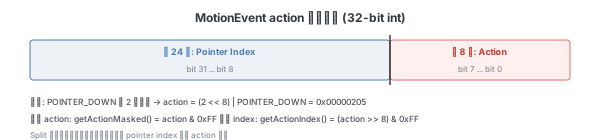
- 如果是 POINTER_DOWN/POINTER_UP,检查对应的指针 ID 是否属于当前窗口
- 属于且只有一个指针:POINTER_DOWN → DOWN,POINTER_UP → UP(或 CANCEL)
- 属于且有多个指针:重新计算 pointer index
- 不属于:不相关的指针变化 → 转为 MOVE
疑点与验证
在分析完上述流程后,有几个值得思考的问题:
DOWN 之后再来一个 DOWN:在当前实现中,应用会收到两个 DOWN。这通过
InputState的一致性检查(cancelConflictingInputStream)来处理——如果来自不同设备,旧手势会被 cancel。设备上报 DOWN 后不再上报事件:该设备的激活状态会一直卡在 TouchedWindow 中。其他设备的新事件通过
cancelConflictingInputStream会将旧设备的手势 cancel 掉。但如果没有新设备来,旧状态会持续存在直到手势结束。hover 事件目前没有遮挡 flag:这是一个待改进的点。
TouchState 中的壁纸窗口查找没有关联 deviceId:当前
getWallpaperWindow(DeviceId)已经增加了 deviceId 参数。
事件接收
应用进程通过 ViewRootImpl 的 setView 创建 InputChannel,然后创建 InputEventReceiver 监听事件:
mInputEventReceiver = new WindowInputEventReceiver(inputChannel, Looper.myLooper());Native 层创建 InputConsumer,监听客户端 fd:
void NativeInputEventReceiver::setFdEvents(int events) {
    if (mFdEvents != events) {
        mFdEvents = events;
        int fd = mInputConsumer.getChannel()->getFd();
        if (events) {
            mMessageQueue->getLooper()->addFd(fd, 0, events, this, nullptr);
        } else {
            mMessageQueue->getLooper()->removeFd(fd);
        }
    }
}收到事件后,handleEvent 调用 consumeEvents 读取并通过 JNI 回调到 Java 层:
int NativeInputEventReceiver::handleEvent(int receiveFd, int events, void* data) {
    // ...
    if (events & ALOOPER_EVENT_INPUT) {
        JNIEnv* env = AndroidRuntime::getJNIEnv();
        status_t status = consumeEvents(env, /*consumeBatches=*/false, -1, nullptr);
        // ...
    }
}

status_t NativeInputEventReceiver::consumeEvents(JNIEnv* env,
        bool consumeBatches, nsecs_t frameTime, bool* outConsumedBatch) {
    for (;;) {
        uint32_t seq;
        InputEvent* inputEvent;
        status_t status = mInputConsumer.consume(&mInputEventFactory,
                consumeBatches, frameTime, &seq, &inputEvent);
        // ...
        env->CallVoidMethod(receiverObj.get(), dispatchInputEvent, seq, inputEventObj);
    }
}
事件在 Java 层的 dispatchInputEvent 中作为 KeyEvent 或 MotionEvent,通过 View Tree 层层派发。处理完成后调用 finishInputEvent,将 finish 事件推入 mOutboundQueue,然后由 processOutboundEvents() 通过 InputChannel 发送 finish 信号给 InputDispatcher,从 WaitQueue 中移除事件。
status_t NativeInputEventReceiver::finishInputEvent(uint32_t seq, bool handled) {
    Finish finish{
            .seq = seq,
            .handled = handled,
    };
    mOutboundQueue.push_back(finish);
    return processOutboundEvents();
}

status_t NativeInputEventReceiver::processOutboundEvents() {
    while (!mOutboundQueue.empty()) {
        OutboundEvent& outbound = *mOutboundQueue.begin();
        if (std::holds_alternative<Finish>(outbound)) {
            const Finish& finish = std::get<Finish>(outbound);
            status = mInputConsumer.sendFinishedSignal(finish.seq, finish.handled);
        }
        // ...
    }
}
调试工具
显示点按操作反馈(小白点)
adb shell settings put system show_touches 1实现位于事件上报与读取流程内,反映底层上报的原始事件。没有小白点 → 一般是底层报点问题。
指针位置(十字线)
adb shell settings put system pointer_location 1实现位于事件派发流程内,反映 Input 模块的事件派发状态。有小白点但没有十字线 → 一般是派发流程问题。
Input 日志级别
adb shell dumpsys input debuglog N各级别可组合使用(例如 24 = 8+16 同时打开 Dispatcher 和 Reader 全部日志):
| 级别值 | 含义 |
|---|---|
| 1 | 标准等级 (MAJOR) |
| 2 | 详细 (DETAIL) |
| 8 | InputDispatcher 全部日志 |
| 16 | InputReader 全部日志 |
| 32 | InputTransport 全部日志 |
打开"小白点"或"十字线"后会自动打开 MAJOR 等级日志。复现点击无响应问题时,建议同时打开小白点和十字线。
常见异常排查
事件上报与读取阶段
底层不上报事件
现象:没有小白点、没有十字线、任何地方点击都无响应。通常是设备驱动适配问题。
卡点
底层上报异常,存在一个异常触点一直卡在屏幕某个位置。用户的点击无法到达期望位置。打开小白点可看到角落里卡着一个白点。
事件派发阶段
窗口遮挡
部分遮挡:透明窗口覆盖了用户操作区域的一部分。例如游戏上方暂停键无法点击,但攻击键正常。日志中交互窗口为上方的透明窗口。
全屏遮挡:透明窗口覆盖整个屏幕。例如桌面点击无响应但状态栏可下拉。日志中当前交互窗口是一个其他窗口而非桌面。
以上两种情况通常是窗口控制方出现异常,未及时移除窗口。
不受信窗口:安全机制——如果派发目标上方存在达到一定透明度的不受信窗口,事件被丢弃以防止恶意程序欺骗用户。日志中不显示交互窗口,InputDispatcher 日志会显示因某个应用导致事件被 drop。
ActivityRecordInputSink:防止 Activity 缩小自身让事件透传到后方。在 Activity 窗口后附加一个全屏窗口。Activity 异常时可能导致此窗口异常遮挡。日志类似无交互窗口情况。
窗口触摸区域错误
TouchableRegion 和可见区域不一致导致的问题。通过 adb shell dumpsys input 查看窗口的 touchableRegion 信息。注意 touchableRegion 在物理屏坐标系内。
事件异常
来源信息错误:注入事件未指定来源时,Motion 事件可能被错误地按焦点窗口方式派发。
目标 uid 限制:通过 Instrumentation.sendPointerSync 注入的事件只能派发到自身窗口,派发到其他窗口时事件被丢弃。
其他异常
- InputDispatcher 线程等锁:线程卡住导致无法派发,检查 dvm_lock 相关日志
- 物理屏与逻辑屏不一致:设备支持切换分辨率时,如果 SurfaceFlinger 的 display 信息未正确告知尺寸差异,坐标映射丢失导致点击偏移
- enabled / frozen 状态:InputDispatcher 的启用/冻结状态会暂停事件处理,通过
adb shell dumpsys input查看
事件接收阶段
应用不处理事件
应用收到事件但不执行响应逻辑。日志中 notifyMotion(入队)和 publisher(派发)正常,ViewRootImpl(接收)也正常,但应用无响应——需要应用开发者排查。
应用主线程卡死
事件接收发生在创建 View 的线程(通常是主线程)。主线程耗时会导致事件接收延迟。日志中有 notifyMotion 和 publisher 但没有 ViewRootImpl 的日志,可能是应用未及时读取事件。