WMS - 窗口添加和移除
背景
Android 的窗口系统由 WindowManagerService(WMS)管理,主要负责调度和控制 Window 对象,Window 同时也包含多个 View 对象。WMS 的职责还包含窗口生命周期(创建添加、移除窗口),确定窗口位置和大小,以及窗口切换和动画功能。
本文档的主要内容围绕 WMS 对窗口添加和移除的窗口生命周期流程的介绍。
WindowManager 体系
WindowManager 体系里可大致先分为三个部分:
- Window:一个抽象类,管理 View 的容器,实现它的子类:
PhoneWindow。 - WindowManager:接口类,继承
ViewManager,用于管理 Window,也可以具备管理 View 的能力。还承担应用端和 WMS 系统服务端沟通的一部分职责。作为接口类,它的实现类是WindowManagerImpl。 - WindowManagerService(WMS):系统服务中其中一个模块,WindowManager(APP 进程)和 WMS(系统进程)通过 Binder 通讯。最终实现窗口添加、移除、更新操作都将由 WMS 完成。
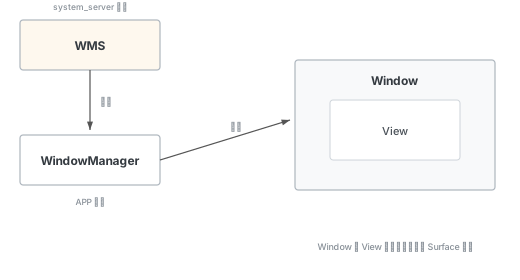
APP 进程和 WMS 系统进程的关系
每个应用进程无论添加、更新还是移除窗口,首先都需要通过 WindowManagerImpl 交给 WindowManagerGlobal。WindowManagerGlobal 是一个窗口的全局内部单例类,一个应用进程只存在唯一一个,且每一个 WindowManagerImpl 都包含一个 mGlobal 的引用。
最终 mGlobal 通过调用对应的实现方法,并完成与 WMS 的跨进程通信。
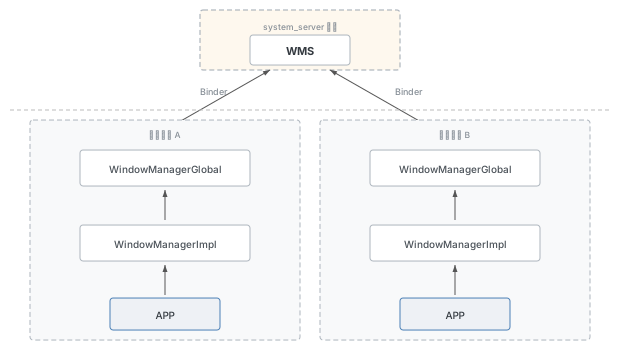
WindowManager 如何进行对 Window 管理
相关类
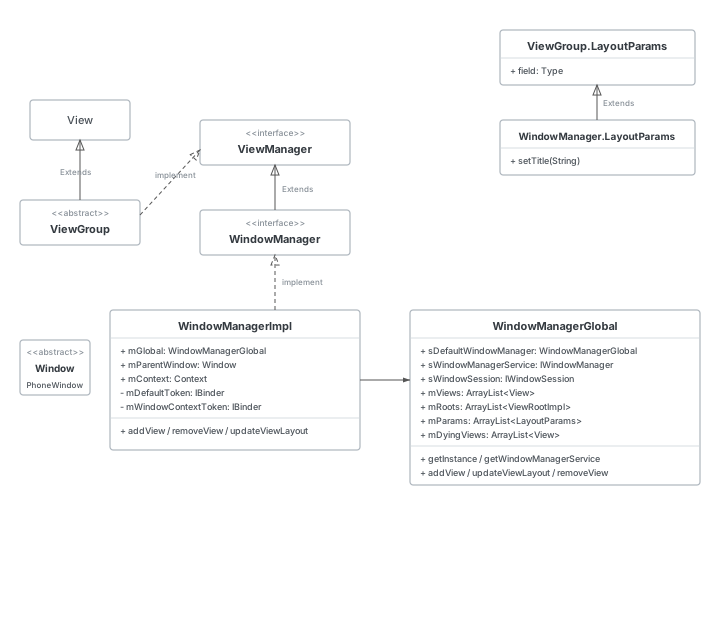
ViewManager
传入参数为 View 和 ViewGroup.LayoutParams,用于在 Window 中添加 View,将传递的 LayoutParams 传给指定的 View。
源码位置:
frameworks/base/core/java/android/view/ViewManager.java
package android.view;

/**
 * Interface to let you add and remove child views to an Activity.
 * To get an instance of this class, call Context.getSystemService().
 */
public interface ViewManager {
    public void addView(View view, ViewGroup.LayoutParams params);
    public void updateViewLayout(View view, ViewGroup.LayoutParams params);
    public void removeView(View view);
}
WindowManager
接口用于 APP 和 WMS 之间窗口管理的沟通。每个窗口管理实例和一个 Display 绑定。APP 获取实例方式通过 Context#getSystemService(Context.WINDOW_SERVICE) 方法去获取。
源码位置:
frameworks/base/core/java/android/view/WindowManager.java
- BadTokenException:在尝试添加 View 且 LayoutParam 和它的 token 无效的话,会被抛出该异常
- InvalidDisplayException:添加 View 在扩展屏,如果 Display 找不到,则抛出该异常
- getDefaultDisplay:获取窗口相对应的主屏幕
- removeViewImmediate:表示从窗口上移除 View,一般是当 View 调用了
onDetachedFromWindow也就是从 Window 上分开后,把它移除 - LayoutParams:静态内部类,是 Window 的布局参数,里面定义了一系列的窗口属性
@SystemService(Context.WINDOW_SERVICE)
public interface WindowManager extends ViewManager {

    public static class BadTokenException extends RuntimeException {
        public BadTokenException() {}
        public BadTokenException(String name) { super(name); }
    }

    public static class InvalidDisplayException extends RuntimeException {
        public InvalidDisplayException() {}
        public InvalidDisplayException(String name) { super(name); }
    }

    // ...

    public static class LayoutParams extends ViewGroup.LayoutParams implements Parcelable {
    }
}
WindowManagerImpl
源码位置:
frameworks/base/core/java/android/view/WindowManagerImpl.java
WindowManager 的实现类。WindowManagerImpl 类包含 WindowManagerGlobal 的成员变量。APP 进程使用的 WindowManager 添加和移除 View 的方式主要通过 WindowManagerImpl 去实现,最终在通过 WindowManagerGlobal 全局单例去完成和 WMS 的沟通,通知系统服务端执行相关操作。
WindowManagerImpl 具体实现了 addView、updateViewLayout、removeView 三个方法。
思考:
mWindowContextToken和LayoutParams.token都是 IBinder 类型,分别的作用是什么?mDefaultToken、mWindowContextToken、LayoutParams.token三者里的值是什么?谁给它赋的值?
// WindowManagerImpl.java 关键字段和方法
public final class WindowManagerImpl implements WindowManager {
    @UnsupportedAppUsage
    private final WindowManagerGlobal mGlobal = WindowManagerGlobal.getInstance();
    @UiContext
    @VisibleForTesting
    public final Context mContext;
    private final Window mParentWindow;

    /**
     * If LayoutParams#token is null and no parent window is specified, the value
     * of LayoutParams#token will be overridden to mDefaultToken.
     */
    private IBinder mDefaultToken;

    /**
     * This token will be set to LayoutParams#mWindowContextToken and used to receive
     * configuration changes from the server side.
     */
    @Nullable
    private final IBinder mWindowContextToken;

    // ...

    @Override
    public void addView(@NonNull View view, @NonNull ViewGroup.LayoutParams params) {
        // android.util.SeempLog.record_vg_layout(383, params);
        applyTokens(params);
        mGlobal.addView(view, params, mContext.getDisplayNoVerify(), mParentWindow,
                mContext.getUserId());
    }

    @Override
    public void removeView(View view) {
        mGlobal.removeView(view, false);
    }

    @Override
    public void updateViewLayout(@NonNull View view,
            @NonNull ViewGroup.LayoutParams params) {
        applyTokens(params);
        mGlobal.updateViewLayout(view, params);
    }

    private void applyTokens(@NonNull ViewGroup.LayoutParams params) {
        if (!(params instanceof WindowManager.LayoutParams)) {
            throw new IllegalArgumentException("Params must be WindowManager.LayoutParams");
        }
        final WindowManager.LayoutParams wparams = (WindowManager.LayoutParams) params;
        assertWindowContextTypeMatches(wparams.type);
        // Only use the default token if we don't have a parent window and a token.
        if (mDefaultToken != null && mParentWindow == null && wparams.token == null) {
            wparams.token = mDefaultToken;
        }
        wparams.mWindowContextToken = mWindowContextToken;
    }
}
WindowManagerGlobal
源码位置:
frameworks/base/core/java/android/view/WindowManagerGlobal.java
窗口的内部全局类,仅内部使用。是一个单例类,一个应用仅有一个 WindowManagerGlobal,和 WindowManagerImpl 共同负责 APP 进程与 WMS 系统服务的跨进程通信。
// WindowManagerGlobal.java 三个核心方法签名
public void addView(View view, ViewGroup.LayoutParams params,
        Display display, Window parentWindow, int userId) {
    // ... 见下方详细分析
}

public void updateViewLayout(View view, ViewGroup.LayoutParams params) {
    if (view == null) {
        throw new IllegalArgumentException("view must not be null");
    }
    if (!(params instanceof WindowManager.LayoutParams)) {
        throw new IllegalArgumentException("Params must be WindowManager.LayoutParams");
    }

    final WindowManager.LayoutParams wparams = (WindowManager.LayoutParams) params;
    view.setLayoutParams(wparams);

    synchronized (mLock) {
        int index = findViewLocked(view, true);
        ViewRootImpl root = mRoots.get(index);
        mParams.remove(index);
        mParams.add(index, wparams);
        root.setLayoutParams(wparams, false);
    }
}

public void removeView(View view, boolean immediate) {
    if (view == null) {
        throw new IllegalArgumentException("view must not be null");
    }

    synchronized (mLock) {
        int index = findViewLocked(view, true);
        View curView = mRoots.get(index).getView();
        removeViewLocked(index, immediate);
        if (curView == view) {
            return;
        }

        throw new IllegalStateException("Calling with view " + view
                + " but the ViewAncestor is attached to " + curView);
    }
}
WindowManager.addView 流程分析
无论是 Activity 启动还是没有 Activity 的应用,创建窗口的流程本质是对 View 的管理:一方面需要获取 WindowManager 的实例,另一方面需要通过 addView 将 View 添加到 WMS,并在系统服务当中完成显示工作。
1. 应用内创建窗口
获取 WindowManager 的对象实例,实际上通过 getSystemService 直接创建 WindowManagerImpl 的对象,后续调用 addView 或者 removeView 都是通过 WindowManagerImpl 去开始调用。
WindowManager mWindowManager = (WindowManager)
        mContext.getSystemService(Context.WINDOW_SERVICE);

WindowManager.LayoutParams wmParams = new WindowManager.LayoutParams();
// 适配挖孔全屏
wmParams.layoutInDisplayCutoutMode =
        LayoutParams.LAYOUT_IN_DISPLAY_CUTOUT_MODE_SHORT_EDGES;
wmParams.type = LayoutParams.TYPE_APPLICATION_OVERLAY;
wmParams.format = PixelFormat.TRANSLUCENT;
wmParams.flags = LayoutParams.FLAG_NOT_FOCUSABLE
        | LayoutParams.FLAG_WATCH_OUTSIDE_TOUCH
        | LayoutParams.FLAG_LAYOUT_IN_SCREEN;
wmParams.gravity = Gravity.CENTER | Gravity.TOP;
wmParams.alpha = 0.8f;
wmParams.width = WindowManager.LayoutParams.WRAP_CONTENT;
Context.getSystemService 如何获取 WindowManager 实例
mContext 是 ContextImpl 的对象。
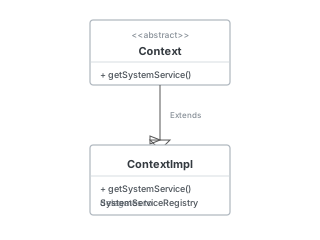
WINDOW_SERVICE 可以通过 ContextImpl 中 getSystemService 拿到 WindowManager 的服务实例。SYSTEM_SERVICE_FETCHERS 实际上是一个 HashMap 集合,最终初始化的位置在 SystemServiceRegistry 的静态方法中,该方法注册很多的服务,其中会包括 WINDOW_SERVICE。
源码位置:
frameworks/base/core/java/android/app/SystemServiceRegistry.java
wm = (WindowManager) mContext.getSystemService(Context.WINDOW_SERVICE);

// ContextImpl
@Override
public Object getSystemService(String name) {
    // ...
    return SystemServiceRegistry.getSystemService(this, name);
}

// SystemServiceRegistry
private static ServiceFetcher<?> getSystemServiceFetcher(String name) {
    if (name == null) {
        return null;
    }
    final ServiceFetcher<?> fetcher = SYSTEM_SERVICE_FETCHERS.get(name);
    if (fetcher == null) {
        if (sEnableServiceNotFoundWtf) {
            Slog.wtf(TAG, "Unknown manager requested: " + name);
        }
        return null;
    }
    return fetcher;
}

public static Object getSystemService(@NonNull ContextImpl ctx, String name) {
    final ServiceFetcher<?> fetcher = getSystemServiceFetcher(name);
    if (fetcher == null) {
        return null;
    }
    final Object ret = fetcher.getService(ctx);
    // ...
    return ret;
}
static 方法会在类加载时初始化,且整个类使用期间执行一次。所以最终 getSystemService 会获得一个最初的 WM 的实现类对象(无 parent window):
// SystemServiceRegistry.java 静态块
static {
    registerService(Context.WINDOW_SERVICE, WindowManager.class,
            new CachedServiceFetcher<WindowManager>() {
        @Override
        public WindowManager createService(ContextImpl ctx) {
            return new WindowManagerImpl(ctx);
        }
    });
}
后面 addView 之前还需要创建 WindowManager.LayoutParams 设置窗口的参数和属性。
窗口类型(Type)
Window 窗口类型有很多种:比如应用程序窗口、PopupWindow、Toast、Dialog、输入法窗口、系统错误窗口等。总体来说主要分为以下三大类:
| 应用程序窗口(Application Window) | 子窗口(Sub Window) | 系统窗口(System Window) | |
|---|---|---|---|
| 类型值 | 1-99 | 1000-1999 | 2000-2999 |
| 特点 | 非 Dialog 的应用窗口 | 不能独立存在,需要依附于父窗口存在 | Toast、System_alert、输入法窗口等 |
WindowManager.LayoutParams.type = LayoutParams.TYPE_APPLICATION_OVERLAY;三类型窗口的层级顺序:系统窗口 > 子窗口 > 应用程序窗口
窗口的层级是根据 Z-order 排序,Z-order 又最终和窗口的类型值相关,类型值越大层级越高。
窗口标志(FLAG)
Window Flag 用于控制窗口的一些事件,例如:是否接收触摸事件、窗口显示时是否允许锁屏、窗口可见时屏幕常亮、隐藏窗口等。
常用的标志:
| Flag | 说明 |
|---|---|
FLAG_ALLOW_LOCK_WHILE_SCREEN_ON | 窗口可见时,允许在此窗口锁屏,一般需要结合 FLAG_KEEP_SCREEN_ON 和 FLAG_SHOW_WHEN_LOCKED 使用 |
FLAG_DIM_BEHIND | 该窗口后面的画面会变模糊,一般会有一个模糊值 dimAmount |
FLAG_NOT_FOCUSABLE | 窗口不能获取焦点,设置这个 Flag 的同时 FLAG_NOT_TOUCH_MODAL 也会被设置 |
FLAG_NOT_TOUCHABLE | 该窗口获取不到输入事件,不可点击状态 |
FLAG_NOT_TOUCH_MODAL | 在该窗口区域外的触摸事件传递给其他的 Window,而自己只会处理窗口区域内的触摸事件 |
FLAG_KEEP_SCREEN_ON | 只要窗口可见,屏幕就会一直亮着 |
FLAG_LAYOUT_NO_LIMITS | 允许窗口超过屏幕之外 |
FLAG_FULLSCREEN | 隐藏所有的屏幕装饰窗口,比如在游戏、播放器中的全屏显示 |
FLAG_SHOW_WHEN_LOCKED | 窗口可以在锁屏的窗口之上显示 |
FLAG_IGNORE_CHEEK_PRESSES | 当用户的脸贴近屏幕时(比如打电话),不会去响应此事件 |
FLAG_TURN_SCREEN_ON | 窗口显示时将屏幕点亮 |
FLAG_DISMISS_KEYGUARD | 窗口显示时,键盘会关闭 |
窗口软键盘模式(softInput)
WindowManager 提供了关于软键盘模式的 Window 窗口处理方式:
| 模式 | 说明 |
|---|---|
SOFT_INPUT_STATE_UNSPECIFIED | 没有指定状态,系统会选择一个合适的状态或依赖于主题的设置 |
SOFT_INPUT_STATE_UNCHANGED | 不会改变软键盘状态 |
SOFT_INPUT_STATE_HIDDEN | 当用户进入该窗口时,软键盘默认隐藏 |
SOFT_INPUT_STATE_ALWAYS_HIDDEN | 当窗口获取焦点时,软键盘总是被隐藏 |
SOFT_INPUT_ADJUST_RESIZE | 当软键盘弹出时,窗口会调整大小 |
SOFT_INPUT_ADJUST_PAN | 当软键盘弹出时,窗口不需要调整大小,要确保输入焦点是可见的 |
软键盘模式设置方式:getWindow().setSoftInputMode
2. 窗口添加内部机制
整体 addView 流程
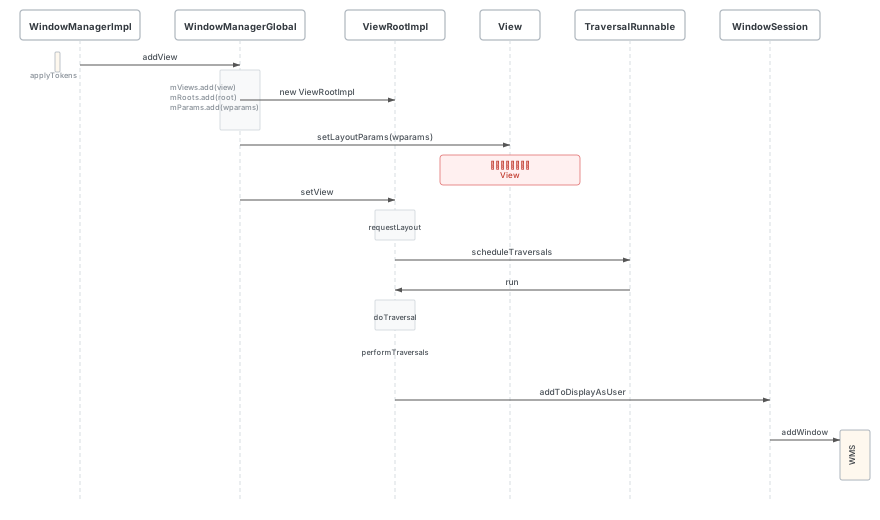
WindowManagerImpl.addView
applyTokens 之后交给 WindowManagerGlobal:
源码位置:
WindowManagerImpl.java行 175
@Override
public void addView(@NonNull View view, @NonNull ViewGroup.LayoutParams params) {
    // android.util.SeempLog.record_vg_layout(383, params);
    applyTokens(params);
    mGlobal.addView(view, params, mContext.getDisplayNoVerify(), mParentWindow,
            mContext.getUserId());
}

private void applyTokens(@NonNull ViewGroup.LayoutParams params) {
    if (!(params instanceof WindowManager.LayoutParams)) {
        throw new IllegalArgumentException("Params must be WindowManager.LayoutParams");
    }
    final WindowManager.LayoutParams wparams = (WindowManager.LayoutParams) params;
    assertWindowContextTypeMatches(wparams.type);
    // Only use the default token if we don't have a parent window and a token.
    if (mDefaultToken != null && mParentWindow == null && wparams.token == null) {
        wparams.token = mDefaultToken;
    }
    wparams.mWindowContextToken = mWindowContextToken;
}
WindowManagerGlobal.addView
主要做三件事:
- 检查数据合法性
- 更新 LayoutParams(处理子窗口/硬件加速等)
- 创建
ViewRootImpl并通过setView发起窗口添加
源码位置:
WindowManagerGlobal.java行 447
public void addView(View view, ViewGroup.LayoutParams params,
        Display display, Window parentWindow, int userId) {
    if (view == null) {
        throw new IllegalArgumentException("view must not be null");
    }
    if (display == null) {
        throw new IllegalArgumentException("display must not be null");
    }
    if (!(params instanceof WindowManager.LayoutParams)) {
        throw new IllegalArgumentException("Params must be WindowManager.LayoutParams");
    }

    final WindowManager.LayoutParams wparams = (WindowManager.LayoutParams) params;
    // ...
    if (parentWindow != null) {
        parentWindow.adjustLayoutParamsForSubWindow(wparams);
    } else {
        // If there's no parent, then hardware acceleration for this view is
        // set from the application's hardware acceleration setting.
        final Context context = view.getContext();
        if (context != null
                && (context.getApplicationInfo().flags
                        & ApplicationInfo.FLAG_HARDWARE_ACCELERATED) != 0) {
            wparams.flags |= WindowManager.LayoutParams.FLAG_HARDWARE_ACCELERATED;
        }
    }

    ViewRootImpl root;
    View panelParentView = null;

    synchronized (mLock) {
        // ... 检查是否重复添加、查找子窗口的父窗口等

        // 一个 Window 对应一个 ViewRootImpl
        if (windowlessSession == null) {
            root = new ViewRootImpl(view.getContext(), display);
        } else {
            root = new ViewRootImpl(view.getContext(), display,
                    windowlessSession, new WindowlessWindowLayout());
        }

        // 更新布局参数并保存到三个列表中
        view.setLayoutParams(wparams);
        mViews.add(view);
        mRoots.add(root);
        mParams.add(wparams);

        // do this last because it fires off messages to start doing things
        try {
            root.setView(view, wparams, panelParentView, userId);
        } catch (RuntimeException e) {
            final int viewIndex = (index >= 0) ? index : (mViews.size() - 1);
            // BadTokenException or InvalidDisplayException, clean up.
            if (viewIndex >= 0) {
                removeViewLocked(viewIndex, true);
            }
            throw e;
        }
    }
}
ViewRootImpl.setView
- 异步请求布局刷新 View —— 执行 View 的绘制流程
- 这部分的绘制流程大致如下:
ViewRootImpl.requestLayout
    -> ViewRootImpl.scheduleTraversals
    -> Choreographer.postCallback(同时异步刷新 View)

ViewRootImpl.scheduleTraversals
    -> TraversalRunnable.run
    -> ViewRootImpl.doTraversal
    -> ViewRootImpl.performTraversals
通过 mWindowSession 跨进程调用到 WMS 的 addWindow
mWindowSession 类型是 IWindowSession,是 Binder 对象。mWindowSession 是在 ViewRootImpl 创建时获取(new ViewRootImpl),由 WindowManagerGlobal 通过获取 WindowManagerService 来为每个应用创建一个单独的 Session。
源码位置:
ViewRootImpl.java行 2026
// ViewRootImpl.setView 中发起跨进程调用
res = mWindowSession.addToDisplayAsUser(mWindow, mWindowAttributes,
        getHostVisibility(), mDisplay.getDisplayId(), userId,
        mInsetsController.getRequestedVisibleTypes(), inputChannel,
        mTempInsets, mTempControls, attachedFrame, compatScale);
WMS.addWindow 方法
源码位置:
WindowManagerService.java行 1818 此方法主要做四件事:
- 调用
checkAddPermission进行基本的安全检查,比如检查当前添加窗口的 Type 是否合法,添加系统级别类型的窗口时检查 APP 是否有权限等 - 根据添加窗口的 Type,进行参数检测,比如是否重复添加窗口,添加子窗口时其父窗口是否合法,这里的检查基本靠的就是 Token
- 成功进行 1、2 之后,创建一个
WindowState,创建InputChannel,通知 Session 添加窗口,将新建的 WS 保存到 WMS 的mWindowMap中,调用WindowToken的addWindow方法绑定父子关系 - 做输入法显示相关的调整,设置 addWindow 中 Rect 相关的参数(比如 outFrame、outContentInsets),更新 Input 信息,根据必要更新焦点窗口,结束
// WMS.addWindow 方法签名(注意:当前版本与旧 API 有差异,详见文末说明)
public int addWindow(Session session, IWindow client, LayoutParams attrs,
        int viewVisibility, int displayId, int requestUserId,
        @InsetsType int requestedVisibleTypes,
        InputChannel outInputChannel, InsetsState outInsetsState,
        InsetsSourceControl.Array outActiveControls,
        Rect outAttachedFrame, float[] outSizeCompatScale) {

    outActiveControls.set(null, false /* copyControls */);
    int[] appOp = new int[1];
    final boolean isRoundedCornerOverlay = (attrs.privateFlags
            & PRIVATE_FLAG_IS_ROUNDED_CORNERS_OVERLAY) != 0;
    int res = mPolicy.checkAddPermission(attrs.type, isRoundedCornerOverlay,
            attrs.packageName, appOp);
    if (res != ADD_OKAY) {
        return res;
    }

    WindowState parentWindow = null;
    final int callingUid = Binder.getCallingUid();
    final int callingPid = Binder.getCallingPid();
    final long origId = Binder.clearCallingIdentity();
    final int type = attrs.type;

    synchronized (mGlobalLock) {
        if (!mDisplayReady) {
            throw new IllegalStateException("Display has not been initialialized");
        }
        if (session.isClientDead()) {
            return WindowManagerGlobal.ADD_APP_EXITING;
        }

        final DisplayContent displayContent =
                getDisplayContentOrCreate(displayId, attrs.token);

        // ---- 检查 Display 有效性 ----
        if (displayContent == null) {
            return WindowManagerGlobal.ADD_INVALID_DISPLAY;
        }
        if (!displayContent.hasAccess(session.mUid)) {
            return WindowManagerGlobal.ADD_INVALID_DISPLAY;
        }

        // ---- 检查是否重复添加 ----
        if (mWindowMap.containsKey(client.asBinder())) {
            return WindowManagerGlobal.ADD_DUPLICATE_ADD;
        }

        // ---- 子窗口检查:父窗口必须存在且不能是子窗口 ----
        if (type >= FIRST_SUB_WINDOW && type <= LAST_SUB_WINDOW) {
            parentWindow = windowForClientLocked(null, attrs.token, false);
            if (parentWindow == null) {
                return WindowManagerGlobal.ADD_BAD_SUBWINDOW_TOKEN;
            }
            if (parentWindow.mAttrs.type >= FIRST_SUB_WINDOW
                    && parentWindow.mAttrs.type <= LAST_SUB_WINDOW) {
                return WindowManagerGlobal.ADD_BAD_SUBWINDOW_TOKEN;
            }
        }

        // ---- Presentation 窗口通知与检查 ----
        if (type == TYPE_PRESENTATION || type == TYPE_PRIVATE_PRESENTATION) {
            mDisplayManagerInternal.onPresentation(
                    displayContent.getDisplay().getDisplayId(), /*isShown=*/ true);
        }

        if (type == TYPE_PRIVATE_PRESENTATION && !displayContent.isPrivate()) {
            return WindowManagerGlobal.ADD_PERMISSION_DENIED;
        }
        if (type == TYPE_PRESENTATION
                && !displayContent.getDisplay().isPublicPresentation()) {
            return WindowManagerGlobal.ADD_INVALID_DISPLAY;
        }

        // ---- 用户 ID 检查 ----
        int userId = UserHandle.getUserId(session.mUid);
        if (requestUserId != userId) {
            try {
                mAmInternal.handleIncomingUser(callingPid, callingUid,
                        requestUserId, false, ALLOW_NON_FULL, null, null);
            } catch (Exception exp) {
                return WindowManagerGlobal.ADD_INVALID_USER;
            }
            userId = requestUserId;
        }

        // ---- Token 处理:根据窗口类型进行各种 Token 验证 ----
        ActivityRecord activity = null;
        final boolean hasParent = parentWindow != null;
        WindowToken token = displayContent.getWindowToken(
                hasParent ? parentWindow.mAttrs.token : attrs.token);
        final int rootType = hasParent ? parentWindow.mAttrs.type : type;

        if (token == null) {
            // Token 不存在时的处理:检查是否允许创建新 Token
            if (!unprivilegedAppCanCreateTokenWith(parentWindow, callingUid, type,
                    rootType, attrs.token, attrs.packageName)) {
                return WindowManagerGlobal.ADD_BAD_APP_TOKEN;
            }
            // 为子窗口使用父窗口的 Token,或创建新 Token
            if (hasParent) {
                token = parentWindow.mToken;
            } else {
                // ... 创建新的 WindowToken
            }
        } else if (rootType >= FIRST_APPLICATION_WINDOW
                && rootType <= LAST_APPLICATION_WINDOW) {
            // 应用窗口:Token 必须关联到 ActivityRecord
            activity = token.asActivityRecord();
            if (activity == null) {
                return WindowManagerGlobal.ADD_NOT_APP_TOKEN;
            } else if (activity.getParent() == null) {
                return WindowManagerGlobal.ADD_APP_EXITING;
            }
        } else if (rootType == TYPE_INPUT_METHOD) {
            if (token.windowType != TYPE_INPUT_METHOD) {
                return WindowManagerGlobal.ADD_BAD_APP_TOKEN;
            }
        }
        // ... 其他类型(VOICE_INTERACTION、WALLPAPER、TOAST 等)的 Token 验证

        // ---- 创建 WindowState ----
        final WindowState win = new WindowState(this, session, client, token,
                parentWindow, appOp[0], attrs, viewVisibility, session.mUid,
                userId, session.mCanAddInternalSystemWindow);

        final DisplayPolicy displayPolicy = displayContent.getDisplayPolicy();
        displayPolicy.adjustWindowParamsLw(win, win.mAttrs);
        win.setRequestedVisibilities(requestedVisibleTypes);

        res = displayPolicy.validateAddingWindowLw(attrs, callingPid, callingUid);
        if (res != ADD_OKAY) {
            return res;
        }

        // ---- 打开 InputChannel ----
        final boolean openInputChannels = (outInputChannel != null
                && (attrs.inputFeatures & INPUT_FEATURE_NO_INPUT_CHANNEL) == 0);
        if (openInputChannels) {
            win.openInputChannel(outInputChannel);
        }

        // From now on, no exceptions or errors allowed!

        // ---- 通知 Session 添加窗口,加入 mWindowMap ----
        win.mSession.onWindowAdded(win);
        mWindowMap.put(client.asBinder(), win);
        win.initAppOpsState();

        // ---- 绑定 Token 父子关系,添加到 DisplayPolicy ----
        win.mToken.addWindow(win);
        displayPolicy.addWindowLw(win, attrs);
        displayPolicy.setDropInputModePolicy(win, win.mAttrs);

        // ---- 处理动画、焦点、输入法等 ----
        final WindowStateAnimator winAnimator = win.mWinAnimator;
        winAnimator.mEnterAnimationPending = true;
        winAnimator.mEnteringAnimation = true;

        boolean focusChanged = false;
        if (win.canReceiveKeys()) {
            focusChanged = updateFocusedWindowLocked(
                    UPDATE_FOCUS_WILL_ASSIGN_LAYERS, false);
        }
        win.getParent().assignChildLayers();

        displayContent.getInputMonitor().updateInputWindowsLw(false);

        win.fillInsetsState(outInsetsState, true /* copySources */);
        getInsetsSourceControls(win, outActiveControls);
    }

    Binder.restoreCallingIdentity(origId);
    return res;
}
WindowManager.removeView 流程分析
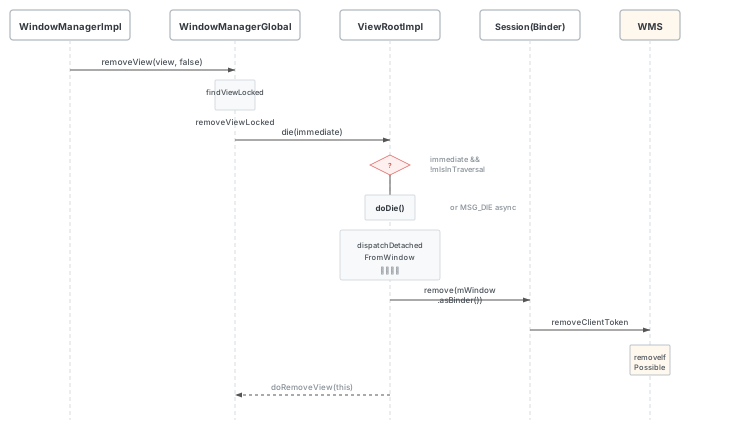
WindowManagerGlobal.removeView
源码位置:
WindowManagerGlobal.java行 621 调用链:WindowManagerImpl.removeView->WindowManagerGlobal.removeView->removeViewLocked
通过找到对应的 View index,调用 removeViewLocked:
@UnsupportedAppUsage(maxTargetSdk = Build.VERSION_CODES.R, trackingBug = 170729553)
public void removeView(View view, boolean immediate) {
    if (view == null) {
        throw new IllegalArgumentException("view must not be null");
    }

    synchronized (mLock) {
        int index = findViewLocked(view, true);
        View curView = mRoots.get(index).getView();
        removeViewLocked(index, immediate);
        if (curView == view) {
            return;
        }

        throw new IllegalStateException("Calling with view " + view
                + " but the ViewAncestor is attached to " + curView);
    }
}
removeViewLocked 执行 die 方法去准备移除 ViewRoot
private void removeViewLocked(int index, boolean immediate) {
    ViewRootImpl root = mRoots.get(index);
    View view = root.getView();

    root.getImeFocusController().onWindowDismissed();
    boolean deferred = root.die(immediate);
    if (view != null) {
        view.assignParent(null);
        if (deferred) {
            mDyingViews.add(view);
        }
    }
}
ViewRootImpl.die —— 准备调用 doDie
源码位置:
ViewRootImpl.java行 11088
boolean die(boolean immediate) {
    // Make sure we do execute immediately if we are in the middle of a traversal
    // or the damage done by dispatchDetachedFromWindow will cause havoc on return.
    if (immediate && !mIsInTraversal) {
        doDie();
        return false;
    }

    if (!mIsDrawing) {
        destroyHardwareRenderer();
    } else {
        Log.e(mTag, "Attempting to destroy the window while drawing!\n"
                + "  window=" + this + ", title=" + mWindowAttributes.getTitle());
    }
    // 异步移除:发出 doDie 调用消息
    mHandler.sendEmptyMessage(MSG_DIE);
    return true;
}
doDie —— 最终实现移除窗口
源码位置:
ViewRootImpl.java行 11106doDie的主要逻辑:先检查线程、避免重复移除,然后调用dispatchDetachedFromWindow进行资源释放。
void doDie() {
    checkThread();
    // ...
    synchronized (this) {
        if (mRemoved) {
            return;
        }
        mRemoved = true;
        mOnBackInvokedDispatcher.detachFromWindow();
        removeVrrMessages();

        if (mAdded) {
            dispatchDetachedFromWindow();
        }

        if (mAdded && !mFirst) {
            destroyHardwareRenderer();

            if (mView != null) {
                int viewVisibility = mView.getVisibility();
                boolean viewVisibilityChanged = mViewVisibility != viewVisibility;
                if (mWindowAttributesChanged || viewVisibilityChanged) {
                    try {
                        if ((relayoutWindow(mWindowAttributes, viewVisibility, false)
                                & WindowManagerGlobal.RELAYOUT_RES_FIRST_TIME) != 0) {
                            mWindowSession.finishDrawing(
                                    mWindow, null /* postDrawTransaction */,
                                    Integer.MAX_VALUE);
                        }
                    } catch (RemoteException e) {
                    }
                }
                destroySurface();
            }
        }

        // ...
        WindowManagerGlobal.getInstance().doRemoveView(this);
    }
}
dispatchDetachedFromWindow —— 释放资源并跨进程移除
源码位置:
ViewRootImpl.java行 7255 释放资源后,通过mWindowSession.remove(mWindow.asBinder())跨进程调用到 WMS 端进行窗口移除。
void dispatchDetachedFromWindow() {
    // Make sure we free-up insets resources if view never received
    // onWindowFocusLost() because of a die-signal
    mInsetsController.onWindowFocusLost();
    if (mFirstInputStage != null) {
        mFirstInputStage.onDetachedFromWindow();
    }

    if (mView != null && mView.mAttachInfo != null) {
        mAttachInfo.mTreeObserver.dispatchOnWindowAttachedChange(false);
        mView.dispatchDetachedFromWindow();
    }

    mAccessibilityInteractionConnectionManager.ensureNoConnection();
    mAccessibilityInteractionConnectionManager.ensureNoDirectConnection();
    removeSendWindowContentChangedCallback();

    destroyHardwareRenderer();
    setAccessibilityFocus(null, null);
    mInsetsController.cancelExistingAnimations();

    mView.assignParent(null);
    mView = null;
    mAttachInfo.mRootView = null;

    destroySurface();

    if (mInputQueueCallback != null && mInputQueue != null) {
        mInputQueueCallback.onInputQueueDestroyed(mInputQueue);
        mInputQueue.dispose();
        mInputQueueCallback = null;
        mInputQueue = null;
    }
    try {
        // 注意:当前版本传入的是 asBinder(),而非旧版的 IWindow 对象
        mWindowSession.remove(mWindow.asBinder());
    } catch (RemoteException e) {
    }
    if (mInputEventReceiver != null) {
        mInputEventReceiver.dispose();
        mInputEventReceiver = null;
    }

    unregisterListeners();
    unscheduleTraversals();
}
Session.remove -> WMS.removeClientToken
源码位置:
Session.java行 289,WindowManagerService.java行 2480
// Session.java
public void remove(IBinder clientToken) {
    mService.removeClientToken(this, clientToken);
}

// WindowManagerService.java
void removeClientToken(Session session, IBinder client) {
    synchronized (mGlobalLock) {
        WindowState win = windowForClientLocked(session, client, false);
        if (win != null) {
            win.removeIfPossible();
            return;
        }

        // Remove embedded window map if the token belongs to an embedded window
        mEmbeddedWindowController.remove(client);
    }
}注意:在旧版源码中此方法名为
removeWindow(Session, IWindow),当前版本已重命名为removeClientToken(Session, IBinder),参数类型也从IWindow变为IBinder。核心逻辑不变:通过windowForClientLocked找到对应的WindowState,调用removeIfPossible()执行实际移除。
常见的窗口过程
Activity 启动中的窗口创建:大多数应用会去创建和启动一个 Activity,一个 Activity 需要包含对 Window 的创建,这过程涉及 Activity、Window 以及 WindowManager 的关联,并且通过
Activity#setContentView去创建 DecorView 给到当前的 Window 内,从而进一步实现窗口和 View 的联系。无 Activity 的应用服务的窗口创建:另一种少数应用不存在 Activity,可能是一个 Service,通过
getSystemService获取 WindowManager 的实例,并且设置 LayoutParams 的窗口属性等,最后通过addView添加窗口。
Toast 的窗口创建
Toast 的窗口创建与普通 addView 不同,它需要经过 NotificationManagerService(NMS)的中转。
源码入口:
Toast.java行 198
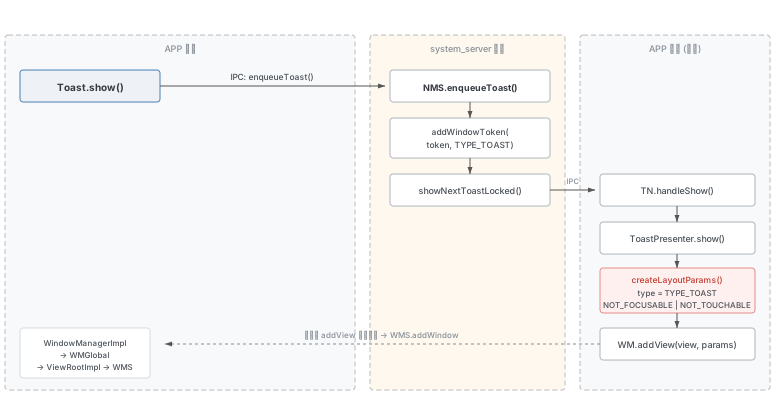
关键步骤:
Toast.show():不直接调用
WindowManager.addView,而是通过 IPC 调用INotificationManager.enqueueToast(),将 Toast 请求交给系统服务 NMS。NMS.enqueueToast():NMS 首先通过
mWindowManagerInternal.addWindowToken(windowToken, TYPE_TOAST, displayId)在 WMS 中预注册一个TYPE_TOAST类型的 WindowToken,然后将 Toast 加入显示队列。NMS.showNextToastLocked():从队列中取出第一个 Toast,通过
ITransientNotification.show(windowToken)回调通知 APP 进程显示。TN.handleShow():APP 进程中的
TN(Toast 的内部 Binder 回调类)收到通知后,调用ToastPresenter.show()开始实际的窗口添加。ToastPresenter.createLayoutParams():创建 Toast 专用的窗口参数:
// ToastPresenter.java 行 145
private static final String WINDOW_TITLE = "Toast";
// ...
WindowManager.LayoutParams params = new WindowManager.LayoutParams();
params.height = WindowManager.LayoutParams.WRAP_CONTENT;
params.width = WindowManager.LayoutParams.WRAP_CONTENT;
params.format = PixelFormat.TRANSLUCENT;
params.windowAnimations = R.style.Animation_Toast;
params.type = WindowManager.LayoutParams.TYPE_TOAST;
params.setTitle(WINDOW_TITLE);
params.flags = WindowManager.LayoutParams.FLAG_KEEP_SCREEN_ON
        | WindowManager.LayoutParams.FLAG_NOT_FOCUSABLE
| WindowManager.LayoutParams.FLAG_NOT_TOUCHABLE;- ToastPresenter.addToastView():调用
windowManager.addView(mView, mParams),后续走标准的WindowManagerImpl→WindowManagerGlobal→ViewRootImpl→WMS.addWindow流程。
Toast 与普通窗口的关键区别:
- 窗口类型为
TYPE_TOAST(系统窗口,值 2005) - WindowToken 由 NMS 预先在 WMS 中注册,而非由应用自行创建
- 默认不可获取焦点(
FLAG_NOT_FOCUSABLE)且不可触摸(FLAG_NOT_TOUCHABLE) - NMS 会为 Toast 设置超时自动隐藏(
hideTimeoutMilliseconds)
Dialog 的窗口创建
Dialog 拥有自己的 PhoneWindow 和 DecorView,其窗口创建流程比较直接。
源码入口:
Dialog.java行 207(构造),行 325(show)
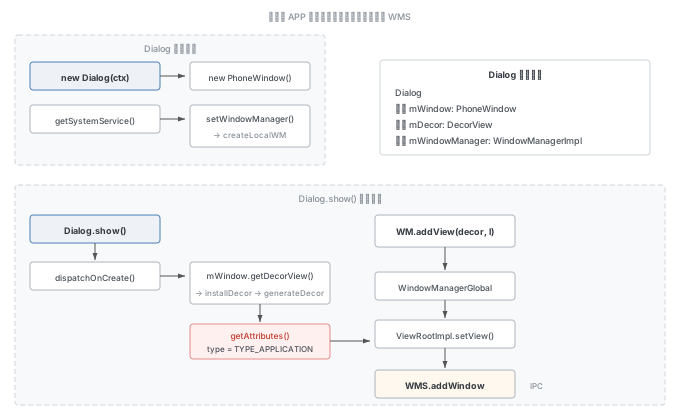
构造阶段(new Dialog(context)):
// Dialog.java 行 207-235
mWindowManager = (WindowManager) context.getSystemService(Context.WINDOW_SERVICE);
final Window w = new PhoneWindow(mContext);
mWindow = w;
w.setCallback(this);
w.setOnWindowDismissedCallback(this);
w.setOnWindowSwipeDismissedCallback(() -> {
    if (mCancelable) {
        cancel();
    }
});
w.setWindowManager(mWindowManager, null, null);  // 创建绑定到此 Window 的本地 WM
w.setGravity(Gravity.CENTER);
Dialog 在构造时就创建了自己的 PhoneWindow,并通过 setWindowManager 创建了一个绑定到该 Window 的本地 WindowManagerImpl(createLocalWindowManager(this)),这样后续 addView 时 mParentWindow 就指向 Dialog 自己的 Window。
show() 阶段(dialog.show()):
dispatchOnCreate():如果是首次显示,触发
Dialog.onCreate(),应用在此时调用setContentView设置 Dialog 内容。mWindow.getDecorView():获取或创建 DecorView。如果 DecorView 尚未创建,
PhoneWindow会通过installDecor()→generateDecor()创建DecorView实例,并通过generateLayout()加载窗口布局。mWindow.getAttributes():获取窗口参数,Dialog 的默认窗口类型为
TYPE_APPLICATION(值 2)。mWindowManager.addView(mDecor, l):将 DecorView 添加到窗口管理器,后续走标准的
WindowManagerImpl→WindowManagerGlobal→ViewRootImpl→WMS.addWindow流程。
// Dialog.java 行 325-375 (show 方法关键逻辑)
if (!mCreated) {
    dispatchOnCreate(null);
}
mDecor = mWindow.getDecorView();
WindowManager.LayoutParams l = mWindow.getAttributes();
mWindowManager.addView(mDecor, l);
mShowing = true;
Dialog 与 Activity 窗口的关键区别:
- Dialog 拥有独立的
PhoneWindow,不共享 Activity 的 Window - Dialog 的窗口类型默认为
TYPE_APPLICATION(与 Activity 相同),而非特殊类型 - Dialog 的 WindowToken 来自其关联的 Activity(通过
parentWindow.adjustLayoutParamsForSubWindow设置),因此 Dialog 依赖于 Activity 的存在 - Dialog 直接调用
WindowManager.addView,不经过 NMS 等系统服务中转