WindowInsets
概述
WindowInsets 表示窗口内容的系统占用区域——即一个 Window 相对于屏幕需要让出的空间,以容纳状态栏、导航栏、输入法等系统窗口。具体表现为该区域在上下左右四个方向所需的偏移量。
Android 11 开始支持通过 WindowInsets API 获取导航栏、状态栏、键盘的高度和可见状态。
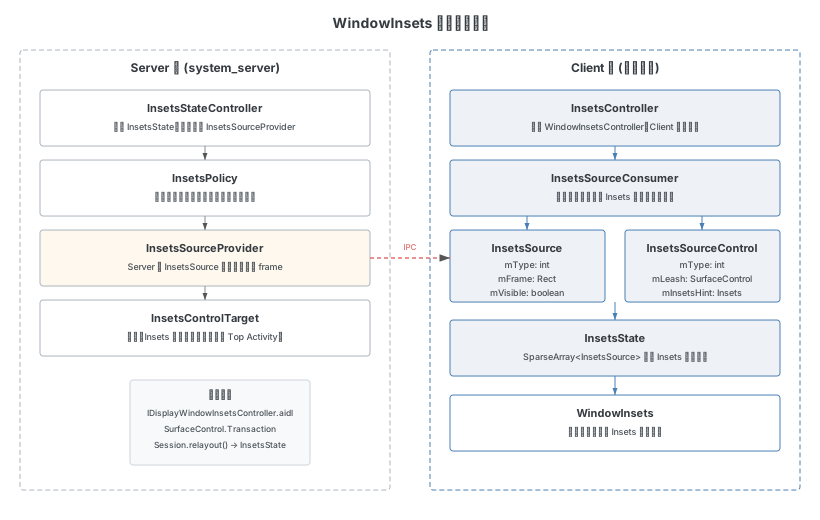
Insets 类型系统
按系统类分
| 分类 | 含义 |
|---|---|
| SystemWindowInsets | 全窗口模式下,被状态栏、导航栏、输入法或系统窗口覆盖的区域 |
| StableInsets | 全窗口模式下,被系统 UI 覆盖的区域(不随可见性变化) |
| WindowDecorInsets | 内容窗口模式下,被 Framework 提供的窗口(ActionBar、TitleBar、ToolBar)覆盖的区域 |
按类型分
所有 Insets 类型定义在 android.view.WindowInsets.Type 中,使用位标志表示:
// frameworks/base/core/java/android/view/WindowInsets.java

static final int FIRST = 1 << 0;
static final int STATUS_BARS = FIRST;           // 1   - 状态栏
static final int NAVIGATION_BARS = 1 << 1;      // 2   - 导航栏
static final int CAPTION_BAR = 1 << 2;          // 4   - 标题栏
static final int IME = 1 << 3;                  // 8   - 输入法
static final int SYSTEM_GESTURES = 1 << 4;      // 16  - 系统手势
static final int MANDATORY_SYSTEM_GESTURES = 1 << 5; // 32  - 强制系统手势
static final int TAPPABLE_ELEMENT = 1 << 6;     // 64  - 可点击元素
static final int DISPLAY_CUTOUT = 1 << 7;       // 128 - 显示切口
static final int WINDOW_DECOR = 1 << 8;         // 256 - 窗口装饰
static final int SYSTEM_OVERLAYS = 1 << 9;      // 512 - 系统覆盖层
static final int LAST = SYSTEM_OVERLAYS;
static final int SIZE = 10;
每种类型通过 indexOf 方法映射为数组下标,用于在 InsetsState 内部的 SparseArray<InsetsSource> 中按 ID 存取。
核心数据结构
Insets
Insets 定义在 frameworks/base/graphics/java/android/graphics/Insets.java,表示矩形四边的偏移量:
public final class Insets implements Parcelable {
    public static final @NonNull Insets NONE = new Insets(0, 0, 0, 0);

    public final int left;
    public final int top;
    public final int right;
    public final int bottom;
}
Insets 是不可变对象,可安全地作为值传递。
InsetsSource
InsetsSource 定义在 frameworks/base/core/java/android/view/InsetsSource.java,描述单个产生 Insets 的窗口状态:
public class InsetsSource implements Parcelable {
    private final @InsetsType int mType;

    /** Frame of the source in screen coordinate space */
    private final Rect mFrame;
    private @Nullable Rect mVisibleFrame;
    private boolean mVisible;

    public InsetsSource(@InternalInsetsType int type) {
        mType = type;
        mFrame = new Rect();
        mVisible = InsetsState.getDefaultVisibility(type);
    }
}
三个核心属性:
mType:Insets 类型(STATUS_BARS、NAVIGATION_BARS 等)mFrame:该 Insets 源在屏幕坐标系中占据的矩形区域mVisible:当前是否可见
InsetsState
InsetsState 定义在 frameworks/base/core/java/android/view/InsetsState.java,是所有 InsetsSource 的集合:
public class InsetsState implements Parcelable {
    private final SparseArray<InsetsSource> mSources;

    /** The frame of the display these sources are relative to. */
    private final Rect mDisplayFrame = new Rect();

    public InsetsState() {
        mSources = new SparseArray<>();
    }
}
InsetsState 通过 SparseArray<InsetsSource> 保存所有 Insets 源。它提供的核心方法 calculateInsets() 根据给定的窗口 frame 和请求的 Insets 类型,计算出具体的 Insets 值:
public WindowInsets calculateInsets(Rect frame,
        @Nullable InsetsState ignoringVisibilityState,
        boolean isScreenRound, int legacySoftInputMode, int legacyWindowFlags,
        int legacySystemUiFlags, int windowType, @ActivityType int activityType,
        @Nullable @InternalInsetsSide SparseIntArray idSideMap) {
    Insets[] typeInsetsMap = new Insets[Type.SIZE];
    Insets[] typeMaxInsetsMap = new Insets[Type.SIZE];
    boolean[] typeVisibilityMap = new boolean[Type.SIZE];
    // ...
    for (int i = mSources.size() - 1; i >= 0; i--) {
        final InsetsSource source = mSources.valueAt(i);
        final @InsetsType int type = source.getType();
        // 处理 FLAG_FORCE_CONSUMING、FLAG_SUPPRESS_SCRIM 等标志
        processSource(source, relativeFrame, false, typeInsetsMap,
                idSideMap, typeVisibilityMap, typeBoundingRectsMap);
        // IME 不会在 max insets 中报告
        if (type != WindowInsets.Type.ime()) {
            processSource(ignoringVisibilitySource, relativeFrameMax,
                    true, typeMaxInsetsMap, null, null, typeMaxBoundingRectsMap);
        }
    }
    return new WindowInsets(typeInsetsMap, typeMaxInsetsMap, typeVisibilityMap, ...);
}
InsetsSourceControl
InsetsSourceControl 定义在 frameworks/base/core/java/android/view/InsetsSourceControl.java,代表对单个 InsetsSource 的控制权:
public class InsetsSourceControl implements Parcelable {
    private final @InsetsType int mType;
    private final @Nullable SurfaceControl mLeash;
    private final Point mSurfacePosition;
    private final boolean mInitiallyVisible;
    private final Insets mInsetsHint;

    public InsetsSourceControl(int id, @InsetsType int type,
            @Nullable SurfaceControl leash,
            boolean initiallyVisible, Point surfacePosition, Insets insetsHint) {
        mId = id;
        mType = type;
        mLeash = leash;
        mInitiallyVisible = initiallyVisible;
        mSurfacePosition = surfacePosition;
        mInsetsHint = insetsHint;
    }
}mType:控制的 Insets 类型mLeash:用于动画的 SurfaceControl。动画期间 leash 被添加为 Insets 窗口的父节点,动画完成后移除mInsetsHint:Insets 提示值,帮助 Client 端在获得控制权之前预测 Insets 大小
Server 端
Server 端的核心类位于 com.android.server.wm 包下:
| 类名 | 职责 |
|---|---|
| InsetsSourceProvider | Server 端 InsetsSource 的生产者,对应 Client 端的 InsetsSourceConsumer。负责计算和更新 Insets 的 frame、控制权分配 |
| InsetsStateController | 管理 InsetsState,协调所有 InsetsSourceProvider |
| InsetsPolicy | WindowInsets 的策略类,控制系统栏的显示/隐藏策略,决定控制权归属 |
| InsetsControlTarget | 接口,代表 Insets 状态的实际控制者(通常是顶层 Activity) |
通信机制
Server 端和 Client 端通过以下方式通信:
- IDisplayWindowInsetsController.aidl:跨进程通知 Insets 变化
- SurfaceControl.Transaction:通过 SurfaceControl 事务控制 Insets 窗口的位置和可见性
- relayoutWindow:Client 端通过
Session.relayout()获取最新的InsetsState和InsetsSourceControl[]
Display Cutout 机制
什么是 Display Cutout
DisplayCutout 表示显示屏上不能显示内容的区域(如摄像头开孔、刘海)。Cutout 不等于状态栏——它们是两个独立的概念,只是传统设备通常将 Cutout 高度配置为与状态栏高度一致。
Cutout 配置
Cutout 的形状通过 SVG 路径字符串配置,解析规则遵循 SVG Path 规范。
单屏设备
非折叠设备只需配置 config_mainBuiltInDisplayCutout:
<!-- frameworks/base/core/res/res/values/config.xml -->
<string translatable="false" name="config_mainBuiltInDisplayCutout">
    M 0,0 H -28 V 94 H 28 V 0 H 0 Z
</string>
路径解析示例:
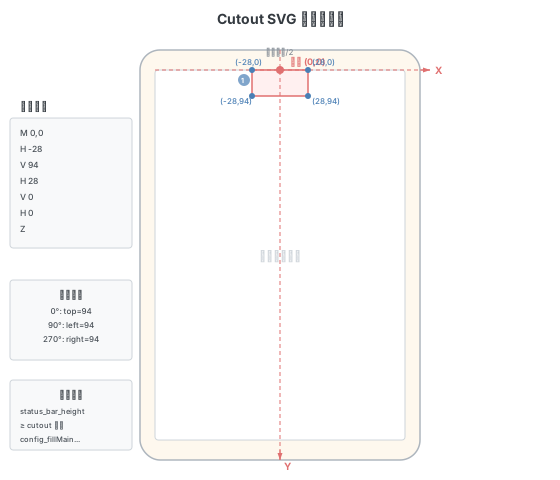
以坐标系原点为屏幕顶部中心点(Y=0, X=屏幕宽度/2):
| 命令 | 含义 |
|---|---|
M 0,0 | 移动到起点(屏幕顶部中心) |
H -28 | 水平向左画到 x=-28 |
V 94 | 垂直向下画到 y=94 |
H 28 | 水平向右画到 x=28(跨度 56) |
V 0 | 垂直向上画到 y=0 |
H 0 | 水平向左画到 x=0 |
Z | 闭合路径 |
多屏设备
多屏设备需要通过 displayUniqueId 来区分不同屏幕的 Cutout 配置。Framework 侧配置 config_displayUniqueIdArray 数组,SystemUI 侧同时配置主副屏的 Cutout 路径:
<!-- Framework: config_displayUniqueIdArray -->
<string-array name="config_displayUniqueIdArray" translatable="false">
    <item>"local:4630947108695800451"</item>
    <item>"local:4630947108695800452"</item>
</string-array>

<!-- SystemUI: 分别配置主屏和副屏 -->
<string name="config_mainBuiltInDisplayCutout">M 0,0 H -43 V 126 H 43 V 0 H 0 Z</string>
<string name="config_secondaryBuiltInDisplayCutout">M 0,0 H -728 V 398 H 0 V 0 Z @right</string>
查看系统 Cutout 配置
adb shell dumpsys activity | grep "mDisplayCutout="输出示例(单屏):
mDisplayCutout=DisplayCutout{
  insets=Rect(0, 94 - 0, 0)
  boundingRect={Bounds=[Rect(0,0-0,0), Rect(512,0-568,94), Rect(0,0-0,0), Rect(0,0-0,0)]}
  cutoutSpec={M 0,0 H -28 V 94 H 28 V 0 H 0 Z}
}
如何解读 DisplayCutout
- insets=Rect(左, 上 - 右, 下):Cutout 在各方向占据的宽度/高度。旋转时会跟随变化,如顶部 94 在旋转 90° 后变为左侧 94
- boundingRect:四个矩形分别对应左/上/右/下方向的 Cutout 绝对位置。旋转时矩形位置跟随变化
- cutoutSpec:原始配置的 SVG 路径字符串
Cutout 字符串解析流程
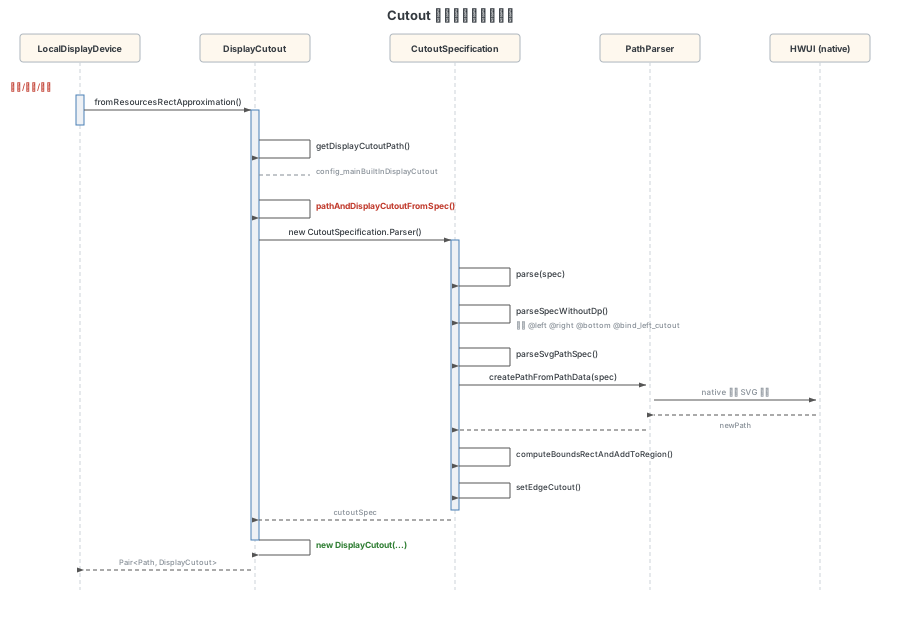
Cutout 的解析入口是 DisplayCutout.fromResourcesRectApproximation(),在折叠/展开、应用打开等场景都会触发更新。
// frameworks/base/core/java/android/view/DisplayCutout.java

public static DisplayCutout fromResourcesRectApproximation(Resources res,
        String displayUniqueId, int physicalDisplayWidth, int physicalDisplayHeight,
        int displayWidth, int displayHeight) {
    return pathAndDisplayCutoutFromSpec(
            getDisplayCutoutPath(res, displayUniqueId),              // Cutout 路径字符串
            getDisplayCutoutApproximationRect(res, displayUniqueId), // 近似矩形
            physicalDisplayWidth, physicalDisplayHeight,
            displayWidth, displayHeight,
            DENSITY_DEVICE_STABLE / (float) DENSITY_DEFAULT,
            getWaterfallInsets(res, displayUniqueId),                // 瀑布屏 Insets
            getDisplayCutoutSideOverrides(res, displayUniqueId)).second; // 侧边覆盖配置
}多屏加载逻辑:getDisplayCutoutPath 通过 DisplayUtils.getDisplayUniqueIdConfigIndex() 从 config_displayCutoutPathArray 中按 displayUniqueId 匹配对应的 Cutout 配置,找不到则回退到主屏配置。
核心解析方法 pathAndDisplayCutoutFromSpec():
// frameworks/base/core/java/android/view/DisplayCutout.java

private static Pair<Path, DisplayCutout> pathAndDisplayCutoutFromSpec(
        String pathSpec, String rectSpec, int physicalDisplayWidth, int physicalDisplayHeight,
        int displayWidth, int displayHeight, float density, Insets waterfallInsets,
        int[] sideOverrides) {
    // 1. 创建 CutoutSpecification.Parser 解析 SVG 路径
    CutoutSpecification cutoutSpec = new CutoutSpecification.Parser(density,
            physicalDisplayWidth, physicalDisplayHeight, physicalPixelDisplaySizeRatio)
            .parse(spec);

    // 2. 获取安全 Inset 空间和各方向边界
    Rect safeInset = cutoutSpec.getSafeInset();
    final Rect boundLeft = cutoutSpec.getLeftBound();
    final Rect boundTop = cutoutSpec.getTopBound();
    final Rect boundRight = cutoutSpec.getRightBound();
    final Rect boundBottom = cutoutSpec.getBottomBound();

    // 3. 瀑布屏设置
    if (!waterfallInsets.equals(Insets.NONE)) {
        safeInset.set(
                Math.max(waterfallInsets.left, safeInset.left),
                Math.max(waterfallInsets.top, safeInset.top),
                Math.max(waterfallInsets.right, safeInset.right),
                Math.max(waterfallInsets.bottom, safeInset.bottom));
    }

    // 4. 创建 CutoutPathParserInfo 和 DisplayCutout
    final CutoutPathParserInfo cutoutPathParserInfo = new CutoutPathParserInfo(
            displayWidth, displayHeight, physicalDisplayWidth, physicalDisplayHeight,
            density, pathSpec.trim(), ROTATION_0, 1f, physicalPixelDisplaySizeRatio);
    final DisplayCutout cutout = new DisplayCutout(
            safeInset, waterfallInsets, boundLeft, boundTop, boundRight, boundBottom,
            cutoutPathParserInfo, false);
    return new Pair<>(cutoutSpec.getPath(), cutout);
}
路径解析器 CutoutSpecification.Parser.parse():
// frameworks/base/core/java/android/view/CutoutSpecification.java

public CutoutSpecification parse(@NonNull String originalSpec) {
    // 解析规则支持:@dp @left @right @bind_left_cutout 等后缀
    parseSpecWithoutDp(spec);
    mInsets = Insets.of(mSafeInsetLeft, mSafeInsetTop, mSafeInsetRight, mSafeInsetBottom);
    return new CutoutSpecification(this);
}
parseSpecWithoutDp 逐字符扫描配置字符串,识别 @left、@right、@bottom、@bind_left_cutout 等位置标记,确定 Cutout 在哪个边缘。最终调用 parseSvgPathSpec 将 SVG 路径字符串传给 HWUI 的 PathParser.createPathFromPathData() 进行解析,并通过 computeBoundsRectAndAddToRegion 计算出边界矩形。
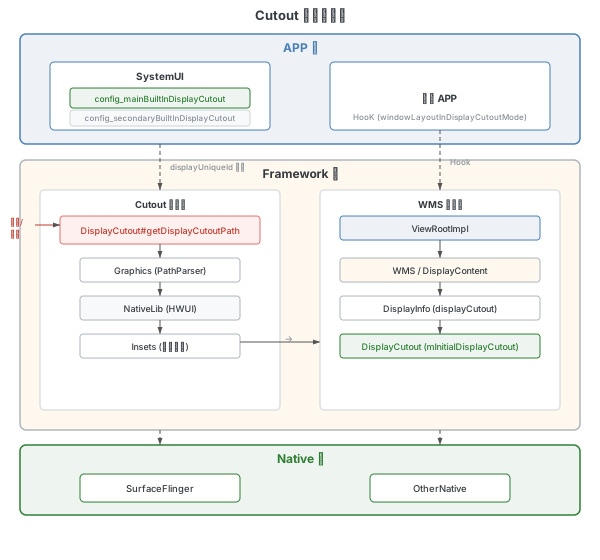
系统侧获取 Cutout
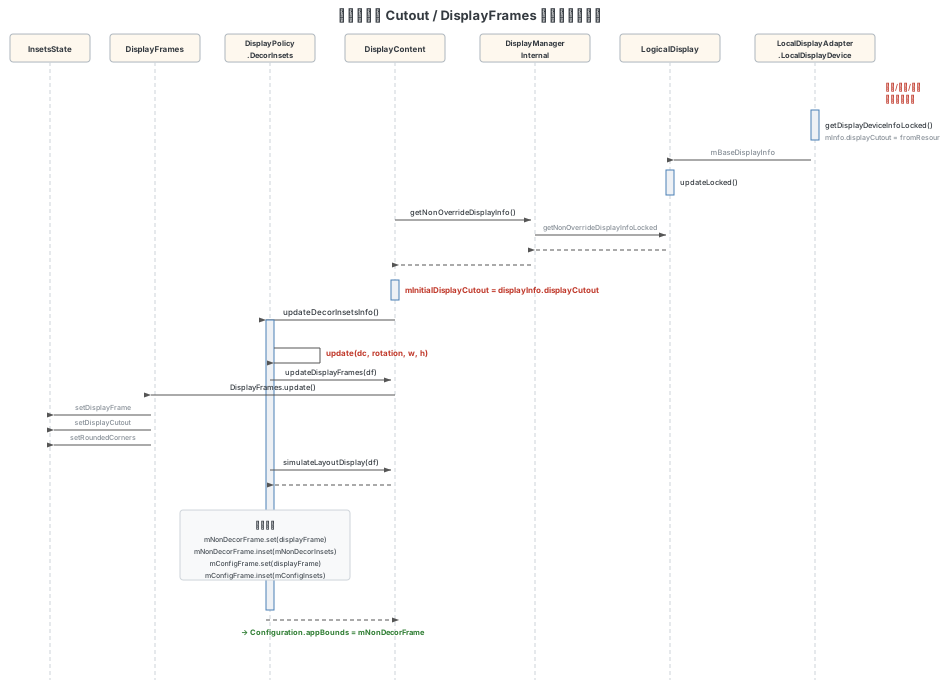
Cutout 信息通过 Display 子系统加载后,经由 DisplayContent 传递到窗口管理系统:
1. DisplayDevice 加载 Cutout:
// com.android.server.display.LocalDisplayAdapter.LocalDisplayDevice

@Override
public DisplayDeviceInfo getDisplayDeviceInfoLocked() {
    // ...
    mInfo.displayCutout = DisplayCutout.fromResourcesRectApproximation(res,
            mInfo.uniqueId, maxWidth, maxHeight, mInfo.width, mInfo.height);
    // ...
    return mInfo;
}
2. DisplayManager → DisplayContent 推送 DisplayInfo:
V 上采用推送模式:DisplayManager 在 Display 属性变更时主动调用 DisplayContent.updateDisplayInfo(DisplayInfo),而非 DisplayContent 主动拉取。
// com.android.server.wm.DisplayContent (line 3529)

void updateDisplayInfo(@NonNull DisplayInfo newDisplayInfo) {
    // 将新的 DisplayInfo 推送给 updateBaseDisplayMetricsIfNeeded
    updateBaseDisplayMetricsIfNeeded(newDisplayInfo);
    copyDisplayInfoFields(mDisplayInfo, newDisplayInfo, mLastDisplayInfoOverride, WM_OVERRIDE_FIELDS);
    mDisplayInfo.getAppMetrics(mDisplayMetrics, mDisplay.getDisplayAdjustments());
    onDisplayInfoChanged();
    onDisplayChanged(this);
}

// com.android.server.wm.DisplayContent (line 3622)
private void updateBaseDisplayMetricsIfNeeded(DisplayInfo newDisplayInfo) {
    // 复制最新的 DisplayInfo
    mDisplayInfo.copyFrom(newDisplayInfo);
    // 提取 Cutout
    final DisplayCutout newCutout = mIgnoreDisplayCutout
            ? DisplayCutout.NO_CUTOUT : mDisplayInfo.displayCutout;
    // ...
    if (displayMetricsChanged || physicalDisplayChanged) {
        // ...
        mInitialDisplayCutout = newCutout;  // line 3710
        // ...
    }
}
DisplayInfo 数据来源:
LogicalDisplay.updateLocked()时,从mPrimaryDisplayDevice.getDisplayDeviceInfoLocked()获取 deviceInfo,设置mBaseDisplayInfo.displayCutout = deviceInfo.displayCutout。之后由DisplayManagerService通过DisplayManagerInternal.getNonOverrideDisplayInfo()供上层读取,或在显示变更时通过updateDisplayInfo()推送给 DisplayContent。
DisplayFrames 更新
DisplayFrames 的更新是连接 Cutout 与窗口布局的关键环节:
// com.android.server.wm.DisplayPolicy.DecorInsets.Info

InsetsState update(DisplayContent dc, int rotation, int w, int h) {
    final DisplayFrames df = new DisplayFrames();
    // 1. 更新 DisplayFrames,将 Cutout 信息写入 df.mInsetsState
    dc.updateDisplayFrames(df, rotation, w, h);
    // 2. 模拟布局,更新 InsetsState 和 InsetsFrameProvider
    dc.getDisplayPolicy().simulateLayoutDisplay(df);

    final InsetsState insetsState = df.mInsetsState;
    final Rect displayFrame = insetsState.getDisplayFrame();
    // 3. 计算各类 Insets
    final Insets decor = insetsState.calculateInsets(displayFrame,
            dc.mWmService.mDecorTypes, true);
    final Insets configInsets = /* ... */;

    // 4. 设置各种 frame
    mNonDecorInsets.set(decor.left, decor.top, decor.right, decor.bottom);
    mNonDecorFrame.set(displayFrame);
    mNonDecorFrame.inset(mNonDecorInsets);
    mConfigFrame.set(displayFrame);
    mConfigFrame.inset(mConfigInsets);
    // ...
}
其中 updateDisplayFrames 通过 calculateDisplayCutoutForRotation 获取当前旋转角度下的 Cutout,然后在 DisplayFrames.update() 中将所有信息写入 InsetsState。
Configuration 更新
Cutout 信息最终通过 Configuration 下发给应用:
// com.android.server.wm.DisplayContent (line 3013)

void computeScreenConfiguration(Configuration config) {
    final DisplayInfo displayInfo = updateDisplayAndOrientation(config);
    final int dw = displayInfo.logicalWidth;
    final int dh = displayInfo.logicalHeight;
    // 设置窗口 Bounds
    mTmpRect.set(0, 0, dw, dh);
    config.windowConfiguration.setBounds(mTmpRect);
    config.windowConfiguration.setMaxBounds(mTmpRect);
    config.windowConfiguration.setWindowingMode(getWindowingMode());
    // 计算应用相关 Configuration(包括 appBounds)
    computeScreenAppConfiguration(config, dw, dh, displayInfo.rotation);
    // ...(screenLayout、densityDpi 等其余字段)
}

// com.android.server.wm.DisplayContent (line 2981)
private void computeScreenAppConfiguration(Configuration outConfig, int dw, int dh, int rotation) {
    final DisplayPolicy.DecorInsets.Info info =
            mDisplayPolicy.getDecorInsetsInfo(rotation, dw, dh);
    outConfig.windowConfiguration.setAppBounds(info.mNonDecorFrame);
    outConfig.windowConfiguration.setRotation(rotation);
    final float density = mDisplayMetrics.density;
    outConfig.screenWidthDp = (int) (info.mConfigFrame.width() / density + 0.5f);
    outConfig.screenHeightDp = (int) (info.mConfigFrame.height() / density + 0.5f);
    outConfig.orientation = (outConfig.screenWidthDp <= outConfig.screenHeightDp)
            ? ORIENTATION_PORTRAIT : ORIENTATION_LANDSCAPE;
    // ...(compatSmallestScreenWidthDp 等)
}
dump 查看 DecorInsetsInfo:
adb shell dumpsys window | grep "mDecorInsetsInfo" -A 10最终 Configuration 由 updateDisplayOverrideConfigurationLocked() 派发到各窗口和 Activity。
WindowInsets 分发流程
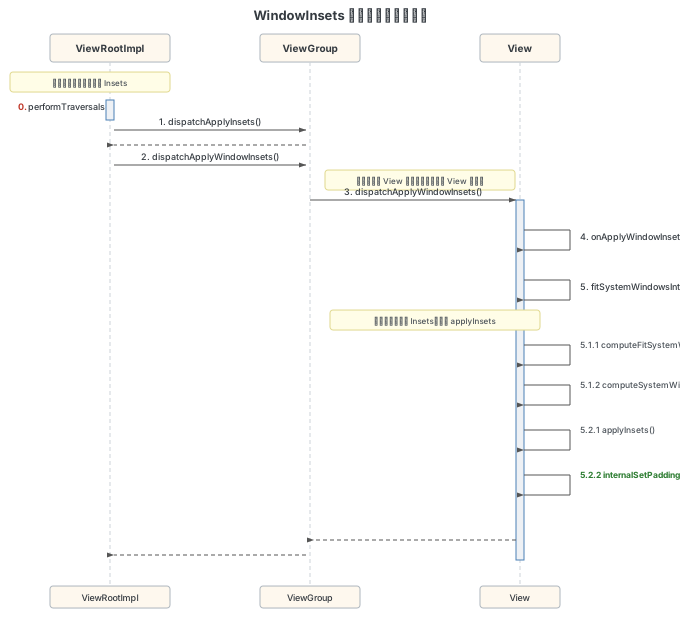
WindowInsets 的分发起点在 ViewRootImpl.performTraversals(),从 DecorView 开始自上而下深度遍历,直到 WindowInsets.isConsumed() 返回 true。
0. ViewRootImpl#performTraversals
WindowInsets 在 Window 大小变化时传递给 ViewRootImpl 并被存储。在 performTraversals 中,如果 mApplyInsetsRequested 为 true,则开始 Insets 分发:
1. ViewRootImpl#dispatchApplyInsets
调用 DecorView(即 host)的 dispatchApplyWindowInsets 方法。DecorView 继承自 ViewGroup。
2. ViewGroup#dispatchApplyWindowInsets
ViewGroup 直接调用父类 View 的实现,然后在子 View 中进行分发。
3. View#dispatchApplyWindowInsets
// frameworks/base/core/java/android/view/View.java

public WindowInsets dispatchApplyWindowInsets(WindowInsets insets) {
    try {
        mPrivateFlags3 |= PFLAG3_APPLYING_INSETS;
        if (mListenerInfo != null && mListenerInfo.mOnApplyWindowInsetsListener != null) {
            // 应用主动设置了监听器,优先回调
            return mListenerInfo.mOnApplyWindowInsetsListener.onApplyWindowInsets(this, insets);
        } else {
            // 走系统默认处理
            return onApplyWindowInsets(insets);
        }
    } finally {
        mPrivateFlags3 &= ~PFLAG3_APPLYING_INSETS;
    }
}
如果应用通过 setOnApplyWindowInsetsListener() 注册了监听器,则由应用自行处理;否则进入系统默认处理流程。
4. View#onApplyWindowInsets
public WindowInsets onApplyWindowInsets(WindowInsets insets) {
    // Framework 内部可选适配路径(View 持有 FITS_SYSTEM_WINDOWS 且设置了 PFLAG4 时走此路径)
    if ((mPrivateFlags4 & PFLAG4_FRAMEWORK_OPTIONAL_FITS_SYSTEM_WINDOWS) != 0
            && (mViewFlags & FITS_SYSTEM_WINDOWS) != 0) {
        return onApplyFrameworkOptionalFitSystemWindows(insets);
    }
    if ((mPrivateFlags3 & PFLAG3_FITTING_SYSTEM_WINDOWS) == 0) {
        // 不在 fitSystemWindows 递归流程中,调用 fitSystemWindows(deprecated 回退路径)
        if (fitSystemWindows(insets.getSystemWindowInsetsAsRect())) {
            return insets.consumeSystemWindowInsets();
        }
    } else {
        // 正在 fitSystemWindows 递归流程中,调用 fitSystemWindowsInt
        if (fitSystemWindowsInt(insets.getSystemWindowInsetsAsRect())) {
            return insets.consumeSystemWindowInsets();
        }
    }
    return insets;
}
5. View#fitSystemWindowsInt
这是实际消费 WindowInsets 的核心方法:
private boolean fitSystemWindowsInt(Rect insets) {
    if ((mViewFlags & FITS_SYSTEM_WINDOWS) == FITS_SYSTEM_WINDOWS) {
        Rect localInsets = sThreadLocal.get();
        // 5.1 计算是否消费 WindowInsets
        boolean res = computeFitSystemWindows(insets, localInsets);
        // 5.2 应用 Insets(调整 padding)
        applyInsets(localInsets);
        return res;
    }
    return false;
}computeFitSystemWindows:计算当前 View 应该消费的 Insets 范围applyInsets→internalSetPadding:将 Insets 转换为 View 的 padding 值,完成消费
状态栏隐藏流程
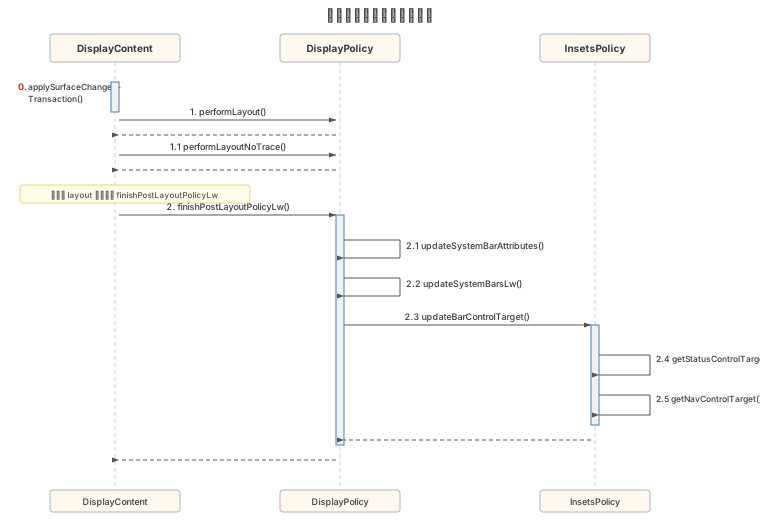
状态栏的显示/隐藏由 DisplayPolicy 和 InsetsPolicy 协同控制。
触发入口
在 DisplayContent.applySurfaceChangesTransaction() 中遍历所有窗口后,调用 DisplayPolicy.finishPostLayoutPolicyLw() 完成策略计算。
finishPostLayoutPolicyLw
此方法在窗口布局完成后调用,根据当前的窗口层级关系,更新系统栏的显示策略,并调用 updateSystemBarAttributes()。
updateSystemBarAttributes
根据焦点窗口和顶层全屏窗口的属性,计算系统栏的 appearance 和 behavior,最终调用 updateSystemBarsLw() 确定系统栏可见性。
InsetsPolicy#updateBarControlTarget
InsetsPolicy 负责确定状态栏和导航栏的控制权归属:
// com.android.server.wm.InsetsPolicy

void updateBarControlTarget(@Nullable WindowState focusedWin) {
    // 根据焦点窗口和策略,确定 statusBar 和 navBar 的控制目标
    final InsetsControlTarget statusControlTarget =
            getStatusControlTarget(focusedWin, false);
    // ...
    // 将控制权分发给对应的 InsetsSourceProvider
}
getStatusControlTarget 根据以下条件决定控制权:
- 焦点窗口是否请求隐藏状态栏
- 是否存在强制隐藏状态栏的窗口
- 瞬态(transient)状态栏的处理
Insets 动画
动画流程概述
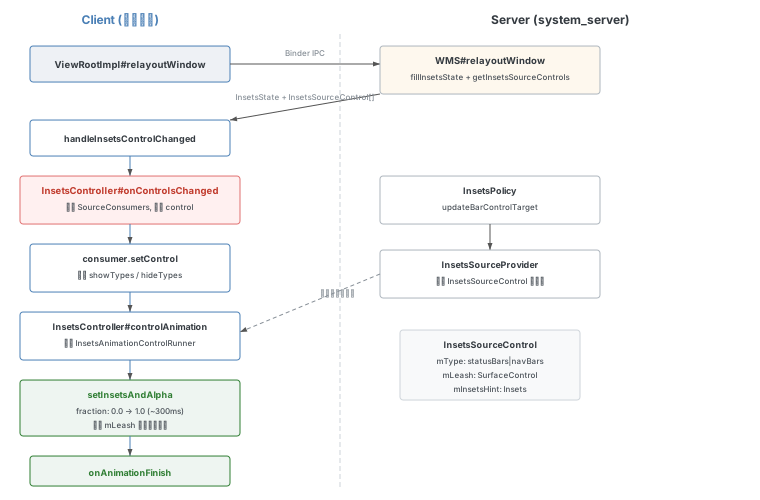
Insets 动画发生在 Client 端,通过 InsetsController 驱动。整体流程如下:
1. 获取控制权: 在 ViewRootImpl.relayoutWindow() 中,Client 端通过 Binder 调用 Server 端的 relayoutWindow(),获取最新的 InsetsState 和 InsetsSourceControl[]:
// frameworks/base/core/java/android/view/ViewRootImpl.java

private int relayoutWindow(WindowManager.LayoutParams params, int viewVisibility,
        boolean insetsPending) throws RemoteException {
    // 1. 通过 Binder 获取最新的 InsetsState 和 Controls
    relayoutResult = mWindowSession.relayout(mWindow, params, ...);
    // 2. 处理 Insets 控制权变化
    handleInsetsControlChanged(mTempInsets, mTempControls);
    return relayoutResult;
}
2. 分发控制权: handleInsetsControlChanged(ViewRootImpl.java:2804)先调用 onStateChanged 更新状态,再调用 InsetsController.onControlsChanged():
// frameworks/base/core/java/android/view/ViewRootImpl.java:2804

private void handleInsetsControlChanged(@NonNull InsetsState insetsState,
        @NonNull InsetsSourceControl.Array activeControls) {
    // 1. 先通知状态变化
    mInsetsController.onStateChanged(insetsState);
    // 2. 再分发控制权
    if (mAdded) {
        mInsetsController.onControlsChanged(controls);
    }
}// frameworks/base/core/java/android/view/InsetsController.java:1063
public void onControlsChanged(InsetsSourceControl[] activeControls) {
// 遍历所有 InsetsSourceConsumer,分发控制权
for (int i = mSourceConsumers.size() - 1; i >= 0; i--) {
final InsetsSourceConsumer consumer = mSourceConsumers.valueAt(i);
final InsetsSourceControl control = mTmpControlArray.get(consumer.getId());
// 设置控制权,同时收集需要 show/hide 的类型
consumer.setControl(control, showTypes, hideTypes);
}
// ...
}3. Server 端处理: Server 端的 WMS.relayoutWindow() 中填充 InsetsState 和 Controls 返回给 Client:
// frameworks/base/services/core/java/com/android/server/wm/WindowManagerService.java

public int relayoutWindow(Session session, IWindow client, ...) {
    synchronized (mGlobalLock) {
        final WindowState win = windowForClientLocked(session, client, false);
        // 填充当前窗口的 InsetsState
        outInsetsState.set(win.getInsetsState(), win.isClientLocal());
        // 获取该窗口拥有的 InsetsSourceControl
        getInsetsSourceControls(win, outActiveControls);
    }
}
4. 完整动画调用链: onControlsChanged 收集完 showTypes/hideTypes 后,调用 applyAnimation:
// frameworks/base/core/java/android/view/InsetsController.java (line 2086)

@VisibleForTesting
public void applyAnimation(@InsetsType final int types, boolean show, boolean fromIme,
        boolean skipAnim, @Nullable ImeTracker.Token statsToken) {
    if (types == 0) return;

    boolean hasAnimationCallbacks = mHost.hasAnimationCallbacks();
    // 创建内部动画控制监听器(skipAnim || mAnimationsDisabled 控制是否跳过动画)
    final InternalAnimationControlListener listener = new InternalAnimationControlListener(
            show, hasAnimationCallbacks, types, mHost.getSystemBarsBehavior(),
            skipAnim || mAnimationsDisabled, mHost.dipToPx(FLOATING_IME_BOTTOM_INSET_DP),
            mLoggingListener, mJankContext);

    // 启动动画,传入 durationMs 和 interpolator(由 listener 提供)
    controlAnimationUnchecked(
            types, null /* cancellationSignal */, listener, null /* frame */, fromIme,
            listener.getDurationMs(), listener.getInsetsInterpolator(),
            show ? ANIMATION_TYPE_SHOW : ANIMATION_TYPE_HIDE,
            show ? LAYOUT_INSETS_DURING_ANIMATION_SHOWN : LAYOUT_INSETS_DURING_ANIMATION_HIDDEN,
            !hasAnimationCallbacks /* useInsetsAnimationThread */, statsToken);
}
controlAnimationUnchecked → controlAnimationUncheckedInner 中完成动画的实际创建:
// InsetsController.java line 1456
private void controlAnimationUncheckedInner(@InsetsType int types,
        @Nullable CancellationSignal cancellationSignal,
        WindowInsetsAnimationControlListener listener, @Nullable Rect frame, boolean fromIme,
        long durationMs, Interpolator interpolator,
        @AnimationType int animationType,
        @LayoutInsetsDuringAnimation int layoutInsetsDuringAnimation,
        boolean useInsetsAnimationThread, @Nullable ImeTracker.Token statsToken) {
    // ...
    // 收集有控制权的 InsetsSourceControl(line 1496)
    final SparseArray<InsetsSourceControl> controls = new SparseArray<>();
    // 根据 refactorInsetsController flag 选择不同的收集方法
    // Flags.refactorInsetsController() → collectSourceControlsV2,else → collectSourceControls

    // 创建动画 Runner(line 1612)
    final InsetsAnimationControlRunner runner = useInsetsAnimationThread
            ? new InsetsAnimationThreadControlRunner(controls, frame, mState, listener,
                    typesReady, this, durationMs, interpolator, animationType, ...)
            : new InsetsAnimationControlImpl(controls, frame, mState, listener,
                    typesReady, this, durationMs, interpolator, animationType, ...);
    mRunningAnimations.add(new RunningAnimation(runner, animationType));
}
5. 动画执行过程: InternalAnimationControlListener.onReady() 被调用后,通过 InsetsAnimationControlImpl.setInsetsAndAlpha() 逐帧更新 Insets 窗口的位置。动画通过 mLeash(SurfaceControl)直接操作窗口表面。
系统栏 Show/Hide 动画日志
通过 InsetsController 标签可以观察完整的动画过程:
Show 动画日志:
InsetsController: controlAnimation types: 3                              // statusBars(1) | navigationBars(2)
InsetsController: Animation added to runner. useInsetsAnimationThread: true
InsetsController: default animation onReady types: 3 controller=InsetsAnimationControlImpl@35f194e
InsetsController: Default animation setInsetsAndAlpha fraction: 0.0
InsetsController: Default animation setInsetsAndAlpha fraction: 0.00955104
InsetsController: Default animation setInsetsAndAlpha fraction: 0.042047124
InsetsController: Default animation setInsetsAndAlpha fraction: 0.10747186
InsetsController: Default animation setInsetsAndAlpha fraction: 0.22254309
InsetsController: Default animation setInsetsAndAlpha fraction: 0.38104337
InsetsController: Default animation setInsetsAndAlpha fraction: 0.5316085
InsetsController: Default animation setInsetsAndAlpha fraction: 0.660573
InsetsController: Default animation setInsetsAndAlpha fraction: 0.75782377
InsetsController: Default animation setInsetsAndAlpha fraction: 0.8812261
InsetsController: Default animation setInsetsAndAlpha fraction: 0.9498020
InsetsController: Default animation setInsetsAndAlpha fraction: 0.9947705
InsetsController: Default animation setInsetsAndAlpha fraction: 1.0
InsetsController: InternalAnimationControlListener onFinished types:statusBars navigationBars
InsetsController: onAnimationFinish showOnFinish: true
Hide 动画日志:
InsetsController: controlAnimation types: 3
InsetsController: Animation added to runner. useInsetsAnimationThread: true
InsetsController: default animation onReady types: 3
InsetsController: Default animation setInsetsAndAlpha fraction: 0.0
...
InsetsController: Default animation setInsetsAndAlpha fraction: 1.0
InsetsController: InternalAnimationControlListener onFinished types:statusBars navigationBars
InsetsController: onAnimationFinish showOnFinish: false
动画总时长约 300ms,使用缓动曲线(fraction 值非线性增长)。useInsetsAnimationThread: true 表示动画在独立线程执行,避免阻塞主线程。
导航栏布局流程
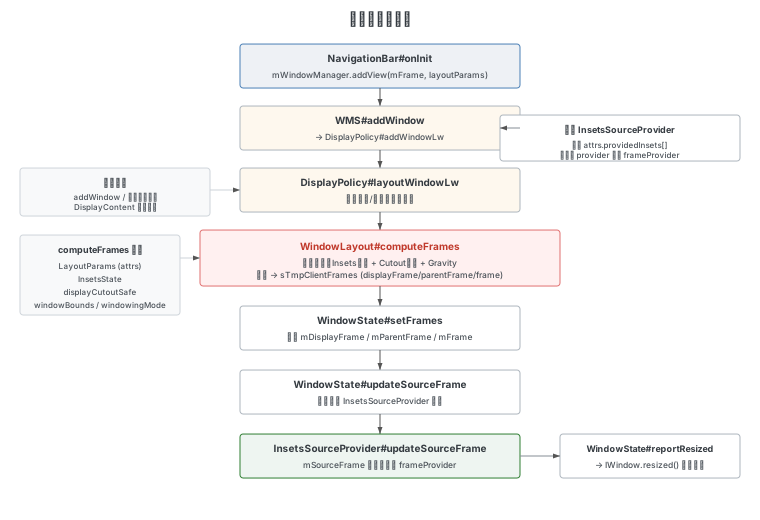
导航栏从 SystemUI 添加 View 到 frame 计算完成的完整流程:
1. NavigationBar 添加 View
SystemUI 的 NavigationBar.onInit() 中添加导航栏窗口:
// frameworks/base/packages/SystemUI/.../NavigationBar.java

@Override
public void onInit() {
    mWindowManager.addView(mFrame,
            getBarLayoutParams(mContext.getResources().getConfiguration()
                    .windowConfiguration.getRotation()));
}
getBarLayoutParams 为每个旋转方向创建 LayoutParams,其中包含关键的 providedInsets(通过 getInsetsFrameProvider 构造):
private InsetsFrameProvider[] getInsetsFrameProvider(int insetsHeight, Context userContext) {
    final InsetsFrameProvider navBarProvider =
            new InsetsFrameProvider(mInsetsSourceOwner, 0, WindowInsets.Type.navigationBars());
    // 设置导航栏高度
    if (insetsHeight != -1) {
        navBarProvider.setInsetsSize(Insets.of(0, 0, 0, insetsHeight));
    }
    // 还包括 tappableElement、mandatorySystemGestures、systemGestures 等 Provider
    return new InsetsFrameProvider[] { navBarProvider, ... };
}
2. WMS addWindow → addWindowLw
WindowManagerService.addWindow() 调用 DisplayPolicy.addWindowLw(),根据 attrs.type 识别导航栏窗口,并注册 InsetsSourceProvider:
// com.android.server.wm.DisplayPolicy

void addWindowLw(WindowState win, WindowManager.LayoutParams attrs) {
    switch (attrs.type) {
        case TYPE_NAVIGATION_BAR:
            mNavigationBar = win;
            break;
    }
    // 处理 providedInsets
    if (attrs.providedInsets != null) {
        for (int i = attrs.providedInsets.length - 1; i >= 0; i--) {
            final InsetsFrameProvider provider = attrs.providedInsets[i];
            final TriFunction<DisplayFrames, WindowContainer, Rect, Integer> frameProvider =
                    getFrameProvider(win, i, INSETS_OVERRIDE_INDEX_INVALID);
            // 注册到 InsetsStateController
            final InsetsSourceProvider sourceProvider = mDisplayContent
                    .getInsetsStateController().getOrCreateSourceProvider(
                            provider.getId(), provider.getType());
            sourceProvider.setWindowContainer(win, frameProvider, overrideProviders);
            mInsetsSourceWindowsExceptIme.add(win);
        }
    }
}
3. DisplayPolicy#layoutWindowLw → WindowLayout#computeFrames
窗口属性或显示内容变更时,触发 layoutWindowLw 进行布局计算。该方法调用 WindowLayout.computeFrames() 根据窗口的 LayoutParams、InsetsState、DisplayCutout 安全区域等计算出三个关键矩形(frame / displayFrame / parentFrame),然后通过 WindowState.setFrames() 写入窗口状态。
computeFrames 内部分为五个阶段:
- Insets 约束:根据
fitInsetsTypes和fitInsetsSides调用InsetsState.calculateInsets()收缩 displayFrame - parentFrame 确定:根窗口使用 displayFrame,子窗口使用父帧或 displayFrame
- DisplayCutout 裁切:根据
layoutInDisplayCutoutMode对帧进行安全区域限制 - 窗口尺寸计算:结合 MATCH_PARENT / 固定值 / compatScale 计算 w × h
- Gravity 定位:
Gravity.apply()+Gravity.applyDisplay()确定最终 frame
该算法的完整源码分析、数据结构说明和流程图详见 WMS 窗口大小计算流程:computeFrames。
getFrameProvider 的计算逻辑
getFrameProvider 返回一个 lambda,在 InsetsSourceProvider.updateSourceFrame 时被调用:
// com.android.server.wm.DisplayPolicy

private static TriFunction<DisplayFrames, WindowContainer, Rect, Integer> getFrameProvider(
        WindowState win, int index, int overrideIndex) {
    return (displayFrames, windowContainer, inOutFrame) -> {
        final LayoutParams lp = win.mAttrs.forRotation(displayFrames.mRotation);
        final InsetsFrameProvider ifp = lp.providedInsets[index];
        // 根据 source 类型确定初始 frame
        switch (ifp.getSource()) {
            case SOURCE_DISPLAY:
                inOutFrame.set(displayFrame);
                break;
            case SOURCE_CONTAINER_BOUNDS:
                inOutFrame.set(windowContainer.getBounds());
                break;
            case SOURCE_FRAME:
                // 使用窗口自身的 frame(默认)
                break;
        }
        // 应用 insetsSize 约束
        final Insets insetsSize = overrideIndex == INSETS_OVERRIDE_INDEX_INVALID
                ? ifp.getInsetsSize()
                : ifp.getInsetsSizeOverrides()[overrideIndex].getInsetsSize();
        calculateInsetsFrame(inOutFrame, insetsSize);
        // 如果需要扩展到 Cutout 区域
        if (extendByCutout && insetsSize != null) {
            WindowLayout.extendFrameByCutout(safe, displayFrame, inOutFrame, sTmpRect);
        }
        return ifp.getFlags();
    };
}问题排查提示:如果导航栏 Insets 异常(如高度为 0 或异常值),可检查
getInsetsFrameProvider中insetsSize是否正确设置。原始 Doc 7 中记录了一个实际案例:开机引导阶段insetsSize为 null 导致桌面高度异常,原因是 NavigationBar 的条件判断未走到setInsetsSize分支。
4. WindowState#setFrames → updateSourceFrame
计算完成后,将 frame 设置到 WindowState,并更新所有关联的 InsetsSourceProvider:
// com.android.server.wm.WindowState

void setFrames(ClientWindowFrames clientWindowFrames, int requestedWidth, int requestedHeight) {
    // 设置各种 frame
    windowFrames.mDisplayFrame.set(clientWindowFrames.displayFrame);
    windowFrames.mParentFrame.set(clientWindowFrames.parentFrame);
    windowFrames.mFrame.set(clientWindowFrames.frame);
    // ...
    // 更新 InsetsSourceProvider 的 sourceFrame
    updateSourceFrame(windowFrames.mFrame);
}

void updateSourceFrame(Rect winFrame) {
    final SparseArray<InsetsSourceProvider> providers = getInsetsSourceProviders();
    for (int i = providers.size() - 1; i >= 0; i--) {
        providers.valueAt(i).updateSourceFrame(winFrame);
    }
}
5. InsetsSourceProvider#updateSourceFrame
最终更新 InsetsSource 的 frame:
// com.android.server.wm.InsetsSourceProvider

void updateSourceFrame(Rect frame) {
    mSourceFrame.set(frame);
    if (mFrameProvider != null) {
        // 应用 FrameProvider 的计算逻辑(如 insetsSize 约束)
        mFlagsFromFrameProvider = mFrameProvider.apply(
                mWindowContainer.getDisplayContent().mDisplayFrames,
                mWindowContainer, mSourceFrame);
    }
    updateSourceFrameForServerVisibility();
    // ...
}
6. 通知应用
frame 更新完成后,通过 WindowState.reportResized() 通知应用端:
// WindowState.java line 4236
void reportResized() {
    fillClientWindowFramesAndConfiguration(mLastReportedFrames, mLastReportedConfiguration,
            mLastReportedActivityWindowInfo, true /* useLatestConfig */,
            false /* relayoutVisible */);
    fillInsetsState(mLastReportedInsetsState, false /* copySources */);
    // ...
    // V 上新增 bundleClientTransactionFlag 路径,通过 WindowStateResizeItem 发送
    if (Flags.bundleClientTransactionFlag()) {
        getProcess().scheduleClientTransactionItem(
                WindowStateResizeItem.obtain(mClient, mLastReportedFrames, reportDraw,
                        mLastReportedConfiguration, mLastReportedInsetsState, forceRelayout,
                        alwaysConsumeSystemBars, displayId,
                        syncWithBuffers ? mSyncSeqId : -1, isDragResizing,
                        mLastReportedActivityWindowInfo));
    } else {
        mClient.resized(mLastReportedFrames, reportDraw, mLastReportedConfiguration,
                mLastReportedInsetsState, forceRelayout, alwaysConsumeSystemBars, displayId,
                syncWithBuffers ? mSyncSeqId : -1, isDragResizing,
                mLastReportedActivityWindowInfo);
    }
}
导航栏颜色机制
导航栏的最终颜色由 PhoneWindow 设置的初始值和 DecorView 的计算共同决定。
PhoneWindow 设置导航栏背景色
在 PhoneWindow.generateLayout() 中,从主题属性读取导航栏颜色:
// com.android.internal.policy.PhoneWindow (line 2634)

if (!mForcedNavigationBarColor) {
    // 从资源读取系统默认颜色和配置指定颜色
    final int navBarCompatibleColor = context.getColor(R.color.navigation_bar_compatible);
    final int navBarDefaultColor = context.getColor(R.color.navigation_bar_default);
    final int navBarColor = a.getColor(R.styleable.Window_navigationBarColor, navBarDefaultColor);
    final boolean navigationBarColorSpecified = navBarColor != navBarDefaultColor;
    // V 上优先考虑 E2E 强制状态:未强制 E2E 且没有指定颜色时使用兼容色,否则用指定色
    mNavigationBarColor =
            !navigationBarColorSpecified && !mEdgeToEdgeEnforced
                    && !context.getResources().getBoolean(R.bool.config_navBarDefaultTransparent)
            ? navBarCompatibleColor
            : navBarColor;
    mNavigationBarDividerColor = mEdgeToEdgeEnforced ? Color.TRANSPARENT
            : a.getColor(R.styleable.Window_navigationBarDividerColor, Color.TRANSPARENT);
}
DecorView 计算最终颜色
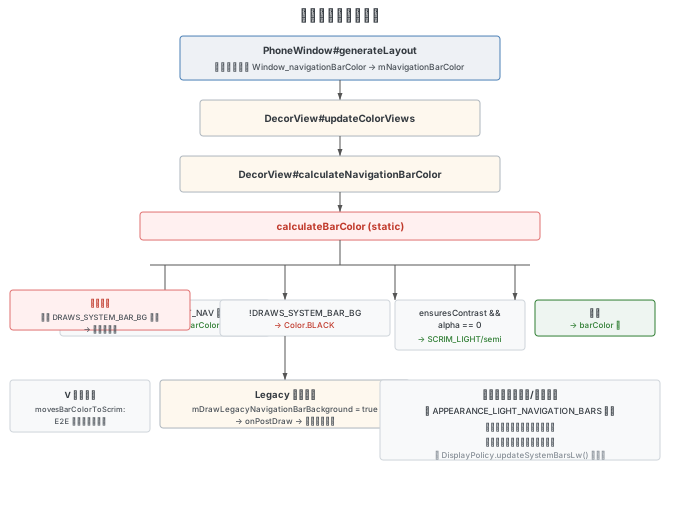
PhoneWindow.mNavigationBarColor 不直接作为最终颜色,还需经过 DecorView 的 calculateNavigationBarColor 和 calculateBarColor 计算:
// com.android.internal.policy.DecorView (line 1551)

private int calculateNavigationBarColor(@Appearance int appearance) {
    return calculateBarColor(mWindow.getAttributes().flags, FLAG_TRANSLUCENT_NAVIGATION,
            mSemiTransparentBarColor, mWindow.mNavigationBarColor,
            appearance, APPEARANCE_LIGHT_NAVIGATION_BARS,
            // ensuresContrast:需要对比度时(非遮罩压制且 config_navBarNeedsScrim 为 true)
            mWindow.mEnsureNavigationBarContrastWhenTransparent
                    && (mLastSuppressScrimTypes & WindowInsets.Type.navigationBars()) == 0,
            // movesBarColorToScrim:E2E 强制时将颜色移至 scrim 层
            mWindow.mEdgeToEdgeEnforced);
}

// DecorView.java line 1566
public static int calculateBarColor(int flags, int translucentFlag, int semiTransparentBarColor,
        int barColor, @Appearance int appearance, @Appearance int lightAppearanceFlag,
        boolean ensuresContrast, boolean movesBarColorToScrim) {
    if ((flags & translucentFlag) != 0) {
        return semiTransparentBarColor;              // 半透明标志 → 半透明色
    } else if ((flags & FLAG_DRAWS_SYSTEM_BAR_BACKGROUNDS) == 0) {
        return Color.BLACK;                          // 不绘制系统栏背景 → 黑色
    } else if (ensuresContrast) {
        final int alpha = Color.alpha(barColor);
        if (alpha == 0) {
            boolean light = (appearance & lightAppearanceFlag) != 0;
            return light ? SCRIM_LIGHT : semiTransparentBarColor; // 完全透明 → 遮罩
        } else if (movesBarColorToScrim) {
            return (barColor & 0xffffff) | SCRIM_ALPHA;           // 半透明 + E2E → 带 scrim alpha
        }
    } else if (movesBarColorToScrim) {
        return Color.TRANSPARENT;                                  // E2E 强制 → 透明
    }
    return barColor;                                               // 正常返回颜色
}
Legacy 绘制路径
当窗口没有 FLAG_DRAWS_SYSTEM_BAR_BACKGROUNDS 标志时,mDrawLegacyNavigationBarBackground 会被设为 true。在下一次绘制时,通过 ViewRootImpl.draw() → ThreadedRenderer.updateRootDisplayList() → DecorView.onPostDraw() → drawLegacyNavigationBarBackground() 绘制黑色背景:
// DecorView.java line 2395
private void drawLegacyNavigationBarBackground(RecordingCanvas canvas) {
    // mDrawLegacyNavigationBarBackgroundHandled 为 true 时由其他路径处理
    if (!mDrawLegacyNavigationBarBackground || mDrawLegacyNavigationBarBackgroundHandled) {
        return;
    }
    View v = mNavigationColorViewState.view;
    if (v == null) return;
    // mLegacyNavigationBarBackgroundPaint 在 DecorView 构造时(line 332)设为 Color.BLACK
    canvas.drawRect(v.getLeft(), v.getTop(), v.getRight(), v.getBottom(),
            mLegacyNavigationBarBackgroundPaint);
}
导航键颜色
导航键(三键虚拟按键或小白条)的颜色由 APPEARANCE_LIGHT_NAVIGATION_BARS 标志控制:
- 有此标志:浅色导航栏背景,导航键为深色(偏灰,方便在浅色背景上辨认)
- 无此标志:深色导航栏背景,导航键为浅色
此标志在 DisplayPolicy.updateSystemBarsLw() 中根据焦点窗口的属性计算:
// 原生流程:从 navColorWin 获取 appearance
appearance &= ~APPEARANCE_LIGHT_NAVIGATION_BARS;
appearance |= navColorWin.mAttrs.insetsFlags.appearance & APPEARANCE_LIGHT_NAVIGATION_BARS;排查导航键颜色问题可通过 dump 窗口信息查看 DRAWS_SYSTEM_BAR_BACKGROUNDS 标志:
adb shell dumpsys window windows查看 fl= 行是否包含 DRAWS_SYSTEM_BAR_BACKGROUNDS。缺少此标志时,导航栏背景可能变黑,导致背景色和导航键颜色相近而难以辨认。
Edge-to-Edge 机制
什么是 Edge-to-Edge
Edge-to-Edge(E2E)是让应用界面延伸到屏幕全部空间的全屏沉浸式体验。Google 从 Android 15 开始强制要求 targetSdk >= 35 的应用适配 E2E。
E2E 适配前后的核心区别:
- 未适配(Legacy size):应用布局区域 = 全屏 - Cutout - SystemBars
- 已适配(Insets decoupled size):应用布局区域 = 全屏
应用适配方法
View mainView = findViewById(R.id.main_layout);
ViewCompat.setOnApplyWindowInsetsListener(mainView, (view, insets) -> {
    Insets systemBar = insets.getInsets(WindowInsets.Type.systemBars());
    view.setPadding(systemBar.left, systemBar.top, systemBar.right, systemBar.bottom);
    return insets;
});
Android V 上的关键变化
mAppBounds 的变化
WindowConfiguration.mAppBounds 在 V 上不再包含 Insets 信息:
# V上
nonDecorFrame=[0,0][1440,3200]  (全屏大小)

# U上
nonDecorFrame=[0,122][1440,3144]  (去除了状态栏和导航栏)
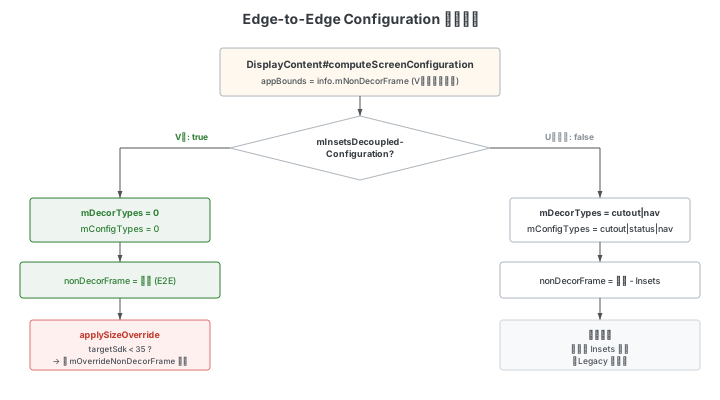
mInsetsDecoupledConfiguration
V 上默认开启此 Flag,含义是将 Configuration 与 Insets 解耦:
// WindowManagerService 构造方法
if (mFlags.mInsetsDecoupledConfiguration) {
    mDecorTypes = 0;    // V上:不扣除任何 Insets
    mConfigTypes = 0;
} else {
    mDecorTypes = WindowInsets.Type.displayCutout() | WindowInsets.Type.navigationBars();
    mConfigTypes = WindowInsets.Type.displayCutout() | WindowInsets.Type.statusBars()
            | WindowInsets.Type.navigationBars();
}
当 mDecorTypes = 0 时,DecorInsets.Info.update() 中计算的 mNonDecorInsets 全为零,mNonDecorFrame 等于全屏大小。
DecorInsets.Info.update() 的完整计算逻辑:
// com.android.server.wm.DisplayPolicy.DecorInsets.Info

InsetsState update(DisplayContent dc, int rotation, int w, int h) {
    final DisplayFrames df = new DisplayFrames();
    dc.updateDisplayFrames(df, rotation, w, h);
    dc.getDisplayPolicy().simulateLayoutDisplay(df);
    final InsetsState insetsState = df.mInsetsState;
    final Rect displayFrame = insetsState.getDisplayFrame();

    // 使用 mDecorTypes 计算 decor insets
    // V上 mDecorTypes=0 → decor 全为零
    final Insets decor = insetsState.calculateInsets(displayFrame,
            dc.mWmService.mDecorTypes, true);
    // 使用 mConfigTypes 计算 config insets
    final Insets configInsets = dc.mWmService.mConfigTypes == dc.mWmService.mDecorTypes
            ? decor
            : insetsState.calculateInsets(displayFrame, dc.mWmService.mConfigTypes, true);
    // 使用 mOverrideDecorTypes 计算 override insets(为兼容旧应用)
    final Insets overrideDecorInsets = dc.mWmService.mDecorTypes == dc.mWmService.mOverrideDecorTypes
            ? decor
            : insetsState.calculateInsets(displayFrame, dc.mWmService.mOverrideDecorTypes, true);

    mNonDecorInsets.set(decor.left, decor.top, decor.right, decor.bottom);
    mOverrideNonDecorInsets.set(overrideDecorInsets.left, overrideDecorInsets.top,
            overrideDecorInsets.right, overrideDecorInsets.bottom);
    mNonDecorFrame.set(displayFrame);
    mNonDecorFrame.inset(mNonDecorInsets);           // V上不 inset,等于全屏
    mOverrideNonDecorFrame.set(displayFrame);
    mOverrideNonDecorFrame.inset(mOverrideNonDecorInsets);  // 始终 inset,用于兼容
    // ...
}
V 与 U 上 dump 对比:
adb shell dumpsys window | grep "nonDecorFrame="# V上(mDecorTypes=0,nonDecorFrame 为全屏)
ROTATION_0={nonDecorInsets=[0,0][0,0], overrideNonDecorInsets=[0,147][0,56],
nonDecorFrame=[0,0][1440,3200],
overrideNonDecorFrame=[0,147][1440,3144]}
# U上(mDecorTypes 包含 cutout+nav,nonDecorFrame 去除了 Insets)
ROTATION_0={nonDecorInsets=[0,122][0,56],
nonDecorFrame=[0,122][1440,3144]}DisplayInfo 的同步变化
在 V 上,DisplayInfo.appWidth 和 DisplayInfo.appHeight 也同步使用 mNonDecorFrame:
// com.android.server.wm.DisplayContent (line 2788)

private DisplayInfo updateDisplayAndOrientation(Configuration outConfig) {
    final int rotation = getRotation();
    final boolean rotated = (rotation == ROTATION_90 || rotation == ROTATION_270);
    final int dw = rotated ? mBaseDisplayHeight : mBaseDisplayWidth;
    final int dh = rotated ? mBaseDisplayWidth : mBaseDisplayHeight;
    // ...
    final Rect appFrame = mDisplayPolicy.getDecorInsetsInfo(rotation, dw, dh).mNonDecorFrame;
    mDisplayInfo.appWidth = appFrame.width();    // V上 = 全屏宽度(mNonDecorFrame 不扣 Insets)
    mDisplayInfo.appHeight = appFrame.height();  // V上 = 全屏高度
    // ...
}
因此通过 ApplicationContext 获取的 DisplayMetrics 在 V 上也是全屏大小。
applySizeOverrideIfNeeded 兼容机制
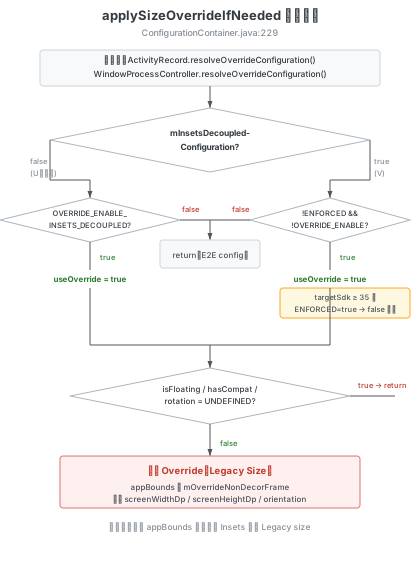
对于未适配 E2E 的应用(targetSdk < 35),系统通过 applySizeOverride 重写其 Configuration,使其看到的 appBounds 仍然是去除 Insets 后的 Legacy size:
// com.android.server.wm.ConfigurationContainer (line 229)
// ActivityRecord.java:10919 和 WindowState.java:3345 均通过调用此方法实现 E2E 兼容

static void applySizeOverrideIfNeeded(DisplayContent displayContent, ApplicationInfo appInfo,
        Configuration newParentConfiguration, Configuration inOutConfig,
        boolean optsOutEdgeToEdge, boolean hasFixedRotationTransform,
        boolean hasCompatDisplayInsets) {
    if (displayContent == null) return;
    // 判断是否需要重写
    final boolean useOverrideInsetsForConfig =
            displayContent.mWmService.mFlags.mInsetsDecoupledConfiguration
                    ? !appInfo.isChangeEnabled(INSETS_DECOUPLED_CONFIGURATION_ENFORCED)
                            && !appInfo.isChangeEnabled(OVERRIDE_ENABLE_INSETS_DECOUPLED_CONFIGURATION)
                    : appInfo.isChangeEnabled(OVERRIDE_ENABLE_INSETS_DECOUPLED_CONFIGURATION);

    if (!optOutEdgeToEdge && (!useOverrideInsetsForConfig || ...)) {
        return false;  // 不需要重写,使用 E2E Configuration
    }

    // 使用 mOverrideNonDecorFrame(去除了 system bar 的区域)重写 appBounds
    final Rect nonDecorFrame = displayContent.getDisplayPolicy()
            .getDecorInsetsInfo(rotation, dw, dh).mOverrideNonDecorFrame;
    Rect outAppBounds = inOutConfig.windowConfiguration.getAppBounds();
    if (outAppBounds == null || outAppBounds.isEmpty()) {
        inOutConfig.windowConfiguration.setAppBounds(parentBounds);
        outAppBounds = inOutConfig.windowConfiguration.getAppBounds();
        outAppBounds.intersect(nonDecorFrame);
    }
    // 同时重写 screenWidthDp、screenHeightDp、orientation 等
    // ...
    return true;
}
applySizeOverrideIfNeeded 定义在 ConfigurationContainer.java:229,由 ActivityRecord.java:10919、WindowState.java:3345 和 WindowProcessController.java:1816 调用,确保应用收到的 Configuration 已被正确重写。
强制 Edge-to-Edge
在 Android 15 设备上,可通过以下方式强制所有应用开启 E2E:
- 开发者选项:启用
ENFORCE_EDGE_TO_EDGE兼容性标志 - 修改系统代码:在
PhoneWindow.isEdgeToEdgeEnforced()中返回 true
注意:E2E 强制开启后,如果应用未通过
config_navBarNeedsScrim禁用 scrim,导航栏区域可能出现半透明遮罩而非完全透明。AOSP 中小白条模式通过 RRO 包NavigationBarModeGesturalOverlay将config_navBarNeedsScrim设为 false 来消除遮罩。
E2E 典型问题
V 上开启 mInsetsDecoupledConfiguration 后,未适配的应用可能在以下场景遇到问题:
Configuration 异常(appBounds 为全屏大小): 应用收到的 Configuration 中 appBounds 没有去除 Insets,导致布局计算错误。原因通常是 applySizeOverride 未正确执行,需检查应用的 targetSdk 和 INSETS_DECOUPLED_CONFIGURATION_ENFORCED 标志。
DisplayMetrics 异常: 通过 ApplicationContext 获取的 DisplayMetrics 返回全屏大小(不含 Insets 扣除)。这是因为 DisplayInfo.appWidth/appHeight 在 V 上使用了 mNonDecorFrame(全屏大小)。应用应改为通过 Activity 的 Configuration 或 WindowMetrics 获取正确的尺寸。
// 示例:通过 ApplicationContext 获取的 DisplayMetrics 在 V 上是全屏大小
WindowManager wm = (WindowManager) getApplicationContext()
        .getSystemService(Context.WINDOW_SERVICE);
DisplayMetrics dm = new DisplayMetrics();
wm.getDefaultDisplay().getMetrics(dm);
// dm.widthPixels / dm.heightPixels 为全屏大小,未扣除 Insets
常见问题排查
状态栏反色问题
"反色问题"指状态栏文字/图标颜色与背景颜色相反,导致内容不可见。
可能原因:
| 原因 | 说明 |
|---|---|
| 应用 Flag 传递异常 | 状态栏背景暗色,但应用传递了 LIGHT_STATUS_BARS,导致图标变黑 |
| Insets 计算异常 | 应用设置正确的 flag,但经过 Insets 计算后 SystemUI 收到错误的 flag |
| SystemUI 处理异常 | flag 和 displayId 都正确,但 SystemUI 内部处理有误(罕见) |
分析方法:
# 查看窗口焦点
adb shell dumpsys window | grep -i "focus"

# 查看系统栏属性变化
# 在 logcat 中过滤 WmSystemUiDebug 标签
# 关注 displayId、appearanceRegions(是否含 LIGHT_STATUS_BARS)、packageName

# dump 窗口属性
adb shell dumpsys window windows
# 查看 apr= 行的 appearance 值分析优先级:应用 Flag → Insets 计算 → SystemUI 处理
导航栏背景色异常
排查步骤:
- 判断是否应用设置:logcat 过滤
"set navigation bar color"查看调用栈 - 检查 FLAG_DRAWS_SYSTEM_BAR_BACKGROUNDS:dump 窗口信息查看
fl=行。缺少此标志时导航栏背景会变黑 - 检查布局是否延伸到导航栏:使用 Layout Inspector 工具查看应用布局是否只到状态栏和导航栏之间
- 检查深色模式:某些应用未适配深色模式,会出现导航栏跟随系统变色但页面主体不变的现象
页面控件与小白条重叠
此类问题通常由页面沉浸导致。可能是应用自身设置,也可能是系统策略。
大圆角裁切:某些机型圆角较大,靠近圆角区域的控件可能被裁切。
dump 命令参考
# 查看所有 Insets 信息
adb shell dumpsys window d

# 查看应用的 LocalInsetsSources
adb shell dumpsys window d | grep "LocalInsetsSources"

# 查看系统 Cutout 信息
adb shell dumpsys activity | grep cutout -i

# 查看 InsetsStateController
adb shell dumpsys activity a | grep WindowInsetsStateController -A70

# 查看 DecorInsetsInfo
adb shell dumpsys window | grep "mDecorInsetsInfo" -A 10

# 查看窗口状态栏 appearance
adb shell dumpsys window windows | grep "apr="
附:厂商定制技术概述
以下功能属于厂商定制实现,不属于 AOSP 标准流程,此处仅概述其设计思路以供参考。
动态 Cutout 与前摄区域盖黑
对于屏下摄像头(CUP)或极致小孔设备,在前摄调用时需要在摄像头位置添加圆形黑色 View 防止过曝,同时需要动态启用 Cutout 让三方相机适配避让。实现这类功能需要考虑的核心流程包括:通过 CameraManager.AvailabilityCallback 监听前摄开关状态来添加/移除盖黑视图;在 WindowState.getMergedInsetsState() 中根据盖黑状态动态设置或清除 DisplayCutout;通过 ViewRootImpl.setView() 时查询云控名单决定当前窗口是否需要 Cutout;还需处理分屏/小窗/转屏/手势操作等复杂场景下的盖黑状态管理和延迟优化。
应用内刘海设置
此功能允许在系统设置中针对单个应用强制覆盖其 layoutInDisplayCutoutMode 为 ALWAYS 模式,使应用界面延伸到 Cutout 区域。实现方式是在 WindowLayout.computeFrames() 布局计算时,根据预设名单将目标应用的 CutoutMode 强制替换为 LAYOUT_IN_DISPLAY_CUTOUT_MODE_ALWAYS。应用也可通过在 AndroidManifest.xml 的 application 标签中配置 notch.config meta-data 主动请求此行为。