焦点窗口切换
本文档覆盖焦点窗口切换的完整链路:WMS 确定焦点窗口 → InputMonitor 同步到 SurfaceFlinger → SurfaceFlinger 传递给 InputDispatcher → InputDispatcher 授予焦点 → App 收到焦点回调。
一、概述
1.1 焦点窗口的定义
焦点窗口(Focused Window) 是当前接收按键事件(KeyEvent)和非指针 MotionEvent(如游戏手柄摇杆)的窗口。同一屏幕同一时间最多一个焦点窗口。
触摸事件(触屏 MotionEvent)不依赖焦点窗口,它根据触摸坐标找到对应窗口进行派发。
1.2 焦点切换的触发场景
焦点更新的入口是 WindowManagerService.updateFocusedWindowLocked(),在以下场景中被调用:
addWindow():新窗口添加removeWindow():窗口移除relayoutWindow():窗口重新布局setFocusedApp():前台 Activity 切换(如启动新 Activity、返回)- 分屏操作:切换焦点 Task
- IME 变化:输入法窗口出现/消失
- Display 变化:多屏焦点切换
1.3 焦点应用与焦点窗口
// DisplayContent.java
// 焦点应用:当前前台 Activity,低于它的窗口不能成为焦点窗口
ActivityRecord mFocusedApp = null;

// 焦点窗口:当前接收按键事件和指针事件的窗口
WindowState mCurrentFocus = null;- 焦点应用(mFocusedApp):Activity 切换为 top resumed 时设置
- 焦点窗口(mCurrentFocus):由 WMS 遍历窗口树确定,同一屏幕同一时间最多一个
1.4 全链路总览
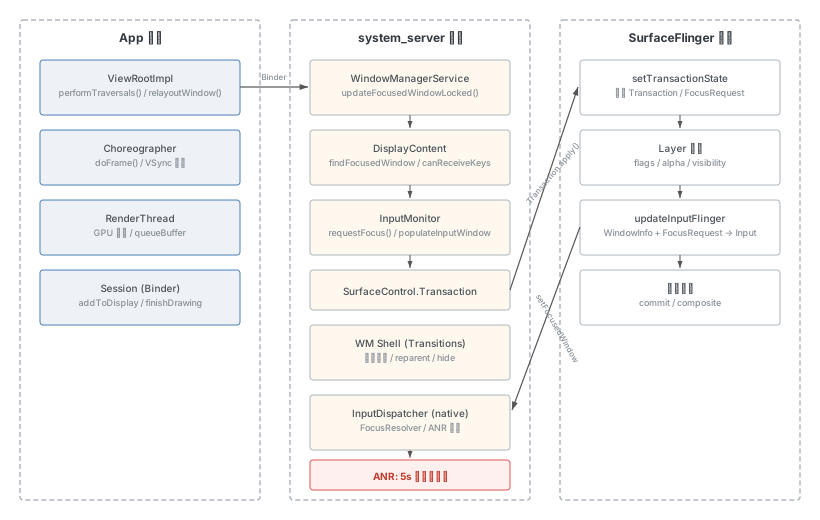
焦点窗口的确定涉及四个模块协作:
- WMS:管理窗口状态,确定哪个窗口应该获得焦点
- SurfaceFlinger:管理 Layer 显示,根据实际可见性补充标记,传递焦点请求到 Input
- InputDispatcher:根据窗口列表和焦点请求,最终决定是否授予焦点
- App:收到焦点事件后,触发
onWindowFocusChanged回调
WMS 只管理窗口元数据,无法确定实际显示状态;SurfaceFlinger 管理实际渲染,能知道哪些 Layer 确实可见。因此焦点信息需要经过 SurfaceFlinger 校验后才能到达 InputDispatcher。
二、查看焦点窗口的方法
# WMS 侧:查看焦点窗口和焦点应用
adb shell dumpsys window displays | grep -E "mCurrentFocus|mFocusedApp"
#   mCurrentFocus=Window{xxx u0 com.example.app/.MainActivity}
#   mFocusedApp=ActivityRecord{yyy u0 com.example.app/.MainActivity t12}

# SurfaceFlinger 侧:HWC layers 中 [*] 标记焦点窗口
adb shell dumpsys SurfaceFlinger | grep -A 50 "HWC layers"

# Input 侧:查看焦点应用和焦点窗口
adb shell dumpsys input | grep -E "FocusedApplications|FocusedWindows"
#   FocusedWindows: displayId=0, name='xxx com.example.app/...'
#   如果是 <none>,说明当前无焦点窗口
三、WMS 侧焦点窗口计算
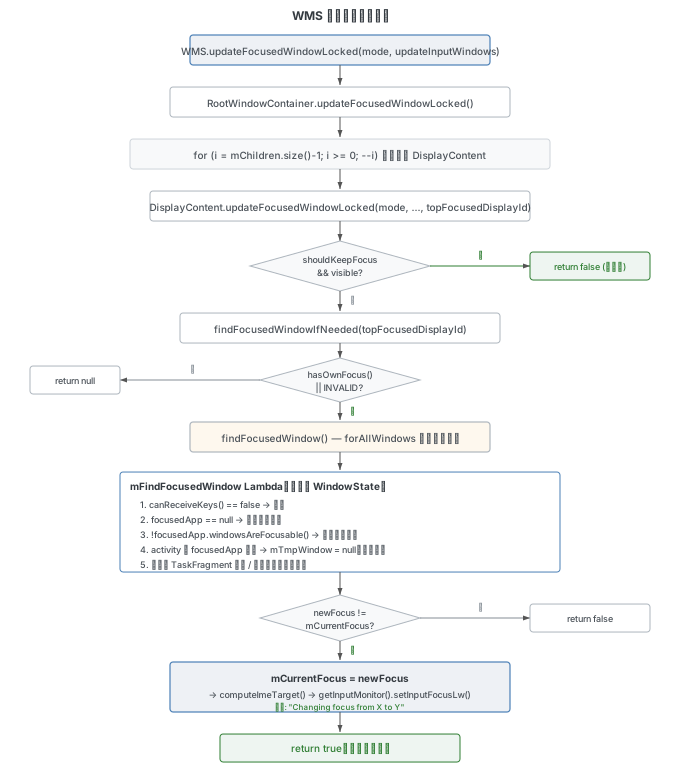
3.1 焦点更新入口
// WindowManagerService.java:7261
boolean updateFocusedWindowLocked(int mode, boolean updateInputWindows) {
    Trace.traceBegin(TRACE_TAG_WINDOW_MANAGER, "wmUpdateFocus");
    boolean changed = mRoot.updateFocusedWindowLocked(mode, updateInputWindows);
    Trace.traceEnd(TRACE_TAG_WINDOW_MANAGER);
    return changed;
}
mode 参数控制更新行为:
UPDATE_FOCUS_NORMAL (0):常规更新UPDATE_FOCUS_WILL_ASSIGN_LAYERS (1):窗口层级分配之前UPDATE_FOCUS_PLACING_SURFACES (2):performSurfacePlacement 期间UPDATE_FOCUS_WILL_PLACE_SURFACES (3):Surface 放置之前UPDATE_FOCUS_REMOVING_FOCUS (4):焦点窗口移除之后
3.2 RootWindowContainer.updateFocusedWindowLocked()
按 Z 序(从最顶层开始)遍历所有 DisplayContent,对每个 Display 执行焦点更新:
// RootWindowContainer.java:602
boolean updateFocusedWindowLocked(int mode, boolean updateInputWindows) {
    mTopFocusedAppByProcess.clear();
    boolean changed = false;
    int topFocusedDisplayId = INVALID_DISPLAY;
    // 按 Z 序从顶层开始遍历
    for (int i = mChildren.size() - 1; i >= 0; --i) {
        final DisplayContent dc = mChildren.get(i);
        changed |= dc.updateFocusedWindowLocked(mode, updateInputWindows,
                topFocusedDisplayId);
        final WindowState newFocus = dc.mCurrentFocus;
        if (newFocus != null) {
            final int pidOfNewFocus = newFocus.mSession.mPid;
            if (mTopFocusedAppByProcess.get(pidOfNewFocus) == null) {
                mTopFocusedAppByProcess.put(pidOfNewFocus, newFocus.mActivityRecord);
            }
            if (topFocusedDisplayId == INVALID_DISPLAY) {
                topFocusedDisplayId = dc.getDisplayId();
            }
        } else if (topFocusedDisplayId == INVALID_DISPLAY && dc.mFocusedApp != null) {
            topFocusedDisplayId = dc.getDisplayId();
        }
    }
    if (topFocusedDisplayId == INVALID_DISPLAY) {
        topFocusedDisplayId = DEFAULT_DISPLAY;
    }
    if (mTopFocusedDisplayId != topFocusedDisplayId) {
        mTopFocusedDisplayId = topFocusedDisplayId;
        mWmService.mInputManager.setFocusedDisplay(topFocusedDisplayId);
        mWmService.mPolicy.setTopFocusedDisplay(topFocusedDisplayId);
        mWmService.mAccessibilityController.setFocusedDisplay(topFocusedDisplayId);
    }
    return changed;
}
关键逻辑:第一个找到焦点窗口的 Display 成为 topFocusedDisplayId,后续 Display 如果没有自己的焦点(hasOwnFocus() == false),将不会尝试查找焦点窗口。
3.3 DisplayContent.updateFocusedWindowLocked()
// DisplayContent.java:4581
boolean updateFocusedWindowLocked(int mode, boolean updateInputWindows,
        int topFocusedDisplayId) {
    // 瞬态启动期间不自动切换焦点
    if (mCurrentFocus != null && mTransitionController.shouldKeepFocus(mCurrentFocus)
            && mFocusedApp != null && mCurrentFocus.isDescendantOf(mFocusedApp)
            && mCurrentFocus.isVisible() && mCurrentFocus.isFocusable()) {
        return false;
    }
    WindowState newFocus = findFocusedWindowIfNeeded(topFocusedDisplayId);
    if (mCurrentFocus == newFocus) {
        return false;
    }
    // 更新 IME 目标
    boolean imWindowChanged = false;
    final WindowState imWindow = mInputMethodWindow;
    if (imWindow != null) {
        final WindowState prevTarget = mImeLayeringTarget;
        final WindowState newTarget = computeImeTarget(true);
        imWindowChanged = prevTarget != newTarget;
        if (mode != UPDATE_FOCUS_WILL_ASSIGN_LAYERS
                && mode != UPDATE_FOCUS_WILL_PLACE_SURFACES) {
            assignWindowLayers(false);
        }
        if (imWindowChanged) {
            mWmService.mWindowsChanged = true;
            setLayoutNeeded();
            newFocus = findFocusedWindowIfNeeded(topFocusedDisplayId);
        }
    }
    // 日志:Changing focus from X to Y
    ProtoLog.d(WM_DEBUG_FOCUS_LIGHT, "Changing focus from %s to %s displayId=%d Callers=%s",
            mCurrentFocus, newFocus, getDisplayId(), Debug.getCallers(4));
    final WindowState oldFocus = mCurrentFocus;
    mCurrentFocus = newFocus;

    if (newFocus != null) {
        mWinAddedSinceNullFocus.clear();
        mWinRemovedSinceNullFocus.clear();
        if (newFocus.canReceiveKeys()) {
            newFocus.mToken.paused = false;
        }
    }
    getDisplayPolicy().focusChangedLw(oldFocus, newFocus);
    mAtmService.mBackNavigationController.onFocusChanged(newFocus);
    // 通知 InputMonitor(defer 模式下由调用者负责)
    if (mode != UPDATE_FOCUS_WILL_ASSIGN_LAYERS) {
        getInputMonitor().setInputFocusLw(newFocus, updateInputWindows);
    }
    adjustForImeIfNeeded();
    scheduleToastWindowsTimeoutIfNeededLocked(oldFocus, newFocus);
    return true;
}
3.4 焦点窗口查找
// DisplayContent.java:4545
WindowState findFocusedWindowIfNeeded(int topFocusedDisplayId) {
    // 只有拥有自己的焦点或者还没有其他 Display 获焦时才查找
    return (hasOwnFocus() || topFocusedDisplayId == INVALID_DISPLAY)
                ? findFocusedWindow() : null;
}

// DisplayContent.java:4555
WindowState findFocusedWindow() {
    mTmpWindow = null;
    forAllWindows(mFindFocusedWindow, true /* traverseTopToBottom */);
    if (mTmpWindow == null) {
        ProtoLog.v(WM_DEBUG_FOCUS_LIGHT,
                "findFocusedWindow: No focusable windows, display=%d", getDisplayId());
        return null;
    }
    return mTmpWindow;
}
3.5 mFindFocusedWindow 核心逻辑
这是焦点查找的核心 Lambda,对每个窗口从顶到底逐一检查:
// DisplayContent.java:940
private final ToBooleanFunction<WindowState> mFindFocusedWindow = w -> {
    final ActivityRecord focusedApp = mFocusedApp;
    ProtoLog.v(WM_DEBUG_FOCUS, "Looking for focus: %s, flags=%d, canReceive=%b, reason=%s",
            w, w.mAttrs.flags, w.canReceiveKeys(),
            w.canReceiveKeysReason(false /* fromUserTouch */));

    // ① canReceiveKeys 检查——不满足直接跳过
    if (!w.canReceiveKeys()) {
        return false;
    }

    // ② IME 子窗口特殊处理
    if (w.mIsImWindow && w.isChildWindow() && (mImeLayeringTarget == null
            || !mImeLayeringTarget.isRequestedVisible(ime()))) {
        return false;
    }
    if (w.mAttrs.type == TYPE_INPUT_METHOD_DIALOG && mImeLayeringTarget != null
            && !mImeLayeringTarget.isRequestedVisible(ime())
            && !mImeLayeringTarget.isVisibleRequested()) {
        return false;
    }

    final ActivityRecord activity = w.mActivityRecord;

    // ③ 没有焦点应用时,当前窗口直接获焦
    if (focusedApp == null) {
        ProtoLog.v(WM_DEBUG_FOCUS_LIGHT,
                "findFocusedWindow: focusedApp=null using new focus @ %s", w);
        mTmpWindow = w;
        return true;
    }

    // ④ 焦点应用的窗口不可获焦时,当前窗口获焦
    if (!focusedApp.windowsAreFocusable()) {
        ProtoLog.v(WM_DEBUG_FOCUS_LIGHT,
                "findFocusedWindow: focusedApp windows not focusable using new focus @ %s", w);
        mTmpWindow = w;
        return true;
    }

    // ⑤ 当前窗口的 Activity 在焦点应用之下 → 无焦点窗口
    if (activity != null && w.mAttrs.type != TYPE_APPLICATION_STARTING) {
        if (focusedApp.compareTo(activity) > 0) {
            ProtoLog.v(WM_DEBUG_FOCUS_LIGHT,
                    "findFocusedWindow: Reached focused app=%s", focusedApp);
            mTmpWindow = null;
            return true;
        }
        // ⑥ 嵌入式 Activity 检查
        TaskFragment parent = activity.getTaskFragment();
        if (parent != null && parent.isEmbedded()) {
            if (activity.getTask() == focusedApp.getTask()
                    && activity.getTaskFragment() != focusedApp.getTaskFragment()) {
                return false;
            }
        }
    }

    // ⑦ 默认:当前窗口获焦
    ProtoLog.v(WM_DEBUG_FOCUS_LIGHT, "findFocusedWindow: Found new focus @ %s", w);
    mTmpWindow = w;
    return true;
};
各分支的含义:
- 分支 ①:
canReceiveKeys()失败 → 此窗口不能获焦,跳过 - 分支 ②:IME 子窗口在目标不可见时不获焦
- 分支 ③:没有设置焦点应用 → 第一个能获焦的窗口就是焦点窗口
- 分支 ④:焦点应用的窗口不可获焦(如 finishing 状态)→ 同上
- 分支 ⑤:当前窗口属于焦点应用之下的 Activity → 没有合格的窗口,返回 null(无焦点窗口)
- 分支 ⑥:嵌入式 Activity 在同一 Task 不同 TaskFragment 中 → 跳过
- 分支 ⑦:默认获焦
3.6 canReceiveKeys()
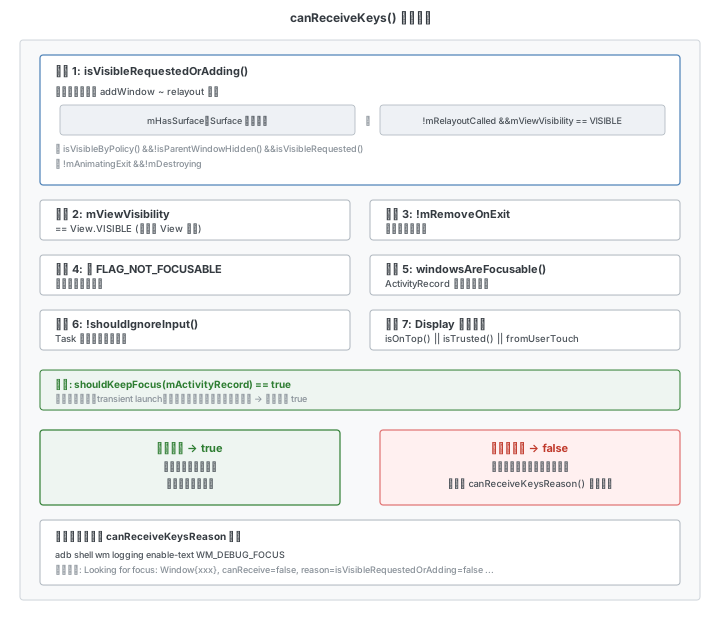
// WindowState.java:3300
public boolean canReceiveKeys(boolean fromUserTouch) {
    // 瞬态启动期间保持可获焦
    if (mActivityRecord != null && mTransitionController.shouldKeepFocus(mActivityRecord)) {
        return true;
    }

    final boolean canReceiveKeys = isVisibleRequestedOrAdding()
            && (mViewVisibility == View.VISIBLE)     // 客户端 View 可见
            && !mRemoveOnExit                         // 非退出状态
            && ((mAttrs.flags & FLAG_NOT_FOCUSABLE) == 0)  // 无不可获焦标记
            && (mActivityRecord == null || mActivityRecord.windowsAreFocusable(fromUserTouch))
            && (mActivityRecord == null || mActivityRecord.getTask() == null
                    || !mActivityRecord.getTask().getRootTask().shouldIgnoreInput());

    if (!canReceiveKeys) {
        return false;
    }
    // 非受信任虚拟屏需用户主动触摸
    return fromUserTouch || getDisplayContent().isOnTop()
            || getDisplayContent().isTrusted();
}
3.7 isVisibleRequestedOrAdding()
// WindowState.java:2095
boolean isVisibleRequestedOrAdding() {
    final ActivityRecord atoken = mActivityRecord;
    return (mHasSurface || (!mRelayoutCalled && mViewVisibility == View.VISIBLE))
            && isVisibleByPolicy() && !isParentWindowHidden()
            && (atoken == null || atoken.isVisibleRequested())
            && !mAnimatingExit && !mDestroying;
}
条件含义:
mHasSurface:Surface 已创建(relayout 已执行);或!mRelayoutCalled && mViewVisibility == VISIBLE(addWindow ~ relayout 之间)isVisibleByPolicy():策略允许可见!isParentWindowHidden():父窗口未隐藏isVisibleRequested():ActivityRecord 请求可见!mAnimatingExit && !mDestroying:非退出/销毁状态
3.8 canReceiveKeysReason() 调试方法
// WindowState.java:3300
public String canReceiveKeysReason(boolean fromUserTouch) {
    return "fromTouch= " + fromUserTouch
            + " isVisibleRequestedOrAdding=" + isVisibleRequestedOrAdding()
            + " mViewVisibility=" + mViewVisibility
            + " mRemoveOnExit=" + mRemoveOnExit
            + " flags=" + mAttrs.flags
            + " appWindowsAreFocusable="
            + (mActivityRecord == null || mActivityRecord.windowsAreFocusable(fromUserTouch))
            + " canReceiveTouchInput=" + canReceiveTouchInput()
            + " displayIsOnTop=" + getDisplayContent().isOnTop()
            + " displayIsTrusted=" + getDisplayContent().isTrusted()
            + " transitShouldKeepFocus=" + (mActivityRecord != null
                    && mTransitionController.shouldKeepFocus(mActivityRecord));
}
开启调试日志:
adb shell wm logging enable-text WM_DEBUG_FOCUS WM_DEBUG_FOCUS_LIGHT日志示例:
WindowManager: Looking for focus: Window{xxx com.example.app/...Activity},
  flags=-2122252032, canReceive=true,
  reason=fromTouch=false isVisibleRequestedOrAdding=true mViewVisibility=0
  mRemoveOnExit=false appWindowsAreFocusable=true canReceiveTouchInput=true
  displayIsOnTop=true displayIsTrusted=true transitShouldKeepFocus=false
  mHasSurface=true mRelayoutCalled=true isVisibleByPolicy=true
  isParentWindowHidden=false atoken.isVisibleRequested=true
  mAnimatingExit=false mDestroying=false
四、InputMonitor:WMS 向底层同步焦点
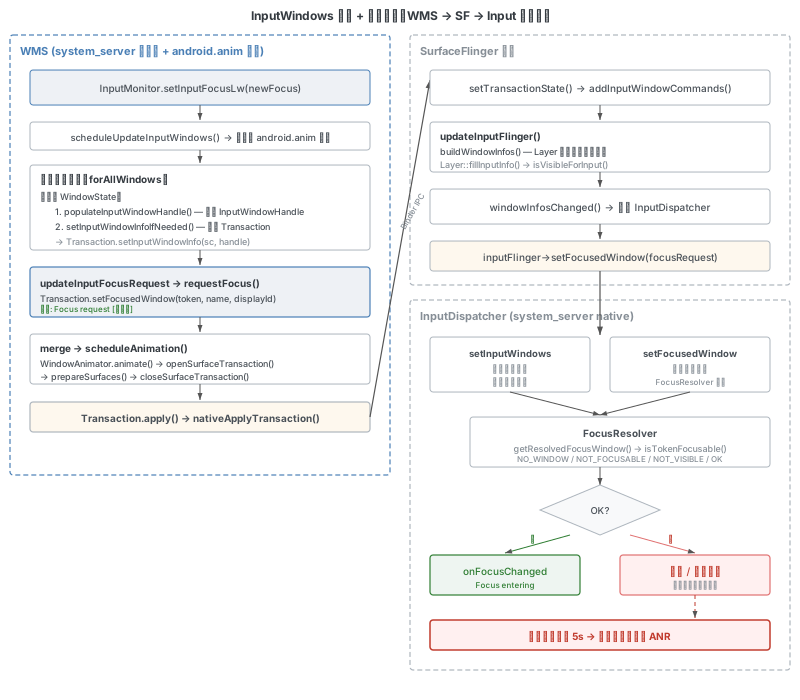
4.1 setInputFocusLw()
WMS 找到焦点窗口后,通过 InputMonitor 开始同步:
// InputMonitor.java:417
void setInputFocusLw(WindowState newWindow, boolean updateInputWindows) {
    ProtoLog.v(WM_DEBUG_FOCUS_LIGHT, "Input focus has changed to %s display=%d",
            newWindow, mDisplayId);
    final IBinder focus = newWindow != null ? newWindow.mInputChannelToken : null;
    if (focus == mInputFocus) {
        return;
    }
    if (newWindow != null && newWindow.canReceiveKeys()) {
        newWindow.mToken.paused = false;
    }
    setUpdateInputWindowsNeededLw();
    if (updateInputWindows) {
        updateInputWindowsLw(false /* force */);
    }
}日志:wms.Input focus has changed to Window{xxx} display=0
4.2 异步更新流程
更新通过 android.anim 线程异步执行:
// InputMonitor.java:383
void updateInputWindowsLw(boolean force) {
    if (!force && !mUpdateInputWindowsNeeded) {
        return;
    }
    scheduleUpdateInputWindows();
}

// InputMonitor.java:390
private void scheduleUpdateInputWindows() {
    if (mDisplayRemoved) return;
    if (!mUpdateInputWindowsPending) {
        mUpdateInputWindowsPending = true;
        mHandler.post(mUpdateInputWindows);  // 投递到 android.anim 线程
    }
}
mUpdateInputWindows Runnable 执行时:
- 通过
forAllWindows()遍历所有窗口,对每个窗口调用populateInputWindowHandle()+setInputWindowInfoIfNeeded() - 调用
updateInputFocusRequest()→requestFocus() - merge 到 PendingTransaction →
scheduleAnimation() WindowAnimator.animate()→closeSurfaceTransaction()→nativeApplyTransaction()发送到 SF
4.3 populateInputWindowHandle()
将 WindowState 的属性填充到 InputWindowHandle:
// InputMonitor.java:271
void populateInputWindowHandle(final InputWindowHandleWrapper inputWindowHandle,
        final WindowState w) {
    inputWindowHandle.setInputApplicationHandle(w.mActivityRecord != null
            ? w.mActivityRecord.getInputApplicationHandle(false) : null);
    inputWindowHandle.setToken(w.mInputChannelToken);
    inputWindowHandle.setDispatchingTimeoutMillis(w.getInputDispatchingTimeoutMillis());
    inputWindowHandle.setPaused(w.mActivityRecord != null && w.mActivityRecord.paused);
    inputWindowHandle.setName(w.getName());

    // 关键:设置 focusable 属性
    final boolean focusable = w.canReceiveKeys()
            && (mDisplayContent.hasOwnFocus() || mDisplayContent.isOnTop());
    inputWindowHandle.setFocusable(focusable);
    // ... touchable region 等
}
4.4 requestFocus()
打印焦点切换两步日志的第一步:
// InputMonitor.java:573
private void requestFocus(IBinder focusToken, String windowName) {
    if (focusToken == mInputFocus) {
        return;
    }
    mInputFocus = focusToken;
    mInputFocusRequestTimeMillis = SystemClock.uptimeMillis();
    mInputTransaction.setFocusedWindow(mInputFocus, windowName, mDisplayId);
    EventLog.writeEvent(LOGTAG_INPUT_FOCUS, "Focus request " + windowName,
            "reason=UpdateInputWindows");
    ProtoLog.v(WM_DEBUG_FOCUS_LIGHT, "Focus requested for window=%s", windowName);
}日志:input_focus: [Focus request xxx com.example.app/...Activity,reason=UpdateInputWindows]
4.5 SurfaceControl.Transaction.setFocusedWindow()
// SurfaceControl.java:4682
public Transaction setFocusedWindow(@NonNull IBinder token,
        String windowName, int displayId) {
    nativeSetFocusedWindow(mNativeObject, token, windowName, displayId);
    return this;
}
JNI 层构造 FocusRequest 结构体(token + windowName + timestamp + displayId),存入 Transaction 的 mInputWindowCommands.focusRequests 列表。Transaction.apply() 时通过 Binder 发送到 SurfaceFlinger 的 setTransactionState()。
五、SurfaceFlinger 侧焦点传递
5.1 Transaction 接收与处理
SurfaceFlinger 通过 setTransactionState() 接收 Transaction,将焦点请求通过 addInputWindowCommands() 合并到待处理列表:
// SurfaceFlinger.cpp
uint32_t SurfaceFlinger::addInputWindowCommands(
        const InputWindowCommands& inputWindowCommands) {
    bool hasChanges = mInputWindowCommands.merge(inputWindowCommands);
    return hasChanges ? eTraversalNeeded : 0;
}
5.2 updateInputFlinger()
在每次 VSync 的 commit() 阶段,SurfaceFlinger 调用 updateInputFlinger() 处理焦点请求:
// SurfaceFlinger.cpp
void SurfaceFlinger::updateInputFlinger(VsyncId vsyncId, TimePoint frameTime) {
    if (!mInputFlinger || (!mUpdateInputInfo && mInputWindowCommands.empty())) {
        return;
    }
    std::vector<WindowInfo> windowInfos;
    std::vector<DisplayInfo> displayInfos;
    bool updateWindowInfo = false;
    if (mUpdateInputInfo) {
        mUpdateInputInfo = false;
        updateWindowInfo = true;
        buildWindowInfos(windowInfos, displayInfos);  // 构建窗口信息列表
    }
    // ...
    BackgroundExecutor::getInstance().sendCallbacks({[...]() {
        if (updateWindowInfo) {
            // 路径 1:窗口信息变化 → 通知 InputDispatcher
            mWindowInfosListenerInvoker->windowInfosChanged(...);
        }
        // 路径 2:焦点请求 → 直接转发
        for (const auto& focusRequest : inputWindowCommands.focusRequests) {
            inputFlinger->setFocusedWindow(focusRequest);
        }
    }});
    mInputWindowCommands.clear();
}
5.3 Layer 可见性判断
buildWindowInfos() 中通过 Layer::fillInputInfo() 为每个窗口设置可见性。Layer 的可见性取决于:
- Layer 自身
flags:末位为奇数表示 hidden(如0x1、0x3、0x103) - Layer 的
alpha值:0表示完全透明 - 父 Layer 的状态:父 Layer hidden 或 alpha=0 会导致子 Layer 不可见
这是 InputDispatcher 判断焦点窗口是否 NOT_VISIBLE 的依据。
5.4 窗口信息到达 InputDispatcher 的两条路径
- 窗口列表更新:
windowInfosChanged()→InputDispatcher::onWindowInfosChanged()→setInputWindowsLocked() - 焦点请求:
inputFlinger->setFocusedWindow()→InputDispatcher::setFocusedWindow()
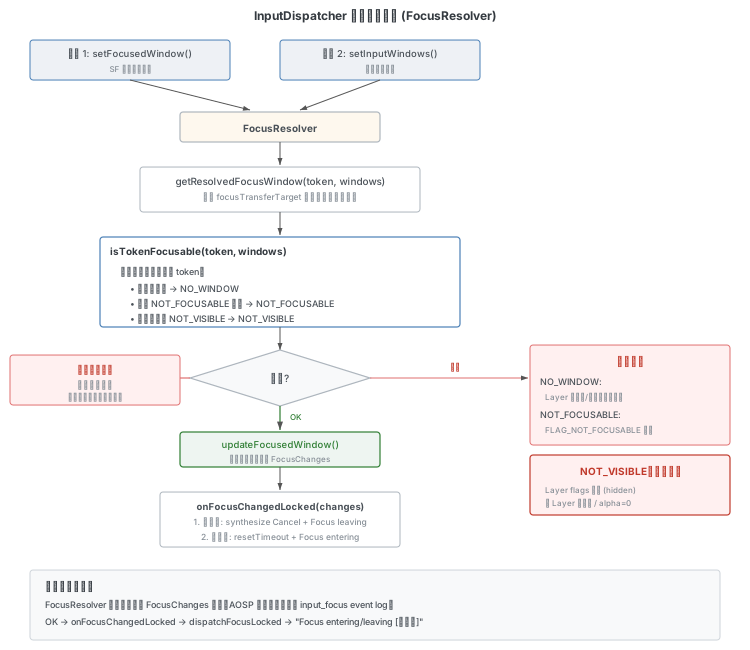
两条路径都会触发 FocusResolver 进行焦点解析。
六、InputDispatcher 侧焦点解析与授予
6.1 焦点应用设置
WMS 通过 InputManagerService.setFocusedApplication() 直接设置焦点应用:
// InputDispatcher.cpp:5924
void InputDispatcher::setFocusedApplicationLocked(
        ui::LogicalDisplayId displayId,
        const std::shared_ptr<InputApplicationHandle>& inputApplicationHandle) {
    std::shared_ptr<InputApplicationHandle> oldFocusedApplicationHandle =
            getValueByKey(mFocusedApplicationHandlesByDisplay, displayId);
    if (sharedPointersEqual(oldFocusedApplicationHandle, inputApplicationHandle)) {
        return;
    }
    if (inputApplicationHandle != nullptr) {
        mFocusedApplicationHandlesByDisplay[displayId] = inputApplicationHandle;
    } else {
        mFocusedApplicationHandlesByDisplay.erase(displayId);
    }
    // 焦点应用变化时重置 ANR 计时
    resetNoFocusedWindowTimeoutLocked();
}
6.2 焦点请求处理
SurfaceFlinger 转发的焦点请求到达 setFocusedWindow(),交由 FocusResolver 解析:
// InputDispatcher.cpp:7429
void InputDispatcher::setFocusedWindow(const FocusRequest& request) {
    { // acquire lock
        std::scoped_lock _l(mLock);
        std::optional<FocusResolver::FocusChanges> changes =
                mFocusResolver.setFocusedWindow(request,
                                                getWindowHandlesLocked(
                                                        ui::LogicalDisplayId{request.displayId}));
        ScopedSyntheticEventTracer traceContext(mTracer);
        if (changes) {
            onFocusChangedLocked(*changes, traceContext.getTracker());
        }
    } // release lock
    mLooper->wake();
}
6.3 焦点窗口判定:isTokenFocusable()
// FocusResolver.cpp:168
Focusability FocusResolver::isTokenFocusable(
        const sp<IBinder>& token,
        const std::vector<sp<WindowInfoHandle>>& windows,
        sp<WindowInfoHandle>& outFocusableWindow) {
    bool allWindowsAreFocusable = true;
    bool windowFound = false;
    sp<WindowInfoHandle> visibleWindowHandle = nullptr;
    for (const sp<WindowInfoHandle>& window : windows) {
        if (window->getToken() != token) {
            continue;
        }
        windowFound = true;
        if (!window->getInfo()->inputConfig.test(
                gui::WindowInfo::InputConfig::NOT_VISIBLE)) {
            visibleWindowHandle = window;
        }
        if (window->getInfo()->inputConfig.test(
                gui::WindowInfo::InputConfig::NOT_FOCUSABLE)) {
            allWindowsAreFocusable = false;
            break;
        }
    }
    if (!windowFound) return Focusability::NO_WINDOW;
    if (!allWindowsAreFocusable) return Focusability::NOT_FOCUSABLE;
    if (!visibleWindowHandle) return Focusability::NOT_VISIBLE;

    outFocusableWindow = visibleWindowHandle;
    return Focusability::OK;
}
四种判定结果:
- OK:窗口存在 + 可见 + 可获焦 → 授予焦点
- NO_WINDOW:窗口不在列表中(Layer 被移除、生命周期未完成)
- NOT_FOCUSABLE:窗口存在但设置了
NOT_FOCUSABLE - NOT_VISIBLE:窗口存在但不可见(最常见的焦点延迟根因)
6.4 getResolvedFocusWindow()
支持焦点转移链(一个窗口获焦后可将焦点转给另一个窗口):
// FocusResolver.cpp
Focusability FocusResolver::getResolvedFocusWindow(
        const sp<IBinder>& token,
        const std::vector<sp<WindowInfoHandle>>& windows,
        sp<WindowInfoHandle>& outFocusableWindow) {
    sp<IBinder> curFocusCandidate = token;
    bool focusedWindowFound = false;
    std::unordered_set<sp<IBinder>, SpHash<IBinder>> tokensReached;

    while (curFocusCandidate != nullptr
            && tokensReached.count(curFocusCandidate) == 0) {
        tokensReached.emplace(curFocusCandidate);
        Focusability result = isTokenFocusable(
                curFocusCandidate, windows, outFocusableWindow);
        if (result == Focusability::OK) {
            focusedWindowFound = true;
            curFocusCandidate = outFocusableWindow->getInfo()->focusTransferTarget;
        }
        if (!focusedWindowFound) {
            return result;
        }
    }
    return focusedWindowFound ? Focusability::OK : Focusability::NO_WINDOW;
}
6.5 窗口信息更新时的焦点重检查
当窗口列表变化时(setInputWindows),FocusResolver 会用之前保存的焦点请求重新检查:
// FocusResolver.cpp
std::optional<FocusChanges> FocusResolver::setInputWindows(
        ui::LogicalDisplayId displayId,
        const std::vector<sp<WindowInfoHandle>>& windows) {
    const std::optional<FocusRequest> request = getFocusRequest(displayId);
    const sp<IBinder> currentFocus = getFocusedWindowToken(displayId);
    if (request) {
        sp<WindowInfoHandle> resolvedFocusWindow;
        Focusability result = getResolvedFocusWindow(
                request->token, windows, resolvedFocusWindow);
        if (result == Focusability::OK
                && resolvedFocusWindow->getToken() == currentFocus) {
            return std::nullopt;  // 焦点未变
        }
        mLastFocusResultByDisplay[displayId] = result;
        if (result == Focusability::OK) {
            return updateFocusedWindow(displayId,
                    "Window became focusable. Previous reason: "
                    + ftl::enum_string(previousResult),
                    resolvedFocusWindow->getToken(),
                    resolvedFocusWindow->getName());
        }
        removeFocusReason = ftl::enum_string(result);
    }
    return updateFocusedWindow(displayId, removeFocusReason, nullptr);
}这是窗口绘制完成后焦点最终生效的关键时机——窗口从 NOT_VISIBLE 变为可见,FocusResolver 检测到后授予焦点。
6.6 焦点结果处理
// InputDispatcher.cpp:7448
void InputDispatcher::onFocusChangedLocked(
        const FocusResolver::FocusChanges& changes, ...) {
    if (changes.oldFocus) {
        // 为旧窗口发送 Cancel 事件 + Focus leaving
        CancelationOptions options(CancelationOptions::Mode::CANCEL_NON_POINTER_EVENTS,
                "focus left window", ...);
        synthesizeCancelationEventsForWindowLocked(..., options);
        enqueueFocusEventLocked(changes.oldFocus, false, changes.reason);
    }
    if (changes.newFocus) {
        // 重置 ANR 计时 + Focus entering
        resetNoFocusedWindowTimeoutLocked();
        enqueueFocusEventLocked(changes.newFocus, true, changes.reason);
    }
    disablePointerCaptureForcedLocked();
    if (mFocusedDisplayId == changes.displayId) {
        sendFocusChangedCommandLocked(changes.oldFocus, changes.newFocus);
    }
}
6.7 焦点事件派发
// InputDispatcher.cpp:1819
void InputDispatcher::dispatchFocusLocked(nsecs_t currentTime,
        std::shared_ptr<const FocusEntry> entry) {
    std::shared_ptr<Connection> connection = getConnectionLocked(entry->connectionToken);
    if (connection == nullptr) return;
    entry->dispatchInProgress = true;
    std::string message = std::string("Focus ")
            + (entry->hasFocus ? "entering " : "leaving ")
            + connection->getInputChannelName();
    std::string reason = std::string("reason=").append(entry->reason);
    android_log_event_list(LOGTAG_INPUT_FOCUS) << message << reason << LOG_ID_EVENTS;
    dispatchEventLocked(currentTime, entry, {{connection}});
}
日志:
input_focus: [Focus entering xxx com.example.app/...Activity (server),reason=Window became focusable. Previous reason: NOT_VISIBLE]input_focus: [Focus leaving xxx com.example.app/...Activity (server),reason=NO_WINDOW]
七、App 侧焦点回调
InputDispatcher 通过 dispatchFocusLocked() 将 FocusEvent 写入 App 的 InputChannel。以下是 App 进程收到焦点事件后的完整处理链路。
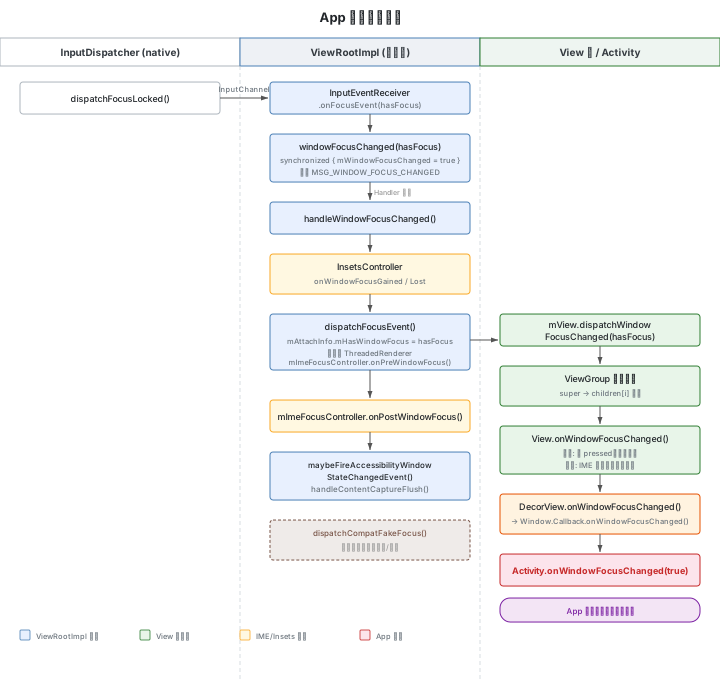
7.1 InputEventReceiver.onFocusEvent()
// InputEventReceiver.java:176
// Called from native code.
public void onFocusEvent(boolean hasFocus) {
}
这是 native 层回调的入口。基类实现为空,真正的处理在 ViewRootImpl 的内部类中。
7.2 WindowInputEventReceiver.onFocusEvent()
// ViewRootImpl.java:11764
final class WindowInputEventReceiver extends InputEventReceiver {
    @Override
    public void onFocusEvent(boolean hasFocus) {
        windowFocusChanged(hasFocus);
    }
}
7.3 windowFocusChanged()
// ViewRootImpl.java:12048
public void windowFocusChanged(boolean hasFocus) {
    synchronized (this) {
        mWindowFocusChanged = true;
        mUpcomingWindowFocus = hasFocus;
    }
    Message msg = Message.obtain();
    msg.what = MSG_WINDOW_FOCUS_CHANGED;
    mHandler.sendMessage(msg);
}
焦点状态通过 synchronized 块安全写入,然后发送 MSG_WINDOW_FOCUS_CHANGED(值为 6)到主线程 Handler 异步处理。
7.4 handleWindowFocusChanged()
主线程 Handler 收到消息后的核心处理:
// ViewRootImpl.java:5355
private void handleWindowFocusChanged() {
    final boolean hasWindowFocus;
    synchronized (this) {
        if (!mWindowFocusChanged) {
            return;
        }
        mWindowFocusChanged = false;
        hasWindowFocus = mUpcomingWindowFocus;
    }
    // 1. 通知 InsetsController
    if (hasWindowFocus) {
        mInsetsController.onWindowFocusGained(
                getFocusedViewOrNull() != null /* hasViewFocused */);
    } else {
        mInsetsController.onWindowFocusLost();
    }

    if (mAdded) {
        // 2. 分发焦点事件到 View 树
        dispatchFocusEvent(hasWindowFocus, false /* fakeFocus */);
        // 3. 焦点回调之后处理 IME
        mImeFocusController.onPostWindowFocus(
                getFocusedViewOrNull(), hasWindowFocus, mWindowAttributes);

        if (hasWindowFocus) {
            // 清除 SOFT_INPUT_IS_FORWARD_NAVIGATION 标记
            mWindowAttributes.softInputMode &=
                    ~WindowManager.LayoutParams.SOFT_INPUT_IS_FORWARD_NAVIGATION;
            ((WindowManager.LayoutParams) mView.getLayoutParams())
                    .softInputMode &=
                    ~WindowManager.LayoutParams.SOFT_INPUT_IS_FORWARD_NAVIGATION;

            maybeFireAccessibilityWindowStateChangedEvent();
            // 全局焦点 View 变化时,触发无障碍焦点事件
            fireAccessibilityFocusEventIfHasFocusedNode();
        } else {
            if (mPointerCapture) {
                handlePointerCaptureChanged(false);
            }
        }
    }
    mFirstInputStage.onWindowFocusChanged(hasWindowFocus);

    if (hasWindowFocus) {
        handleContentCaptureFlush();
    }
}
7.5 dispatchFocusEvent()
// ViewRootImpl.java:5446
private void dispatchFocusEvent(boolean hasWindowFocus, boolean fakeFocus) {
    profileRendering(hasWindowFocus);
    // 获焦时确保 Renderer 已初始化
    if (hasWindowFocus && mAttachInfo.mThreadedRenderer != null && mSurface.isValid()) {
        mFullRedrawNeeded = true;
        try {
            final Rect surfaceInsets = mWindowAttributes.surfaceInsets;
            mAttachInfo.mThreadedRenderer.initializeIfNeeded(
                    mWidth, mHeight, mAttachInfo, mSurface, surfaceInsets);
        } catch (OutOfResourcesException e) {
            Log.e(mTag, "OutOfResourcesException locking surface", e);
            try {
                if (!mWindowSession.outOfMemory(mWindow)) {
                    Slog.w(mTag, "No processes killed for memory; killing self");
                    Process.killProcess(Process.myPid());
                }
            } catch (RemoteException ex) {
            }
            // 延迟 500ms 重试
            mHandler.sendMessageDelayed(mHandler.obtainMessage(
                    MSG_WINDOW_FOCUS_CHANGED), 500);
            return;
        }
    }

    // 更新全局焦点状态(View.hasWindowFocus() 读取此值)
    mAttachInfo.mHasWindowFocus = hasWindowFocus;

    if (!fakeFocus) {
        mImeFocusController.onPreWindowFocus(hasWindowFocus, mWindowAttributes);
    }

    if (mView != null) {
        mAttachInfo.mKeyDispatchState.reset();
        // 向 View 树分发焦点变化
        mView.dispatchWindowFocusChanged(hasWindowFocus);
        mAttachInfo.mTreeObserver.dispatchOnWindowFocusChange(hasWindowFocus);
        if (mAttachInfo.mTooltipHost != null) {
            mAttachInfo.mTooltipHost.hideTooltip();
        }
    }
}
7.6 View 树传播
View 基类——调用 onWindowFocusChanged():
// View.java:17117
public void dispatchWindowFocusChanged(boolean hasFocus) {
    onWindowFocusChanged(hasFocus);
}ViewGroup——先处理自身,再递归传播给所有子 View:
// ViewGroup.java:1520
@Override
public void dispatchWindowFocusChanged(boolean hasFocus) {
    super.dispatchWindowFocusChanged(hasFocus);  // 自身 onWindowFocusChanged
    final int count = mChildrenCount;
    final View[] children = mChildren;
    for (int i = 0; i < count; i++) {
        children[i].dispatchWindowFocusChanged(hasFocus);  // 递归传播
    }
}View.onWindowFocusChanged()——应用可覆写的回调:
// View.java:17131
public void onWindowFocusChanged(boolean hasWindowFocus) {
    if (!hasWindowFocus) {
        if (isPressed()) {
            setPressed(false);
        }
        mPrivateFlags3 &= ~PFLAG3_FINGER_DOWN;
        if ((mPrivateFlags & PFLAG_FOCUSED) != 0) {
            notifyFocusChangeToImeFocusController(false /* hasFocus */);
        }
        removeLongPressCallback();
        removeTapCallback();
        onFocusLost();
    } else if ((mPrivateFlags & PFLAG_FOCUSED) != 0) {
        notifyFocusChangeToImeFocusController(true /* hasFocus */);
        ViewRootImpl viewRoot = getViewRootImpl();
        if (viewRoot != null && initiationWithoutInputConnection() && onCheckIsTextEditor()) {
            viewRoot.getHandwritingInitiator().onEditorFocused(this);
        }
    }
    refreshDrawableState();
}
失焦时清除 pressed 状态、移除长按/点击回调;获焦时通知 IME 焦点控制器,并在文本编辑器获焦时触发手写输入初始化。
7.7 DecorView → Activity.onWindowFocusChanged()
DecorView 是 View 树的根,它的 onWindowFocusChanged() 通过 Window.Callback 通知 Activity:
// DecorView.java:1949
@Override
public void onWindowFocusChanged(boolean hasWindowFocus) {
    super.onWindowFocusChanged(hasWindowFocus);

    // 失焦时关闭正在操作的菜单快捷键
    if (mWindow.hasFeature(Window.FEATURE_OPTIONS_PANEL) && !hasWindowFocus
            && mWindow.mPanelChordingKey != 0) {
        mWindow.closePanel(Window.FEATURE_OPTIONS_PANEL);
    }

    final Window.Callback cb = mWindow.getCallback();
    if (cb != null && !mWindow.isDestroyed() && mFeatureId < 0) {
        cb.onWindowFocusChanged(hasWindowFocus);  // → Activity.onWindowFocusChanged()
    }

    if (mPrimaryActionMode != null) {
        mPrimaryActionMode.onWindowFocusChanged(hasWindowFocus);
    }
    if (mFloatingActionMode != null) {
        mFloatingActionMode.onWindowFocusChanged(hasWindowFocus);
    }
    updateElevation();
}
Activity 实现了 Window.Callback 接口,因此 cb.onWindowFocusChanged(hasWindowFocus) 最终调用:
// Activity.java:4551
public void onWindowFocusChanged(boolean hasFocus) {
    // 应用可覆写此方法响应窗口焦点变化
}
onWindowFocusChanged(true) 通常被视为 App 启动完成、界面可交互的标志。
7.8 dispatchCompatFakeFocus:分屏场景兼容
分屏模式下,未获焦的 App 可能因为等待焦点而不渲染(常见于 Unity 等游戏引擎)。ViewRootImpl 提供了假焦点机制:
// ViewRootImpl.java:5428
public void dispatchCompatFakeFocus() {
    boolean aboutToHaveFocus = false;
    synchronized (this) {
        aboutToHaveFocus = mWindowFocusChanged && mUpcomingWindowFocus;
    }
    final boolean alreadyHaveFocus = mAttachInfo.mHasWindowFocus;
    if (aboutToHaveFocus || alreadyHaveFocus) {
        return;  // 已有焦点或即将获焦,无需模拟
    }
    EventLog.writeEvent(LOGTAG_INPUT_FOCUS,
            "Giving fake focus to " + mBasePackageName, "reason=unity bug workaround");
    dispatchFocusEvent(true, true /* fakeFocus */);
    EventLog.writeEvent(LOGTAG_INPUT_FOCUS,
            "Removing fake focus from " + mBasePackageName, "reason=timeout callback");
    dispatchFocusEvent(false, true /* fakeFocus */);
}
fakeFocus = true 时跳过 IME 预处理(onPreWindowFocus),仅触发 View 树的 onWindowFocusChanged 回调,让游戏引擎开始渲染。
八、焦点切换全链路日志
8.1 正常焦点切换的完整日志序列
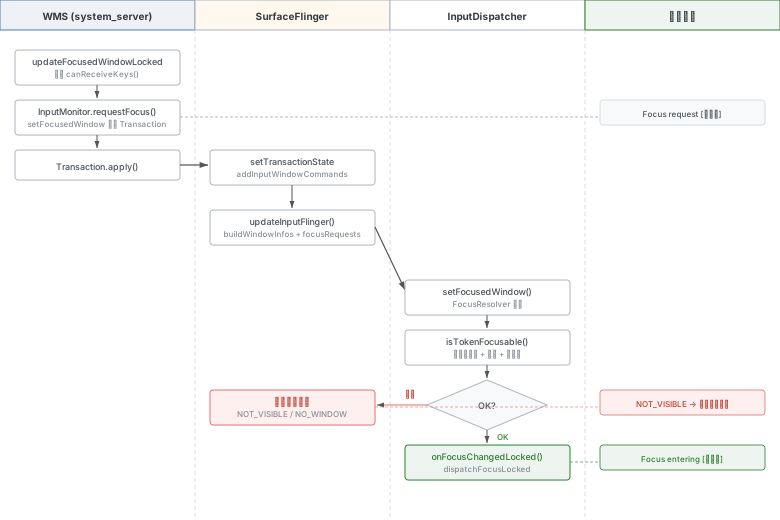
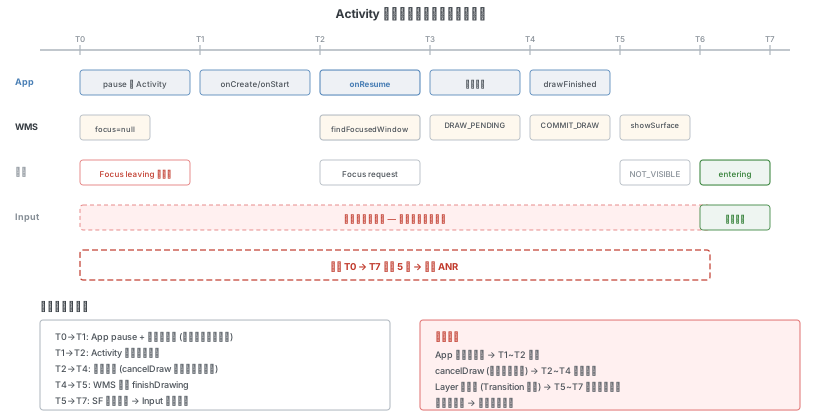
以启动新 Activity 为例:
# 1. 暂停旧 Activity
wm_pause_activity: [0,...,com.example.oldapp/.OldActivity,userLeaving=true,...]
wm_on_paused_called: [0,...,com.example.oldapp.OldActivity,performPause,...]

# 2. 焦点离开旧窗口
input_focus: [Focus leaving xxx com.example.oldapp/...OldActivity (server),reason=NO_WINDOW]

# 3. 新 Activity 生命周期
wm_set_resumed_activity: [0,com.example.newapp/.NewActivity,...]
wm_on_create_called: [0,...,com.example.newapp.NewActivity,performCreate,...]
wm_on_start_called: [0,...,com.example.newapp.NewActivity,handleStartActivity,...]
wm_on_resume_called: [0,...,com.example.newapp.NewActivity,RESUME_ACTIVITY,...]

# 4. WMS 找到焦点窗口
WindowManager: wms.Input focus has changed to Window{xxx com.example.newapp/...NewActivity}

# 5. 焦点切换第一步
input_focus: [Focus request xxx com.example.newapp/...NewActivity,reason=UpdateInputWindows]

# 6. 首帧绘制
vri.reportNextDraw ...
vri.reportDrawFinished ...
WindowManager: wms.finishDrawingLocked: mDrawState=COMMIT_DRAW_PENDING Window{xxx}
WindowManager: wms.showSurfaceRobustly mWin:Window{xxx}

# 7. SF 传递焦点请求,Input 判定 NOT_VISIBLE
# FocusResolver 判定窗口不可见,焦点暂不授予(不产生 input_focus event log)

# 8. 窗口变为可见后焦点生效
input_focus: [Focus entering xxx com.example.newapp/...NewActivity (server),
    reason=Window became focusable. Previous reason: NOT_VISIBLE]
8.2 正常 vs 异常日志对比
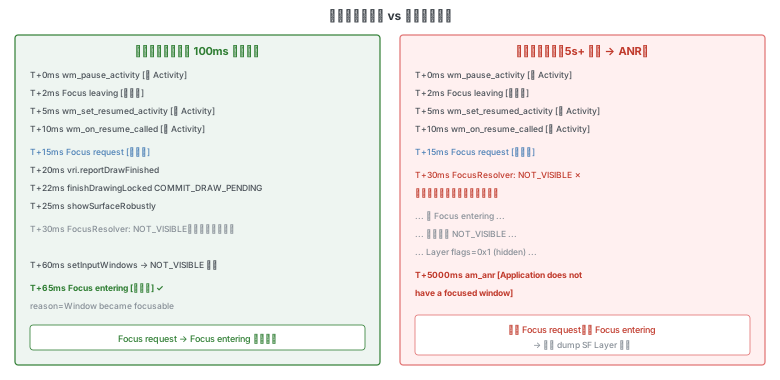
关键判断:Focus request 和 Focus entering 应成对出现。只有 request 没有 entering → 焦点在 SF→Input 路径受阻。
entering有打印:焦点已进入 InputDispatcher,问题在 Input 派发或 App 侧entering无打印:焦点未到达 InputDispatcher,需排查 SurfaceFlinger 或 WMS
8.3 Event Log 关键字
am_anr:ANR 时间点和类型ANR in:具体 ANR 窗口和原因input_focus:焦点切换步骤wm_on_resume_called:Activity 生命周期wm_set_resumed_activity:焦点应用切换
8.4 Proto Log 调试
adb shell wm logging enable-text WM_DEBUG_FOCUS WM_DEBUG_FOCUS_LIGHT输出每个窗口的遍历详情,包括 canReceiveKeys 结果和所有条件值。
附录:关键文件索引
| 模块 | 文件路径 | 关键方法 |
|---|---|---|
| WMS | services/.../wm/WindowManagerService.java | updateFocusedWindowLocked() (7261) |
| WMS | services/.../wm/RootWindowContainer.java | updateFocusedWindowLocked() (602) |
| WMS | services/.../wm/DisplayContent.java | updateFocusedWindowLocked() (4581), findFocusedWindow() (4555), mFindFocusedWindow (940) |
| WMS | services/.../wm/WindowState.java | canReceiveKeys() (3300), isVisibleRequestedOrAdding() (2095) |
| WMS | services/.../wm/InputMonitor.java | requestFocus() (573), setInputFocusLw() (417), populateInputWindowHandle() (271) |
| Framework | core/.../view/SurfaceControl.java | Transaction.setFocusedWindow() (4682) |
| JNI | core/jni/android_view_SurfaceControl.cpp | nativeSetFocusedWindow() (2297) |
| Native | native/.../gui/SurfaceComposerClient.cpp | Transaction::setFocusedWindow() (2205) |
| SF | native/.../surfaceflinger/SurfaceFlinger.cpp | updateInputFlinger() (5595), addInputWindowCommands() (8220) |
| Input | native/.../inputflinger/dispatcher/InputDispatcher.cpp | setFocusedWindow(), findFocusedWindowTargetLocked(), dispatchFocusLocked() |
| Input | native/.../inputflinger/dispatcher/FocusResolver.cpp | isTokenFocusable(), setInputWindows(), setFocusedWindow() |
| App | core/.../view/InputEventReceiver.java | onFocusEvent() (176) |
| App | core/.../view/ViewRootImpl.java | windowFocusChanged() (12048), handleWindowFocusChanged() (5355), dispatchFocusEvent() (5446), dispatchCompatFakeFocus() (5428) |
| App | core/.../view/View.java | dispatchWindowFocusChanged() (17117), onWindowFocusChanged() (17131) |
| App | core/.../view/ViewGroup.java | dispatchWindowFocusChanged() (1520) |
| App | core/.../internal/policy/DecorView.java | onWindowFocusChanged() (1949) |
| App | core/.../app/Activity.java | onWindowFocusChanged() (4551) |