转屏机制
基本概念
rotation 与 orientation 的区别
rotation 和 orientation 是两个相关但不同的概念。
rotation 表示屏幕平面内旋转的方向/角度,定义在 Surface.java 中:
// Surface.java (line 198)
public static final int ROTATION_0 = 0;    // 0 度(自然方向)
public static final int ROTATION_90 = 1;   // 90 度旋转
public static final int ROTATION_180 = 2;  // 180 度旋转
public static final int ROTATION_270 = 3;  // 270 度旋转
orientation 分为两种:
ActivityInfo.screenOrientation:记录 App 设定的方向或旋转模式,包括SCREEN_ORIENTATION_UNSPECIFIED、SCREEN_ORIENTATION_LANDSCAPE、SCREEN_ORIENTATION_PORTRAIT、SCREEN_ORIENTATION_SENSOR、SCREEN_ORIENTATION_LOCKED等。这是应用通过android:screenOrientation或setRequestedOrientation()设置的值。Configuration.orientation:仅有横屏(ORIENTATION_LANDSCAPE)和竖屏(ORIENTATION_PORTRAIT)两种。App 在渲染绘制时只需要知道横竖屏,不需要知道窗口的具体朝向角度。
简单来说:orientation 是应用请求的方向策略,rotation 是系统最终决定的屏幕旋转角度。系统根据 orientation 请求综合 sensor、用户锁定、dock 模式等因素来计算最终的 rotation。
方向锁定机制
系统全局是否响应 sensor 的旋转,由 Settings 中的两个参数控制:
// Settings.System
ACCELEROMETER_ROTATION  // 是否使用加速度计旋转屏幕(0=不使用, 1=使用)
USER_ROTATION           // 方向锁定时的默认方向(ROTATION_0 等)
控制中心或设置中更改方向锁定状态时,会调用 WMS.freezeRotation() 或 WMS.thawRotation(),进而更新这两个 Settings 值。通过监听这些值的变化,DisplayRotation 中的两个关键变量会被更新:
mUserRotationMode:控制是否自由旋屏USER_ROTATION_FREE (0):方向锁定关闭,允许自由旋转USER_ROTATION_LOCKED (1):方向锁定开启,锁定在mUserRotation方向
mUserRotation:方向锁定时系统的默认方向
这两个变量在后续通过 orientation 计算 rotation 时起到关键作用。
旋转触发方式
WMS 中由 DisplayContent 的成员变量 DisplayRotation 对象负责计算和返回横竖屏切换过程中的方向。其中 DisplayRotation.mRotation 是决定横竖屏显示的关键变量,唯一可以更新 mRotation 的位置是 DisplayRotation.updateRotationUnchecked() 方法。
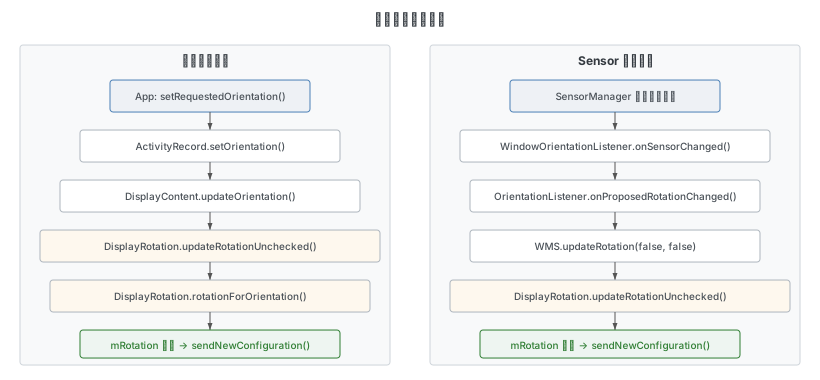
应用请求旋转
应用通过 Binder 通信调用到 ActivityRecord.setOrientation(),最终调用至 DisplayContent.updateOrientation() 方法,再到 DisplayRotation.updateRotationUnchecked(),在 rotationForOrientation() 方法中计算新的 rotation。
调用链:
App: Activity.setRequestedOrientation(orientation)
  → ActivityRecord.setOrientation(orientation)
    → DisplayContent.updateOrientation()
      → DisplayRotation.updateOrientation(orientation, forceUpdate)
        → DisplayRotation.updateRotationUnchecked(forceUpdate)
          → DisplayRotation.rotationForOrientation(lastOrientation, oldRotation)
Sensor 触发旋转
如果应用没有指定固定的横屏或竖屏方向(如 SCREEN_ORIENTATION_UNSPECIFIED),且用户关闭了方向锁定,那么显示窗口可以根据 sensor 的计算方向切换横竖屏。
DisplayRotation 的内部类 OrientationListener 继承自 WindowOrientationListener,通过 SensorManager.registerListener() 监听传感器信息。当传感器检测到方向变化时,回调 onProposedRotationChanged():
// DisplayRotation.java (line 2633)
@Override
public void onProposedRotationChanged(@Surface.Rotation int rotation) {
    ProtoLog.v(WM_DEBUG_ORIENTATION, "onProposedRotationChanged, rotation=%d", rotation);
    // Send interaction power boost to improve redraw performance.
    mService.mPowerManagerInternal.setPowerBoost(Boost.INTERACTION, 0);
    dispatchProposedRotation(rotation);

    if (isRotationChoiceAllowed(rotation)) {
        mRotationChoiceShownToUserForConfirmation = rotation;
        final boolean isValid = isValidRotationChoice(rotation);
        sendProposedRotationChangeToStatusBarInternal(rotation, isValid);
    } else {
        mRotationChoiceShownToUserForConfirmation = ROTATION_UNDEFINED;
        mService.updateRotation(false /* alwaysSendConfiguration */,
                false /* forceRelayout */);
    }
}
当旋转选择(Rotation Choice)未启用时,直接调用 WMS.updateRotation(),进而走到 DisplayRotation.updateRotationUnchecked() 完成旋转。
自动旋转设置流程
Settings 中修改自动旋转开关的流程:
Settings: 自动旋转开关
  → RotationPolicy.setRotationLock(enabled)
    → WMS.freezeRotation() / thawRotation()
      → DisplayRotation.setUserRotation(mode, rotation)
        → Settings.System.putInt(USER_ROTATION / ACCELEROMETER_ROTATION)
          → SettingsObserver.onChange()
            → DisplayRotation.updateSettings()
              → updateOrientationListenerLw()  // 注册/取消 sensor 监听
              → WMS.updateRotation()            // 确保方向一致
SettingsObserver 在 DisplayRotation 构造函数中创建,监听 Settings.System.USER_ROTATION 和 ACCELEROMETER_ROTATION 的变化:
// DisplayRotation.java - SettingsObserver (line 2706)
public void onChange(boolean selfChange) {
    if (updateSettings()) {
        mService.updateRotation(false /* alwaysSendConfiguration */,
                false /* forceRelayout */);
    }
}
updateSettings() 读取最新的 UserRotation 和 UserRotationMode 值。如果有变化,返回 true 触发 updateRotation()。当 UserRotationMode 改变时,还需调用 updateOrientationListenerLw() 来注册或取消传感器监听:
// DisplayRotation.java (line 1448)
private void updateOrientationListenerLw() {
    if (mOrientationListener == null || !mOrientationListener.canDetectOrientation()) {
        return;
    }
    // ...
    // 根据当前 orientation 和 mUserRotationMode 决定是否启用 sensor 监听
    // enable() 注册 SensorManager.registerListener()
    // disable() 取消注册
}
Sensor 完整旋转流程
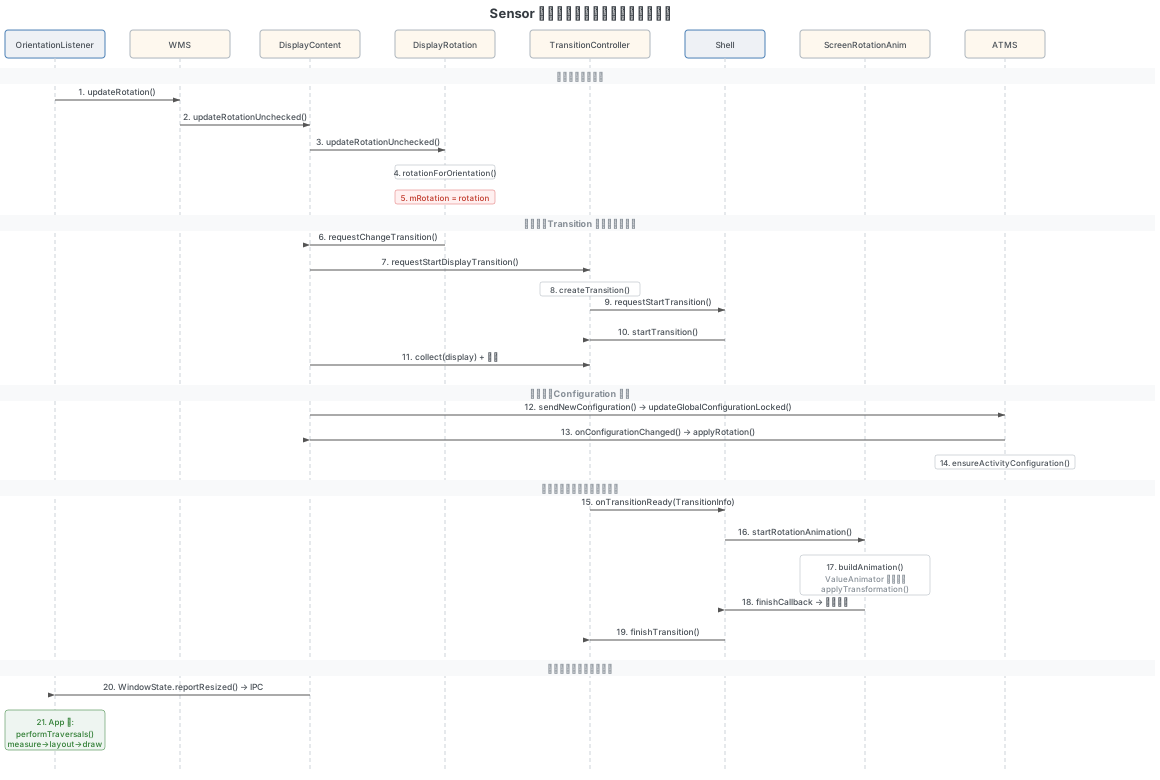
以下时序图展示了 sensor 触发冻屏旋转的完整流程,涵盖从传感器事件到应用端布局更新的全过程:
核心方法
DisplayContent.updateOrientation()
updateOrientation() 是方向更新的入口方法,它连接了方向源(orientation source)的获取与 FixedRotation 的判断。有两个重载:
公开的重载用于触发方向更新并生成新的 Configuration:
// DisplayContent.java (line 2022)
Configuration updateOrientation(WindowContainer<?> freezeDisplayWindow, boolean forceUpdate) {
    if (!mDisplayReady) {
        return null;
    }
    Configuration config = null;
    if (updateOrientation(forceUpdate)) {
        if (freezeDisplayWindow != null && !mWmService.mRoot.mOrientationChangeComplete) {
            final ActivityRecord activity = freezeDisplayWindow.asActivityRecord();
            if (activity != null && activity.mayFreezeScreenLocked()) {
                activity.startFreezingScreen();
            }
        }
        config = new Configuration();
        computeScreenConfiguration(config);
    }
    return config;
}
私有的重载负责获取当前方向源、判断 FixedRotation、并调用 DisplayRotation.updateOrientation():
// DisplayContent.java (line 2057)
private boolean updateOrientation(boolean forceUpdate) {
    final WindowContainer prevOrientationSource = mLastOrientationSource;
    final int orientation = getOrientation();
    final WindowContainer orientationSource = getLastOrientationSource();
    if (orientationSource != prevOrientationSource
            && mRotationReversionController.isRotationReversionEnabled()) {
        mRotationReversionController.updateForNoSensorOverride();
    }
    final ActivityRecord r =
            orientationSource != null ? orientationSource.asActivityRecord() : null;
    if (r != null) {
        final Task task = r.getTask();
        if (task != null && orientation != task.mLastReportedRequestedOrientation) {
            task.mLastReportedRequestedOrientation = orientation;
            mAtmService.getTaskChangeNotificationController()
                    .notifyTaskRequestedOrientationChanged(task.mTaskId, orientation);
        }
        // orientation source 可能不是 top(使用 SCREEN_ORIENTATION_BEHIND 时)
        final ActivityRecord topCandidate = !r.isVisibleRequested() ? topRunningActivity() : r;
        if (topCandidate != null && handleTopActivityLaunchingInDifferentOrientation(
                topCandidate, r, true /* checkOpening */)) {
            // FixedRotation 已启动,延迟方向更新
            return false;
        }
    }
    return mDisplayRotation.updateOrientation(orientation, forceUpdate);
}
注意关键的 FixedRotation 判断:当 top Activity 正在以不同方向启动时,方向更新会被延迟(返回 false),等 FixedRotation 的过渡动画结束后再通过 continueUpdateOrientationForDiffOrienLaunchingApp() 继续更新。
DisplayRotation.updateRotationUnchecked()
这是整个旋转流程的核心入口方法。它负责计算新的 rotation 值,判断是否发生变化,并根据情况选择旋转方式(无缝旋转或冻屏旋转)。
// DisplayRotation.java (line 684)
boolean updateRotationUnchecked(boolean forceUpdate) {
    final int displayId = mDisplayContent.getDisplayId();
    if (!forceUpdate) {
        // ① 检查是否应延迟旋转
        if (mDeferredRotationPauseCount > 0) {
            // 旋转更新被暂停
            return false;
        }
        if (mDisplayContent.inTransition()
                && mDisplayContent.getDisplayPolicy().isScreenOnFully()
                && !mDisplayContent.mTransitionController.useShellTransitionsRotation()) {
            // 上一个旋转动画仍在进行中
            return false;
        }
        if (mService.mDisplayFrozen) {
            // 屏幕仍处于冻结状态
            return false;
        }
        if (mDisplayContent.mFixedRotationTransitionListener.shouldDeferRotation()) {
            mLastOrientation = SCREEN_ORIENTATION_UNSET;
            // 最近任务动画运行中,忽略旋转更新
            return false;
        }
    }

    if (!mService.mDisplayEnabled) {
        // 屏幕未准备好
        return false;
    }

    // ② 计算新的 rotation
    final int oldRotation = mRotation;
    final int lastOrientation = mLastOrientation;
    int rotation = rotationForOrientation(lastOrientation, oldRotation);

    // 折叠屏 tabletop 模式特殊处理
    if (mFoldController != null && mFoldController.shouldRevertOverriddenRotation()) {
        rotation = mFoldController.revertOverriddenRotation();
    }

    // 双屏设备方向协调
    if (DisplayRotationCoordinator.isSecondaryInternalDisplay(mDisplayContent)
            && mDeviceStateController
                    .shouldMatchBuiltInDisplayOrientationToReverseDefaultDisplay()) {
        rotation = RotationUtils.reverseRotationDirectionAroundZAxis(
                mDisplayRotationCoordinator.getDefaultDisplayCurrentRotation());
    }

    ProtoLog.v(WM_DEBUG_ORIENTATION,
            "Computed rotation=%s (%d) for display id=%d based on lastOrientation=%s (%d) "
                    + "and oldRotation=%s (%d)",
            Surface.rotationToString(rotation), rotation, displayId,
            ActivityInfo.screenOrientationToString(lastOrientation), lastOrientation,
            Surface.rotationToString(oldRotation), oldRotation);

    // ③ 判断是否变化
    if (oldRotation == rotation) {
        return false;
    }

    if (isDefaultDisplay) {
        mDisplayRotationCoordinator.onDefaultDisplayRotationChanged(rotation);
    }

    // 取消正在运行的最近任务动画
    final RecentsAnimationController recentsAnimationController =
            mService.getRecentsAnimationController();
    if (recentsAnimationController != null) {
        recentsAnimationController.cancelAnimationForDisplayChange();
    }

    ProtoLog.v(WM_DEBUG_ORIENTATION,
            "Display id=%d rotation changed to %d from %d, lastOrientation=%d",
                    displayId, rotation, oldRotation, lastOrientation);

    // ④ 更新 mRotation
    mRotation = rotation;
    mDisplayContent.setLayoutNeeded();
    mDisplayContent.mWaitingForConfig = true;

    // ⑤ 选择旋转方式
    if (mDisplayContent.mTransitionController.isShellTransitionsEnabled()) {
        // Shell Transitions 启用时
        final boolean wasCollecting = mDisplayContent.mTransitionController.isCollecting();
        if (!wasCollecting) {
            if (mDisplayContent.getLastHasContent()) {
                // 创建 CHANGE Transition
                final TransitionRequestInfo.DisplayChange change =
                        new TransitionRequestInfo.DisplayChange(
                                mDisplayContent.getDisplayId(), oldRotation, mRotation);
                mDisplayContent.requestChangeTransition(
                        ActivityInfo.CONFIG_WINDOW_CONFIGURATION, change);
            }
        } else {
            mDisplayContent.collectDisplayChange(
                    mDisplayContent.mTransitionController.getCollectingTransition());
            startRemoteRotation(oldRotation, mRotation);
        }
        return true;
    }

    // Legacy 路径(Shell Transitions 未启用时)
    mService.mWindowsFreezingScreen = WINDOWS_FREEZING_SCREENS_ACTIVE;
    mService.mH.sendNewMessageDelayed(WindowManagerService.H.WINDOW_FREEZE_TIMEOUT,
            mDisplayContent, WINDOW_FREEZE_TIMEOUT_DURATION);

    if (shouldRotateSeamlessly(oldRotation, rotation, forceUpdate)) {
        prepareSeamlessRotation();
    } else {
        prepareNormalRotationAnimation();
    }

    startRemoteRotation(oldRotation, mRotation);
    return true;
}
方法的核心流程可以总结为 5 步:
- 检查是否应延迟旋转:动画进行中、屏幕冻结、FixedRotation 运行中等情况需要延迟
- 计算新的 rotation:调用
rotationForOrientation()综合各种因素计算 - 判断是否变化:新旧 rotation 相同则直接返回
- 更新 mRotation:将新值写入
mRotation - 选择旋转方式:Shell Transitions 路径或 Legacy 路径,后者在无缝旋转和冻屏旋转之间选择
DisplayRotation.rotationForOrientation()
这是方向计算的核心方法,综合考虑 sensor 方向、方向锁定状态、dock 模式、VR 模式等因素,计算出最终的 rotation。
// DisplayRotation.java (line 1601)
int rotationForOrientation(@ScreenOrientation int orientation,
        @Surface.Rotation int lastRotation) {
    // ...

    if (isFixedToUserRotation()) {
        return mUserRotation;
    }

    // 获取 sensor 提议的方向
    int sensorRotation = mOrientationListener != null
            ? mOrientationListener.getProposedRotation() : -1;
    // 折叠屏场景可能忽略 sensor
    if (mFoldController != null && mFoldController.shouldIgnoreSensorRotation()) {
        sensorRotation = -1;
    }
    mLastSensorRotation = sensorRotation;
    if (sensorRotation < 0) {
        sensorRotation = lastRotation;
    }

    // 获取设备状态
    final int lidState = mDisplayPolicy.getLidState();
    final int dockMode = mDisplayPolicy.getDockMode();
    final boolean hdmiPlugged = mDisplayPolicy.isHdmiPlugged();
    // ...

    final int preferredRotation;

    // 按优先级确定 preferredRotation:
    if (!isDefaultDisplay) {
        preferredRotation = mUserRotation;        // 非默认屏幕:使用用户设置
    } else if (lidState == LID_OPEN && mLidOpenRotation >= 0) {
        preferredRotation = mLidOpenRotation;     // 翻盖打开:强制方向
    } else if (/* car dock */) {
        preferredRotation = ...;                  // 车载模式
    } else if (/* desk dock */) {
        preferredRotation = ...;                  // 桌面底座
    } else if (/* HDMI */) {
        preferredRotation = ...;                  // HDMI 连接
    } else if (/* VR mode */) {
        preferredRotation = mPortraitRotation;    // VR 模式:强制竖屏
    } else if (orientation == SCREEN_ORIENTATION_LOCKED) {
        preferredRotation = lastRotation;         // 锁定:保持上次方向
    } else if (!mSupportAutoRotation) {
        preferredRotation = ...;                  // 不支持自动旋转
    } else if ((mUserRotationMode == USER_ROTATION_FREE || isTabletopAutoRotateOverrideEnabled())
            && (orientation == SCREEN_ORIENTATION_USER || ...)) {
        // 用户允许自由旋转 + 应用未指定固定方向 → 使用 sensor
        if (sensorRotation != ROTATION_180 || getAllowAllRotations() == ALLOW_ALL_ROTATIONS_ENABLED
                || orientation == SCREEN_ORIENTATION_FULL_SENSOR || ...) {
            preferredRotation = sensorRotation;
        } else {
            preferredRotation = lastRotation;
        }
    } else if (mUserRotationMode == USER_ROTATION_LOCKED && /* 非固定方向 */) {
        preferredRotation = mUserRotation;        // 方向锁定:使用用户方向
    } else {
        preferredRotation = -1;                   // 无偏好,由后续 switch 决定
    }

    // 根据 orientation 和 preferredRotation 确定最终 rotation
    switch (orientation) {
        case SCREEN_ORIENTATION_PORTRAIT:
            return isAnyPortrait(preferredRotation) ? preferredRotation : mPortraitRotation;
        case SCREEN_ORIENTATION_LANDSCAPE:
            return isLandscapeOrSeascape(preferredRotation) ? preferredRotation : mLandscapeRotation;
        case SCREEN_ORIENTATION_REVERSE_PORTRAIT:
            return isAnyPortrait(preferredRotation) ? preferredRotation : mUpsideDownRotation;
        case SCREEN_ORIENTATION_REVERSE_LANDSCAPE:
            return isLandscapeOrSeascape(preferredRotation) ? preferredRotation : mSeascapeRotation;
        case SCREEN_ORIENTATION_SENSOR_LANDSCAPE:
        case SCREEN_ORIENTATION_USER_LANDSCAPE:
            if (isLandscapeOrSeascape(preferredRotation)) return preferredRotation;
            if (isLandscapeOrSeascape(lastRotation)) return lastRotation;
            return mLandscapeRotation;
        case SCREEN_ORIENTATION_SENSOR_PORTRAIT:
        case SCREEN_ORIENTATION_USER_PORTRAIT:
            if (isAnyPortrait(preferredRotation)) return preferredRotation;
            if (isAnyPortrait(lastRotation)) return lastRotation;
            return mPortraitRotation;
        default:
            // USER, UNSPECIFIED, NOSENSOR, SENSOR, FULL_SENSOR
            if (preferredRotation >= 0) return preferredRotation;
            return Surface.ROTATION_0;
    }
}
方法的逻辑分为两部分:
- 确定
preferredRotation:按优先级判断各种模式(翻盖、dock、VR、锁定、sensor 等),得到一个"倾向的方向" - switch-case 根据 orientation 决定最终方向:如果
preferredRotation与请求的方向兼容则使用,否则使用该方向的默认 rotation
旋转类型
横竖屏切换主要包含三种旋转方式:
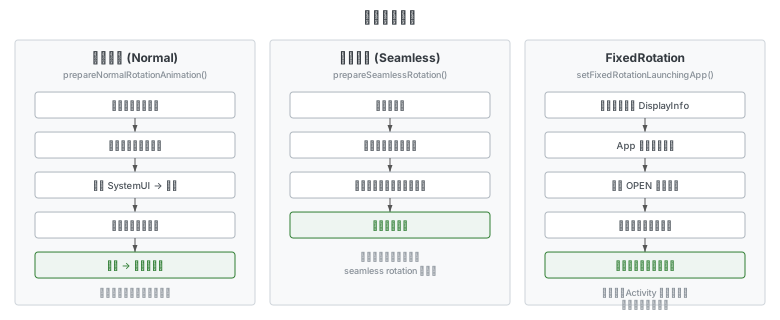
冻屏旋转 (Normal Rotation)
对旧方向截图并冻结屏幕,通过旋转动画缓慢过渡到新的显示方向。在 updateRotationUnchecked() 中通过 prepareNormalRotationAnimation() 触发。适用于应用内旋转且背景中有部分可见活动的场景。
无缝旋转 (Seamless Rotation)
不冻结屏幕,直接由一个方向过渡到另一个方向,各窗口独立完成旋转过渡。通过 prepareSeamlessRotation() 触发。是否能使用无缝旋转由 shouldRotateSeamlessly() 判断。
FixedRotation
针对 Activity 启动时方向与当前屏幕方向不一致 的场景。系统模拟转屏后的屏幕信息发送给应用,让应用提前以新方向绘制,过渡动画结束后再真正转屏。由于此时应用已绘制好,可以直接进行无缝旋转,避免了冻屏旋转带来的体验问题。
冻屏旋转流程
旋转动画准备
当 Shell Transitions 启用时,updateRotationUnchecked() 中会创建一个 CHANGE 类型的 Transition:
// DisplayContent.java (line 4146)
void requestChangeTransition(@ActivityInfo.Config int changes,
        @Nullable TransitionRequestInfo.DisplayChange displayChange) {
    final TransitionController controller = mTransitionController;
    final Transition t = controller.requestStartDisplayTransition(TRANSIT_CHANGE, 0 /* flags */,
            this, null /* remoteTransition */, displayChange);
    t.collect(this);
    mAtmService.startPowerMode(POWER_MODE_REASON_CHANGE_DISPLAY);
    // ...
    if (mFixedRotationLaunchingApp != null) {
        // FixedRotation 完成后,继续启动无缝旋转
        setSeamlessTransitionForFixedRotation(t);
    } else if (isRotationChanging()) {
        if (displayChange != null) {
            final boolean seamless = mDisplayRotation.shouldRotateSeamlessly(
                    displayChange.getStartRotation(), displayChange.getEndRotation(),
                    false /* forceUpdate */);
            if (seamless) {
                t.onSeamlessRotating(this);
            }
        }
        startAsyncRotation(false /* shouldDebounce */);
    }
    t.setKnownConfigChanges(this, changes);
}
Shell Transition 流程
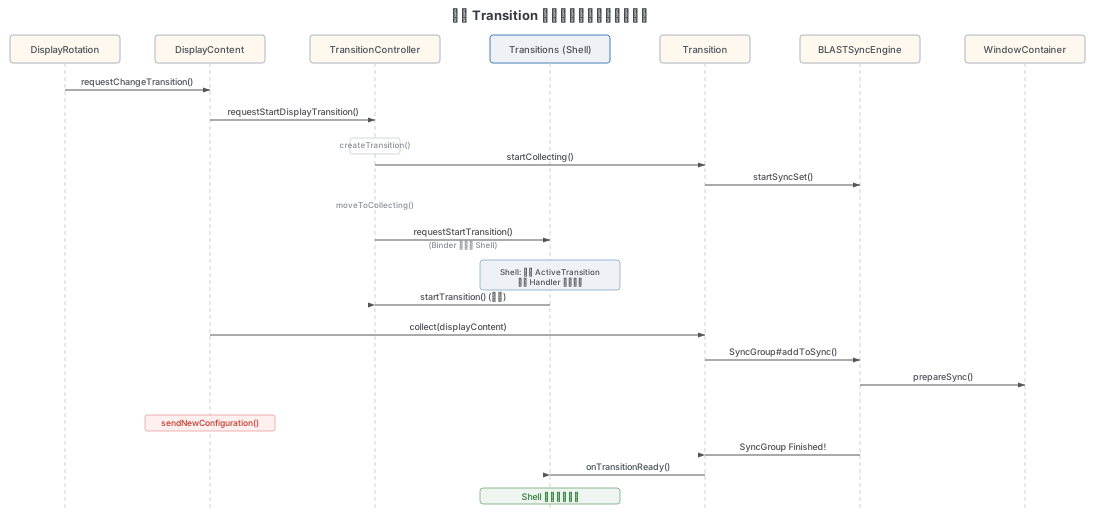
旋转通过 Shell Transition 框架执行,主要经历以下阶段:
1. Create + Collect
由 requestChangeTransition() 触发,创建一个 CHANGE 类型的 Transition 并开始收集参与者:
// TransitionController.java (line 346)
Transition createTransition(@WindowManager.TransitionType int type,
        @WindowManager.TransitionFlags int flags) {
    // ...
    Transition transit = new Transition(type, flags, this, mSyncEngine);
    moveToCollecting(transit);
    return transit;
}
moveToCollecting() 将 Transition 置为 STATE_COLLECTING,并通过 BLASTSyncEngine.startSyncSet() 开始同步。
2. RequestStartTransition
通过 Binder 调用将 TransitionRequestInfo(包含旋转变化信息 DisplayChange)发送到 Shell 侧:
// TransitionController.java (line 1017)
mTransitionPlayers.getLast().mPlayer.requestStartTransition(
        transition.getToken(), request);
3. Shell 侧处理
Shell 侧的 Transitions.requestStartTransition() 接收到请求后:
- 创建
ActiveTransition对象 - 遍历 Handlers 寻找能处理旋转的 Handler
- 检测到
DisplayChange包含旋转变化时,通知DisplayController.onDisplayRotateRequested() - 通过
IWindowOrganizerController.startTransition()回调到 WM Core
4. Configuration 更新
Shell 回调 startTransition() 后,WM Core 执行 sendNewConfiguration() 更新 Configuration:
// DisplayContent.java (line 1923)
boolean sendNewConfiguration() {
    if (!isReady()) {
        return false;
    }
    if (mRemoteDisplayChangeController.isWaitingForRemoteDisplayChange()) {
        return false;
    }
    final boolean configUpdated = updateDisplayOverrideConfigurationLocked();
    // ...
    return configUpdated;
}
5. Sync + Screenshot
在 Configuration 更新的同时,系统会对当前屏幕内容截图(用于旋转动画的旧方向画面)。Transition.collectVisibleChange() 触发截图:
截图通过 ScreenCapture.captureLayers() 获取当前 Surface 内容,保存到 ChangeInfo.mSnapshot 中,后续在 calculateTransitionInfo() 时传递给 Shell 用作旋转动画的源画面。
然后等待所有参与动画的窗口完成绘制同步(BLASTSyncEngine.SyncGroup.tryFinish())。
6. onTransitionReady
所有窗口同步完成后,calculateTransitionInfo() 构建 TransitionInfo,其中包含:
- 每个参与者的起始/结束 bounds、rotation
- 截图(
mSnapshot)和背景色(mSnapshotLuma) - 旋转动画类型(通过
getTaskRotationAnimation()获取)
然后通过 onTransitionReady() 将 TransitionInfo 发送给 Shell。
7. Play animation + finishTransition
Shell 侧 DefaultTransitionHandler.startAnimation() 收到后播放旋转动画(见下节)。动画结束后调用 finishCallback,通过 IWindowOrganizerController.finishTransition() 回到 WM Core 完成 Transition。
无缝旋转判定
在 Shell Transitions 未启用的 legacy 路径中,shouldRotateSeamlessly() 决定使用无缝旋转还是冻屏旋转:
// DisplayRotation.java (line 1015)
boolean shouldRotateSeamlessly(int oldRotation, int newRotation, boolean forceUpdate) {
    // FixedRotation 完成后,App 已以新方向绘制好,直接无缝旋转
    if (mDisplayContent.hasTopFixedRotationLaunchingApp()) {
        return true;
    }

    final WindowState w = mDisplayPolicy.getTopFullscreenOpaqueWindow();
    if (w == null || w != mDisplayContent.mCurrentFocus) {
        return false;
    }
    // 仅当顶层窗口请求了 ROTATION_ANIMATION_SEAMLESS 且处于全屏不透明状态时
    if (w.getAttrs().rotationAnimation != ROTATION_ANIMATION_SEAMLESS || w.inMultiWindowMode()
            || w.isAnimatingLw()) {
        return false;
    }
    if (!canRotateSeamlessly(oldRotation, newRotation)) {
        return false;
    }
    // Activity bounds 与父级不同时拒绝(旋转后位置可能跳变)
    if (w.mActivityRecord != null && !w.mActivityRecord.matchParentBounds()) {
        return false;
    }
    // 存在 PIP 或系统告警窗口时不能无缝旋转
    if (mDisplayContent.getDefaultTaskDisplayArea().hasPinnedTask()
            || mDisplayContent.hasAlertWindowSurfaces()) {
        return false;
    }
    // 还有窗口在等待上一次无缝旋转完成时不能继续
    if (!forceUpdate && mDisplayContent.getWindow(win -> win.mSeamlesslyRotated) != null) {
        return false;
    }
    return true;
}
旋转动画执行
Shell 侧收到 onTransitionReady 后,由 DefaultTransitionHandler.startAnimation() 处理。对于旋转动画:
- 检测到
FLAG_IS_DISPLAY的 CHANGE,获取旋转动画提示(seamless / jumpcut / normal) - 调用
startRotationAnimation()创建ScreenRotationAnimation实例 - 在构造函数中使用之前截取的屏幕快照作为旋转时最上面的层
buildAnimation()根据起止 rotation 差值加载对应的动画资源- 创建
ValueAnimator,每帧通过applyTransformation()更新 Surface 参数 - 动画结束后调用
finishCallback,最终finishTransition()回到 WM Core
// ScreenRotationAnimation.java - buildAnimation() 核心逻辑
// 根据 deltaRotation(mEndRotation, mStartRotation) 加载对应动画:
// ROTATION_0   → screen_rotate_0_exit / rotation_animation_enter
// ROTATION_90  → screen_rotate_plus_90_exit / screen_rotate_plus_90_enter
// ROTATION_180 → screen_rotate_180_exit / screen_rotate_180_enter
// ROTATION_270 → screen_rotate_minus_90_exit / screen_rotate_minus_90_enter
动画的实际执行通过 DefaultTransitionHandler.buildSurfaceAnimation() 驱动:
// DefaultTransitionHandler.java - buildSurfaceAnimation()
static void buildSurfaceAnimation(@NonNull ArrayList<Animator> animations,
        @NonNull Animation anim, @NonNull SurfaceControl leash,
        @NonNull Runnable finishCallback, @NonNull TransactionPool pool,
        @NonNull ShellExecutor mainExecutor, @Nullable Point position,
        float cornerRadius, @Nullable Rect clipRect) {
    final SurfaceControl.Transaction transaction = pool.acquire();
    final ValueAnimator va = ValueAnimator.ofFloat(0f, 1f);
    final Transformation transformation = new Transformation();
    final float[] matrix = new float[9];
    va.overrideDurationScale(1.0f);
    va.setDuration(anim.computeDurationHint());
    va.addUpdateListener(animation -> {
        final long currentPlayTime = Math.min(va.getDuration(), va.getCurrentPlayTime());
        // 每帧通过 applyTransformation 更新 Surface 的 matrix、alpha、crop
        applyTransformation(currentPlayTime, transaction, leash, anim,
                transformation, matrix, position, cornerRadius, clipRect);
    });
    // ...动画结束时 release transaction 并回调 finishCallback
    animations.add(va);
}
动画驱动流程总结:
- 初始化
ScreenRotationAnimation,startTransaction.apply()使新方向生效 - 根据旋转角度差加载对应的进入/退出动画资源
- 构建
ValueAnimator,在每帧的 update 回调中通过applyTransformation()更新窗口的 matrix、alpha 和 crop - 动画结束调用 finish 回调,释放截图 Surface
FixedRotation 机制
概述与原理
FixedRotation 属于无缝旋转的一种,针对 Activity 启动时方向与当前屏幕方向不一致的场景。
原理:Activity 启动时系统判断其是否满足 FixedRotation 条件。满足时,系统会模拟转屏后的屏幕信息(DisplayInfo、WmDisplayCutout、RoundedCorners、PrivacyIndicatorBounds 和 DisplayFrames),然后将这些信息通过 Configuration 变更发送给应用。应用拿到新信息后以新方向绘制,系统基于旧方向对新方向进行方向补偿。这样在不进行实际转屏的情况下,Activity 切换可以使用原有的过渡动画。过渡动画完成之后再进行真正的转屏,由于此时应用已经绘制好,可以直接进行无缝旋转。
关键特征:
- 时机:在应用完成绘制之前(resume 之前)
- 对象:只对 Activity 有效,其它非 Activity 窗口只能跟随其它 Activity 一起做 FixedRotation
- 条件:由
DisplayContent.handleTopActivityLaunchingInDifferentOrientation()判断
触发条件
// DisplayContent.java (line 2176)
private boolean handleTopActivityLaunchingInDifferentOrientation(@NonNull ActivityRecord r,
        @NonNull ActivityRecord orientationSrc, boolean checkOpening) {
    if (!WindowManagerService.ENABLE_FIXED_ROTATION_TRANSFORM) {
        return false;
    }
    if (r.isFinishingFixedRotationTransform()) {
        return false;  // 正在结束 FixedRotation
    }
    if (r.hasFixedRotationTransform()) {
        return true;   // 已经设置且未结束
    }
    if (!r.occludesParent() || r.isReportedDrawn()) {
        // 半透明/浮窗 Activity 或已绘制完成的 Activity,
        // 需要常规旋转动画来覆盖配置变化
        return false;
    }
    if (checkOpening) {
        if (mTransitionController.isShellTransitionsEnabled()) {
            if (!mTransitionController.isCollecting(r)) {
                return false;  // 不在当前 Transition 收集中
            }
        } else {
            if (!mAppTransition.isTransitionSet() || !mOpeningApps.contains(r)) {
                return false;  // 非过渡动画中的 Activity
            }
        }
        if (r.isState(RESUMED) && !r.getTask().mInResumeTopActivity) {
            // 已经执行或完成生命周期回调,使用常规旋转
            return false;
        }
    } else if (r != topRunningActivity()) {
        return false;  // 非顶部 Activity
    }
    if (mLastWallpaperVisible && r.windowsCanBeWallpaperTarget()
            && mFixedRotationTransitionListener.mAnimatingRecents == null
            && !mTransitionController.isTransientLaunch(r)) {
        // 壁纸可见且非最近任务动画场景,使用常规旋转
        return false;
    }
    final int rotation = rotationForActivityInDifferentOrientation(orientationSrc);
    if (rotation == ROTATION_UNDEFINED) {
        return false;  // 不会引起方向变化
    }
    if (!r.getDisplayArea().matchParentBounds()) {
        return false;  // 父容器有自己的边界策略
    }

    setFixedRotationLaunchingApp(r, rotation);
    return true;
}
触发 FixedRotation 的场景包括:
- Activity 冷启动:
RootWindowContainer.ensureVisibilityAndConfig()→updateOrientation() - Activity 热启动:
StartingSurfaceController.createTaskSnapshotSurface()中检测到快照方向不同 - Starting Window 转移:
ActivityRecord.transferStartingWindow()中源 Activity 有 FixedRotation - 横屏应用下锁屏解锁:
KeyguardController.keyguardGoingAway()触发
其中热启动场景的触发代码如下:
// StartingSurfaceController.java (line 150)
StartingSurface createTaskSnapshotSurface(ActivityRecord activity, TaskSnapshot taskSnapshot) {
    final Task task = activity.getTask();
    if (task == null) {
        return null;
    }
    final WindowState mainWindow = task
            .getTopFullscreenMainWindow(false /* includeStartingApp */);
    if (mainWindow == null) {
        return null;
    }
    // 检测快照方向与当前 Display 方向是否不同
    if (activity.mDisplayContent.getRotation() != taskSnapshot.getRotation()) {
        // 快照方向不同,提前应用 FixedRotation 使快照能以正确方向显示
        activity.mDisplayContent.handleTopActivityLaunchingInDifferentOrientation(
                activity, false /* checkOpening */);
    }
    // ...添加 starting window
}
FixedRotation 的设置与模拟
当 handleTopActivityLaunchingInDifferentOrientation() 判断需要 FixedRotation 后,调用 setFixedRotationLaunchingApp() 进行设置:
// DisplayContent.java (line 2449)
void setFixedRotationLaunchingApp(@NonNull ActivityRecord r, @Rotation int rotation) {
    final ActivityRecord prevRotatedLaunchingApp = mFixedRotationLaunchingApp;
    if (prevRotatedLaunchingApp == r
            && r.getWindowConfiguration().getRotation() == rotation) {
        return;  // 相同的 app 和目标 rotation,跳过
    }
    if (prevRotatedLaunchingApp != null
            && prevRotatedLaunchingApp.getWindowConfiguration().getRotation() == rotation
            && prevRotatedLaunchingApp.isInTransition()) {
        // 多个 Activity 连续启动且 rotation 相同,共享变换状态
        r.linkFixedRotationTransform(prevRotatedLaunchingApp);
        if (r != mFixedRotationTransitionListener.mAnimatingRecents) {
            setFixedRotationLaunchingAppUnchecked(r, rotation);
        }
        return;
    }

    if (!r.hasFixedRotationTransform()) {
        startFixedRotationTransform(r, rotation);  // 模拟新方向信息
    }
    setFixedRotationLaunchingAppUnchecked(r, rotation);
    if (prevRotatedLaunchingApp != null) {
        prevRotatedLaunchingApp.finishFixedRotationTransform();
    }
}
startFixedRotationTransform() 是模拟新方向信息的核心:
// DisplayContent.java (line 2551)
private void startFixedRotationTransform(WindowToken token, int rotation) {
    mTmpConfiguration.unset();
    // 计算目标 rotation 下的 DisplayInfo 和 Configuration
    final DisplayInfo info = computeScreenConfiguration(mTmpConfiguration, rotation);
    final DisplayCutout cutout = calculateDisplayCutoutForRotation(rotation);
    final RoundedCorners roundedCorners = calculateRoundedCornersForRotation(rotation);
    final PrivacyIndicatorBounds indicatorBounds =
            calculatePrivacyIndicatorBoundsForRotation(rotation);
    final DisplayShape displayShape = calculateDisplayShapeForRotation(rotation);
    final DisplayFrames displayFrames = new DisplayFrames(new InsetsState(), info,
            cutout, roundedCorners, indicatorBounds, displayShape);
    // 将模拟的新方向信息应用到 Activity
    token.applyFixedRotationTransform(info, displayFrames, mTmpConfiguration);
}这里系统模拟了目标旋转方向下的完整显示信息(DisplayInfo、DisplayCutout、RoundedCorners、PrivacyIndicatorBounds、DisplayShape 和 DisplayFrames),然后通过 applyFixedRotationTransform() 发送给 Activity,使其以新方向进行绘制。
启动流程
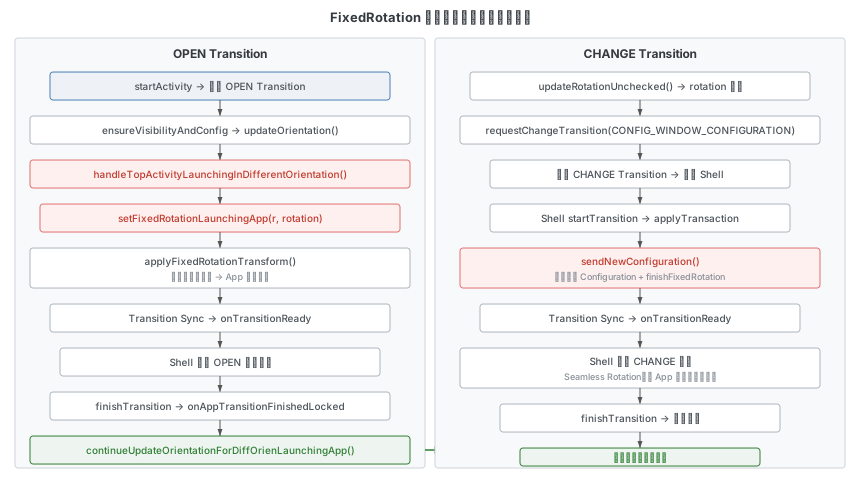
流程说明(V 版本)
OPEN Transition 阶段:
startActivity时触发 OPEN Transition- 在 OPEN Transition 流程中(添加 startingWindow 或
ensureVisibilityAndConfig时),调用handleTopActivityLaunchingInDifferentOrientation()判断是否需要 FixedRotation - 条件满足时,调用
setFixedRotationLaunchingApp(r, rotation),进而调用applyFixedRotationTransform()向 Activity 发送模拟的新方向配置 - App 以新方向绘制(如横屏绘制),但此时屏幕实际仍处于旧方向(如竖屏)
- OPEN Transition 经历 Collecting → Sync → onTransitionReady → play → finish
CHANGE Transition 阶段:
- OPEN Transition finish 时,
onAppTransitionFinishedLocked()中调用continueUpdateOrientationForDiffOrienLaunchingApp() - 该方法触发
updateRotationUnchecked(),此时 rotation 发生变化,创建 CHANGE Transition - Shell 回复
startTransition时,执行 Configuration 更新流程(sendNewConfiguration()) - Configuration 更新过程中调用
finishFixedRotationTransform()结束 FixedRotation - CHANGE Transition 经历 Collecting → Sync → onTransitionReady → play → finish
- play 时采用 Seamless Rotation(因为 App 已经以新方向绘制好)
冷启动调用栈
startActivity → ActivityStarter.startActivityUnchecked
  → createAndStartCollecting (OPEN Transition)
  → ActivityStarter.startActivityInner
    → resumeFocusedTasksTopActivities
      → TaskFragment.resumeTopActivity
        → ActivityTaskSupervisor.realStartActivityLocked
          → RootWindowContainer.ensureVisibilityAndConfig
            → DisplayContent.updateOrientation
              → handleTopActivityLaunchingInDifferentOrientation
                → setFixedRotationLaunchingApp
                  → WindowToken.applyFixedRotationTransform  // 模拟新方向
热启动调用栈
startActivity → ActivityStarter.startActivityUnchecked
  → createAndStartCollecting (OPEN Transition)
  → ActivityStarter.recycleTask
    → ActivityRecord.showStartingWindow
      → ActivityRecord.addStartingWindow
        → StartingSurfaceController.createTaskSnapshotSurface
          → handleTopActivityLaunchingInDifferentOrientation(r, false)
            → setFixedRotationLaunchingApp
              → WindowToken.applyFixedRotationTransform
返回桌面调用栈
从横屏应用返回竖屏桌面时,桌面(Launcher)作为不同方向的 Activity 也会触发 FixedRotation:
Shell: startNewTransition (TO_BACK)
  → WindowOrganizerController.startTransition
    → startCollectOrQueue
      → applyHierarchyOp
        → ActivityStartController.startExistingRecentsIfPossible
          → TaskFragment.resumeTopActivity
            → RootWindowContainer.ensureVisibilityAndConfig
              → DisplayContent.updateOrientation
                → handleTopActivityLaunchingInDifferentOrientation(Launcher)
                  → setFixedRotationLaunchingApp(Launcher, ROTATION_0)
                    → WindowToken.applyFixedRotationTransform

    // 壁纸也跟随 FixedRotation
    → applySurfaceChangesTransaction
      → WallpaperController.adjustWallpaperWindows
        → WallpaperWindowToken.linkFixedRotationTransform

// OPEN Transition 完成后
→ onAppTransitionFinishedLocked(Launcher)
  → continueUpdateOrientationForDiffOrienLaunchingApp
    → updateRotationUnchecked → rotation 变回 ROTATION_0
      → requestChangeTransition (CHANGE)

// CHANGE Transition
→ Shell startTransition
  → sendNewConfiguration
    → finishFixedRotationTransform(Launcher)
  → Seamless Rotation → finishTransition
注意返回桌面时壁纸也会通过 WallpaperWindowToken.linkFixedRotationTransform() 跟随 Launcher 一起做 FixedRotation。
结束流程
FixedRotation 的结束由 FixedRotationTransitionListener 监听过渡动画完成事件:
// DisplayContent.java - FixedRotationTransitionListener
@Override
public void onAppTransitionFinishedLocked(IBinder token) {
    final ActivityRecord r = ActivityRecord.forTokenLocked(token);
    if (r == null || r == mAnimatingRecents || r.getDisplayId() != mDisplayId) {
        return;
    }
    if (mAnimatingRecents != null && mRecentsWillBeTop) {
        return;  // 最近任务动画场景,保持当前外观
    }
    if (mFixedRotationLaunchingApp == null) {
        r.finishFixedRotationTransform();
        return;
    }
    if (mFixedRotationLaunchingApp.hasFixedRotationTransform(r)) {
        if (mFixedRotationLaunchingApp.hasAnimatingFixedRotationTransition()) {
            return;  // 等待所有关联 Activity 完成动画
        }
    } else {
        final Task task = r.getTask();
        if (task == null || task != mFixedRotationLaunchingApp.getTask()) {
            return;
        }
        if (task.getActivity(ActivityRecord::isInTransition) != null) {
            return;
        }
    }
    continueUpdateOrientationForDiffOrienLaunchingApp();
}
continueUpdateOrientationForDiffOrienLaunchingApp() 会触发真正的方向更新(updateRotationUnchecked()),创建 CHANGE Transition,在其中完成 sendNewConfiguration() 和 finishFixedRotationTransform()。
Configuration 更新流程
旋转发生后,系统需要更新全局 Configuration 并通知所有相关组件。
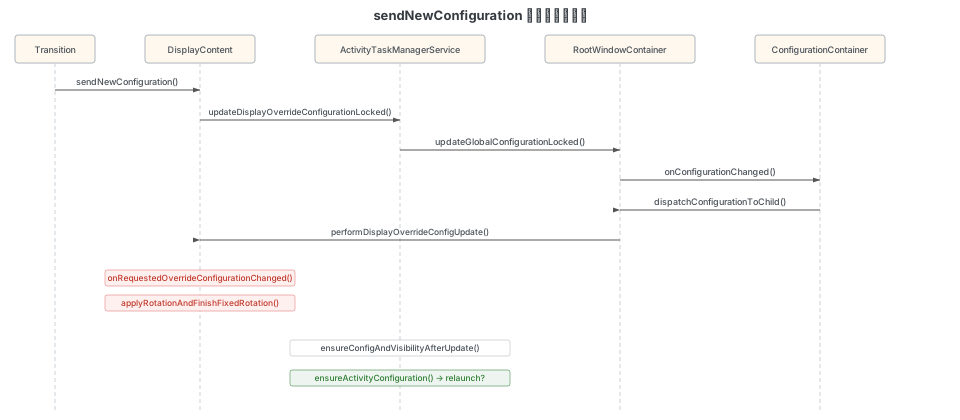
sendNewConfiguration
// DisplayContent.java (line 1923)
boolean sendNewConfiguration() {
    if (!isReady()) {
        return false;
    }
    if (mRemoteDisplayChangeController.isWaitingForRemoteDisplayChange()) {
        return false;
    }
    final Transition.ReadyCondition displayConfig = mTransitionController.isCollecting()
            ? new Transition.ReadyCondition("displayConfig", this) : null;
    if (displayConfig != null) {
        mTransitionController.waitFor(displayConfig);
    }
    final boolean configUpdated = updateDisplayOverrideConfigurationLocked();
    if (displayConfig != null) {
        displayConfig.meet();
    }
    // ...
    return configUpdated;
}
调用链:
DisplayContent.sendNewConfiguration()
  → updateDisplayOverrideConfigurationLocked()
    → ActivityTaskManagerService.updateGlobalConfigurationLocked()
      → 更新全局 Configuration
      → RootWindowContainer.onConfigurationChanged()
        → dispatchConfigurationToChild()
          → DisplayContent.performDisplayOverrideConfigUpdate()
            → onRequestedOverrideConfigurationChanged()
              → applyRotationAndFinishFixedRotation()  // 应用旋转 + 结束 FixedRotation
      → ensureConfigAndVisibilityAfterUpdate()
        → ActivityRecord.ensureActivityConfiguration()
          → shouldRelaunchLocked()  // 判断是否需要重启 Activity
applyRotationAndFinishFixedRotation() 是旋转生效和 FixedRotation 清理的关键方法:
// DisplayContent.java (line 7328)
private void applyRotationAndFinishFixedRotation(int oldRotation, int newRotation) {
    final WindowToken rotatedLaunchingApp = mFixedRotationLaunchingApp;
    if (rotatedLaunchingApp == null) {
        applyRotation(oldRotation, newRotation);
        return;
    }
    // 结束 FixedRotation:恢复 Activity 的正常 Configuration
    rotatedLaunchingApp.finishFixedRotationTransform();
    // 清除 mFixedRotationLaunchingApp
    setFixedRotationLaunchingAppUnchecked(null);
    // 应用旋转到 Display
    applyRotation(oldRotation, newRotation);
}
continueUpdateOrientationForDiffOrienLaunchingApp
FixedRotation 场景下,OPEN Transition 结束后触发此方法完成真正的方向更新:
// DisplayContent.java (line 2497)
void continueUpdateOrientationForDiffOrienLaunchingApp() {
    if (mFixedRotationLaunchingApp == null) {
        return;
    }
    if (mPinnedTaskController.shouldDeferOrientationChange()) {
        return;  // 等待 PiP 动画完成
    }
    // 直接更新方向,因为将改变 Display 方向的 App 已准备好
    if (mDisplayRotation.updateOrientation(getOrientation(), false /* forceUpdate */)) {
        if (!mTransitionController.isCollecting(this)) {
            sendNewConfiguration();
        }
        return;
    }
    if (mRemoteDisplayChangeController.isWaitingForRemoteDisplayChange()) {
        return;
    }
    // Display 方向未变化,清理 FixedRotation
    clearFixedRotationLaunchingApp();
}
Activity 配置更新
ActivityRecord.ensureActivityConfiguration() 方法决定 Activity 如何响应配置变化:
- 如果变更的配置在 Activity 声明的
android:configChanges范围内,Activity 通过onConfigurationChanged()回调自行处理,不会重启 - 如果变更的配置不在声明范围内,Activity 会被 relaunch(销毁并重新创建)
判断是否需要 relaunch 的关键代码是 ActivityRecord.shouldRelaunchLocked(changes, mTmpConfig),其中 changes 为配置变更的标记位,与 Activity 在 Manifest 中配置的 android:configChanges 属性进行比对。
转屏后布局更新
转屏后应用端需要重新布局和绘制,整个流程如下:
WM Core:
  performSurfacePlacement()
    → handleResizingWindows()
      → WindowState.reportResized()
        → mClient.resized()  // IPC 到应用端

App 端 (ViewRootImpl):
  W.resized()  // W 继承 IWindow.Stub,是 ViewRootImpl 的内部类
    → ViewRootImpl.dispatchResized()
      → Handler 发送消息
        → requestLayout()
          → Choreographer.postCallback(CALLBACK_TRAVERSAL)
            → doTraversal()
              → performTraversals()
                → relayoutWindow()      // 1. 请求 WMS 重新布局,创建 SurfaceControl
                → performMeasure()      // 2. 测量 View
                → performLayout()       // 3. 布局 View
                → performDraw()         // 4. 绘制 View
relayoutWindow() 通过 Session.relayout() 调用到 WindowManagerService.relayoutWindow(),在其中会进行方向的更新检查。performMeasure()、performLayout()、performDraw() 则分别对应 View 树的测量、布局和绘制三个阶段。
调试指南
关键日志关键字
以下是 V 版本中与旋转相关的关键日志关键字(用 | 分隔可直接用于 logcat 过滤):
onProposedRotationChanged|updateRotationUnchecked|rotationForOrientation
|Computed rotation|selected orientation|rotation changed|request=S
|Updating global configuration to|configuration_changed:
|ActivityTaskManager: Config changes|Override config changes
|Relayout Window|finishDrawingWindow
|Creating Transition:|Start collecting|Collecting in transition
|Requesting StartTransition|WindowManager: setSyncGroup
|Set sync ready|onTransitionReady|Finish Transition
|applyFixedRotationTransform|setFixedRotationLaunchingApp
|linkFixedRotationTransform|finishFixedRotationTransform
dumpsys 命令
查看当前显示方向信息:
adb shell dumpsys window displays在返回数据中关注 DisplayRotation 部分:
mCurrentAppOrientation:当前应用请求的方向(如SCREEN_ORIENTATION_UNSPECIFIED)mRotation:当前屏幕旋转角度mUserRotationMode:用户旋转模式(USER_ROTATION_FREE或USER_ROTATION_LOCKED)mUserRotation:用户锁定的方向
日志分析示例
以下是一个典型的 sensor 触发旋转的日志序列:
// 1. Sensor 检测到方向变化
V WindowManager: onProposedRotationChanged, rotation=1

// 2. 计算新的 rotation
V WindowManager: rotationForOrientation(orient=SCREEN_ORIENTATION_UNSPECIFIED (-1),
    last=ROTATION_0 (0)); user=ROTATION_0 (0)
V WindowManager: Computed rotation=ROTATION_90 (1) for display id=0
    based on lastOrientation=SCREEN_ORIENTATION_UNSPECIFIED (-1)
    and oldRotation=ROTATION_0 (0)

// 3. 确认 rotation 变化
V WindowManager: Display id=0 rotation changed to 1 from 0, lastOrientation=-1

// 4. 创建 CHANGE Transition
V WindowManager: Creating Transition: TransitionRecord{... type=CHANGE}

// 5. Configuration 更新
I WindowManager: Updating global configuration to: {...mDisplayRotation=ROTATION_90...}
I configuration_changed: 536872064

// 6. 旋转动画完成
V WindowManager: Finish Transition: TransitionRecord{... type=CHANGE}
以下是一个 FixedRotation 的日志序列(桌面冷启动横屏应用):
// 1. 创建 OPEN Transition
V WindowManager: Start collecting in Transition: TransitionRecord{... type=OPEN}

// 2. 启动 FixedRotation,向 App 发送横屏配置
D WindowManager: applyFixedRotationTransform ActivityRecord{... com.example.game/.MainActivity}
    config={...land...mDisplayRotation=ROTATION_90...}
D WindowManager: setFixedRotationLaunchingApp 0 prev=null
    now=ActivityRecord{... com.example.game/.MainActivity} rotation=1

// 3. OPEN 过渡动画完成
V WindowManager: Finish Transition: TransitionRecord{... type=OPEN}

// 4. 触发全局方向更新
V WindowManager: Computed rotation=ROTATION_90 (1) for display id=0
V WindowManager: Display id=0 rotation changed to 1 from 0

// 5. 创建 CHANGE Transition
V WindowManager: Creating Transition: TransitionRecord{... type=CHANGE}

// 6. 更新 Configuration + 结束 FixedRotation
I WindowManager: Updating global configuration to: {...land...ROTATION_90...}
D WindowManager: finishFixedRotationTransform ActivityRecord{... com.example.game/.MainActivity}
D WindowManager: setFixedRotationLaunchingApp 0 prev=ActivityRecord{...} now=null

// 7. Seamless Rotation 完成
V WindowManager: Finish Transition: TransitionRecord{... type=CHANGE}