WMS 窗口显示流程
概述
Android 窗口的显示涉及三个进程的协作:
| 角色 | 进程 | 职责 |
|---|---|---|
| 应用端 | App 进程 | 发起窗口创建请求,绘制 UI |
| WMS | system_server | 管理所有窗口,计算大小/位置,协调 Surface |
| SurfaceFlinger | surfaceflinger | 合成图层,输出到屏幕 |
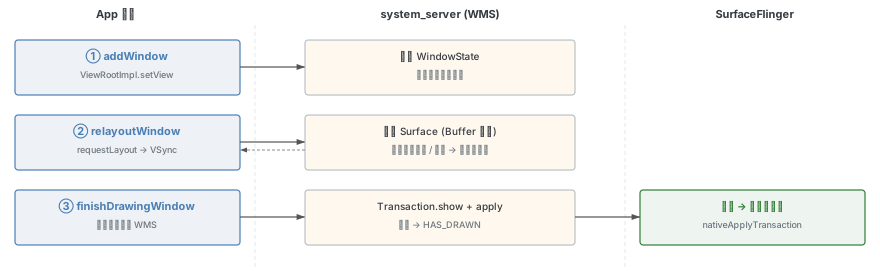
窗口从创建到显示,经历三个核心流程:
- addWindow:WMS 为应用端创建
WindowState并挂载到窗口层级树 - relayoutWindow:WMS 为窗口申请 Surface 并返回给应用端,同时计算窗口大小/位置
- finishDrawingWindow:应用绘制完成后,通知 WMS,最终由 SurfaceFlinger 显示
前置知识:应用端窗口创建
Activity 启动中的窗口创建
Activity 启动过程中,系统会依次创建 Activity、Window 和 WindowManager:
LaunchActivityItem.execute
  → ActivityThread.handleLaunchActivity
    → ActivityThread.performLaunchActivity
      → Instrumentation.newActivity        // 创建 Activity
      → Activity.attach                    // 创建 Window
        → new PhoneWindow(...)
        → Window.setWindowManager
      → Instrumentation.callActivityOnCreate
        → Activity.performCreate
          → Activity.onCreate              // 回调 onCreate
在 Activity.attach 中:
- 创建
PhoneWindow(Window 的唯一实现类) - 通过
Window.setWindowManager关联WindowManagerImpl
setContentView 的本质
// Activity
public void setContentView(int layoutResID) {
    getWindow().setContentView(layoutResID);
}
setContentView 的核心操作:
- 创建
DecorView(继承自FrameLayout,是 View 树的根节点) - 将用户 layout 添加到
DecorView中id为android.R.id.content的容器内
此时 仅创建了 View 树,窗口尚未与 WMS 通信。
ViewRootImpl 的创建
真正的窗口显示在 onResume 之后触发:
ResumeActivityItem.execute
  → ActivityThread.handleResumeActivity
    → Activity.performResume
      → Activity.onResume
    → WindowManagerImpl.addView          // 创建 ViewRootImpl
      → WindowManagerGlobal.addView
        → ViewRootImpl.setView           // 与 WMS 通信
WindowManagerGlobal.addView 中创建了 ViewRootImpl,它是应用端与 WMS 通信的核心桥梁:
// WindowManagerGlobal
public void addView(View view, ViewGroup.LayoutParams params,
                    Display display, Window parentWindow, int userId) {
    // ...
    ViewRootImpl root = new ViewRootImpl(view.getContext(), display);
    root.setView(view, wparams, panelParentView, userId);
}
ViewRootImpl.setView 是窗口显示的总入口,它会触发窗口显示的全部三个流程。
ViewRootImpl 的关键成员变量
// ViewRootImpl
public final Surface mSurface = new Surface();                    // View 绘制的 Surface
private final SurfaceControl mSurfaceControl = new SurfaceControl(); // Surface 控制句柄
private final ClientWindowFrames mTmpFrames = new ClientWindowFrames(); // 临时窗口尺寸信息
final Rect mWinFrame;  // frame given by window manager            // 最终窗口大小
final IWindowSession mWindowSession; // 与 WMS 的通信会话mSurface和mSurfaceControl在创建时为空壳,真正的值在relayoutWindow流程中由 system_server 端赋值mTmpFrames和mSurfaceControl作为出参传递给 WMS,WMS 负责填充数据后返回
前置知识:窗口层级树
WMS 以树形结构管理所有窗口,这棵树称为窗口层级树(Window Hierarchy Tree)。
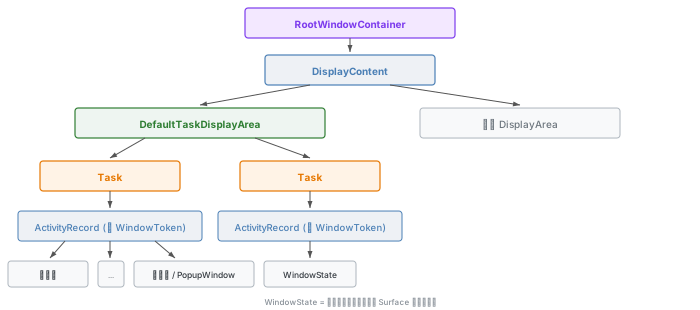
层级树节点说明
| 节点类型 | 说明 |
|---|---|
RootWindowContainer | 树的根节点,管理所有 DisplayContent |
DisplayContent | 代表一块屏幕(通常只有一个默认屏幕) |
DisplayArea | 屏幕内的区域划分(如 DefaultTaskDisplayArea) |
Task | 任务栈,包含多个 ActivityRecord |
ActivityRecord | 对应一个 Activity,同时也是 WindowToken |
WindowState | 最终的窗口节点,对应应用端的一个 Window |
WindowToken
WindowToken 是窗口在 WMS 中的身份标识。对于应用窗口(Activity 的窗口),ActivityRecord 本身就继承自 WindowToken:
class ActivityRecord extends WindowToken { ... }每个 WindowState 都挂载在对应的 WindowToken(即 ActivityRecord)下。
WindowState
WindowState 是 WMS 中窗口的最小管理单元,同时也是一个容器节点:
public class WindowState extends WindowContainer<WindowState>
    implements WindowManagerPolicy.WindowState, InsetsControlTarget, InputTarget {
}
WindowState 的子节点也是 WindowState,对应子窗口(如 PopupWindow)。
调试命令
可以通过以下命令查看层级树信息:
adb shell dumpsys activity containers   # 查看完整层级树
adb shell dumpsys window windows         # 查看窗口信息
第一步:addWindow
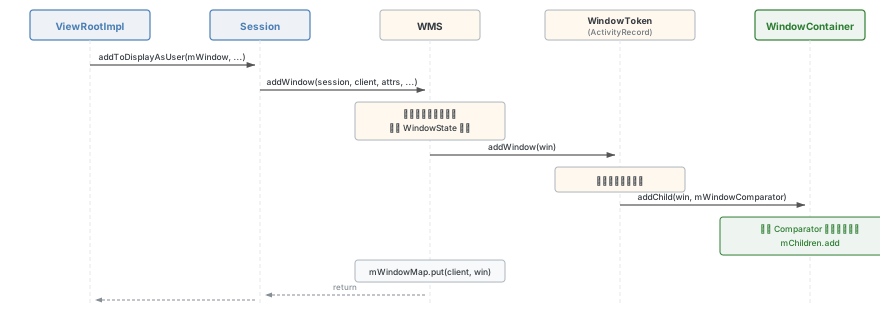
addWindow 流程的核心任务:为应用端创建对应的 WindowState,并将其挂载到窗口层级树上。
1.1 触发入口
在 ViewRootImpl.setView 中,通过 Session 跨进程调用 WMS:
// ViewRootImpl
public void setView(View view, WindowManager.LayoutParams attrs, ...) {
    synchronized (this) {
        if (mView == null) {
            mView = view;
            requestLayout();  // 触发 relayoutWindow(异步,等待 VSync)
            // ...
            Rect attachedFrame = new Rect();
            final float[] compatScale = { 1f };
            res = mWindowSession.addToDisplayAsUser(mWindow, mWindowAttributes,
                    getHostVisibility(), mDisplay.getDisplayId(), userId,
                    mInsetsController.getRequestedVisibleTypes(),
                    inputChannel, mTempInsets, mTempControls,
                    attachedFrame, compatScale);
            // ...
            view.assignParent(this);  // DecorView.getParent() 返回 ViewRootImpl 的原因
        }
    }
}关键时序:requestLayout 内部需要等待 VSync 到来才会异步执行,而 addToDisplayAsUser 是同步调用。因此 addWindow 流程先于 relayoutWindow 流程执行。
1.2 WindowManagerService.addWindow
// WindowManagerService
final HashMap<IBinder, WindowState> mWindowMap = new HashMap<>();

public int addWindow(Session session, IWindow client, LayoutParams attrs,
        int viewVisibility, int displayId, int requestUserId,
        @InsetsType int requestedVisibleTypes,
        InputChannel outInputChannel, InsetsState outInsetsState,
        InsetsSourceControl.Array outActiveControls, Rect outAttachedFrame,
        float[] outSizeCompatScale) {

    // 1. 检查窗口是否已添加(防止重复)
    if (mWindowMap.containsKey(client.asBinder())) {
        return WindowManagerGlobal.ADD_DUPLICATE_ADD;
    }

    // 2. WindowToken 相关处理(查找或创建)
    // 3. 创建 WindowState
    // ...

    // 4. WindowState 的挂载
    win.mSession.onWindowAdded(win);
    mWindowMap.put(client.asBinder(), win);  // 存入 map
    win.mToken.addWindow(win);               // 挂载到窗口树
}
核心数据结构 mWindowMap:
- key:
IBinder,即应用端ViewRootImpl下的内部类W的 Binder 代理 - value:
WindowState
这个 Map 在后续的 relayoutWindow 和 finishDrawingWindow 中都会通过 windowForClientLocked 从中查找 WindowState。
1.3 WindowState 的创建
创建 WindowState 时有两个重要参数:
- client:即应用端
ViewRootImpl的内部类W,代表客户端 - token:即对应的
ActivityRecord(WindowToken)
1.4 WindowState 的挂载
挂载就是将 WindowState 添加到对应的 ActivityRecord(WindowToken)下:
// ActivityRecord
@Override
void addWindow(WindowState w) {
    super.addWindow(w);  // 调用 WindowToken.addWindow
    checkKeyguardFlagsChanged();
}

// WindowToken
void addWindow(final WindowState win) {
    if (win.isChildWindow()) {
        return;  // 子窗口不在此处添加
    }
    if (!mChildren.contains(win)) {
        addChild(win, mWindowComparator);  // 通过比较器确定插入位置
        mWmService.mWindowsChanged = true;
    }
}
1.5 挂载位置的确定
WindowContainer.addChild 方法负责将子元素按规则插入到正确位置:
// WindowContainer
protected void addChild(E child, Comparator<E> comparator) {
    // 检查子元素未被其他容器拥有
    if (!child.mReparenting && child.getParent() != null) {
        throw new IllegalArgumentException("addChild: container=" + child.getName()
                + " is already a child of container=" + child.getParent().getName()
                + " can't add to container=" + getName());
    }

    int positionToAdd = -1;
    if (comparator != null) {
        final int count = mChildren.size();
        for (int i = 0; i < count; i++) {
            if (comparator.compare(child, mChildren.get(i)) < 0) {
                positionToAdd = i;
                break;
            }
        }
    }

    if (positionToAdd == -1) {
        mChildren.add(child);          // 添加到末尾
    } else {
        mChildren.add(positionToAdd, child);  // 插入到指定位置
    }
    child.setParent(this);
}
WindowToken 下的 mWindowComparator 通过比较 mBaseLayer 值来决定排序:
// WindowToken
private final Comparator<WindowState> mWindowComparator =
    (WindowState newWindow, WindowState existingWindow) -> {
        return isFirstChildWindowGreaterThanSecond(newWindow, existingWindow) ? 1 : -1;
    };

protected boolean isFirstChildWindowGreaterThanSecond(
        WindowState newWindow, WindowState existingWindow) {
    return newWindow.mBaseLayer >= existingWindow.mBaseLayer;
}mBaseLayer在创建WindowState时赋值,根据窗口类型计算- 正常情况下同一应用的窗口
mBaseLayer相同,按顺序添加到末尾
1.6 addWindow 小结
addWindow 流程完成两件事:
- 创建
WindowState - 将其挂载到窗口层级树上(添加到对应
ActivityRecord的子节点中)
第二步:relayoutWindow
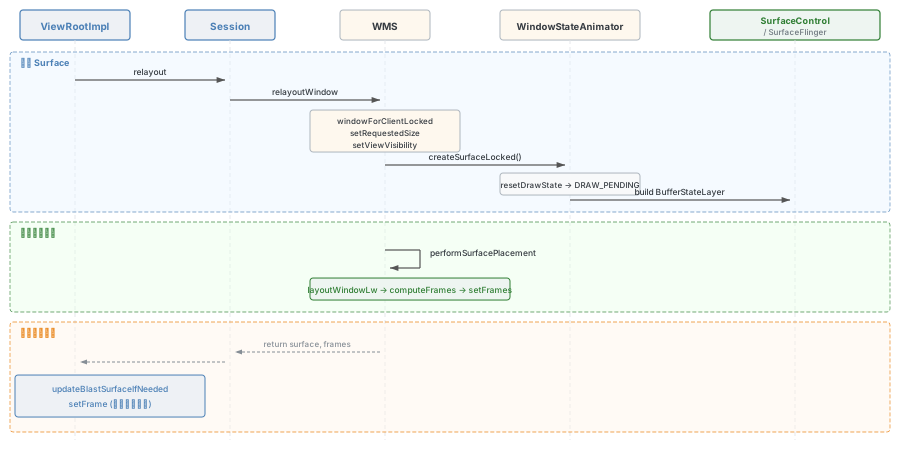
relayoutWindow 流程的核心任务:
- 为窗口申请 Surface 并返回给应用端(应用端需要 Surface 来绘制 UI)
- 计算窗口的大小、位置信息并返回给应用端
2.1 应用端触发
在 ViewRootImpl.setView 中调用 requestLayout() 触发异步遍历:
// ViewRootImpl
@Override
public void requestLayout() {
    if (!mHandlingLayoutInLayoutRequest) {
        checkThread();          // 只有主线程能更新 UI
        mLayoutRequested = true;
        scheduleTraversals();
    }
}
scheduleTraversals 通过 Choreographer 注册回调,等待下一个 VSync-app 信号到来后执行:
// ViewRootImpl
void scheduleTraversals() {
    if (!mTraversalScheduled) {
        mTraversalScheduled = true;
        mTraversalBarrier = mHandler.getLooper().getQueue().postSyncBarrier();
        mChoreographer.postCallback(
                Choreographer.CALLBACK_TRAVERSAL, mTraversalRunnable, null);
        notifyRendererOfFramePending();
        pokeDrawLockIfNeeded();
    }
}
VSync 到来后执行 doTraversal → performTraversals:
// ViewRootImpl
void doTraversal() {
    if (mTraversalScheduled) {
        mTraversalScheduled = false;
        mHandler.getLooper().getQueue().removeSyncBarrier(mTraversalBarrier);
        performTraversals();
    }
}
2.2 performTraversals 概览
performTraversals 是 ViewRootImpl 中最核心的方法(约 1890 行代码),它串联了窗口显示的主要流程:
// ViewRootImpl
private void performTraversals() {
    Rect frame = mWinFrame;

    // ---- 1. 硬绘相关初始化 ----
    boolean hwInitialized = false;

    // ---- 2. relayoutWindow 流程 ----
    relayoutResult = relayoutWindow(params, viewVisibility, insetsPending);
    // 内部会将 WMS 计算后的窗口尺寸给 mWinFrame

    // 1.2 初始化硬件加速,将 Surface 与硬件加速绑定
    hwInitialized = mAttachInfo.mThreadedRenderer.initialize(mSurface);

    // ---- 3. View 绘制三部曲 ----
    performMeasure(childWidthMeasureSpec, childHeightMeasureSpec);
    performLayout(lp, mWidth, mHeight);

    // ---- 4. finishDrawing 流程 ----
    createSyncIfNeeded();

    // ---- 5. View 绘制 - Draw ----
    // performDraw() 在 createSyncIfNeeded 之后
    mActiveSurfaceSyncGroup.markSyncReady();
}
2.3 ViewRootImpl.relayoutWindow
// ViewRootImpl
private int relayoutWindow(WindowManager.LayoutParams params, int viewVisibility,
        boolean insetsPending) throws RemoteException {
    int relayoutResult = 0;

    // 1. 跨进程调用 WMS 的 relayoutWindow
    //    新版使用 WindowRelayoutResult 合并出参;旧版使用 relayoutLegacy 分别传递
    if (windowSessionRelayoutInfo()) {
        relayoutResult = mWindowSession.relayout(mWindow, params,
                requestedWidth, requestedHeight, viewVisibility,
                insetsPending ? WindowManagerGlobal.RELAYOUT_INSETS_PENDING : 0,
                mRelayoutSeq, mLastSyncSeqId, mRelayoutResult);
    } else {
        relayoutResult = mWindowSession.relayoutLegacy(mWindow, params,
                requestedWidth, requestedHeight, viewVisibility,
                ..., mTmpFrames, ..., mSurfaceControl, ...);
    }

    if (mSurfaceControl.isValid()) {
        // 2. 给 mSurface 赋值
        updateBlastSurfaceIfNeeded();

        // 设置硬件加速渲染器的 SurfaceControl 和 BlastBufferQueue
        if (mAttachInfo.mThreadedRenderer != null) {
            mAttachInfo.mThreadedRenderer.setSurfaceControl(
                    mSurfaceControl, mBlastBufferQueue);
        }
    }

    // 3. 将 WMS 计算的窗口大小设置到当前
    setFrame(mTmpFrames.frame, true);
    return relayoutResult;
}mTmpFrames和mSurfaceControl作为出参传递给 WMS- 执行前
mSurfaceControl是空壳,执行后由 WMS 赋予了真正的 native Surface 句柄 mTmpFrames包含 WMS 计算好的窗口尺寸信息
updateBlastSurfaceIfNeeded 方法负责将 mSurfaceControl 转换为可用的 mSurface:
// ViewRootImpl
void updateBlastSurfaceIfNeeded() {
    if (!mSurfaceControl.isValid()) {
        return;
    }
    // 创建 BLASTBufferQueue 对象
    mBlastBufferQueue = new BLASTBufferQueue(mTag, mSurfaceControl,
            mSurfaceSize.x, mSurfaceSize.y, mWindowAttributes.format);
    Surface blastSurface = mBlastBufferQueue.createSurface();
    // 给当前 mSurface 赋值
    mSurface.transferFrom(blastSurface);
}
2.4 WMS 端:relayoutWindow
应用端通过 Session 跨进程调用 WindowManagerService.relayoutWindow:
// Session
@Override
public int relayout(IWindow window, WindowManager.LayoutParams attrs,
        int requestedWidth, int requestedHeight, int viewFlags, int flags, int seq,
        int lastSyncSeqId, WindowRelayoutResult outRelayoutResult) {
    int res = mService.relayoutWindow(this, window, attrs,
            requestedWidth, requestedHeight, viewFlags, flags, seq,
            lastSyncSeqId, outRelayoutResult);
    return res;
}
WindowManagerService.relayoutWindow 的核心逻辑:
// WindowManagerService
public int relayoutWindow(Session session, IWindow client, LayoutParams attrs,
        int requestedWidth, int requestedHeight, int viewVisibility, int flags, int seq,
        int lastSyncSeqId, WindowRelayoutResult outRelayoutResult) {
    // 从 outRelayoutResult 中解包出参
    final ClientWindowFrames outFrames;
    final MergedConfiguration outMergedConfiguration;
    final SurfaceControl outSurfaceControl;
    final InsetsState outInsetsState;
    final InsetsSourceControl.Array outActiveControls;
    if (outRelayoutResult != null) {
        outFrames = outRelayoutResult.frames;
        outMergedConfiguration = outRelayoutResult.mergedConfiguration;
        outSurfaceControl = outRelayoutResult.surfaceControl;
        outInsetsState = outRelayoutResult.insetsState;
        outActiveControls = outRelayoutResult.insetsControls;
    } else { ... }

    // 内部调用 relayoutWindowInner 执行核心逻辑
    return relayoutWindowInner(...);
}
relayoutWindowInner 中的核心逻辑:
// WindowManagerService (relayoutWindowInner)
synchronized (mGlobalLock) {
    // 从 mWindowMap 中获取 WindowState
    final WindowState win = windowForClientLocked(session, client, false);
    if (win == null) { return 0; }

    if (viewVisibility != View.GONE) {
        // 保存应用端请求的大小
        win.setRequestedSize(requestedWidth, requestedHeight);
    }

    // 调整窗口属性和类型
    displayPolicy.adjustWindowParamsLw(win, attrs);

    // 设置窗口可见
    win.setViewVisibility(viewVisibility);

    if (shouldRelayout && outSurfaceControl != null) {
        try {
            // ** 重点 1:创建 SurfaceControl **
            result = createSurfaceControl(outSurfaceControl, result,
                    win, winAnimator);
        } catch (Exception e) {
            return 0;
        }
    }

    // ** 重点 2:计算窗口大小(performSurfacePlacement)**
    mWindowPlacerLocked.performSurfacePlacement(true /* force */);

    // ** 重点 3:填充数据返回应用端 **
    win.fillClientWindowFramesAndConfiguration(outFrames,
            outMergedConfiguration, outActivityWindowInfo,
            false /* useLatestConfig */, shouldRelayout);
}
return result;
三个核心操作:
createSurfaceControl:创建 "Buff" 类型 SurfaceperformSurfacePlacement:执行窗口 layout,计算大小/位置fillClientWindowFramesAndConfiguration:将计算结果填充到出参
2.5 创建 Surface
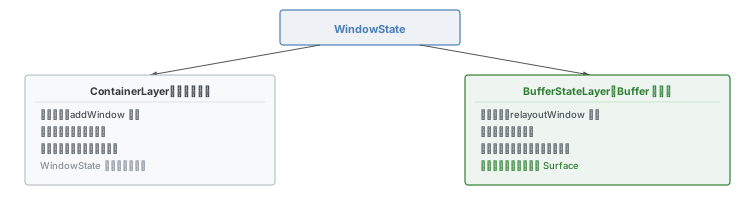
Container 类型与 Buffer 类型
在 SurfaceFlinger 中存在两种类型的 Layer:
- ContainerLayer(容器类型):不可显示,只作为容器
- BufferStateLayer(Buffer 类型):可显示数据,是真正的绘制图层
每个 WindowState 实际创建了两个 SurfaceControl:
- 在 addWindow 流程中创建容器类型(挂载到层级树时创建)
- 在 relayoutWindow 流程中创建Buffer 类型(用于实际显示)
应用端拿到的是 Buffer 类型的 SurfaceControl,绘制数据最终写入这个 Surface。
创建流程
调用链:
WindowManagerService.relayoutWindow
  → WindowManagerService.createSurfaceControl
    → WindowStateAnimator.createSurfaceLocked    // 创建 Buffer 类型 Layer
      → WindowStateAnimator.resetDrawState       // mDrawState = DRAW_PENDING
      → new WindowSurfaceController(name, format, flags, this, attrs.type)
        → SurfaceControl.Builder.build → SurfaceControl.init
→ WindowSurfaceController.getSurfaceControl // 给应用端 Surface 赋值WindowManagerService.createSurfaceControl:
// WindowManagerService
private int createSurfaceControl(SurfaceControl outSurfaceControl, int result,
        WindowState win, WindowStateAnimator winAnimator) {
    if (!win.mHasSurface) {
        result |= RELAYOUT_RES_SURFACE_CHANGED;
    }
    // 1. 创建 WindowSurfaceController 对象
    WindowSurfaceController surfaceController;
    try {
        surfaceController = winAnimator.createSurfaceLocked();
    } finally { }

    if (surfaceController != null) {
        // 2. 出参给应用端
        surfaceController.getSurfaceControl(outSurfaceControl);
    }
    return result;
}WindowStateAnimator.createSurfaceLocked:
// WindowStateAnimator
WindowSurfaceController mSurfaceController;
int mDrawState;

WindowSurfaceController createSurfaceLocked() {
    final WindowState w = mWin;
    if (mSurfaceController != null) {
        return mSurfaceController;  // 已创建则直接返回
    }

    w.setHasSurface(false);
    resetDrawState();  // 设置 mDrawState = DRAW_PENDING

    mSurfaceController = new WindowSurfaceController(
            attrs.getTitle().toString(), format, flags, this, attrs.type);
    return mSurfaceController;
}
WindowSurfaceController 构造方法中真正构建 SurfaceControl:
// WindowSurfaceController
WindowSurfaceController(String name, int format, int flags,
        WindowStateAnimator animator, int windowType) {
    final WindowState win = animator.mWin;

    mSurfaceControl = win.makeSurface()
            .setParent(win.getSurfaceControl())  // 设置父节点
            .setName(name)
            .setFormat(format)
            .setFlags(flags)
            .setMetadata(METADATA_WINDOW_TYPE, windowType)
            .setMetadata(METADATA_OWNER_UID, mWindowSession.mUid)
            .setMetadata(METADATA_OWNER_PID, mWindowSession.mPid)
            .setCallsite("WindowSurfaceController")
            .setBLASTLayer()  // 无条件设置为 Buffer 类型
            .build();
}
关键步骤:
win.makeSurface()方法会构建一个 Surface Builder.setBLASTLayer()无条件将其设置为 Buffer 类型.build()真正创建SurfaceControl(会触发 native 层创建 Layer)
Surface 赋值给应用端
// WindowSurfaceController
void getSurfaceControl(SurfaceControl outSurfaceControl) {
    outSurfaceControl.copyFrom(mSurfaceControl, "WindowSurfaceController.getSurfaceControl");
}
通过 copyFrom 将 framework 层的 SurfaceControl 复制给应用端传过来的 outSurfaceControl。
窗口状态:DRAW_PENDING
在 createSurfaceLocked 中调用 resetDrawState():
// WindowStateAnimator
void resetDrawState() {
    mDrawState = DRAW_PENDING;  // 等待绘制
    if (mWin.mActivityRecord == null) { return; }
    if (!mWin.mActivityRecord.isAnimating(TRANSITION)) {
        mWin.mActivityRecord.clearAllDrawn();
    }
}
此时窗口 Surface 状态为 DRAW_PENDING,表示 Surface 已创建但等待应用端绘制。

2.6 计算窗口大小
performSurfacePlacement 概述
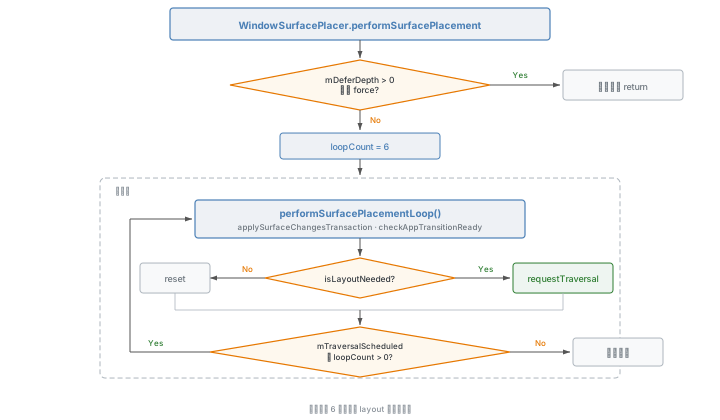
WindowSurfacePlacer.performSurfacePlacement 是 WMS 中执行 layout 的入口方法。它会循环执行(最多 6 次),直到所有窗口布局稳定:
// WindowSurfacePlacer
final void performSurfacePlacement(boolean force) {
    if (mDeferDepth > 0 && !force) { return; }
    int loopCount = 6;
    do {
        mTraversalScheduled = false;
        performSurfacePlacementLoop();
        mService.mAnimationHandler.removeCallbacks(mPerformSurfacePlacement);
        loopCount--;
    } while (mTraversalScheduled && loopCount > 0);
}
内部调用 RootWindowContainer.performSurfacePlacement,最终到达 DisplayContent.applySurfaceChangesTransaction,执行所有窗口的布局计算。
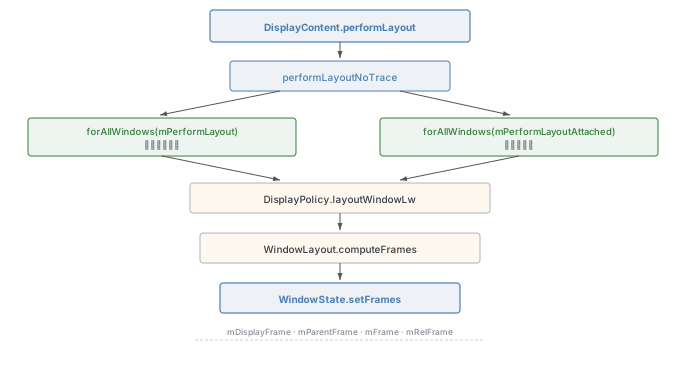
布局计算链
DisplayContent.performLayout
  → DisplayContent.performLayoutNoTrace
    → clearLayoutNeeded()  // mLayoutNeeded = false
    → forAllWindows(mPerformLayout)          // 遍历普通窗口
    → forAllWindows(mPerformLayoutAttached)  // 遍历子窗口
对每个窗口执行:
// mPerformLayout lambda
private final Consumer<WindowState> mPerformLayout = w -> {
    if (w.mLayoutAttached) { return; }  // 子窗口跳过

    final boolean gone = w.isGoneForLayout();
    if (!gone || !w.mHaveFrame || w.mLayoutNeeded) {
        getDisplayPolicy().layoutWindowLw(w, null, mDisplayFrames);
    }
};
DisplayPolicy.layoutWindowLw
此方法调用 WindowLayout.computeFrames 计算窗口大小,然后通过 WindowState.setFrames 保存结果:
// DisplayPolicy
public void layoutWindowLw(WindowState win, WindowState attached,
        DisplayFrames displayFrames) {
    // ...
    mWindowLayout.computeFrames(attrs, win.getInsetsState(),
            displayFrames.mDisplayCutoutSafe,
            win.getBounds(), win.getWindowingMode(),
            requestedWidth, requestedHeight,
            win.getRequestedVisibleTypes(), win.mGlobalScale,
            sTmpClientFrames);

    win.setFrames(sTmpClientFrames, win.mRequestedWidth, win.mRequestedHeight);
}
WindowLayout.computeFrames
这是一个非常复杂的方法(约 260 行),负责根据以下因素计算窗口的最终位置和大小:
- 窗口属性(
LayoutParams:gravity, width, height, x, y 等) - Insets 状态(状态栏、导航栏等系统窗口占用的区域)
- 显示区域(刘海屏裁剪区域
DisplayCutout) - 窗口模式(全屏、多窗口等)
- 兼容缩放比例(
compatScale)
核心计算逻辑简述:
// WindowLayout.computeFrames 核心逻辑(简化)
public void computeFrames(..., ClientWindowFrames frames) {
    // 1. 计算 Insets
    final Insets insets = state.calculateInsets(windowBounds, ...);

    // 2. 计算显示区域
    outDisplayFrame.set(windowBounds.left + left, windowBounds.top + top,
            windowBounds.right - right, windowBounds.bottom - bottom);

    // 3. 计算父容器区域
    outParentFrame.set(outDisplayFrame);  // 或 attachedWindowFrame

    // 4. 处理刘海屏裁剪

    // 5. 根据窗口属性计算宽高
    if (attrs.width == MATCH_PARENT) { w = pw; }
    else if (hasCompatScale) { w = (int)(rw * compatScale + .5f); }
    else { w = rw; }
    // 高度同理

    // 6. 根据 gravity 计算窗口位置
    Gravity.apply(attrs.gravity, w, h, outParentFrame, ...outFrame);

    // 7. 如需适配显示区域
    if (fitToDisplay) {
        Gravity.applyDisplay(attrs.gravity, outDisplayFrame, outFrame);
    }
}
WindowState.setFrames
将计算结果保存到 WindowState 的 mWindowFrames 中:
// WindowState
void setFrames(ClientWindowFrames clientWindowFrames, int requestedWidth,
        int requestedHeight) {
    final WindowFrames windowFrames = mWindowFrames;

    windowFrames.mDisplayFrame.set(clientWindowFrames.displayFrame);
    windowFrames.mParentFrame.set(clientWindowFrames.parentFrame);
    windowFrames.mFrame.set(clientWindowFrames.frame);

    windowFrames.mCompatFrame.set(windowFrames.mFrame);
    if (mInvGlobalScale != 1f) {
        windowFrames.mCompatFrame.scale(mInvGlobalScale);
    }

    // 计算相对坐标
    windowFrames.mRelFrame.set(windowFrames.mFrame);
    WindowContainer<?> parent = getParent();
    // ... 根据父容器计算偏移

    // 标记 Surface 需要重新放置
    mSurfacePlacementNeeded = true;
    mHaveFrame = true;
}
WindowFrames 中的关键字段:
| 字段 | 含义 |
|---|---|
mParentFrame | 父容器矩形位置 |
mDisplayFrame | 屏幕显示区域(含状态栏、导航栏等) |
mFrame | 窗口实际可见区域(应用端绘制的大小即为此值) |
mRelFrame | 相对于父容器坐标系的 mFrame |
2.7 返回窗口大小给应用端
WindowState.fillClientWindowFramesAndConfiguration 将计算好的尺寸信息填充到 outFrames 参数中:
// WindowState
void fillClientWindowFramesAndConfiguration(@NonNull ClientWindowFrames outFrames,
        @NonNull MergedConfiguration outMergedConfiguration,
        @Nullable ActivityWindowInfo outActivityWindowInfo,
        boolean useLatestConfig, boolean relayoutVisible) {
    outFrames.frame.set(mWindowFrames.mCompatFrame);
    outFrames.displayFrame.set(mWindowFrames.mDisplayFrame);
    // ...
    mLastConfigReportedToClient = true;
}
这个 outFrames 就是应用端 ViewRootImpl.relayoutWindow 方法传递的 mTmpFrames。
2.8 relayoutWindow 小结
relayoutWindow 流程完成两件核心任务:
创建 Surface
- 创建 Buffer 类型的
SurfaceControl,通过出参返回给应用端 - 设置窗口状态为
DRAW_PENDING
- 创建 Buffer 类型的
计算窗口大小和位置
- 通过
WindowLayout.computeFrames计算窗口尺寸 - 通过
WindowState.setFrames保存到WindowState - 通过
fillClientWindowFramesAndConfiguration返回给应用端
- 通过
第三步:finishDrawingWindow
3.1 流程目标
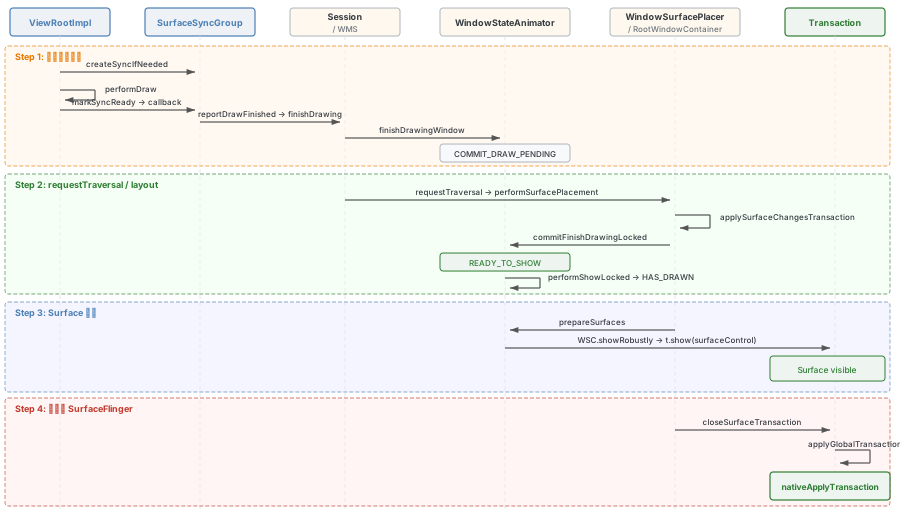
finishDrawingWindow 流程的目标只有一个:把窗口的内容显示到屏幕上。
两个常见疑问:
- 在 relayoutWindow 中已经创建了 Surface,为什么内容还没有显示?—— 因为 Surface 中虽有数据(应用绘制后),但尚未通知 SurfaceFlinger 显示这个 Layer
- 每一帧都需要走 finishDrawingWindow 吗?—— 不需要,后续帧通过 Surface 内部的生产者-消费者模型直接提交
3.2 Surface 显示的四个步骤

在 Framework 层控制一个 Surface 的显示需要四步:
- 创建 SurfaceControl
- 设置 Buffer 数据(绘制内容)
- 执行
Transaction.show(surfaceControl):标记 Surface 需要显示 - 执行
Transaction.apply():提交事务到 SurfaceFlinger
步骤 1、2 在 relayoutWindow 流程和应用端绘制中已完成,finishDrawingWindow 负责步骤 3、4。
3.3 窗口 Surface 状态定义
窗口状态定义在 WindowStateAnimator 中:
// WindowStateAnimator
static final int NO_SURFACE = 0;          // 无 Surface
static final int DRAW_PENDING = 1;        // Surface 已创建,等待绘制
static final int COMMIT_DRAW_PENDING = 2; // 绘制完成,等待下次 layout 提交
static final int READY_TO_SHOW = 3;       // 已提交到 SF,准备显示
static final int HAS_DRAWN = 4;           // 窗口已显示
3.4 应用端触发
在 ViewRootImpl.performTraversals 方法的最后阶段:
// ViewRootImpl
private void performTraversals() {
    // ... relayoutWindow, performMeasure, performLayout ...

    // 设置 mReportNextDraw = true
    if ((relayoutResult & WindowManagerGlobal.RELAYOUT_RES_FIRST_TIME) != 0) {
        reportNextDraw();
    }

    // 创建同步组,注册回调
    createSyncIfNeeded();

    // performDraw
    // ...

    // 触发绘制完成回调
    mActiveSurfaceSyncGroup.markSyncReady();
}
createSyncIfNeeded
// ViewRootImpl
private void createSyncIfNeeded() {
    if (isInWMSRequestedSync() || !mReportNextDraw) {
        return;  // mReportNextDraw 控制不是每帧都走 finishDrawingWindow
    }

    mWmsRequestSyncGroupState = WMS_SYNC_PENDING;
    mWmsRequestSyncGroup = new SurfaceSyncGroup("wmsSync-" + mTag, t -> {
        mWmsRequestSyncGroupState = WMS_SYNC_MERGED;
        // 绘制完成后触发 finishDrawingWindow
        reportDrawFinished(t, seqId);
    });
    mWmsRequestSyncGroup.add(this, null);
}
View 绘制完成后,markSyncReady 触发回调,最终调用 reportDrawFinished:
// ViewRootImpl
private void reportDrawFinished(@Nullable Transaction t, int seqId) {
    try {
        // 跨进程触发 WMS 的 finishDrawingWindow 流程
        mWindowSession.finishDrawing(mWindow, t, seqId);
    } catch (RemoteException e) { }
}
3.5 system_server 端处理
WindowManagerService.finishDrawingWindow
// WindowManagerService
void finishDrawingWindow(Session session, IWindow client,
        @Nullable SurfaceControl.Transaction postDrawTransaction, int seqId) {
    final long origId = Binder.clearCallingIdentity();
    try {
        synchronized (mGlobalLock) {
            WindowState win = windowForClientLocked(session, client, false);

            // 1. 执行 WindowState.finishDrawing
            if (win != null && win.finishDrawing(postDrawTransaction, seqId)) {
                win.setDisplayLayoutNeeded();
                // 2. 请求布局刷新
                mWindowPlacerLocked.requestTraversal();
            }
        }
    } finally {
        Binder.restoreCallingIdentity(origId);
    }
}
两个核心操作:
win.finishDrawing→ 设置状态为COMMIT_DRAW_PENDINGmWindowPlacerLocked.requestTraversal()→ 触发一次 layout
Step 1:状态设为 COMMIT_DRAW_PENDING
// WindowState
boolean finishDrawing(SurfaceControl.Transaction postDrawTransaction, int syncSeqId) {
    // ...
    final boolean layoutNeeded =
            mWinAnimator.finishDrawingLocked(postDrawTransaction);
    // We always want to force a traversal after a finish draw for blast sync.
    return !skipLayout && (hasSyncHandlers || layoutNeeded);
}

// WindowStateAnimator
boolean finishDrawingLocked(SurfaceControl.Transaction postDrawTransaction) {
    // ...
    boolean layoutNeeded = false;
    if (mDrawState == DRAW_PENDING) {
        mDrawState = COMMIT_DRAW_PENDING;
        layoutNeeded = true;
    }
    return layoutNeeded;  // 需要 layout
}
Step 2:layout 流程中的状态转换
requestTraversal 触发的 layout 流程会遍历每个窗口,在 DisplayContent.applySurfaceChangesTransaction 中执行 mApplySurfaceChangesTransaction lambda:
// DisplayContent
void applySurfaceChangesTransaction() {
    mTmpUpdateAllDrawn.clear();
    performLayout(true, false);  // 执行布局

    // 遍历所有窗口
    forAllWindows(mApplySurfaceChangesTransaction, true);

    // Surface 操作
    prepareSurfaces();

    // 更新 allDrawn
    while (!mTmpUpdateAllDrawn.isEmpty()) {
        final ActivityRecord activity = mTmpUpdateAllDrawn.removeLast();
        activity.updateAllDrawn();
    }
}
对每个窗口执行的 lambda 逻辑:
// DisplayContent
private final Consumer<WindowState> mApplySurfaceChangesTransaction = w -> {
    final WindowStateAnimator winAnimator = w.mWinAnimator;

    if (w.mHasSurface) {
        // 设置状态为 READY_TO_SHOW 和 HAS_DRAWN
        final boolean committed = winAnimator.commitFinishDrawingLocked();
    }

    // allDrawn 相关逻辑
    final ActivityRecord activity = w.mActivityRecord;
    if (activity != null && activity.isVisibleRequested()) {
        final boolean updateAllDrawn = activity.updateDrawnWindowStates(w);
        if (updateAllDrawn && !mTmpUpdateAllDrawn.contains(activity)) {
            mTmpUpdateAllDrawn.add(activity);
        }
    }
};
commitFinishDrawingLocked:COMMIT_DRAW_PENDING → READY_TO_SHOW → HAS_DRAWN
// WindowStateAnimator
boolean commitFinishDrawingLocked() {
    // 只有 COMMIT_DRAW_PENDING 或 READY_TO_SHOW 状态才继续
    if (mDrawState != COMMIT_DRAW_PENDING && mDrawState != READY_TO_SHOW) {
        return false;
    }

    // 设置为 READY_TO_SHOW
    mDrawState = READY_TO_SHOW;

    // 满足条件则直接设置为 HAS_DRAWN
    if (activity == null || activity.canShowWindows()
            || mWin.mAttrs.type == TYPE_APPLICATION_STARTING) {
        result = mWin.performShowLocked();
    }
    return result;
}
performShowLocked 将状态设为 HAS_DRAWN:
// WindowState
boolean performShowLocked() {
    // 前置条件检查
    if (mWinAnimator.mDrawState != READY_TO_SHOW || !isReadyForDisplay()) {
        return false;
    }

    // 设置为 HAS_DRAWN
    mWinAnimator.mDrawState = HAS_DRAWN;
    mWmService.scheduleAnimationLocked();
    return true;
}
canShowWindows 的判断
ActivityRecord.canShowWindows 决定能否在 commitFinishDrawingLocked 中直接走到 HAS_DRAWN:
// ActivityRecord (U 版本)
boolean canShowWindows() {
    return mTransitionController.isShellTransitionsEnabled()
            ? mSyncState != SYNC_STATE_WAITING_FOR_DRAW : allDrawn;
}
在 T 版本中逻辑不同,主要受 allDrawn 影响:
// ActivityRecord (T 版本)
boolean canShowWindows() {
    return allDrawn && !(isAnimating(PARENTS, ANIMATION_TYPE_APP_TRANSITION)
            && hasNonDefaultColorWindow());
}
核心判断条件:
allDrawn:当前ActivityRecord下的所有窗口是否都已绘制完成- 第一次 layout 时
allDrawn通常为 false,会在第二次 layout 时设为 true
allDrawn 属性的更新
ActivityRecord 有三个关于窗口绘制的关键变量:
| 变量 | 含义 |
|---|---|
mNumInterestingWindows | 需要绘制的窗口数量 |
mNumDrawnWindows | 已完成绘制的窗口数量 |
allDrawn | 所有窗口是否都绘制完了 |
allDrawn 通过 updateAllDrawn 方法设置为 true:
// ActivityRecord
void updateAllDrawn() {
    if (!allDrawn) {
        if (numInteresting > 0 && allDrawnStatesConsidered()
                && mNumDrawnWindows >= numInteresting && !isRelaunching()) {
            allDrawn = true;

            // 需要再来一次 layout
            if (mDisplayContent != null) {
                mDisplayContent.setLayoutNeeded();
            }
        }
    }
}
设置 allDrawn = true 后会触发再来一次 layout,这次 layout 中 canShowWindows() 返回 true,从而走到 performShowLocked 设置 HAS_DRAWN。
3.6 Surface 显示:prepareSurfaces
在 DisplayContent.applySurfaceChangesTransaction 的最后,调用 prepareSurfaces() 执行 Surface 显示逻辑:
// DisplayContent
@Override
void prepareSurfaces() {
    Trace.traceBegin(TRACE_TAG_WINDOW_MANAGER, "prepareSurfaces");
    try {
        super.prepareSurfaces();  // 遍历所有子节点
    } finally {
        Trace.traceEnd(TRACE_TAG_WINDOW_MANAGER);
    }
}
最终到达 WindowState.prepareSurfaces:
// WindowState
@Override
void prepareSurfaces() {
    mWinAnimator.prepareSurfaceLocked(getSyncTransaction());
    super.prepareSurfaces();
}WindowStateAnimator.prepareSurfaceLocked:
// WindowStateAnimator
void prepareSurfaceLocked(SurfaceControl.Transaction t) {
    // 状态是 HAS_DRAWN 才执行
    if (prepared && mDrawState == HAS_DRAWN) {
        if (mLastHidden) {
            mSurfaceController.showRobustly(t);
        }
    }
}
WindowSurfaceController.showRobustly 执行 Surface 的真正显示:
// WindowSurfaceController
void showRobustly(SurfaceControl.Transaction t) {
    ProtoLog.i(WM_SHOW_TRANSACTIONS, "SURFACE SHOW (performLayout): %s", title);
    setShown(true);  // mSurfaceShown = true
    t.show(mSurfaceControl);  // Transaction.show
}
t.show(mSurfaceControl) 就是将 Surface 显示的请求添加到当前事务中。
3.7 提交事务到 SurfaceFlinger
在当前版本中,Surface 事务的提交方式已从全局事务模式演进为基于 SyncTransaction 的模式。每个 DisplayContent 维护自己的 SyncTransaction,在 applySurfaceChangesTransaction 中各个窗口的 Surface 操作都记录在该事务中,最终由 RootWindowContainer 统一提交。
注:
SurfaceControl.closeTransaction()在当前版本中已是空方法(no-op),全局事务(sGlobalTransaction、GlobalTransactionWrapper)已不存在。事务提交通过各DisplayContent的SyncTransaction.apply()完成。
统一提交的好处:把一次 layout 中对所有窗口的 Surface 操作放在一个 Transaction 里做提交,避免逐个提交浪费资源和导致显示不同步。
3.8 finishDrawingWindow 小结
finishDrawingWindow 流程的两条主线:
主线一:状态转换
DRAW_PENDING→COMMIT_DRAW_PENDING(finishDrawingLocked)COMMIT_DRAW_PENDING→READY_TO_SHOW(commitFinishDrawingLocked)READY_TO_SHOW→HAS_DRAWN(performShowLocked)
主线二:Surface 事务提交
Transaction.show(surfaceControl)—— 在prepareSurfaces中执行SyncTransaction.apply()—— 由RootWindowContainer统一提交
附录:关键调用链
Activity 启动触发的两个事务调用链
LaunchActivityItem.execute
  ActivityThread.handleLaunchActivity
    ActivityThread.performLaunchActivity
      Instrumentation.newActivity           // 创建 Activity
      Activity.attach                       // 创建 Window
        new PhoneWindow(...)
        Window.setWindowManager
      Instrumentation.callActivityOnCreate
        Activity.performCreate
          Activity.onCreate                 // onCreate

ResumeActivityItem.execute
  ActivityThread.handleResumeActivity
    Activity.performResume
      Instrumentation.callActivityOnResume
        Activity.onResume                   // onResume
    WindowManagerImpl.addView               // 创建 ViewRootImpl
      WindowManagerGlobal.addView
        ViewRootImpl.setView                // 与 WMS 通信
应用端 ViewRootImpl.setView 调用链
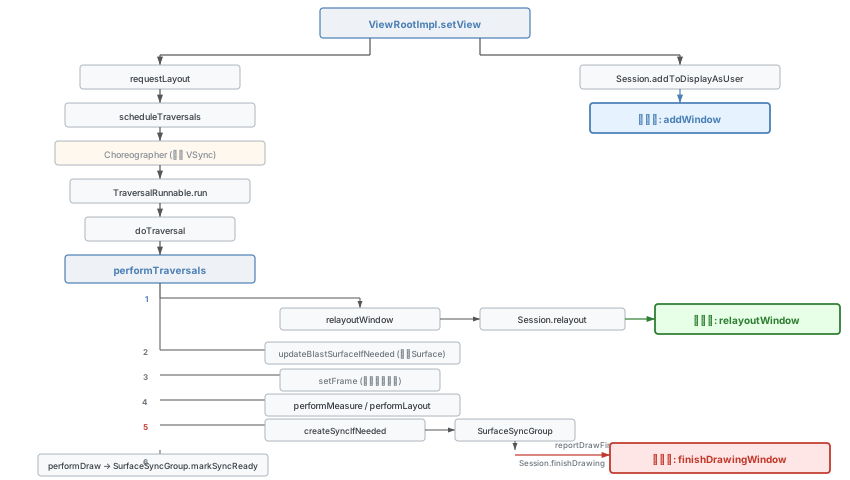
ViewRootImpl.setView
  ViewRootImpl.requestLayout
    ViewRootImpl.scheduleTraversals
      ViewRootImpl.TraversalRunnable.run        // Vsync 相关
        ViewRootImpl.doTraversal
          ViewRootImpl.performTraversals
            ViewRootImpl.relayoutWindow          // 第二步: relayoutWindow
              Session.relayout                   // 跨进程调用
            ViewRootImpl.updateBlastSurfaceIfNeeded
              Surface.transferFrom               // 应用端 Surface 赋值
            ViewRootImpl.setFrame                // 应用端窗口大小赋值
            ViewRootImpl.performMeasure          // View 绘制三部曲 - Measure
            ViewRootImpl.performLayout           // View 绘制三部曲 - Layout
            ViewRootImpl.createSyncIfNeeded
              SurfaceSyncGroup.init
              ViewRootImpl.reportDrawFinished
                Session.finishDrawing            // 第三步: finishDrawingWindow
            ViewRootImpl.performDraw             // View 绘制三部曲 - Draw
            SurfaceSyncGroup.markSyncReady       // 触发绘制完成回调
  Session.addToDisplayAsUser                     // 第一步: addWindow
system_server 端 relayoutWindow 调用链
WindowManagerService.relayoutWindow
  WindowManagerService.createSurfaceControl
    WindowStateAnimator.createSurfaceLocked       // 创建 Buffer 类型 Surface
      WindowStateAnimator.resetDrawState          // DRAW_PENDING
      new WindowSurfaceController
        SurfaceControl.Builder.build
          SurfaceControl.init
  WindowSurfacePlacer.performSurfacePlacement     // 计算窗口大小
    WindowSurfacePlacer.performSurfacePlacementLoop
      RootWindowContainer.performSurfacePlacement
        RootWindowContainer.performSurfacePlacementNoTrace
          DisplayContent.applySurfaceChangesTransaction
            DisplayContent.performLayout
              DisplayContent.performLayoutNoTrace
                DisplayPolicy.layoutWindowLw
                  WindowLayout.computeFrames      // 计算窗口大小
                    WindowState.setFrames          // 保存到 WindowState
  WindowSurfaceController.getSurfaceControl       // 给应用端 Surface 赋值
  WindowState.fillClientWindowFramesAndConfiguration  // 给应用端窗口大小赋值
system_server 端 finishDrawingWindow 调用链
WindowManagerService.finishDrawingWindow
  WindowState.finishDrawing
    WindowStateAnimator.finishDrawingLocked        // COMMIT_DRAW_PENDING
  WindowPlacerLocked.requestTraversal              // 触发 layout
    Traverser.run
      WindowSurfacePlacer.performSurfacePlacement
        WindowSurfacePlacer.performSurfacePlacementLoop
          RootWindowContainer.performSurfacePlacement
            RootWindowContainer.performSurfacePlacementNoTrace
              RootWindowContainer.applySurfaceChangesTransaction
                DisplayContent.applySurfaceChangesTransaction
                  DisplayContent.performLayout               // 窗口布局
                  forAllWindows(mApplySurfaceChangesTransaction)
                    WindowStateAnimator.commitFinishDrawingLocked  // READY_TO_SHOW
                      WindowState.performShowLocked               // HAS_DRAWN
                    ActivityRecord.updateDrawnWindowStates
                      mTmpUpdateAllDrawn.add
                  mTmpUpdateAllDrawn → ActivityRecord.updateAllDrawn  // allDrawn = true
                  DisplayContent.prepareSurfaces                 // Surface 处理
                    WindowContainer.prepareSurfaces
                      WindowState.prepareSurfaces
                        WindowStateAnimator.prepareSurfaceLocked
                          WindowSurfaceController.showRobustly
                            WindowSurfaceController.setShown
                            SurfaceControl.Transaction.show      // Surface 显示
              // 事务由各 DisplayContent 的 SyncTransaction 统一提交
            RootWindowContainer.checkAppTransitionReady          // App 切换事务
Java 层 Surface 相关类关系
| 类名 | 说明 |
|---|---|
WindowSurfaceController | WMS 中管理窗口 Surface 的控制器,内部持有 SurfaceControl |
SurfaceControl | Java 层的 Surface 控制句柄,内部通过 native 指针关联底层 SurfaceControl |
Surface | Java 层的绘图表面,内部通过 native 指针关联底层 Surface |
BLASTBufferQueue | 构建依赖 SurfaceControl,可创建 Surface 并返回上层 |